
1. Уводзіны
This manual provides instructions for the installation, operation, and maintenance of the Cisco CP-68KEM-3PCC Expansion Module. This module is designed to enhance the functionality of your Cisco IP Phone 6851 by providing additional programmable keys.
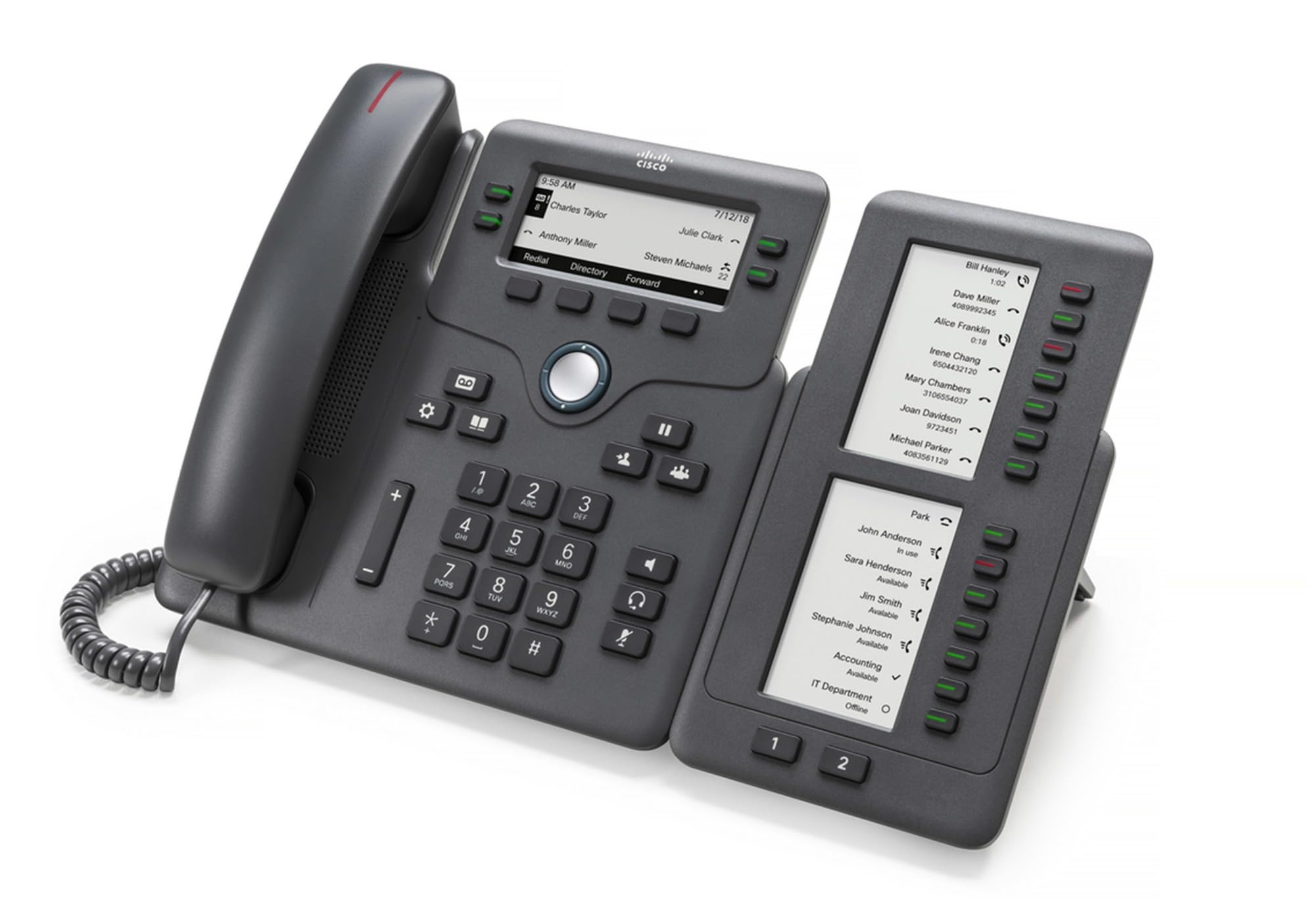
Figure 1: Cisco CP-68KEM-3PCC Expansion Module. This image shows the front view of the expansion module with its grayscale LCD screen and programmable keys.
The Cisco CP-68KEM-3PCC Expansion Module adds 14-line keys and 2-page keys, totaling 28 additional keys, with an easy-to-read grayscale LCD screen. It is ideal for monitoring and managing call status, directory numbers, and speed dial functions.
2. Што ў скрынцы
Акуратна распакуйце скрынку і пераканайцеся, што ўсе прадметы наяўныя:
- Cisco CP-68KEM-3PCC Phone Expansion Module
- Connecting Cable (typically included for linking to the phone)
- Дакументацыя (гэта кіраўніцтва карыстальніка, інфармацыя па бяспецы)
If any items are missing or damaged, please contact your vendor or Cisco support immediately.
3. Інструкцыі па ўсталёўцы
Follow these steps to connect your Cisco CP-68KEM-3PCC Expansion Module to your Cisco IP Phone 6851.
- Prepare the IP Phone: Ensure your Cisco IP Phone 6851 is powered off and disconnected from the network.
- Connect the Expansion Module: Locate the expansion port on the back or side of your Cisco IP Phone 6851. Connect the provided connecting cable from the expansion module to this port.
- Абараніце злучэнне: Ensure the cable is securely fastened to prevent accidental disconnection.
- Уключэнне: Reconnect your Cisco IP Phone 6851 to the network and power it on. The expansion module should be detected automatically.
- Праверце функцыянальнасць: Once the phone has booted, check the expansion module's display and keys to ensure they are responsive.
For detailed visual instructions, refer to the official Cisco documentation or support webсайт.
4. Operating the Expansion Module
The expansion module provides additional keys for various functions, enhancing your call management capabilities.
4.1 праграмуемыя клавішы
The 28 programmable keys (14 keys across 2 pages) can be configured for:
- Directory Numbers (DNs): Assign specific phone lines or extensions.
- Хуткі набор: Праграма часта выклікае нумары для хуткага доступу.
- Ключавыя функцыі: Assign functions like call transfer, conference, or call park.
- Call Status Monitoring: Monitor the status of other lines (e.g., busy, ringing).
4.2 Page Navigation
Use the dedicated page keys (usually located near the display) to switch between the two pages of programmable keys. The grayscale LCD screen will update to show the labels for the currently active page.
4.3 Канфігурацыя
Configuration of the programmable keys is typically managed through your organization's phone system administrator or via the web interface of the Cisco IP Phone 6851. Consult your IT department for specific configuration instructions.
5. Тэхнічнае абслугоўванне
To ensure the longevity and optimal performance of your Cisco CP-68KEM-3PCC Expansion Module, follow these maintenance guidelines:
- Уборка: Для ачысткі вонкавых паверхняў выкарыстоўвайце мяккую, сухую тканіну без ворса. Для выдалення ўстойлівых плям злёгкуampen the cloth with water. Avoid using harsh chemicals, abrasive cleaners, or solvents, as these can damage the finish and electronic components.
- Асяроддзе: Keep the module in a clean, dry environment, away from direct sunlight, excessive heat, and moisture.
- Апрацоўка: Handle the module with care. Avoid dropping it or subjecting it to strong impacts.
- Кабельнае кіраванне: Ensure connecting cables are not kinked, pinched, or under strain.
There are no user-serviceable parts inside the expansion module. Do not attempt to open or repair the device yourself.
6. Выпраўленне непаладак
If you encounter issues with your expansion module, try the following troubleshooting steps:
| праблема | Магчымая прычына | Рашэнне |
|---|---|---|
| Module not recognized by phone | Loose cable connection, phone not restarted, incompatible phone model. |
|
| Клавішы не рэагуюць | Software glitch, configuration issue. |
|
| Дысплей пусты або мігціць | Праблема з электраэнергіяй, унутраная няспраўнасць. |
|
If these steps do not resolve the issue, please contact Cisco technical support or your authorized reseller.
7. Тэхнічныя характарыстыкі
| Асаблівасць | Дэталь |
|---|---|
| Нумар мадэлі | CP-68KEM-3PCC |
| Марка | Cisco |
| Сумяшчальныя прылады | IP-тэлефон Cisco 6851 |
| Колер | Чорны |
| Матэрыял | Метал |
| Памеры прадмета (ДxШxВ) | 5.1 х 10.2 х 20.3 см |
| Крыніца харчавання | Corded (powered via host IP Phone) |
| Колькасць ключоў | 28 (14 keys across 2 pages) |
| Дысплей | Grayscale LCD |
| GTIN/UPC | 889728068383 |
8. Інфармацыя аб гарантыі
The Cisco CP-68KEM-3PCC Expansion Module comes with a 2-гадовая гарантыя на прадукт з даты пакупкі. Гэтая гарантыя распаўсюджваецца на дэфекты матэрыялаў і вырабу пры нармальным выкарыстанні. Яна не распаўсюджваецца на пашкоджанні, выкліканыя няправільным выкарыстаннем, няшчаснымі выпадкамі, несанкцыянаванымі мадыфікацыямі або знешнімі прычынамі.
For warranty claims or detailed terms and conditions, please refer to the official Cisco warranty policy available on their webсайт або звярніцеся ў месца пакупкі.
9. Падтрымка
For technical assistance, product information, or to report issues, please contact Cisco support:
- Падтрымка Cisco Webсайт: Наведайце чыноўніка Падтрымка Cisco webсайт for documentation, downloads, and contact options.
- Authorized Reseller: Contact the reseller from whom you purchased the product.
When contacting support, please have your product model (CP-68KEM-3PCC) and serial number ready.