
Darkglass Electronics AO900
Darkglass Alpha Omega 900 Bass Head User Manual
Model: AO900 | Brand: Darkglass Electronics
1. Уводзіны
This manual provides comprehensive instructions for the Darkglass Alpha Omega 900 Bass Head. It covers setup, operation, maintenance, troubleshooting, and technical specifications. Please read this manual thoroughly before operating the device to ensure proper use and to maximize its performance and longevity.
The Alpha Omega 900 is a 900-watt bass amplifier head featuring a built-in compressor, IR cabinet simulation, a 6-band graphic EQ, and MIDI capabilities, offering unparalleled tonal flexibility and power for the modern bass player.
2. Прадукт скончыўсяview
Элементы кіравання на пярэдняй панэлі

Figure 2.1: Front panel of the Alpha Omega 900 Bass Head, showing input, compression, drive, level, EQ, and master controls.
- Увод: Connect your instrument here. Features Passive/Active switch for different pickup outputs.
- Камп.: Кантралюе ступень сціску.
- дыск: Рэгулюе колькасць скажэнняў.
- узровень: Sets the overall output volume of the distortion circuit.
- Мод: Selects between Alpha (punchy, tight) and Omega (brutal, raw) distortion circuits.
- Сумесь: Mixes the clean signal with the distorted signal.
- Узмацненне: Controls the input gain of the ampзадымнік.
- Graphic EQ: 6-band graphic equalizer for precise tone shaping (250 Hz, 500 Hz, 1.5 kHz, 3 kHz, 5 kHz).
- Адключэнне гуку: Mutes the output signal.
- Майстар: Кантралюе агульную гучнасць выхаду ampзадымнік.
Злучэнні задняй панэлі

Figure 2.2: Rear panel of the Alpha Omega 900 Bass Head, detailing speaker outputs, effects loop, auxiliary input, headphone output, USB, DI outputs, MIDI, and footswitch connections.
- Выхад на дынамік: Connect to your bass cabinet.
- Send/Return: Effects loop for external effects pedals.
- Дапаможны ўваход: Connect external audio devices for practice.
- Выхад для навушнікаў: Для ціхай практыкі.
- USB: Connect to a computer for Darkglass Suite software access and firmware updates.
- Pre DI/Post DI: Balanced XLR outputs for direct connection to mixing consoles or audio interfaces.
- MIDI: For external MIDI control.
- Нажны пераключальнік: Connect the Darkglass Intelligent Footswitch for remote control of functions.
3. Настройка
- Падключэнне сілкавання: Connect the power cable to the AC inlet on the rear panel and then to a grounded power outlet. Ensure the power switch is in the OFF position before connecting.
- Падключэнне дынаміка: Connect your bass cabinet(s) to the Speaker Output jacks using appropriate speaker cables. Ensure the impedance of your cabinet(s) matches the amplifier's output capabilities (minimum 2 Ohm load).
- Падключэнне інструмента: Plug your bass guitar into the Input jack on the front panel. Select the Passive or Active input mode based on your instrument's pickups.
- Падключэнне педалі (дадаткова): Connect the Darkglass Intelligent Footswitch to the Footswitch jack on the rear panel for remote control of distortion and mute functions.
- Auxiliary Devices (Optional): For practice, connect an external audio source (e.g., smartphone, MP3 player) to the Aux In jack. Adjust the Headphone Volume for monitoring.
- DI Output (Optional): For recording or live sound, connect the Pre DI or Post DI XLR outputs to a mixing console or audio interface. Use the Ground Lift switch if hum is present.
4. Інструкцыя па эксплуатацыі
Базавая аперацыя
- Уключэнне: After all connections are made, set the Master volume to minimum and then turn on the power switch.
- Рэгуляванне гучнасці: Slowly increase the Master volume to your desired listening level.
- Фарміраванне тону: Use the 6-band Graphic EQ sliders to adjust your tone. Experiment with the frequency bands to find your desired sound.
- Сцісканне: Adjust the Comp knob to control the dynamic range of your signal.
- Скажэнне: Engage the distortion circuit using the dedicated switch. Use the Drive, Level, Mod, and Blend knobs to sculpt your distorted tone.
Пашыраныя магчымасці
- IR Cabinet Simulation: The Alpha Omega 900 features built-in Impulse Response (IR) cabinet simulation. These can be accessed and managed via the Darkglass Suite software.
- Darkglass Suite Software: Падключыце amplifier to your computer via the USB port. Download and install the Darkglass Suite software from the official Darkglass website. This software allows for firmware updates, loading custom IRs, and fine-tuning various ampпараметры Lifier.
- Кіраванне MIDI: The amplifier supports MIDI control for various functions. Refer to the Darkglass website or Darkglass Suite for detailed MIDI implementation charts.

Figure 4.1: Darkglass Suite software interface for managing IRs and settings.
5. Тэхнічнае абслугоўванне
- Уборка: Для чысткі выкарыстоўвайце мяккую сухую тканіну ampзнешні выгляд выратавальніка. Пазбягайце абразіўных ачышчальнікаў або растваральнікаў.
- Вентыляцыя: Забяспечце належную вентыляцыю вакол amplifier. Do not block the cooling fan or vents on the rear panel.
- захоўванне: Захоўваць amplifier in a dry, cool environment away from direct sunlight and extreme temperatures.
- Транспарт: When transporting, use a padded case to protect the amplifier from physical damage.
6. Выпраўленне непаладак
| праблема | Магчымая прычына | Рашэнне |
|---|---|---|
| Без гуку | Power not connected, Master volume low, Mute engaged, faulty cables, incorrect input selection. | Check power connection, increase Master volume, disengage Mute, check all cables, ensure Passive/Active switch is correct. |
| Гудзенне/гудзенне | Ground loop, faulty instrument cable, interference from other electronics. | Engage Ground Lift switch on DI output, try different cables, move amplifier away from other electronic devices. |
| Distortion not engaging | Distortion switch not activated, Drive knob set too low. | Press the Distortion switch, increase the Drive knob. |
| Перагрэў | Blocked vents, prolonged high-volume use in poor ventilation. | Ensure vents are clear, allow amplifier to cool down, operate in a well-ventilated area. |
7. Тэхнічныя характарыстыкі
- Выхад ватtage: 900 Вт RMS
- Уваходны супраціў: 1М Ом
- Мінімальны супраціў нагрузкі: 2 Ом
- Памеры (Ш х Г х У): 11 х 12 х 3.75 цалі (27.94 х 30.48 х 9.53 см)
- Вага: Прыблізна 1 фунт (0.45 кг) - Note: This weight seems unusually low for a 900W bass head. Please refer to official Darkglass specifications for precise weight.
- элементы кіравання: Input, Comp, Drive, Level, Mod, Blend, Gain, 6-band Graphic EQ, Mute, Master.
- Падключэнне: Instrument Input, Speaker Outputs, Send/Return, Aux In, Headphone Output, USB, Pre DI, Post DI, MIDI, Footswitch.
- Асаблівасці: Built-in Compressor, Alpha/Omega Distortion Engine, IR Cabinet Simulation, MIDI Control.
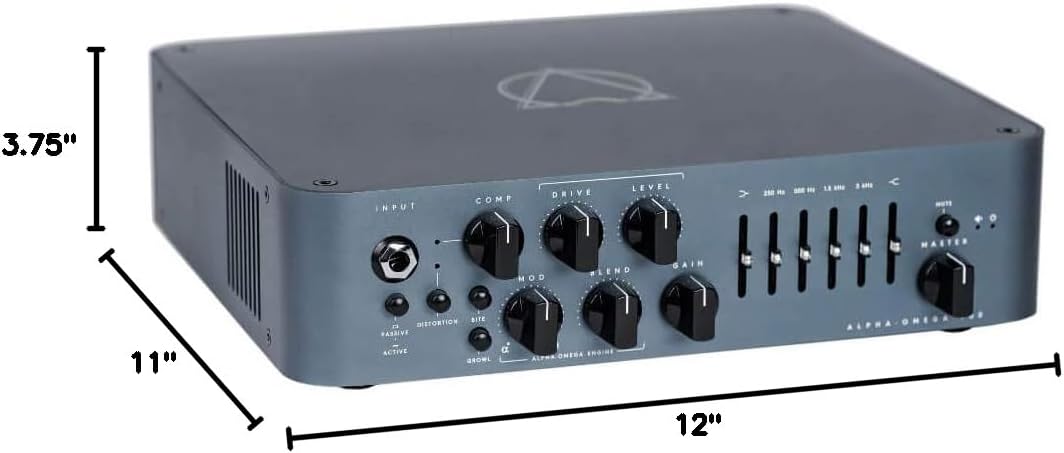
Figure 7.1: Physical dimensions of the Alpha Omega 900 Bass Head.
8. Гарантыя і падтрымка
Darkglass Electronics products are covered by a limited warranty. For detailed warranty information, please visit the official Darkglass Electronics webсайт або звярніцеся ў службу падтрымкі кліентаў.
For technical support, troubleshooting assistance, or service inquiries, please contact Darkglass Electronics customer support through their official webсайт: www.darkglass.com/support