
1. Уводзіны
Thank you for choosing the Vocal-Star WM-880 Dual Wireless Microphone System. This manual provides essential information for the proper setup, operation, and maintenance of your new wireless microphone system. Please read this manual thoroughly before use to ensure optimal performance and to prevent damage.
2. Інфармацыя па бяспецы
- Не падвяргайце прыладу ўздзеянню дажджу або вільгаці, каб пазбегнуць пажару або паражэння электрычным токам.
- Не адчыняйце casing. Унутры няма дэталяў, якія можна абслугоўваць самастойна. Па ўсіх пытаннях абслугоўвання звяртайцеся да кваліфікаванага персаналу.
- Забяспечце належную вентыляцыю вакол прыёмніка.
- Use only the specified power adapter for the receiver.
- Утылізуйце батарэйкі адказна ў адпаведнасці з мясцовымі правіламі.
- Трымайце сістэму далей ад моцных электрамагнітных палёў.
3. Змесціва ўпакоўкі
Калі ласка, праверце наяўнасць усіх прадметаў і іх стан:
- 1 x Vocal-Star WM-880 Wireless Receiver
- 2 x Vocal-Star Wireless Microphones
- 1 х адаптар харчавання для прымача
- 1 x Audio Connection Cable (3.5mm Jack)
- 1 х Кіраўніцтва карыстальніка
4. Прадукт скончыўсяview
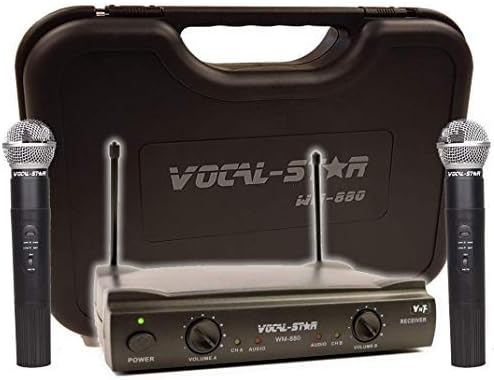
Image: The Vocal-Star WM-880 Dual Wireless Microphone System includes a black receiver unit with two antennas, two black handheld wireless microphones, and a black hard-shell carrying case. The receiver features power and volume controls for each microphone channel.
Прыёмны блок
- Кнопка харчавання: Уключае/выключае прыёмнік.
- Volume Controls (Volume A, Volume B): Adjusts the output level for each microphone channel independently.
- Антэны: For receiving wireless signals from the microphones.
- Аўдыявыхад: Падключаецца да вашага amplifier, mixer, or speaker system.
Бесправадныя мікрафоны
- Выключальнік сілкавання: Уключае/выключае мікрафон.
- Батарэйны адсек: Houses the batteries (typically AA, not included).
- Рашотка мікрафона: Protects the microphone capsule.
5. Настройка
- Position the Receiver: Place the receiver unit on a stable surface, away from other electronic devices that may cause interference. Extend the antennas vertically for optimal signal reception.
- Падключыце харчаванне: Connect the provided power adapter to the DC IN port on the receiver and plug it into a power outlet.
- Падключыць аўдыявыхад: Use the audio connection cable to connect the receiver's audio output to the input of your amplifier, mixer, or powered speaker. Ensure the volume on your audio system is initially set to a low level.
- Усталюйце батарэйкі мікрафона: Unscrew the bottom part of each microphone to access the battery compartment. Insert the required batteries (e.g., 2x AA per microphone, not included) ensuring correct polarity (+/-). Screw the bottom part back on securely.
- Уключэнне: Press the power button on the receiver. The power indicator light should illuminate. Turn on each microphone using its power switch.
6. Інструкцыя па эксплуатацыі
- Рэгуляванне гучнасці: Павольна павялічвайце гучнасць на вашым amplifier/mixer and then adjust the individual Volume A and Volume B controls on the receiver to achieve the desired sound level for each microphone.
- Выкарыстанне мікрафона: Hold the microphone approximately 2-6 inches (5-15 cm) from your mouth for optimal sound pickup. Avoid covering the microphone grille with your hand.
- дыяпазон: The effective operating range of the wireless system can vary depending on environmental conditions, obstacles, and interference. Maintain a clear line of sight between the microphones and the receiver whenever possible.
- Выключэнне: When finished, turn off the microphones first, then power off the receiver. This helps prevent unexpected noises through your sound system.
7. Тэхнічнае абслугоўванне
- Уборка: Для чысткі прымача і мікрафонаў выкарыстоўвайце мяккую сухую тканіну. Не выкарыстоўвайце вадкія ачышчальнікі або абразіўныя матэрыялы.
- Замена батарэі: Replace microphone batteries when the low battery indicator (if present) illuminates or when sound quality degrades. Always replace both batteries in a microphone at the same time.
- захоўванне: When not in use for extended periods, remove batteries from the microphones and store the system in a cool, dry place, preferably in its original packaging or a protective case.
8. Выпраўленне непаладак
| праблема | Магчымая прычына | Рашэнне |
|---|---|---|
| Няма гуку з мікрафонаў | Microphones or receiver not powered on; low batteries; incorrect audio connection; receiver volume too low. | Ensure all units are powered on. Replace batteries. Check audio cable connections. Increase receiver volume. |
| Перашкоды або статычныя перашкоды | Other wireless devices nearby; receiver too far from microphones; obstacles blocking signal. | Move receiver away from other electronics. Reduce distance between microphones and receiver. Ensure clear line of sight. |
| Нізкая гучнасць | Receiver volume too low; microphone batteries low; microphone held too far away. | Increase receiver volume. Replace microphone batteries. Hold microphone closer to mouth. |
9. Тэхнічныя характарыстыкі
- Нумар мадэлі: WM-880 / VS-UHF
- Марка: Vocal-Star
- Тэхналогія падключэння: УВЧ
- Колькасць каналаў: 2
- Крыніца харчавання: Battery Powered (microphones), AC Adapter (receiver)
- асаблівасць: Рэгулятар гучнасці
- Тып раздыма: 3.5 mm Jack (audio output)
- Сумяшчальныя прылады: спікер, AmpLifier, Mixer
- Палярны ўзор: Аднанакіраваны
- Адчувальнасць гуку: 100 дэцыбел
- Вага прадмета: 1 Kilogram (approximate total system weight)
- Рэкамендуемае выкарыстанне: Караоке
10. Гарантыя і падтрымка
This product is covered by a manufacturer's warranty. Please refer to the warranty card included with your purchase or visit the official Vocal-Star website for detailed warranty terms and conditions. For technical support or service inquiries, please contact Vocal-Star customer service through their official channels.
Webсайт: www.vocal-star.com (Напрample link, please verify actual manufacturer webсайт)