1. Уводзіны
Дзякуй за пакупкуasing the Infocus 24-inch 720p LED TV, model IM24ED800. This manual provides essential information for setting up, operating, and maintaining your television. Please read this manual thoroughly before using the product and retain it for future reference.
Інфармацыя па бяспецы
- Не падвяргайце тэлевізар уздзеянню дажджу або вільгаці.
- Не перакрывайце вентыляцыйныя адтуліны.
- Забяспечце належнае харчаванне voltage.
- Абараніце сеткавы шнур ад наступання або заціскання.
- Звяртайцеся да кваліфікаванага абслугоўваючага персаналу.
- Трымайце тэлевізар далей ад прамых сонечных прамянёў, крыніц цяпла і моцных магнітных палёў.
2. Змесціва ўпакоўкі
Калі ласка, пастаўце галачку для наступных пунктаў:
- Infocus 24-inch 720p LED TV (IM24ED800)
- Remote Control (with batteries, if included)
- Шнур харчавання
- Тумба пад тэлевізар (2 штукі)
- Шрубы для падстаўкі пад тэлевізар
- Кіраўніцтва карыстальніка (гэты дакумент)
3. Настройка
3.1 Мацаванне падстаўкі для тэлевізара
To attach the stand to your Infocus TV:
- Асцярожна пакладзеце тэлевізар экранам уніз на мяккую чыстую паверхню, каб пазбегнуць драпін.
- Сумясціце кожную частку падстаўкі з адпаведнымі пазы ў ніжняй частцы тэлевізара.
- Замацуйце кожную частку падстаўкі з дапамогай прадугледжаных шруб. Пераканайцеся, што яны надзейна зацягнуты.
- Асцярожна падніміце тэлевізар і пастаўце яго на ўстойлівую, роўную паверхню.
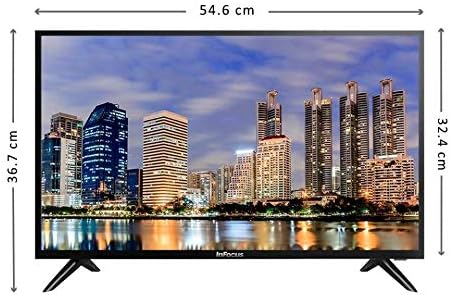
Выява: спераду view of the Infocus 24-inch LED TV with dimensions indicated. The TV measures approximately 54.6 cm in width and 36.7 cm in height with the stand.
3.2 Падключэнне прылад
Your Infocus TV features multiple input ports for connecting external devices.

Выява: Задняя частка view of the Infocus 24-inch LED TV, highlighting the location of various input ports including HDMI and USB.
- Падключэнні HDMI: Connect Blu-ray players, game consoles, or cable/satellite boxes to the HDMI ports. The TV has 2 HDMI inputs.
- USB-злучэнні: Connect USB flash drives for media playback to the USB ports. The TV has 2 USB inputs.
- Антэна/кабель: Connect an antenna or cable TV signal to the RF input (if available, not explicitly listed but standard for TVs).
- Магутнасць: Падключыце шнур харчавання да ўваходу харчавання тэлевізара, а затым да разеткі.
3.3 Першапачатковае ўключэнне
Пасля падключэння ўсіх неабходных кабеляў:
- Ensure the power cord is securely plugged into both the TV and a power outlet.
- Націсніце кнопку харчавання на пульце дыстанцыйнага кіравання або на самым тэлевізары.
- Follow the on-screen instructions for initial setup, which may include language selection, time zone, and channel scanning.
4. Кіраванне тэлевізарам
4.1 Пульт дыстанцыйнага кіраванняview
The remote control allows you to access all TV functions. While specific button layouts may vary, common functions include:
- Магутнасць: Уключае або выключае тэлевізар.
- Уваход/Крыніца: Selects the input source (HDMI 1, HDMI 2, USB, TV).
- Павялічыць/паменшыць гучнасць: Рэгулюе ўзровень гуку.
- Канал уверх/уніз: Змяняе тэлеканалы.
- Адключэнне гуку: Выключае гук тэлевізара.
- Меню: Адкрывае галоўнае меню для змены налад.
- Кнопкі навігацыі (Уверх/Уніз/Улева/Управа/ОК): Выкарыстоўваецца для навігацыі па меню і пацверджання выбару.
- Выхад/Назад: Вяртае на папярэдні экран або выходзіць з меню.
4.2 Асноўныя функцыі
- Змена крыніцы ўваходнага сігналу: Націсніце Увод or Крыніца button on your remote control. Use the navigation buttons to select the desired input (e.g., HDMI 1, USB) and press OK.
- Рэгуляванне гучнасці: Выкарыстоўвайце Павелічэнне гучнасці (+) or Volume Down (-) кнопкі.
- Змена каналаў: Выкарыстоўвайце Channel Up (CH+) or Channel Down (CH-) кнопкі.
4.3 Прайграванне носьбітаў інфармацыі з USB
Для прайгравання мультымедыя files from a USB flash drive:
- Insert a USB flash drive into one of the TV's USB ports.
- Націсніце Увод or Крыніца кнопку на пульце дыстанцыйнага кіравання і абярыце USB.
- Павінен з'явіцца медыябраўзер тэлевізара. Перайдзіце па сваім files (photos, music, videos) using the remote control.
- Выберыце а file і націсніце OK гуляць у гэта.
5. Тэхнічнае абслугоўванне
5.1 Ачыстка экрана
- Turn off the TV and unplug the power cord before cleaning.
- Выкарыстоўвайце мяккую тканіну без ворса (напрыклад, з мікрафібры), каб акуратна працерці экран.
- Для ўстойлівых плям злёгку пачысціцеampПрацярыце тканіну вадой або спецыяльным сродкам для чысткі экранаў. Ніколі не распыляйце ачышчальнік непасрэдна на экран.
- Avoid using abrasive cleaners, alcohol, benzene, or thinners, as these can damage the screen.
5.2 Агульны догляд
- Трымайце тэлевізар у добра вентыляваным памяшканні.
- Пазбягайце размяшчэння цяжкіх прадметаў на тэлевізары.
- Адключайце тэлевізар ад сеткі падчас навальніцы або калі ён не будзе выкарыстоўвацца працяглы час.
6. Выпраўленне непаладак
Калі ў вас узніклі праблемы з тэлевізарам, звярніцеся да наступных распаўсюджаных праблем і іх рашэнняў:
| праблема | Магчымая прычына | Рашэнне |
|---|---|---|
| Няма ўлады | Power cord not connected; power outlet issue | Пераканайцеся, што шнур харчавання надзейна падключаны. Праверце разетку з дапамогай іншай прылады. |
| Няма выявы, але гук ёсць | Incorrect input source selected; loose video cable | Націсніце Уваход/Крыніца кнопку, каб выбраць правільны ўваход. Праверце падключэнне відэакабеля. |
| Няма гуку, але выява ёсць | Volume muted or too low; audio cable issue | Націсніце Адключыць гук button or increase volume. Check audio cable connections. |
| Пульт дыстанцыйнага кіравання не працуе | Batteries depleted; obstruction; remote sensor blocked | Replace batteries. Remove any obstructions between the remote and TV. Ensure the TV's remote sensor is clear. |
| Паведамленне «Няма сігналу» | Incorrect input source; device not powered on; cable issue | Verify the correct input source is selected. Ensure the connected device is powered on. Check all cable connections. |
7. Тэхнічныя характарыстыкі
The following are the technical specifications for the Infocus 24-inch 720p LED TV model IM24ED800:
| Асаблівасць | Дэталь |
|---|---|
| Нумар мадэлі | IM24ED800 |
| Памер экрана | 24 цаляў (61 см) |
| Тэхналогія адлюстравання | святлодыёд |
| дазвол | 1366 x 768 (720p HD) |
| Частата абнаўлення | 60 Гц |
| Уваходы HDMI | 2 |
| Уваходы USB | 2 |
| Сувязь | HDMI, USB |
| Тып мацавання | Настольная падстаўка |
| Памеры ўпакоўкі | 60.8 х 37.8 х 12 см |
| Вага ўпакоўкі | 5 кг |
8. Гарантыя і падтрымка
This Infocus TV is sold as a renewed product, which typically comes with a limited warranty provided by the seller or refurbisher. Please refer to your purchase documentation or contact your retailer for specific warranty terms and conditions.
For technical support or service inquiries, please contact the customer support channel provided by your retailer or the Infocus support webсайт.