
MEE audio EP-X5G2-GM
MEE audio X5-G2-2019 Wireless In-Ear Sport Headphones
Кіраўніцтва карыстальніка
Model: EP-X5G2-GM
1. Настройка
1.1 Змест пакета
Праверце, ці ёсць усе прадметы ў ўпакоўцы вашага прадукту:
- X5 Wireless In-Ear Headset
- Зарадны кабель Micro-USB
- Eartips (4 sizes)
- Вушныя плаўнікі
- Кіраўніцтва карыстальніка

Image: Retail packaging of the MEE audio X5-G2-2019 headphones, showing the product and accessories.
1.2 Зарадка навушнікаў
Before first use, fully charge the headphones. Connect the supplied Micro-USB charging cable to the charging port on the control module and plug the other end into a USB power source (e.g., computer USB port or wall adapter). The LED indicator will show charging status.
1.3 Нашэнне навушнікаў
The X5-G2-2019 headphones are designed for a secure and comfortable fit. Experiment with the different sizes of eartips and ear fins to find the best seal and stability for your ears. The ergonomic design ensures they stay in place during physical activity.
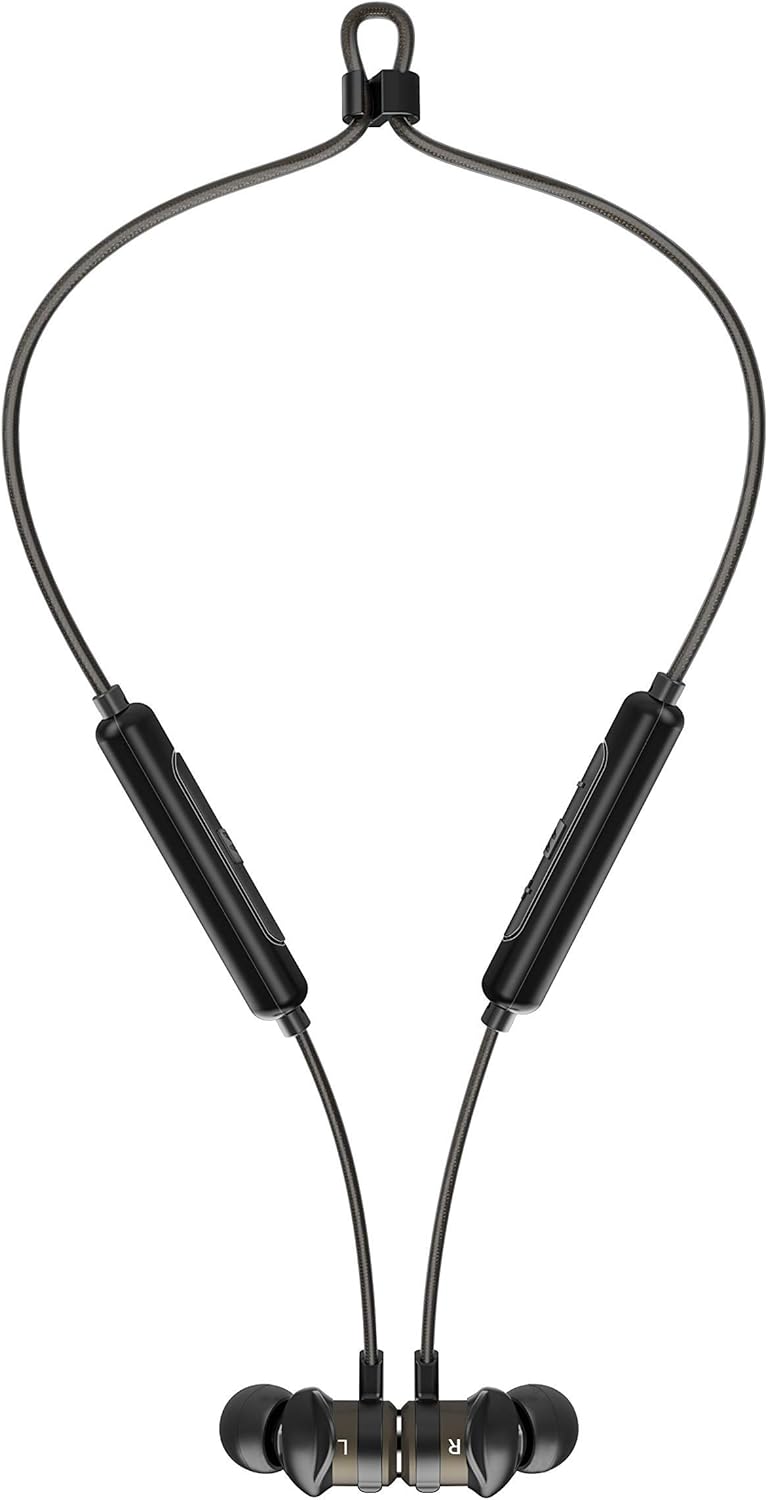

Image: The headphones shown worn around the neck and with earpieces magnetically connected for secure storage.
1.4 Спалучэнне па Bluetooth
- Пераканайцеся, што навушнікі зараджаны і выключаны.
- Націсніце і ўтрымлівайце шматфункцыянальную кнопку на модулі кіравання, пакуль святлодыёдны індыкатар не пачне міргаць сінім і чырвоным колерамі, што паказвае на рэжым спалучэння.
- На вашай прыладзе (смартфоне, планшэце і г.д.) уключыце Bluetooth і пачніце пошук новых прылад.
- Select "MEE audio X5-G2-2019" from the list of available devices.
- Пасля падключэння святлодыёдны індыкатар будзе перыядычна міргаць сінім колерам.
2. Кіраванне навушнікамі
2.1 Упраўленне надview
The X5-G2-2019 features an integrated remote and microphone for convenient control of calls and music playback.

Image: Close-up of the MEE audio X5-G2-2019 headphones showing the inline control module with volume and multi-function buttons.
- Шматфункцыянальная кнопка: Уключэнне/выключэнне, прайграванне/паўза, адказ/завяршэнне выклікаў.
- Павялічыць гучнасць (+): Павелічэнне гучнасці, наступны трэк (доўгі націск).
- Памяншэнне гучнасці (-): Памяншэнне гучнасці, папярэдні трэк (доўгі націск).
2.2 Уключэнне/выключэнне сілкавання
- Уключэнне: Press and hold the multi-function button until the LED flashes blue.
- Выключэнне: Press and hold the multi-function button until the LED flashes red and turns off.
2.3 Прайграванне музыкі
- Прайграванне/Паўза: Адзін раз націсніце шматфункцыянальную кнопку.
- Наступны трэк: Доўга націсніце кнопку павелічэння гучнасці (+).
- Папярэдні трэк: Доўга націсніце кнопку памяншэння гучнасці (-).
2.4 Кіраванне выклікамі
- Адказ/завяршэнне выкліку: Адзін раз націсніце шматфункцыянальную кнопку.
- Адхіліць выклік: Націсніце і ўтрымлівайце шматфункцыянальную кнопку.
3. Тэхнічнае абслугоўванне
3.1 Ачыстка
Clean the headphones regularly with a soft, damp cloth. Do not use harsh chemicals or abrasive materials. Remove eartips and clean them separately with mild soap and water if necessary, ensuring they are completely dry before reattaching.
3.2 Захоўванне
When not in use, store the headphones in a cool, dry place away from direct sunlight and extreme temperatures. The magnetic earpieces allow for tangle-free storage around your neck or in a pouch.
3.3 Воданепранікальнасць і потаўстойлівасць
The MEE audio X5-G2-2019 headphones feature an IPX5 sweat and weather-resistant design, protecting them from splashes and sweat. Do not submerge the headphones in water or expose them to running water.
4. Выпраўленне непаладак
4.1 Агульныя праблемы і рашэнні
- Няма харчавання: Пераканайцеся, што навушнікі цалкам зараджаныя. Падключыце іх да крыніцы харчавання і праверце індыкатар зарадкі.
- Немагчыма спалучыць: Ensure the headphones are in pairing mode (flashing blue and red). Turn off and on your device's Bluetooth. Try forgetting the device on your phone and re-pairing.
- Няма гуку: Check the volume level on both the headphones and your connected device. Ensure the headphones are properly paired and connected.
- Дрэнная якасць гуку: Ensure the eartips provide a good seal in your ear. Move closer to your connected device to avoid interference.
5. Тэхнічныя характарыстыкі
| Марка | MEE аўдыя |
| Назва мадэлі | EP-X5G2-GM |
| Нумар мадэлі | EP-X5G2-GM |
| Тэхналогія падлучэння | Правадная, бесправадная |
| Тэхналогія бесправадной сувязі | Bluetooth |
| Размяшчэнне вушэй | Укладышы |
| Формаў-фактар | Укладышы |
| Раз'ём для навушнікаў | Micro USB |
| Колер | Стрэльба |
| Памеры прадукту | 2 х 2 х 2 см; 50 грам |
| Батарэі | 1 Lithium-Polymer Battery required (included) |
| Тэрмін службы батарэі (прайграванне музыкі) | Да 8.5 гадзін |
| Тэрмін службы батарэі (час размовы) | Да 9 гадзін |
| Рэйтынг воданепранікальнасці | IPX5 (Sweat and Weather Resistant) |
| Уключаныя кампаненты | X5 Wireless In-Ear Headset, Micro-USB charging cable, Eartips (4 sizes), Ear fins, User Manual |
6. Гарантыя і падтрымка
6.1 Інфармацыя аб гарантыі
MEE audio products are covered by a manufacturer's warranty. Please refer to the warranty card included in your product packaging or visit the official MEE audio webпадрабязныя гарантыйныя ўмовы для вашага рэгіёна глядзіце на сайце.
6.2 Падтрымка кліентаў
For technical assistance, troubleshooting, or warranty claims, please contact MEE audio customer support through their official website. Have your product model number (EP-X5G2-GM) and purchase information ready when contacting support.