
1. Уводзіны
Thank you for choosing the Proscenic M7 Robot Vacuum Cleaner. This device is designed to provide efficient and thorough cleaning for your home, featuring advanced laser navigation, powerful suction, and intelligent mopping capabilities. Please read this manual carefully before using the product to ensure proper operation and maintenance.
2. Важныя інструкцыі па бяспецы
- Перад выкарыстаннем гэтага прыбора прачытайце ўсе інструкцыі.
- Не дазваляйце дзецям карыстацца робатам-пыласосам. Сачыце за дзецьмі і хатнімі жывёламі падчас працы робата.
- Ensure the charging dock is placed against a wall on a level surface, away from water or heat sources.
- Перад пачаткам працы прыбярыце з падлогі любыя свабодныя кабелі, дробныя прадметы або далікатныя рэчы, каб пазбегнуць заблытвання або пашкоджання.
- Do not use the robot vacuum in wet environments or to clean up liquids.
- Не выкарыстоўвайце робат-пыласос побач з адкрытым агнём або лёгкаўзгаральнымі матэрыяламі.
- Выкарыстоўвайце толькі арыгінальны адаптар сілкавання і зарадную док-станцыю, прадастаўленыя вытворцам.
- Turn off the robot and unplug the charging dock before performing any maintenance or cleaning.
3. Прадукт скончыўсяview
3.1 Асноўныя магчымасці
- Laser Navigation (LDS): Scans your home in 360 degrees to create real-time maps for efficient cleaning paths.
- App & Alexa Control: Manage cleaning modes, schedules, virtual no-go zones, and spot cleaning via the ProscenicHome app or Alexa voice commands.
- Y-вобразная мыццё падлогі: Emulates manual mopping for thorough dirt and grime removal with a 500ml electronically controlled water tank.
- Магутнае ўсмоктванне: Up to 2000Pa suction power with three adjustable modes for various floor types.
- Папаўненне і аднаўленне: Automatically returns to the charging dock when the battery is low and resumes cleaning from where it left off.
3.2 Кампаненты робата
Familiarize yourself with the main components of your Proscenic M7 robot vacuum.

Image: Proscenic M7 Robot Vacuum highlighting its navigation and safety features like SLAM, Anti-Collision, LDS, Anti-falling, and Jam-resistant technology. A map overlay illustrates its ability to plan cleaning routes.
- Датчык LDS: Located on top for 360-degree scanning and mapping.
- Бампер: Front bumper with anti-collision sensors.
- Бакавыя шчоткі: Two side brushes to sweep debris into the main brush path.
- Асноўная шчотка: Underside brush for deep cleaning.
- Dustbin/Water Tank: Removable compartments for dry vacuuming and wet mopping.
- Кантакты для зарадкі: On the underside, for connecting to the charging dock.
- Датчыкі падзення: On the underside, to prevent falling down stairs.
4. Кіраўніцтва па наладцы
4.1 Зарадка робата
- Place the charging dock against a wall in an open area, ensuring there are no obstacles within 1 meter (3 feet) to the sides and 2 meters (6 feet) in front.
- Падключыце адаптар сілкавання да зараднай станцыі і ўстаўце яго ў разетку.
- Place the robot onto the charging dock, ensuring the charging contacts align. The robot will begin charging. Allow it to fully charge before first use (approximately 5 hours).
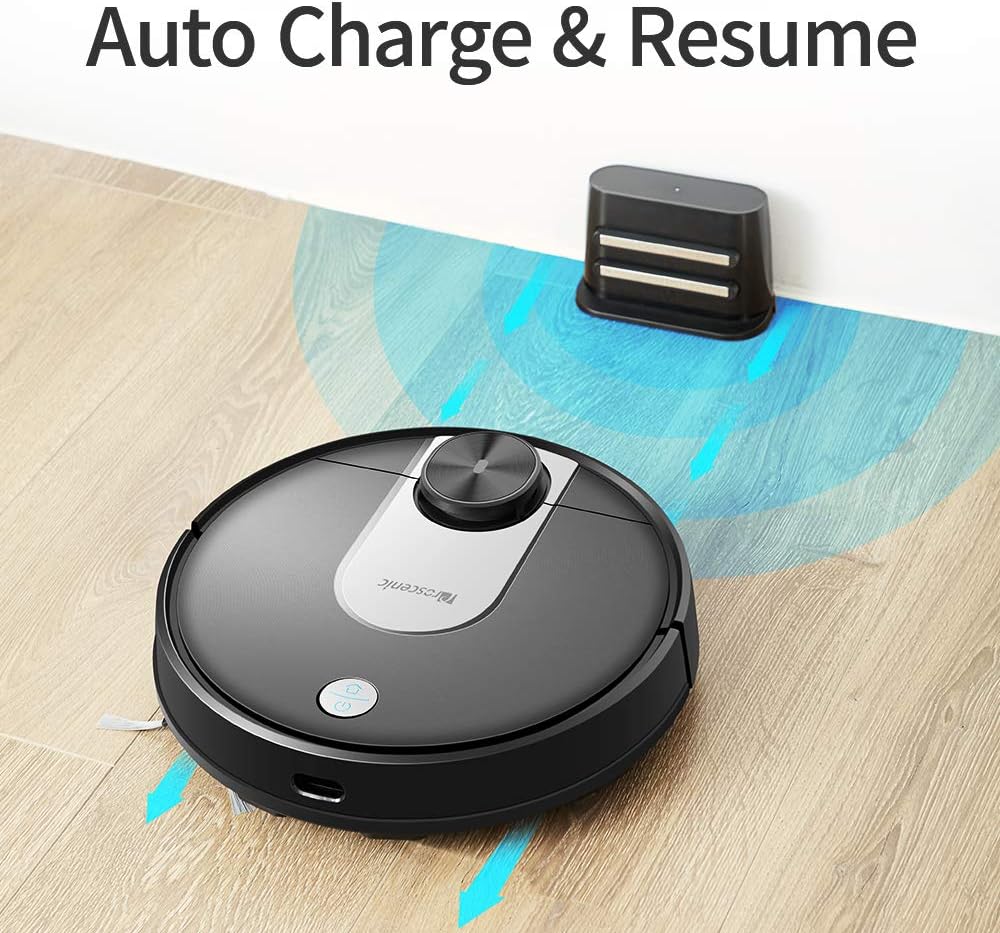
Image: The Proscenic M7 robot vacuum approaching its charging station, demonstrating its auto-charge and resume function.
4.2 Installing the ProscenicHome App
The ProscenicHome app allows you to control your robot vacuum remotely and access advanced features.
- Download the "ProscenicHome" app from the App Store (iOS) or Google Play Store (Android).
- Зарэгіструйце ўліковы запіс і ўвайдзіце ў сістэму.
- Follow the in-app instructions to add your Proscenic M7 device. Ensure your phone is connected to a 2.4GHz Wi-Fi network, as the robot does not support 5GHz networks.
- During the binding process, ensure the robot is fully charged and near your Wi-Fi router for optimal connection. If you encounter issues, try restarting your router or moving the robot closer.

Image: A smartphone screen displaying the ProscenicHome app interface. It shows a generated cleaning map, current cleaned area, battery level, and cleaning time. Icons for scheduling, map saving, zoned cleaning, mopping, no-go zones, spot cleaning, and remote control are visible, along with compatibility logos for Alexa, Android, and iPhone.
5. Інструкцыя па эксплуатацыі
5.1 Запуск цыкла ачысткі
- Ручной запуск: Націсніце кнопку харчавання на робаце адзін раз, каб пачаць поўны цыкл уборкі.
- Кіраванне праграмамі: Open the ProscenicHome app and tap "Start" to initiate cleaning.
- The robot will use its laser navigation to map your home and plan an efficient cleaning path.
5.2 Рэжымы ачысткі
The Proscenic M7 offers various cleaning modes accessible via the ProscenicHome app:
- Аўтаматычная ачыстка: Робат інтэлектуальна чысціць усю даступную зону.
- Ачыстка плям: Накіроўвае робата на інтэнсіўную ўборку пэўнай невялікай плошчы.
- Зональная ўборка: Define a rectangular area on the app's map for the robot to clean. This requires a saved map.
- Ачыстка краю: The robot cleans along the perimeter of your rooms.
- Рэжым мыцця падлогі: Attach the water tank and mopping pad for wet cleaning.
5.3 Функцыя мыцця
The M7 features a Y-shaped mopping pattern for effective wet cleaning.
- Fill the 500ml electronically controlled water tank with clean water.
- Надзейна прымацуйце швабру для мыцця падлогі да рэзервуара для вады.
- Replace the dustbin with the filled water tank assembly.
- Select "Mopping Mode" in the app or allow the robot to detect the water tank and switch automatically.
- Adjust the water flow level via the app if desired.

Выява: буйны план view of the Proscenic M7 robot vacuum, showcasing its large 500ml water tank, designed for extensive mopping coverage.

Выява: Над галавой view of the Proscenic M7 robot vacuum on a wooden floor, illustrating its Y-shaped mopping movement pattern with arrows.
5.4 Map Management and Virtual Walls
- Map Memorization: After completing a full cleaning cycle and successfully returning to the charging dock, the robot will save the generated map. Ensure this feature is enabled in the app.
- Віртуальныя забароненыя зоны: Use the app to draw virtual boundaries or "no-go lines" on the map to prevent the robot from entering specific areas.
- Уборка тэрыторыі: Once a map is saved, you can define specific areas for cleaning.
6. Тэхнічнае абслугоўванне
Рэгулярнае тэхнічнае абслугоўванне забяспечвае аптымальную прадукцыйнасць і падаўжае тэрмін службы вашага робата-пыласоса.
6.1 Ачыстка пылазборніка і фільтра
- Націсніце кнопку вызвалення смеццевага бака і выміце яго.
- Высыпаць змесціва смеццевага бака ў смеццевае вядро.
- Remove the filter and tap it gently to dislodge dust. Rinse the filter with water if necessary, ensuring it is completely dry before reinstallation.
- Wipe the inside of the dustbin with a dry cloth.
- Reinstall the filter and dustbin.
6.2 Ачыстка рэзервуара для вады і швабры
- Зніміце рэзервуар для вады з робата.
- Выліце рэшткі вады з рэзервуара.
- Remove the mopping pad and rinse it thoroughly with water. Allow it to air dry.
- Ачысціце рэзервуар для вады з дапамогай рэкламыamp cloth and allow it to dry completely before storage or refilling.
6.3 Ачыстка шчотак і датчыкаў
- Асноўная шчотка: Remove the main brush cover and lift out the brush. Use the cleaning tool (if provided) to remove hair and debris.
- Бакавыя шчоткі: Periodically check side brushes for tangled hair or debris. Remove and clean them as needed. Replace if worn.
- Датчыкі: Gently wipe the LDS sensor, anti-drop sensors, and charging contacts with a clean, dry cloth to ensure they are free of dust and debris.
7. Выпраўленне непаладак
If you encounter issues with your Proscenic M7, refer to the following common problems and solutions.
| праблема | Магчымая прычына | Рашэнне |
|---|---|---|
| Робат не запускаецца і не рэагуе. | Нізкі ўзровень зарада батарэі; выключаны выключальнік. | Ensure the robot is fully charged; Check if the main power switch is on. |
| Робат часта захрасае. | Obstacles (cables, rugs, furniture); Drop sensors dirty. | Clear the cleaning area of obstacles. Use virtual no-go zones for problematic areas. Clean drop sensors. |
| App connection issues (Binding Error). | Incorrect Wi-Fi band (5GHz); Weak Wi-Fi signal; Robot not fully charged. | Ensure your phone is on a 2.4GHz Wi-Fi network. Move the robot closer to the router. Ensure the robot is fully charged before binding. Try restarting your router. |
| Робат не вяртаецца да зараднай док-станцыі. | Charging dock obstructed; Charging contacts dirty. | Ensure the charging dock area is clear. Clean the charging contacts on both the robot and the dock. |
| Слабая эфектыўнасць уборкі. | Пыласборнік поўны; шчоткі заблыталіся; фільтр забіты. | Empty the dustbin. Clean the main and side brushes. Clean or replace the filter. |
| Mopping leaves streaks or misses spots. | Mopping pad dirty or dry; Water tank empty; Water flow setting too low. | Clean or wet the mopping pad. Refill the water tank. Adjust water flow in the app. |
| Map not saving or virtual walls not working. | First full cleaning cycle not completed; App glitch. | Ensure the robot completes a full cleaning cycle and returns to the dock successfully to generate and save the map. Restart the app or robot if issues persist. |
8. Тэхнічныя характарыстыкі
| Асаблівасць | Дэталь |
|---|---|
| Марка | Прасцэнічны |
| Назва мадэлі | M7 |
| Асаблівасць | No-Go Zone |
| Колер | Чорны |
| Уключаныя кампаненты | акумулятар |
| Тып фільтра | Патрон |
| Тэрмін службы батарэі | Up to 1.5 Hours (3200mAh capacity) |
| Ёмістасць сметніцы | 0.5 літра |
| Ёмістасць бака для вады | 500 мл |
| Крыніца харчавання | Харчаванне ад батарэі |
| Метад кантролю | Voice (Alexa), App |
| Сумяшчальныя прылады | Amazon Echo (Alexa) |
| Формаў-фактар | Рабатызаваны |
| Памеры прадукту | 16.5 х 13.4 х 5.5 цалі |
| Вага прадмета | 12.62 фунта |
| Рэкамендацыя па паверхні | Дыван, цвёрдыя падлогі |
9. Гарантыя і падтрымка
For warranty information or technical support, please refer to the warranty card included with your product or visit the official Proscenic website. You may also contact Proscenic customer service directly for assistance with product operation, maintenance, or troubleshooting beyond this manual.