
1. Уводзіны
This manual provides instructions for the installation, setup, and operation of your Lepro Smart GU10 LED Bulbs. These bulbs offer advanced features including tunable white light, dimming capabilities, and smart control via app or voice assistants.
Асноўныя характарыстыкі:
- Рэгуляваны белы свет: Adjust color temperature from warm white (2700K) to cool white (6500K).
- Зацямненне: Adjust brightness via the app or voice control. Note: Do not use with external dimmer switches.
- Галасавое кіраванне: Сумяшчальнасць з Amazon Alexa і Google Assistant для кіравання без выкарыстання рук.
- Кіраванне праграмамі: Manage lights from anywhere using the 'Smart Life' app.
- Планаванне: Set timers and schedules for automatic light control.
- Не патрабуецца канцэнтратар: Падключаецца непасрэдна да вашай сеткі Wi-Fi 2.4 ГГц.

Выява 1.1: Канецview of Lepro Smart GU10 LED Bulb capabilities, including dimming, tunable white light, scheduling, and smart control options.
2. Важная інфармацыя па бяспецы
Please read and follow all safety instructions carefully before installation and use. Failure to do so may result in electric shock, fire, or other injuries.
- Электрабяспека: Always turn off power at the circuit breaker before installing or removing the bulb.
- Сумяшчальнасць дыммера: These smart bulbs are not compatible with traditional dimmer switches. Using them with a dimmer switch will cause flickering and may damage the bulb. Control dimming exclusively through the 'Smart Life' app or voice commands.
- Толькі для выкарыстання ў памяшканні: This product is designed for indoor use in dry locations.
- Аперацыйная Voltage: Ensure your fixture provides 120 Volts, 60 Hertz.
- Правільная ўстаноўка: Install the bulb securely into a GU10 base fixture.
- Пазбягайце перагрэву: Do not enclose the bulb in fixtures that restrict airflow excessively, as this can lead to overheating and reduced lifespan.
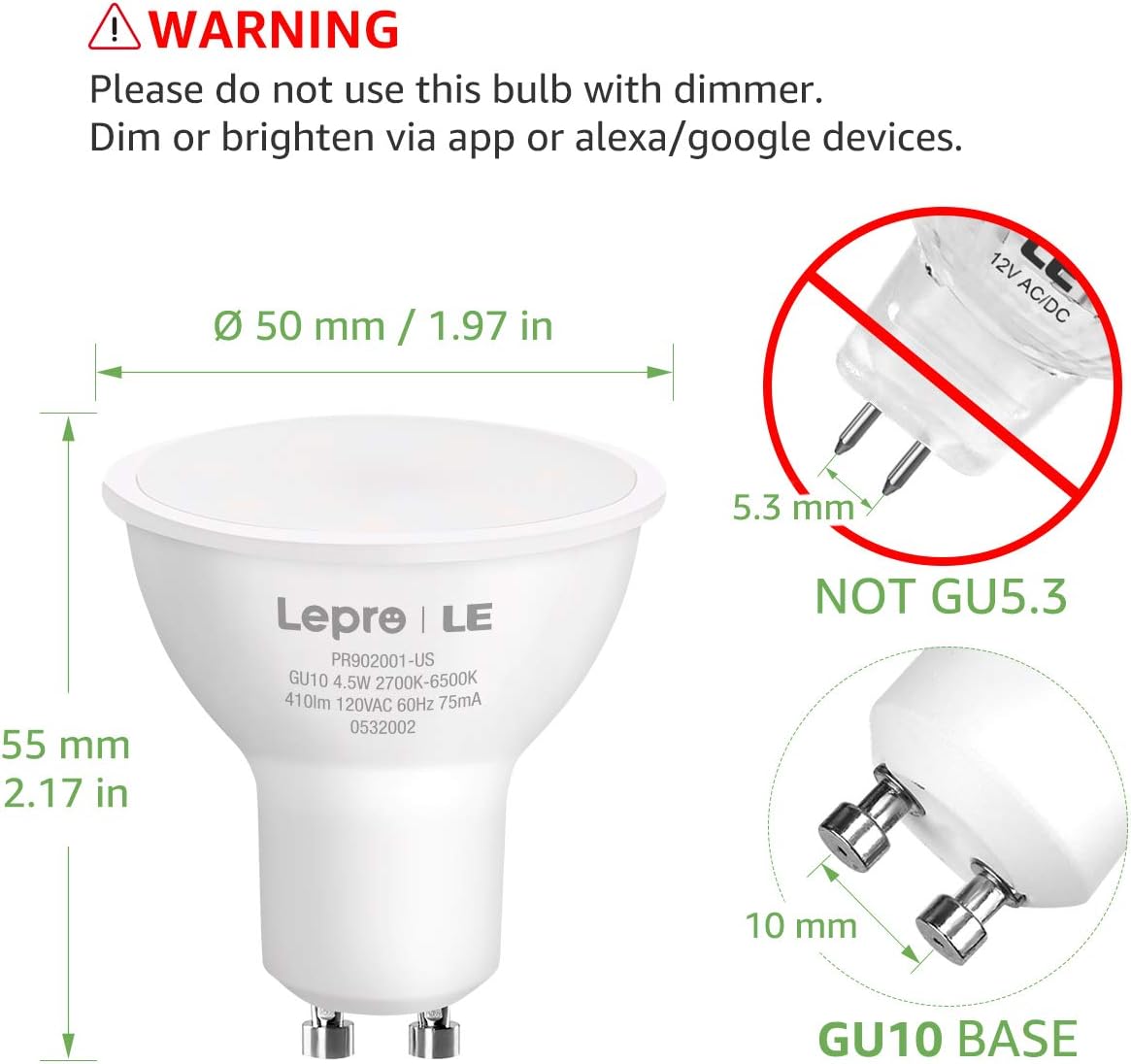
Image 2.1: Important warning regarding dimmer switch incompatibility and correct GU10 base identification.
3. Змесціва ўпакоўкі
Праверце, ці ёсць усе прадметы ў вашай упакоўцы:
- Lepro Smart GU10 LED Bulb(s) (Quantity as purchased, e.g., 2-pack)
- Кіраўніцтва карыстальніка (гэты дакумент)

Image 3.1: Lepro Smart GU10 LED Bulbs and packaging.
4. Тэхнічныя характарыстыкі прадукту
| Спецыфікацыя | Дэталь |
|---|---|
| Марка | Праказа |
| Назва мадэлі | LampUX GU10 WiFi Smart Light Bulbs |
| Светлы тып | святлодыёд |
| Падстава лямпачкі | GU10 |
| Ватtage | 4.5 ват |
| Эквівалент лямпы напальвання | 50 ват |
| Яркасць | 350 люмен |
| Каляровая тэмпература | 2700K - 6500K (рэгуляваны белы) |
| тtage | 120 вольт |
| Частата | 60 герц |
| Сувязь | Толькі Wi-Fi 2.4 ГГц |
| Метад кантролю | App (Smart Life), Voice (Alexa, Google Assistant) |
| Сярэдняя жыццё | 25,000 гадзін |
| Памеры прадукту | 1.97"Ш х 2.17"В |
| Матэрыял | Алюміній, пластык |
| Атэстацыя | FCC |
5. Кіраўніцтва па наладцы
5.1 Фізічная ўстаноўка
- Выключыць харчаванне: Before installation, ensure the power to the light fixture is turned off at the circuit breaker to prevent electric shock.
- Выдаліць старую лямпачку: Carefully remove the existing GU10 bulb from the fixture.
- Усталюйце разумную лямпачку: Insert the Lepro Smart GU10 LED Bulb into the GU10 base. Push and twist clockwise until it is securely seated.
- Аднавіць сілу: Turn the power back on at the circuit breaker. The bulb should flash, indicating it is in pairing mode. If it does not flash, turn the light switch off and on 3-5 times until it begins to flash rapidly.
5.2 Загрузка праграмы і стварэнне ўліковага запісу
- Спампаваць прыкладанне: Scan the QR code provided in the packaging or search for 'Smart Life' in your smartphone's app store (iOS or Android).
- Рэгістрацыя/Уваход: Open the 'Smart Life' app and register for a new account or log in if you already have one.
5.3 Падключэнне да Wi-Fi
Пераканайцеся, што ваша сетка Wi-Fi 2.4 ГГц. These bulbs do not support 5GHz Wi-Fi networks.
- Дадаць прыладу: У дадатку «Smart Life» націсніце значок «+» у правым верхнім куце, каб дадаць прыладу.
- Выберыце асвятленне: Choose 'Lighting' or 'Light Source (Wi-Fi)' from the device list.
- Пацверджанне мігцення: Confirm that the bulb is flashing rapidly. If not, cycle the power (off-on 3-5 times) until it flashes.
- Увядзіце звесткі пра Wi-Fi: Выберыце сетку Wi-Fi 2.4 ГГц і ўвядзіце пароль.
- Спалучэнне: The app will begin connecting to the bulb. Once connected, the bulb will stop flashing and glow steadily.
- Перайменаваць прыладу: You can rename the bulb for easier control (e.g., "Living Room Spotlight 1").

Image 5.1: Illustration of easy setup, highlighting physical installation and 2.4GHz Wi-Fi requirement.
6. Інструкцыя па эксплуатацыі
6.1 Кіраванне праграмамі
Once connected, you can control your bulb(s) through the 'Smart Life' app:
- Укл/Выкл: Tap the power icon to turn the bulb on or off.
- Зацямненне: Use the brightness slider to adjust the light intensity.
- Каляровая тэмпература: Select the 'White' mode and use the slider or color wheel to choose any shade from warm white (2700K) to cool white (6500K).
- Сцэны: The app offers pre-set scenes for different moods or activities. You can also create custom scenes.

Image 6.1: Adjusting color temperature via the 'Smart Life' app, showing warm, natural, and cool white light exampлес.
6.2 Галасавое кіраванне (Alexa/Google Assistant)
Каб уключыць галасавое кіраванне:
- Прывязаць уліковы запіс: In your Amazon Alexa or Google Home app, enable the 'Smart Life' skill/action and link your 'Smart Life' account.
- Адкрыйце для сябе прылады: Папрасіце свайго галасавога памочніка «Знайсці прылады».
- Галасавыя каманды: Выкарыстоўвайце такія каманды, як:
"Alexa, turn on Living Room Spotlight."
"Hey Google, dim the kitchen light to 50%."
"Alexa, set the bedroom light to warm white."
6.3 Планаванне і таймеры
Set up automated schedules for your lights:
- In the 'Smart Life' app, select your bulb and navigate to the 'Schedule' or 'Timer' section.
- Set desired times for turning lights on/off, or for activating specific scenes.
- Repeat for specific days of the week as needed.
6.4 Групавы кантроль
Control multiple bulbs simultaneously:
- In the 'Smart Life' app, select one of your bulbs.
- Tap the pencil icon (edit) or 'Settings' and look for 'Create Group'.
- Select all bulbs you wish to include in the group and confirm.
- You can now control the entire group with a single command or app action.

Малюнак 6.2: Прыкладamples of scheduling and group control features.
7. Тэхнічнае абслугоўванне
To ensure optimal performance and longevity of your Lepro Smart GU10 LED Bulbs:
- Уборка: Перад чысткай пераканайцеся, што лямпачка выключана і астыла. Працярыце мяккай сухой тканінай. Не выкарыстоўвайце вадкія або абразіўныя ачышчальнікі.
- захоўванне: If storing the bulbs for an extended period, keep them in a cool, dry place away from direct sunlight.
- Пазбягайце суровых умоў: Do not expose the bulbs to extreme temperatures, high humidity, or corrosive substances.
8. Кіраўніцтва па ліквідацыі непаладак
If you encounter issues with your Lepro Smart GU10 LED Bulbs, refer to the following common problems and solutions:
| праблема | Магчымая прычына | Рашэнне |
|---|---|---|
| Bulb not connecting to Wi-Fi | Incorrect Wi-Fi band (5GHz), incorrect password, bulb not in pairing mode, weak Wi-Fi signal. | Ensure your router is broadcasting a 2.4GHz network. Confirm Wi-Fi password. Cycle power to the bulb (off-on 3-5 times) until it flashes rapidly to enter pairing mode. Move closer to the router. |
| Bulb flickering or not working correctly | Used with a traditional dimmer switch. | Remove the bulb from any fixture connected to a traditional dimmer switch. These bulbs require a constant power supply and are dimmed via the app or voice control. |
| Bulb appears "Offline" in the app | Loss of Wi-Fi connection, power outage, router issues. | Check your Wi-Fi router and internet connection. Ensure the bulb has constant power. Try restarting the bulb by turning its power off and on at the switch. If the issue persists, re-pair the bulb. |
| Галасавое кіраванне не рэагуе | 'Smart Life' skill/action not enabled or linked, incorrect device name, internet connectivity issues. | Verify that the 'Smart Life' skill/action is enabled and linked in your Alexa/Google Home app. Ensure the device name used in voice commands matches the name in the app. Check your internet connection. |
| Multiple bulbs not working together in a group | One or more bulbs are offline, group not properly configured. | Check individual bulb status in the app. Ensure all bulbs are online. Recreate the group in the 'Smart Life' app. |
9. Гарантыя і падтрымка
9.1 Інфармацыя аб гарантыі
Lepro Smart GU10 LED Bulbs come with a Гарантыя 2 год from the date of purchase. This warranty covers manufacturing defects and malfunctions under normal use. It does not cover damage caused by misuse, improper installation, or external factors.
9.2 Падтрымка кліентаў
For technical assistance, warranty claims, or further inquiries, please contact Lepro customer support through their official website or the contact information provided with your purchase. Please have your product model and purchase details ready when contacting support.