
Уводзіны
This manual provides instructions for the safe and effective use of your T&G TG504 Portable Bluetooth Speaker. Please read it thoroughly before use and retain it for future reference. This speaker is designed for portable audio playback with wireless Bluetooth connectivity and water resistance.
Прадукт скончаныview
The T&G TG504 is a cylindrical, portable Bluetooth speaker featuring a robust design and a built-in microphone for hands-free calling. It offers high-definition sound with bass boost and multiple connectivity options.
Асноўныя характарыстыкі:
- Portable and Cylindrical Design
- Water Resistant Construction
- Built-in Microphone for Calls
- Бесправадная сувязь Bluetooth
- AUX and USB Port for versatile playback
- Bass Boost and High Definition Sound
- Battery Powered for on-the-go use
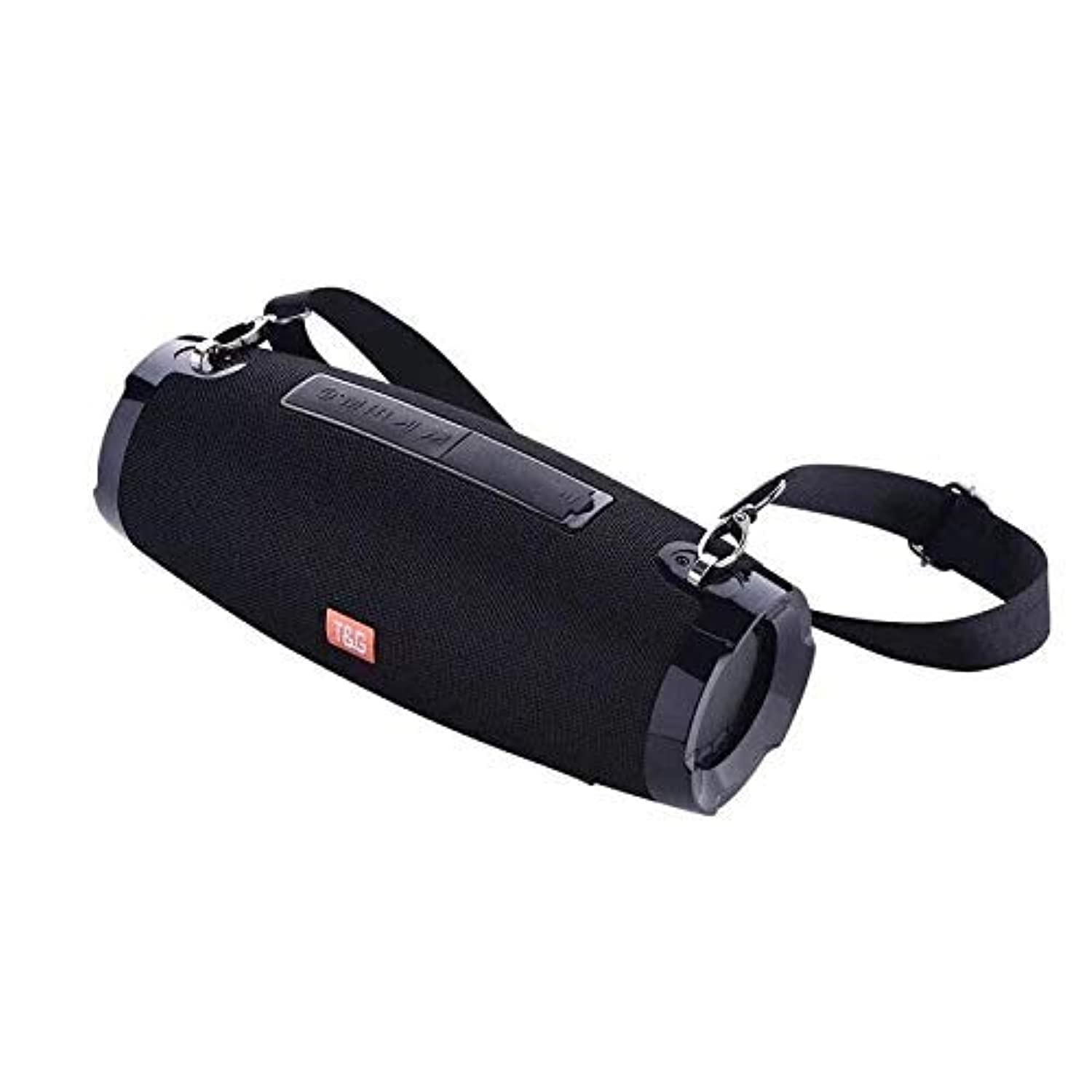
This image shows the T&G TG504 Portable Bluetooth Speaker. It features a black cylindrical design with a mesh grille covering the speaker. The T&G brand logo is visible in orange on the front. The speaker has attachment points on the sides, suggesting portability.
Змест пакета
- T&G TG504 Portable Bluetooth Speaker
- Кабель AUX
- USB-кабель для зарадкі
- Кіраўніцтва карыстальніка
Элементы кіравання і індыкатары
Familiarize yourself with the speaker's controls and ports for optimal operation.
- Кнопка харчавання: Націсніце і ўтрымлівайце, каб уключыць або выключыць дынамік.
- Кнопка прайгравання/паўзы: Націсніце, каб прайграць або прыпыніць гук.
- Павялічыць гучнасць (+): Націсніце, каб павялічыць гучнасць. Утрымлівайце, каб перайсці да наступнай кампазіцыі.
- Памяншэнне гучнасці (-): Націсніце, каб паменшыць гучнасць. Утрымлівайце, каб перайсці да папярэдняй кампазіцыі.
- Кнопка рэжыму (M): Націсніце, каб пераключацца паміж рэжымамі Bluetooth, AUX і USB.
- Кнопка выкліку: Press to answer or end a phone call. Hold to reject a call.
- AUX порт: Для праваднога падключэння да аўдыёпрылад.
- Порт USB: For playing music from a USB drive or charging other devices (if supported).
- Порт для зарадкі: Для падключэння USB-кабеля для зарадкі.
- Святлодыёдны індыкатар: Shows power status, charging status, and Bluetooth pairing status.
Настройка
1. Зарадка дынаміка
- Падключыце меншы канец USB-кабеля для зарадкі да зараднага порта дынаміка.
- Падключыце большы канец USB-кабеля для зарадкі да USB-адаптара харчавання (не ўваходзіць у камплект) або USB-порта кампутара.
- Святлодыёдны індыкатар будзе паказваць стан зарадкі (напрыклад, чырвоны падчас зарадкі, выключаны пры поўнай зарадцы).
- Перад першым выкарыстаннем дайце поўнай зарадцы прыблізна 3-4 гадзіны.
2. Уключэнне / выключэнне харчавання
- To power on, press and hold the Power button until the LED indicator lights up and you hear an audible prompt.
- To power off, press and hold the Power button again until the LED indicator turns off and you hear an audible prompt.
3. Спарванне Bluetooth
- Ensure the speaker is powered on and in Bluetooth pairing mode (LED indicator will typically flash blue). If not, press the Mode button to switch to Bluetooth mode.
- На мабільнай прыладзе (смартфоне, планшэце, ноўтбуку) уключыце Bluetooth.
- Пошук available Bluetooth devices. The speaker will appear as "TG504" or similar.
- Select "TG504" to connect. Once paired, the LED indicator will turn solid blue, and you will hear a confirmation sound.
- Пры ўключэнні дынамік аўтаматычна падключыцца да апошняй спалучанай прылады, калі прылада знаходзіцца ў зоне дзеяння і Bluetooth уключаны.
4. Connecting via AUX
- Connect one end of the provided AUX cable to the speaker's AUX port.
- Connect the other end of the AUX cable to the headphone jack of your audio device.
- Дынамік аўтаматычна пераключыцца ў рэжым AUX, або вам можа спатрэбіцца націснуць кнопку Mode, каб выбраць AUX.
Інструкцыя па эксплуатацыі
Прайграванне музыкі
- Рэжым Bluetooth: Once paired, start playing music on your connected device. Audio will stream through the speaker.
- AUX рэжым: Start playing music on your connected audio device.
- Рэжым USB: Ўстаўце флешку з mp3 files into the USB port. The speaker will automatically detect and play music. Press the Mode button to switch to USB mode if needed.
- Выкарыстоўвайце кнопку прайгравання/паўзы на дынаміку або прыладзе для кіравання прайграваннем.
Рэгуляванне гучнасці
- Націсніце кнопку павелічэння гучнасці (+), каб павялічыць гучнасць.
- Націсніце кнопку памяншэння гучнасці (-), каб паменшыць гучнасць.
- Volume can also be adjusted from your connected device.
Handling Calls (Bluetooth Mode)
- Адказаць на званок: When a call comes in, press the Call button once to answer.
- Завяршыць выклік: During a call, press the Call button once to end the call.
- Адхіліць выклік: When a call comes in, press and hold the Call button to reject it.
- Паўторны набор апошняга нумара: In standby mode, double-press the Call button to redial the last number.
Галасавое кіраванне
The speaker supports voice control. Depending on your connected device, you may be able to activate your device's voice assistant (e.g., Siri, Google Assistant) by pressing and holding the Play/Pause button (or a dedicated voice button if available) for a few seconds.
Тэхнічнае абслугоўванне
Уборка
- Працярыце дынамік мяккай сухой тканінай.
- Не выкарыстоўвайце абразіўныя ачышчальнікі, спірт або хімічныя растваральнікі.
Захоўванне
- Захоўвайце дынамік у прахалодным, сухім месцы, удалечыні ад прамых сонечных прамянёў і экстрэмальных тэмператур.
- Калі вы захоўваеце акумулятар працяглы час, перыядычна зараджайце яго, каб падоўжыць тэрмін яго службы.
Воданепранікальнасць Сыход
- Перад тым, як падвяргаць дынамік уздзеянню вады, пераканайцеся, што ўсе вечкі партоў надзейна зачыненыя.
- Do not submerge the speaker in water. Water resistance protects against splashes and light rain, not full immersion.
- After exposure to water, wipe the speaker dry before charging or opening port covers.
Ліквідацыю непаладак
If you encounter issues with your speaker, refer to the following table for common problems and solutions.
| праблема | Магчымая прычына | Рашэнне |
|---|---|---|
| Дынамік не ўключаецца | Нізкі зарад батарэі; кнопка харчавання націснута няправільна | Зарадзіце дынамік; націсніце і ўтрымлівайце кнопку харчавання 3-5 секунды. |
| Немагчыма падключыць прыладу праз Bluetooth | Speaker not in pairing mode; Device Bluetooth off; Speaker too far from device | Ensure speaker LED is flashing blue; Turn on Bluetooth on your device; Move speaker closer to device (within 10 meters). |
| Няма гуку | Volume too low; Incorrect mode selected; Device not playing audio | Павялічце гучнасць дынаміка і прылады; націсніце кнопку рэжыму, каб выбраць правільны ўваходны сігнал; пераканайцеся, што на прыладзе прайграваецца гук. |
| Скажэнне гуку | Занадта высокая гучнасць; нізкі зарад батарэі; перашкоды | Reduce volume; Charge the speaker; Move away from other wireless devices. |
| Не працуе мікрафон | Not in call mode; Microphone blocked | Ensure you are on a call; Check for obstructions around the microphone. |
Тэхнічныя характарыстыкі
| Назва мадэлі | TG504 |
| Марка | T&G |
| Колер | Чорны |
| Форма | Цыліндрычны |
| Вага прадмета | 735 grams (approx. 1 kg / 2.2 pounds) |
| Максімальная выходная магутнасць дынаміка | 10 ват |
| Тэхналогія падлучэння | Bluetooth, Auxiliary (AUX) |
| Тэхналогія бесправадной сувязі | Bluetooth |
| Водатрывалы | так |
| Крыніца харчавання | Харчаванне ад батарэі |
| Метад кантролю | Голас |
| Рэжым выхаду гуку | Акружаць |
| Тып мацавання | Стальніца |
| Сумяшчальныя прылады | Tablet, Laptop, Smartphone |
| Асаблівасці | Bass Boost, High Definition Sound, Water Resistant, USB Port |
| Уключаныя кампаненты | AUX кабель |
Інфармацыя па бяспецы
- Не падвяргайце дынамік уздзеянню экстрэмальных тэмператур, прамых сонечных прамянёў або высокай вільготнасці.
- Пазбягайце падзення дынаміка і не падвяргайце яго моцным ударам.
- Трымайце калонку далей ад дзяцей і хатніх жывёл.
- Не спрабуйце разбіраць, рамантаваць або мадыфікаваць дынамік самастойна. Гэта прывядзе да анулявання гарантыі і можа прывесці да пашкоджанняў або траўмаў.
- Use only the specified charging cable and a compatible power adapter.
- Do not use the speaker near water sources if port covers are not securely closed.
- Працяглае праслухоўванне на высокай гучнасці можа прывесці да пашкоджання слыху.
Гарантыя і падтрымка
Specific warranty details are not provided in the product information. For warranty claims or technical support, please refer to the retailer or manufacturer's official website where you purchased the product. Keep your proof of purchase for any warranty-related inquiries.