
Уводзіны
This manual provides instructions for the Calvas USARMT LTV-914 Universal Remote Control, designed for use with various LG TV models, including AKB73715634, AKB73715679, and 3D Smart TV LN577S. This remote operates via infrared (IR) technology and is intended as a direct replacement, requiring no programming for most compatible LG televisions.
Змест пакета
- 1 x USARMT LTV-914 Universal Remote Control
Тэхнічныя характарыстыкі
- Нумар мадэлі: LTV-914
- Марка: залысіны
- Тып: Пульт дыстанцыйнага кіравання тэлевізарам
- Сувязь: Інфрачырвоны (ВК)
- Частата: 433 МГц
- Каналы: 1
- Крыніца харчавання: 2 шчолачныя батарэйкі тыпу AAA (не ўключаны)
- матэрыял: АБС
- Сумяшчальныя прылады: LG Televisions (e.g., AKB73715634, AKB73715679, 3D Smart TV LN577S)
- асаблівасць: Універсальная сумяшчальнасць
Настройка
Ўстаноўка батарэй
- Знайдзіце батарэйны адсек на задняй частцы пульта дыстанцыйнага кіравання.
- Зрушыце вечка батарэйнага адсека ўніз або націсніце на зашчапку і падніміце яе, каб адкрыць.
- Устаўце дзве (2) шчолачныя батарэйкі тыпу AAA, пераканаўшыся, што станоўчая (+) і адмоўная (-) клемы правільна сумяшчаюцца з пазнакамі ўнутры адсека.
- Зачыніце вечка батарэйнага адсека, зрушыўшы яго назад да пстрычкі.

Image: Back of the remote control with the battery compartment open, illustrating battery insertion.
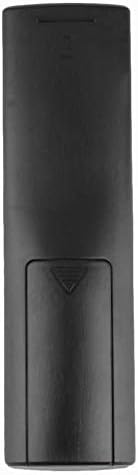
Выява: Задняя частка view пульта дыстанцыйнага кіравання з закрытай вечкам адсека для батарэй.
Інструкцыя па эксплуатацыі
Першапачатковае выкарыстанне
The Calvas USARMT LTV-914 remote control is designed to work directly with most compatible LG TV models without requiring any programming. Simply insert the batteries and point the remote towards your television.
Direct Use and Basic Functions
Most functions, such as power on/off, volume control, channel selection, and navigation, should operate immediately upon pointing the remote at your LG TV.

Выява: спераду view of the remote control, displaying the button layout.
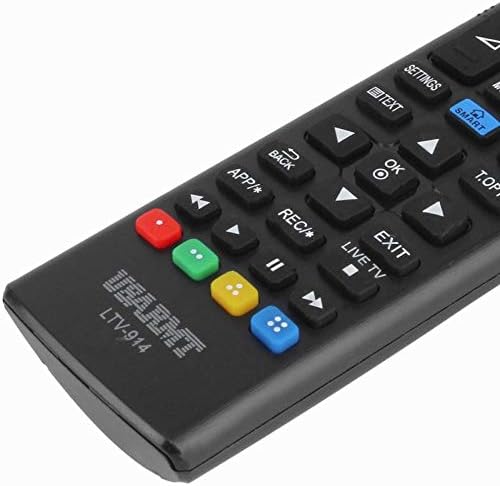
Image: Close-up of the remote's buttons, showing details of the control interface.
Factory Reset / Reconfiguration (If direct use fails)
In rare cases, if the remote does not operate your TV directly, you may need to perform a factory reset or attempt a reconfiguration.
- To reset to factory settings: Press and hold the УЛАДА button and the number 0 кнопку адначасова на некалькі секунд.
- To attempt re-pairing (if applicable, though typically not required for this universal remote): Press and hold the УЛАДА button and the number 1 кнопку адначасова на некалькі секунд.
After performing either of these steps, release the buttons and test the remote's functionality with your TV.
Ліквідацыю непаладак
- Пульт не адказвае:
- Праверце, ці правільна ўстаўлены батарэйкі з захаваннем палярнасці.
- Замяніце старыя або разраджаныя батарэйкі новымі шчолачнымі батарэйкамі тыпу AAA.
- Пераканайцеся, што паміж пультам дыстанцыйнага кіравання і ІЧ-прыёмнікам тэлевізара няма перашкод.
- Пераканайцеся, што вы знаходзіцеся ў зоне дзеяння ІЧ-прыёмніка тэлевізара.
- Некаторыя функцыі не працуюць:
- While this is a universal remote, some advanced or specific smart TV functions might not be fully supported on all LG models.
- Try the factory reset/reconfiguration steps mentioned in the "Operating Instructions" section.
- Remote LED indicator not lighting up:
- This usually indicates dead batteries or incorrect battery insertion. Replace batteries.
Тэхнічнае абслугоўванне
- Трымайце пульт дыстанцыйнага кіравання сухім. Пазбягайце кантакту з вадкасцямі.
- Не кідайце і не падвяргайце пульт моцнаму ўдару.
- Працірайце пульт мяккай сухой тканінай. Не выкарыстоўвайце абразіўныя ачышчальнікі або растваральнікі.
- Калі пульт не будзе выкарыстоўвацца працяглы час, выміце батарэйкі, каб прадухіліць іх уцечку.
Гарантыя і падтрымка
Specific warranty information for this product is not provided in the available data. For support or warranty inquiries, please contact your retailer or the manufacturer, Calvas.