
Уводзіны
These instructions provide detailed guidance for the safe and effective use of your AfterShokz Titanium Open Ear Wireless Bone Conduction Headphones, model AS600CR. This manual covers setup, operation, maintenance, and troubleshooting to ensure optimal performance and longevity of your device.
Прадукт скончаныview
Асноўныя характарыстыкі
- Дызайн з адкрытым вушам: Patented bone conduction technology delivers audio through the cheekbone, keeping you connected and aware of your surroundings.
- Бяспечная і зручная пасадка: An open-ear design enables bud-free listening and a partial titanium frame keeps the headphones in place through any activity.
- Шматфункцыянальная кнопка: Easy controls to play, pause, skip, activate voice assistant, and answer calls.
- Потстойкі: IP55 certified to repel sweat, dust, and moisture. Ideal for various activities, including rainy runs.
- 6-гадзінны тэрмін службы батарэі: Provides up to 6 hours of continuous music and calls on a single charge.
Змест пакета
Your AfterShokz Titanium headphones package typically includes:
- AfterShokz Titanium Headphones (AS600CR)
- Зарадны кабель Micro-USB
- Сумка для захоўвання
- Earplugs (for optional use)
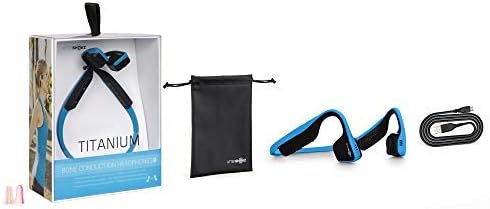
Image: Contents of the AfterShokz Titanium package, including the headphones, charging cable, storage pouch, and earplugs.
Настройка
Зарадка навушнікаў
- Locate the Micro-USB charging port on your headphones.
- Connect the Micro-USB charging cable to the headphones and the other end to a USB power adapter or computer USB port.
- Падчас зарадкі святлодыёдны індыкатар будзе гарэць чырвоным святлом.
- Once fully charged, the LED indicator will turn blue. A full charge takes approximately 1.5 hours.
Спалучэнне з прыладай Bluetooth
- Пераканайцеся, што навушнікі выключаны.
- Press and hold the power button (usually the volume+ button) for 5-7 seconds until the LED indicator flashes red and blue alternately. This indicates pairing mode.
- На вашай прыладзе (смартфоне, планшэце, камп'ютары) уключыце Bluetooth і знайдзіце даступныя прылады.
- Select "AfterShokz Titanium" from the list of found devices.
- Once successfully paired, the LED indicator will flash blue once, and a voice prompt will confirm "Connected."
Інструкцыя па эксплуатацыі
Нашэнне навушнікаў
Place the headphones with the transducers resting on your cheekbones, just in front of your ears. The band should rest comfortably behind your head.

Image: A person wearing AfterShokz Titanium headphones, demonstrating the open-ear design and comfortable fit during physical activity.
Функцыі кнопак
| Кнопка | Дзеянне | Функцыя |
|---|---|---|
| Multifunction Button (Large button on left transducer) | Адзінкавая прэса | Play/Pause music, Answer call |
| Двайны прэс | Перайсці да наступнага трэка | |
| Націсніце і ўтрымлівайце (2 секунды) | Activate voice assistant, Reject call | |
| Volume + / Power Button | Адзінкавая прэса | Павялічыць гучнасць |
| Націсніце і ўтрымлівайце (2 секунды) | Уключэнне/выключэнне харчавання | |
| Гучнасць - кнопка | Адзінкавая прэса | Паменшыць гучнасць |
Тэхнічнае абслугоўванне
Уборка
- Працярыце навушнікі мяккай, damp тканіна.
- Пазбягайце выкарыстання агрэсіўных хімікатаў або абразіўных матэрыялаў.
- Перад зарадкай пераканайцеся, што зарадны порт сухі.
Захоўванне
- Store the headphones in the provided pouch when not in use to protect them from dust and damage.
- Avoid storing in extreme temperatures.
Ліквідацыю непаладак
Няма сілы
- Ensure the headphones are fully charged. Connect to a power source and check the LED indicator.
- Паспрабуйце іншы зарадны кабель або USB-порт.
Немагчыма спалучыць
- Пераканайцеся, што навушнікі знаходзяцца ў рэжыме спалучэння (святлодыёд міргае чырвоным і сінім колерамі).
- Выключыце і ўключыце Bluetooth на прыладзе.
- Падсуньце навушнікі бліжэй да прылады.
- Ачысціце папярэднія падключэнні Bluetooth на прыладзе, калі ў вас іх занадта шмат.
Нізкая гучнасць або дрэнная якасць гуку
- Адрэгулюйце гучнасць як на навушніках, так і на падлучанай прыладзе.
- Ensure the transducers are positioned correctly on your cheekbones.
- If using earplugs, ensure they are inserted correctly.
- Праверце перашкоды ад іншых бесправадных прылад.
Тэхнічныя характарыстыкі
| Асаблівасць | Дэталь |
|---|---|
| мадэль | AS600 |
| Сувязь | Bluetooth |
| Тэрмін службы батарэі | Да 6 гадзін |
| Воданепранікальнасць | IP55 (Sweat and water-resistant) |
| Вага | 40 грамаў |
| Матэрыял | Тытан |
| Дыяпазон частот | 20 Гц - 20 000 Гц |
| Мікрафон | Убудаваны |
Гарантыя і падтрымка
For warranty information and customer support, please refer to the official AfterShokz (now Shokz) webсайт або звярніцеся непасрэдна ў службу падтрымкі кліентаў. Захоўвайце пацвярджэнне пакупкі для прэтэнзій па гарантыі.
Note: AfterShokz has been rebranded to Shokz. Product support and warranty services are now provided under the Shokz brand.