
1. Уводзіны
This manual provides detailed instructions for the proper use and maintenance of your HOPESTAR H13 Bluetooth Speaker. Please read this manual thoroughly before operating the device to ensure optimal performance and longevity. Keep this manual for future reference.
2. Змесціва ўпакоўкі
Праверце наяўнасць усіх прадметаў у камплекце:
- HOPESTAR H13 Bluetooth Speaker
- Зарадны кабель
- Кіраўніцтва карыстальніка
3. Прадукт скончыўсяview
Familiarize yourself with the components and controls of your HOPESTAR H13 speaker.
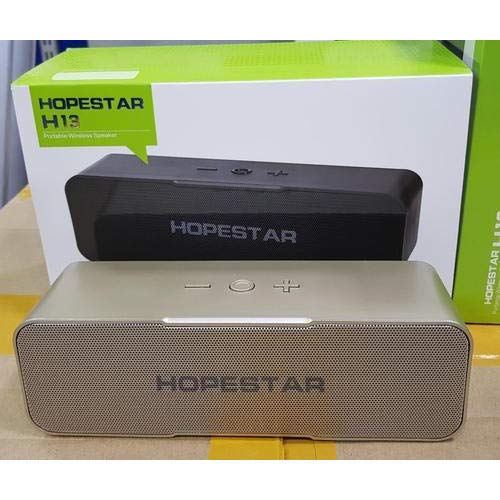
An image showing the HOPESTAR H13 portable wireless speaker in gold color, alongside its packaging box. The speaker features a mesh grille and control buttons on top, including power, volume down, and volume up.
Кнопкі кіравання:
- Кнопка харчавання: Press and hold to turn the speaker ON/OFF. Press once to Play/Pause music or Answer/End calls.
- Памяншэнне гучнасці (-): Націсніце, каб паменшыць гучнасць.
- Павялічыць гучнасць (+): Націсніце, каб павялічыць гучнасць.
4. Настройка
Першапачатковая зарадка:
Before first use, it is recommended to fully charge the HOPESTAR H13 speaker. Connect the provided charging cable to the speaker's charging port and a compatible USB power adapter (not included). The charging indicator light will illuminate during charging and turn off once the battery is full.
Уключэнне/выключэнне:
- Абярнуцца ON: Press and hold the Power Button until you hear an audible prompt.
- Абярнуцца ВЫКЛ: Press and hold the Power Button again until you hear an audible prompt.
5. Інструкцыя па эксплуатацыі
Спалучэнне праз Bluetooth:
- Ensure the HOPESTAR H13 speaker is powered on and in pairing mode (indicated by a flashing LED light, if present).
- Activate Bluetooth on your source device (e.g., smartphone, tablet, computer).
- Пошук 'HOPESTAR H13' in the list of available Bluetooth devices.
- Select 'HOPESTAR H13' to initiate the pairing process.
- A confirmation sound will indicate successful pairing. The LED light will typically become solid.
Once paired, the speaker will automatically connect to the last paired device when powered on, if the device's Bluetooth is active and within range.
Прайграванне музыкі:
- Прайграванне/Паўза: Націсніце кнопку харчавання адзін раз.
- Рэгуляванне гучнасці: Use the Volume Down (-) and Volume Up (+) buttons on the speaker, or control volume directly from your connected device.
Апрацоўка выклікаў:
- Адказ/завяршэнне выкліку: Press the Power Button once when a call comes in or to end an ongoing call.
6. Зарадка
The HOPESTAR H13 speaker is powered by a built-in Lithium Ion battery. To charge the speaker:
- Connect the small end of the charging cable to the speaker's charging port.
- Connect the USB end of the charging cable to a USB power source (e.g., computer USB port, USB wall adapter).
- Індыкатар зарадкі будзе паказваць стан зарадкі.
- Пасля поўнай зарадкі адключыце зарадны кабель.
7. Тэхнічнае абслугоўванне
- Clean the speaker with a soft, dry cloth. Do not use liquid cleaners, abrasive materials, or solvents.
- Do not immerse the speaker in water, as it is not waterproof.
- Захоўвайце дынамік у прахалодным, сухім месцы, удалечыні ад прамых сонечных прамянёў і экстрэмальных тэмператур.
- Пазбягайце падзення дынаміка і не падвяргайце яго моцным ударам.
8. Выпраўленне непаладак
| праблема | Магчымая прычына | Рашэнне |
|---|---|---|
| Дынамік не ўключаецца | Акумулятар разраджаны | Поўнасцю зарадзіце дынамік з дапамогай кабеля, які ўваходзіць у камплект. |
| Няма гуку з дынаміка | Volume too low; Not paired; Device not playing | Increase volume on both speaker and source device. Ensure speaker is paired correctly. Check if music is playing on the source device. |
| Bluetooth connection unstable or disconnects | Too far from source device; Interference | Move the source device closer to the speaker (within 10 meters). Avoid obstacles between devices. Re-pair the speaker with your device. |
| Немагчыма спалучыць прыладу | Speaker not in pairing mode; Bluetooth off on device | Ensure speaker is powered on and in pairing mode. Turn on Bluetooth on your source device and search again. |
9. Тэхнічныя характарыстыкі
- Марка: ЗОРКА НАДЗЕІ
- мадэль: H13
- Тэхналогія падключэння: Bluetooth
- Крыніца харчавання: Працуе ад акумулятара (1 літый-іённы акумулятар уключаны)
- Метад кантролю: Дакранацца
- Вага прадмета: 500 г
- Воданепранікальны: няма
- Уключаныя кампаненты: Дынамік, зарадны кабель, кіраўніцтва карыстальніка
10. Гарантыя і падтрымка
The HOPESTAR H13 Bluetooth Speaker comes with a Гарантыя 6 месяцаў з даты пакупкі. Гэтая гарантыя распаўсюджваецца на вытворчыя дэфекты пры нармальным выкарыстанні.
For technical support, warranty claims, or further assistance, please contact your original retailer or visit the official HOPESTAR webсайт для кантактнай інфармацыі.