
Veidoo T10
Veidoo 10-inch Android Tablet PC User Manual
Мадэль: T10
1. Уводзіны
This user manual provides detailed instructions for the safe and efficient operation of your Veidoo 10-inch Android Tablet PC. Please read this manual thoroughly before using the device and retain it for future reference. This tablet is designed for various uses, including communication, entertainment, and productivity.

This image shows the Veidoo 10-inch Android Tablet PC. The front of the tablet displays the home screen with the current time, date, and various application icons such as Camera, Gallery, Settings, and Music. The rear of the tablet, visible behind the front, is black with a subtle textured design and features the rear camera module.
2. Інфармацыя па бяспецы
- Не падвяргайце прыладу ўздзеянню экстрэмальных тэмператур, прамых сонечных прамянёў або высокай вільготнасці.
- Не кідайце прыладу і не падвяргайце яе моцным ударам.
- Выкарыстоўвайце толькі дазволеныя вытворцам зарадныя прылады і аксесуары.
- Не спрабуйце разбіраць або рамантаваць прыладу самастойна. Звярніцеся да кваліфікаванага абслугоўваючага персаналу.
- Захоўвайце прыладу далей ад дзяцей і хатніх жывёл.
- Утылізуйце прыладу і яе акумулятар адказна ў адпаведнасці з мясцовымі правіламі.
3. Прадукт скончыўсяview
3.1 Фізічныя асаблівасці
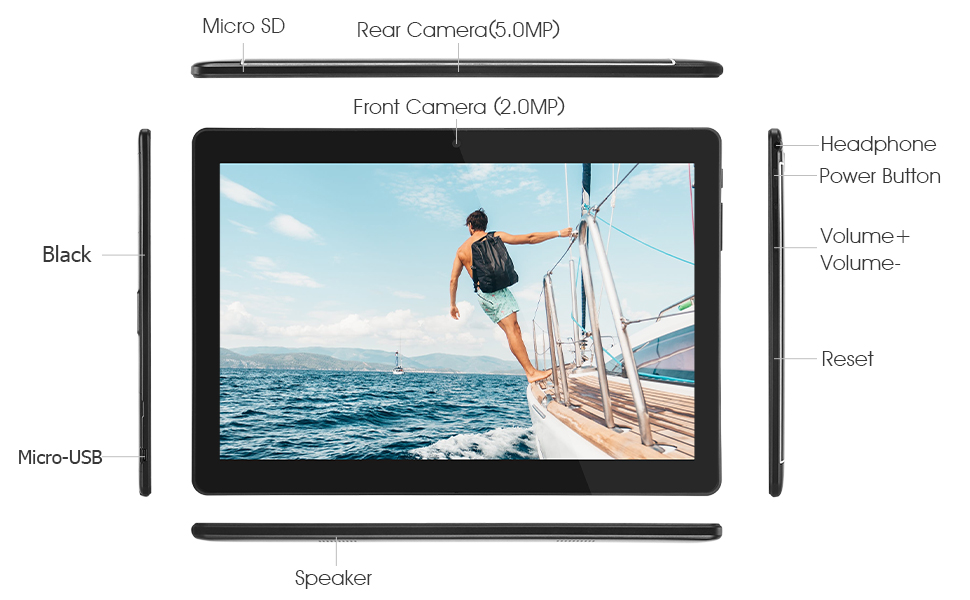
Familiarize yourself with the various ports and buttons on your Veidoo Tablet PC:

This diagram illustrates the various physical components and ports of the Veidoo 10-inch Android Tablet PC. It clearly labels the Micro SD card slot, the 5.0MP rear camera, the 2.0MP front camera, the headphone jack, the power button, the volume up and down buttons, the reset pinhole, the Micro-USB charging port, and the speaker.
- Слот Micro SD: Для пашыранага захоўвання.
- Задняя камера (5.0 МП): Для здымкі фота і відэа.
- Пярэдняя камера (2.0 Мп): Для відэазванкоў і сэлфі.
- Раз'ём для навушнікаў: Падключыце навушнікі 3.5 мм.
- Кнопка харчавання: Press and hold to power on/off, short press to sleep/wake.
- Кнопкі гучнасці: Адрэгулюйце гучнасць гуку.
- Скід Pinhole: Use a thin object to reset the device if unresponsive.
- Порт Micro-USB: Для зарадкі і перадачы дадзеных.
- Дакладчык: Аўдыё выхад.
3.2 Змест пакета
Пераканайцеся, што ў скрынцы з вашым прадуктам ёсць усе неабходныя рэчы:

This image displays the items typically found inside the Veidoo 10-inch Android Tablet PC product box. It includes the tablet itself, a black protective case, a power adapter (wall charger), a USB charging and data cable, a service warranty card, and a leaflet containing frequently asked questions and support information.
- Veidoo 10-inch Android Tablet PC
- Адаптар сілкавання
- Кабель USB
- Protective Case (optional, may vary by package)
- Кіраўніцтва карыстальніка (гэты дакумент)
- Гарантыйны талон на абслугоўванне
- FAQ Leaflet
4. Настройка
4.1 Зарадка акумулятара
Before first use, fully charge the tablet. Connect the USB cable to the tablet's Micro-USB port and the other end to the power adapter. Plug the adapter into a wall outlet. The charging indicator will show the charging status. A full charge typically takes 3-4 hours.

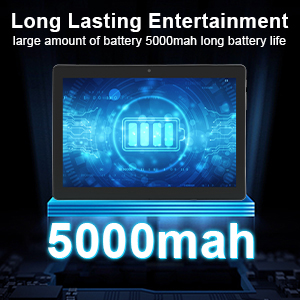
This image focuses on the Veidoo 10-inch Android Tablet PC's battery capacity, prominently displaying a battery icon and '5000mAh'. This signifies the tablet's 5000mAh battery, designed to provide extended usage time for entertainment and productivity.
4.2 Уключэнне/выключэнне
- Каб уключыць: Press and hold the Power button until the Veidoo logo appears on the screen.
- Каб выключыць: Націсніце і ўтрымлівайце кнопку харчавання, пакуль не з'явіцца меню. Выберыце «Выключыць харчаванне» і пацвердзіце.
- Сон/няспанне: Коратка націсніце кнопку харчавання, каб перавесці планшэт у рэжым сну або абудзіць яго.
4.3 Устаўка SIM-карт і карт Micro SD
The tablet supports dual SIM cards for 3G phone calls and a Micro SD card for expandable storage.
- Locate the SIM/SD card slot on the side of the tablet.
- Carefully open the slot cover.
- Insert the SIM card(s) and/or Micro SD card into the designated slots with the gold contacts facing down. Ensure they are correctly seated.
- Шчыльна зачыніце вечка слота.
This image demonstrates the storage capabilities of the Veidoo 10-inch Android Tablet PC, showing multiple applications and content open. It highlights the device's 16GB internal storage (ROM) and its ability to expand storage up to 32GB via a Micro SD card, allowing for ampмесца для праграм, фота і відэа.
4.4 Пачатковая налада
Пры першым уключэнні планшэт правядзе вас праз працэс пачатковай налады:
- Выберыце жаданую мову.
- Падключыцеся да сеткі Wi-Fi.
- Увайдзіце ў свой уліковы запіс Google або стварыце новы. Гэта неабходна для загрузкі праграм з крамы Google Play.
- Наладзьце блакаванне экрана (PIN-код, ключ, пароль).
- Review і прыняць умовы.
5. Кіраванне планшэтам
5.1 Асноўная навігацыя
- Націсніце: Выберыце элемент або адкрыйце праграму.
- Націсніце і ўтрымлівайце: Доступ да кантэкстных меню або перамяшчэнне значкоў.
- Правядзіце пальцам: Пракручваць экраны або спісы.
- Звядзенне пальцамі для павелічэння: Павялічваць або памяншаць маштаб малюнкаў і web старонкі.
5.2 Падключэнне (Wi-Fi і Bluetooth)
- Wi-Fi: Перайсці да Налады > Сетка і інтэрнэт > Wi-Fi. Turn Wi-Fi on, select your network, and enter the password.
- Bluetooth: Перайсці да Налады > Падлучаныя прылады > Bluetooth. Turn Bluetooth on, scan for devices, and pair with your desired accessory.
5.3 Making Phone Calls (3G)
With a valid SIM card inserted, you can make and receive 3G phone calls:

This image shows a group of four individuals participating in a video call using the Veidoo 10-inch Android Tablet PC. This illustrates the tablet's capability for video conferencing and its 3G phone call functionality, allowing users to connect with others remotely.
- Адкрыйце Тэлефон дадатак.
- Dial the number using the keypad or select a contact.
- Націсніце кнопку выкліку, каб пачаць выклік.
5.4 Выкарыстанне камер
The tablet is equipped with a front and rear camera for photos and videos.
- Адкрыйце Камера дадатак.
- Пераключайцеся паміж пярэдняй і задняй камерамі з дапамогай значка камеры.
- Націсніце кнопку спуску засаўкі, каб зрабіць фотаздымак або пачаць/спыніць відэазапіс.
5.5 Кіраванне сховішчам
Вы можаце view and manage your tablet's internal and external storage:
- Перайсці да Налады > Сховішча.
- Here you can see storage usage and free up space by deleting unnecessary files or uninstalling apps.
5.6 Installing and Uninstalling Apps
This image features the Veidoo 10-inch Android Tablet PC showcasing its Android 10 operating system with a multitude of application icons. This highlights that the device is GMS (Google Mobile Services) certified, ensuring access to Google Play Store and other Google services.
- Усталяваць: Адкрыйце Крама Google Play праграма, знайдзіце патрэбную праграму і націсніце Усталяваць.
- Выдаліць: Перайсці да Налады > Праграмы і апавяшчэнні > Глядзець усе праграмы. Select the app you wish to uninstall and tap Выдаліць.
6. Тэхнічнае абслугоўванне
- Уборка: Для чысткі экрана і корпуса выкарыстоўвайце мяккую тканіну без ворса. Пазбягайце выкарыстання абразіўных ачышчальнікаў або растваральнікаў.
- Абнаўленні праграмнага забеспячэння: Рэгулярна правярайце наяўнасць абнаўленняў сістэмы ў Налады > Сістэма > Абнаўленне сістэмы каб забяспечыць аптымальную прадукцыйнасць і бяспеку.
- Сыход за батарэяй: To prolong battery life, avoid fully discharging the battery frequently. Store the tablet in a cool, dry place when not in use for extended periods.
- Рэзервовае капіраванне даных: Regularly back up important data to a cloud service or external storage device to prevent data loss.
7. Выпраўленне непаладак
| праблема | Магчымае рашэнне |
|---|---|
| Планшэт не ўключаецца | Ensure the battery is charged. Connect the charger and wait a few minutes before attempting to power on. If unresponsive, try pressing the reset pinhole. |
| Экран не рэагуе | Restart the tablet by holding the Power button. If that doesn't work, use the reset pinhole. Ensure the screen is clean and dry. |
| Немагчыма падключыцца да Wi-Fi | Check if Wi-Fi is enabled in settings. Ensure the Wi-Fi password is correct. Restart your router and the tablet. |
| Праграмы завісаюць або выходзяць з ладу | Close and reopen the app. Clear the app's cache in Налады > Прыкладанні і апавяшчэнні. Update the app or uninstall and reinstall it. Ensure sufficient storage space. |
| Дрэнны тэрмін службы батарэі | Reduce screen brightness. Close unused apps running in the background. Turn off Wi-Fi, Bluetooth, and GPS when not in use. Limit background data usage. |
8. Тэхнічныя характарыстыкі
Key technical specifications for the Veidoo 10-inch Android Tablet PC (Model T10):

This image provides a visual summary of the Veidoo Tablet PC's key specifications. It highlights features such as 1GB RAM, a 2MP front and 5MP rear camera setup, a 10.1-inch IPS HD display with 1280x800 resolution, 16GB of internal storage, Android 10 operating system, Wi-Fi connectivity, a Quad-Core CPU, and dual SIM card support.
| Асаблівасць | Дэталь |
|---|---|
| Назва мадэлі | Touch (T10) |
| Памер пастаяннага экрана | 10.1 цалі |
| Дазвол экрана | 800 x 1280 (IPS) |
| АЗП | 1 ГБ (DDR3 SDRAM) |
| Памер жорсткага дыска / флэш-памяці | 16 GB (expandable up to 32GB via Micro SD) |
| Бесправадны тып | 802.11b, 802.11b/g (Wi-Fi), Bluetooth |
| Сярэдні тэрмін службы батарэі | 6 Hours (5000mAh Lithium Polymer) |
| Апаратная платформа | Android |
| Аперацыйная сістэма | Android 6.0 Marshmallow (GMS Certified) |
| Вага прадмета | 2.86 фунта |
| Памеры прадукту | 9.49 х 6.69 х 0.37 цалі |
| Тыл WebДазвол камеры | 5 МП |
| Фронт WebДазвол камеры | 2 МП |
| Колькасць працэсараў | 4 (Quad-Core) |
| Крыніца харчавання | Працуе ад акумулятара, электрычны |
9. Гарантыя і падтрымка
Your Veidoo Tablet PC comes with a service warranty. Please refer to the included Service Warranty Card for specific terms and conditions, including warranty period and coverage details.
For technical support, troubleshooting assistance, or warranty claims, please contact Veidoo customer service. Contact information can typically be found on the warranty card or the official Veidoo website. When contacting support, please have your model number (T10) and purchase information ready.
You can also visit the official Veidoo store on Amazon for more information and support resources: Veidoo Store
Ask a question about this manual
Ask about setup, troubleshooting, compatibility, parts, safety, or missing instructions. Manuals+ will review the question and use this page’s manual context to help answer it.