
1. Уводзіны
This manual provides essential instructions for the installation, operation, and maintenance of your FSP iFP600 Uninterruptible Power Supply (UPS). Please read this manual thoroughly before installing or operating the unit to ensure proper function and safety. The FSP iFP600 is designed to provide reliable power backup and surge protection for your electronic devices.

Выява 1.1: Спераду view of the FSP iFP600 UPS, showcasinдзякуючы кампактнаму дызайну і ўбудаванаму ВК-дысплею.
2. Інструкцыі па тэхніцы бяспекі
Please adhere to these important safety guidelines during installation, operation, and maintenance of the UPS:
- Не адкрывайце бесперабойны блокasing. Унутры няма дэталяў, якія можна абслугоўваць самастойна. Па ўсіх пытаннях абслугоўвання звяртайцеся да кваліфікаванага персаналу.
- Do not connect appliances that could overload the UPS, such as laser printers, vacuum cleaners, or heaters.
- Пераканайцеся, што бесперабойнае забеспячэнне падключана да заземленай разеткі пераменнага току.
- Пазбягайце размяшчэння бесперабойнага сілкавання пад прамымі сонечнымі прамянямі, побач з крыніцамі цяпла або ў асяроддзях з падвышанай запыленасцю, вільготнасцю або агрэсіўнымі рэчывамі.
- Position the UPS in a well-ventilated area to prevent overheating.
- In case of fire, use a dry chemical extinguisher. Water can be hazardous.
- The battery inside the UPS is not user-replaceable. Battery replacement should only be performed by qualified personnel.
3. Прадукт скончыўсяview
The FSP iFP600 UPS provides reliable power protection for your critical electronics. It features a compact design and an intuitive LCD display for monitoring status.
3.1 Змест пакета
Пасля адкрыцця ўпакоўкі пераканайцеся, што ўсе кампаненты наяўныя і не пашкоджаныя:
- FSP iFP600 UPS Unit
- Кіраўніцтва карыстальніка (гэты дакумент)
- Шнур харчавання
- Кабель сувязі USB
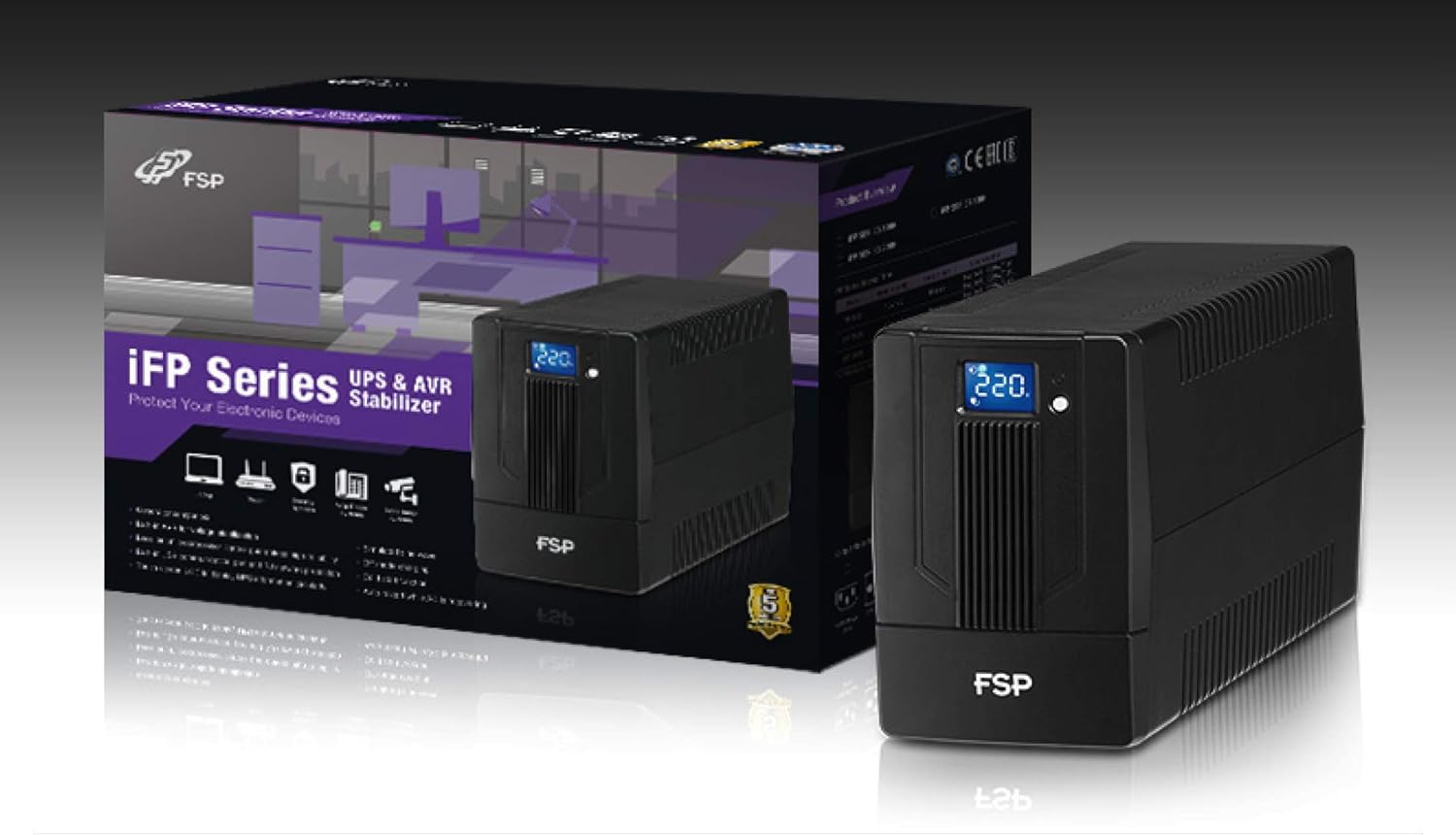
Image 3.1: The FSP iFP600 UPS shown alongside its retail packaging, illustrating the product's presentation.
3.2 Кампаненты задняй панэлі
Familiarize yourself with the connections on the rear panel of the UPS:

Малюнак 3.2: Падрабязны view of the FSP iFP600 UPS rear panel, highlighting connection points.
- Разеткі: Two SCHUKO type outlets for connecting protected equipment.
- Уваход пераменнага току: Connects the UPS to the main utility power.
- Fuse/Breaker: Overcurrent protection for the UPS.
- USB-сувязь: Port for connecting to a computer for monitoring and management.
- Combo RJ11/RJ45 Surge Protection: Provides surge protection for telephone/network lines.
4. Настройка і ўстаноўка
Follow these steps to set up your FSP iFP600 UPS:
- Распакаванне: Асцярожна выміце бесперабойнік з упакоўкі. Праверце на наяўнасць пашкоджанняў пры дастаўцы.
- Размяшчэнне: Place the UPS on a flat, stable surface in a clean, cool, and well-ventilated area. Ensure adequate clearance around the unit for airflow.
- Першапачатковая зарадка: Connect the UPS to a standard grounded AC outlet using the provided power cord. Allow the unit to charge for at least 4-6 hours before initial use to ensure optimal battery performance. The UPS will charge whether it is turned on or off.
- Падлучальнае абсталяванне: Plug your computer, monitor, and other critical electronic devices into the UPS outlets (A). Do not connect surge suppressors or power strips to the UPS outlets.
- USB Communication (Optional): Connect the USB cable from the UPS USB port (D) to your computer's USB port to enable power management software features (software not included, typically downloaded from manufacturer's webсайт).
- RJ11/RJ45 Protection (Optional): For surge protection of your telephone or network line, connect the incoming line to the 'IN' port of the Combo RJ11/RJ45 (E) and connect the 'OUT' port to your device.
5. Інструкцыя па эксплуатацыі
5.1 Уключэнне/выключэнне
- Каб уключыць: Націсніце і ўтрымлівайце кнопку харчавання на пярэдняй панэлі прыблізна 2 секунды, пакуль не пачуеце гукавы сігнал і не падсвеціцца ВК-дысплей.
- Каб выключыць: Press and hold the power button for approximately 2 seconds until you hear a beep and the LCD display turns off.
5.2 Інфармацыя пра ВК-дысплей
The FSP iFP600 features an LCD display that provides real-time status information. The display is touch-sensitive for navigating information.

Image 5.1: The LCD display of the FSP iFP600 UPS, indicating voltage output and its touch-screen functionality.
The LCD display typically shows:
- Уваходны кнtage
- Выхад Voltage
- Узровень зарада батарэі
- Узровень нагрузкі
- Operating Mode (e.g., AC mode, Battery mode)
- Warning/Fault Indicators
5.3 Праца ў рэжыме батарэі
When the utility power fails or fluctuates outside acceptable limits, the UPS will automatically switch to battery mode. During battery mode, the UPS will provide power to connected equipment from its internal battery. An audible alarm will sound to indicate battery operation.
6. Тэхнічнае абслугоўванне
Proper maintenance ensures the longevity and reliability of your UPS.
- Уборка: Для чысткі знешніх паверхняў крыніцы бесперабойнага сілкавання выкарыстоўвайце мяккую сухую тканіну. Не выкарыстоўвайце вадкія або аэразольныя ачышчальнікі.
- Сыход за батарэяй: To maximize battery life, ensure the UPS is connected to AC power and fully charged. If the UPS is stored for an extended period, recharge it every three months to prevent battery degradation.
- Замена батарэі: The internal battery (12V / 7Ah x1) is not user-serviceable. Battery replacement should only be performed by FSP-certified service personnel or a qualified technician. Incorrect battery replacement can pose a risk of explosion or injury.
- захоўванне: Store the UPS in a cool, dry place with adequate ventilation. Ensure the battery is fully charged before storage.
7. Выпраўленне непаладак
Refer to the following table for common issues and their solutions. If the problem persists, contact FSP support.
| Сімптом | Гукавы сігнал | Магчымая прычына | Рашэнне |
|---|---|---|---|
| UPS operating on battery power | Звукавы сігнал кожныя 10 секунд | Utility power failure or fluctuation | Save work and shut down equipment if power outage is prolonged. UPS will return to AC mode when power is restored. |
| Папярэджанне аб нізкім узроўні батарэі | Гукавы сігнал кожную секунду | Зарад батарэі крытычна нізкі | Immediately save work and shut down connected equipment. |
| Стан перагрузкі | Гукавы сігнал кожную 0.5 секунду | Падключанае абсталяванне перавышае магутнасць бесперабойнага сілкавання | Disconnect non-essential equipment until the alarm stops. Ensure total load is within UPS capacity. |
| Няспраўнасць ІБП | Бесперапынна сігналіць | Унутраная няспраўнасць або няспраўнасць | Turn off the UPS and disconnect it from the AC outlet. Contact FSP technical support. |
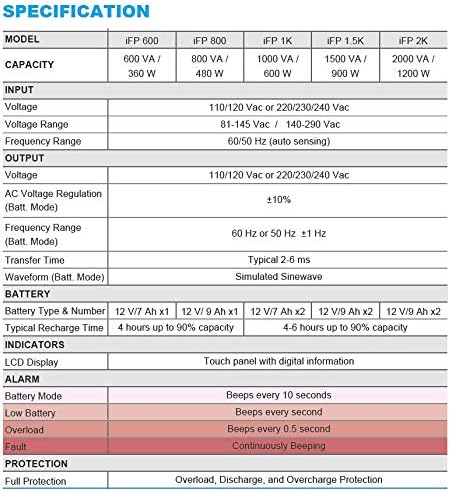
Image 7.1: Excerpt from the FSP iFP series specification table, detailing alarm indicators and their meanings.
8. Тэхнічныя характарыстыкі
Detailed technical specifications for the FSP iFP600 UPS:
| Асаблівасць | Спецыфікацыя |
|---|---|
| мадэль | іФП 600 |
| Ёмістасць | 600 ВА / 360 Вт |
| Уваходны кнtage | 110/120 Vac or 220/230/240 Vac |
| Уваходны кнtagе далёкасць | 81-145 Vac / 140-290 Vac |
| Дыяпазон уваходных частот | 60/50 Гц (аўтаматычнае вызначэнне) |
| Выхад Voltage | 110/120 Vac or 220/230/240 Vac |
| Пераменнага токуtage Рэгуляванне (рэжым батарэі) | ±10% |
| Output Frequency Range (Batt. Mode) | 60 Hz or 50 Hz ±1 Hz |
| Час перадачы | Звычайна 2-6 мс |
| Форма хвалі (Бат. Рэжым) | Імітацыя сінусоіды |
| Тып і нумар батарэі | 12V / 7Ah x1 |
| Тыповы час перазарадкі | 4 гадзіны да 90% ёмістасці |
| Паказчыкі | LCD Display (Touch panel with digital information) |
| Ахова | Overload, Discharge, and Overcharge Protection |
| Вага прадмета | 9.24 фунта (4.2 кг) |
| Памеры прадукту (ДxШxВ) | 11.81 х 3.98 х 5.59 цалі |
| Колер | Чорны |
| Матэрыял | Метал |
9. Гарантыя і падтрымка
FSP products are designed for reliability and performance. For warranty information, please refer to the warranty card included with your product or visit the official FSP website. For technical support, troubleshooting assistance, or service inquiries, please contact FSP customer service through their official channels.
Больш падрабязную інфармацыю і рэсурсы падтрымкі можна знайсці на FSP Store on Amazon.