
1. Уводзіны
Thank you for choosing the APPS2Car Universal Car Phone Mount. This device is designed to securely hold your smartphone in your vehicle, providing convenient access for navigation, calls, and music. Its robust suction cup and adjustable arm ensure stability and optimal viewing angles on both windshields and dashboards.
Please read this manual carefully before installation and use to ensure proper operation and longevity of the product.
2. Інфармацыя па бяспецы
- Do not install the mount in a location that obstructs your view of the road or interferes with the deployment of airbags.
- Ensure the mount is securely attached before placing your device.
- Do not adjust the mount or your phone while driving. Always pull over to a safe location if adjustments are needed.
- Avoid exposing the mount to extreme temperatures (e.g., direct sunlight for prolonged periods in hot weather) as this may affect the suction cup's performance.
3. Змесціва ўпакоўкі
- APPS2Car Universal Car Phone Mount (Main Unit)
- 3M Adhesive Dashboard Pad (for dashboard mounting)
4. Настройка і ўстаноўка
The APPS2Car phone mount offers versatile installation options for both windshields and dashboards.
4.1. Усталёўка лабавога шкла
- Clean the desired area on your windshield thoroughly with a damp тканіну і дайце ёй цалкам высахнуць.
- Press the suction cup firmly against the clean windshield surface.
- Push down the locking lever on the base of the mount to create a strong vacuum seal.

Figure 1: Windshield Installation
4.2. Dashboard Installation (with 3M Adhesive Pad)
For dashboard mounting, especially on textured or uneven surfaces, use the provided 3M adhesive pad.
- Clean the desired area on your dashboard. Ensure it is flat and smooth. Заўвага: If your dashboard is leather, vinyl, or a soft surface, it is recommended to mount the holder on the windshield or use the dashboard pad.
- Peel off the protective film from one side of the 3M adhesive pad and firmly press it onto the dashboard. Allow it to adhere for at least 24 hours before attaching the mount.
- Once the pad is securely attached, peel off the remaining protective film from the other side of the pad.
- Press the suction cup of the mount firmly onto the 3M adhesive pad.
- Push down the locking lever on the base of the mount to secure it.

Figure 2: Dashboard Installation
4.3. Adjusting the Telescopic Arm
The mount features an adjustable telescopic arm for optimal positioning.
- To extend the arm, pull the cradle forward. The arm can extend from 4.6 inches to 6.3 inches.
- To retract the arm, push the cradle backward.

Figure 3: Adjustable Telescopic Arm
4.4. Overall Installation Steps
Follow these general steps for a secure installation:
- Крок 1: Ачысціце - Clean the surface where the mount will be placed.
- Крок 2: Націсніце - Press the suction cup firmly onto the clean surface.
- Крок 3: Блакіроўка - Push down the locking lever to secure the suction cup.
- Step 4: Reusable - The suction cup can be rinsed with water to restore stickiness for reuse.

Малюнак 4: Этапы ўстаноўкі
5. Інструкцыя па эксплуатацыі
5.1. Placing and Removing Your Phone
- Каб адкрыць клamping arms, press the release button located on the back of the mount. The arms will automatically open.
- Place your phone into the cradle, ensuring it rests on the sturdy foot support.
- Gently squeeze the clamping arms together until they securely hold your phone. The gear-holding arm mechanism ensures a tight grip.
- To remove your phone, press the release button again.
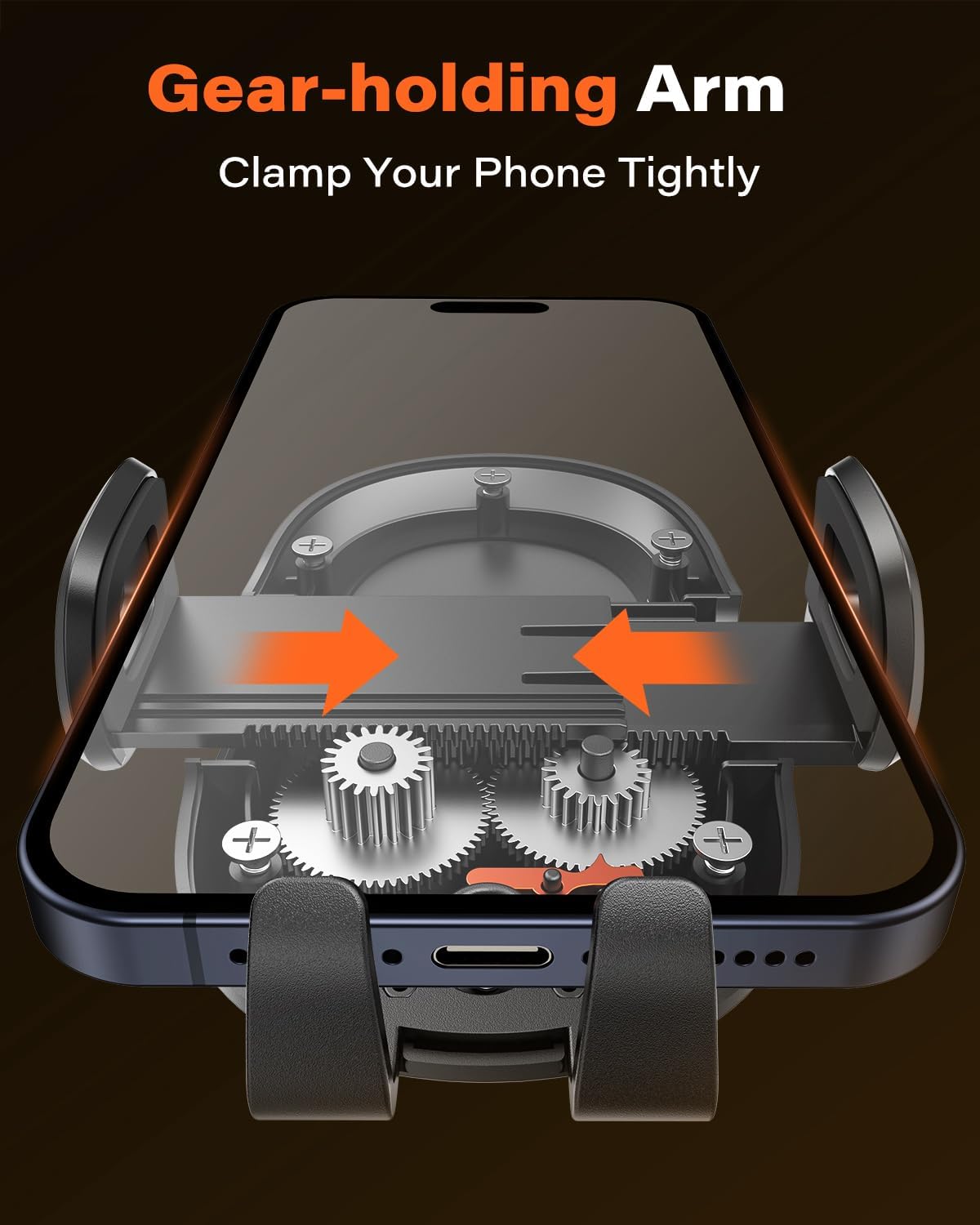
Figure 5: Gear-holding Arm Mechanism

Figure 6: Secure Clampінж
5.2. Наладка Viewвуглавыя куты
The mount features a 360° rotatable ball joint and a 240° adjustable arm, allowing for flexible positioning.
- Rotate the phone holder to switch between portrait and landscape viewрэжымы.
- Adjust the angle of the arm using the pivot point to achieve your desired viewпазіцыя.

Figure 7: Multiple Angle Adjustments
5.3. Сумяшчальнасць
The mount is compatible with smartphones ranging from 4.7 to 6.8 inches. It can extend up to 4 inches wide.
Compatible with models such as iPhone 13 Pro Max/12/11/XR, Samsung Galaxy S21/S20/Note 20/10, Google Pixel, Xiaomi Redmi, Motorola, OnePlus, HUAWEI, and more.
It is recommended that the thickness of the phone with a wallet/card case does not exceed 14mm (0.55 inches).
6. Тэхнічнае абслугоўванне
- Ачыстка прысоскі: If the suction cup loses stickiness, rinse it with warm water and let it air dry. This will restore its adhesive properties.
- Генеральная ўборка: Працярыце мацаванне мяккай губкайamp cloth to remove dust and grime. Do not use harsh chemicals or abrasive cleaners.
- Меркаванні па тэмпературы: Avoid prolonged exposure to extreme temperatures (below -40°F or above 194°F) to maintain the integrity of the materials.

Figure 8: Temperature Durability
7. Выпраўленне непаладак
| праблема | Магчымая прычына | Рашэнне |
|---|---|---|
| Suction cup not sticking / Mount falls off | Surface is dirty, uneven, or not suitable (e.g., porous leather/vinyl). Suction cup is dirty or dry. | Clean the surface thoroughly. If using on dashboard, ensure it's a smooth, flat area or use the 3M adhesive pad. Rinse the suction cup with warm water and let it air dry to restore stickiness. Ensure the locking lever is fully engaged. |
| Тэлефон ненадзейна трымаецца | Clamping arms not fully closed. Phone too thick with case. | Пераканайцеся, што клamping arms are fully closed around the phone. Check if your phone with its case exceeds the maximum thickness of 14mm (0.55 inches). |
| Difficulty adjusting arm/angle | Суставы скаваныя. | Apply gentle, firm pressure. The joints are designed to be tight to maintain position. |
8. Тэхнічныя характарыстыкі
| Асаблівасць | Дэталь |
|---|---|
| Марка | APPS2Car |
| Назва мадэлі | H4-S02 |
| Колер | Чорны |
| Сумяшчальныя прылады | Смартфоны (4.7-6.8 цалі) |
| Сумяшчальныя мадэлі тэлефонаў | Huawei, iPhone (including iPhone 13 Pro Max/12/11/XR), Pixel, Samsung Galaxy (including S21/S20/Note 20/10), Motorola, OnePlus |
| Тып мацавання | Прыборная панэль, лабавое шкло |
| Асаблівасць | Adjustable, 360° Rotation, Telescopic Arm (4.6" to 6.3" extension) |
| Матэрыял | Vinyl, Leather (referring to compatible dashboard surfaces) |
| Абмежаванне вагі | 3 фунта |
| Узровень воданепранікальнасці | Waterproof (referring to the suction cup's reusability after rinsing) |
9. Гарантыя і падтрымка
For any questions, concerns, or support needs regarding your APPS2Car product, please contact our customer service. Refer to the product packaging or the retailer's webсайт для атрымання канкрэтнай інфармацыі аб гарантыі і кантактных дадзеных.
We are committed to providing high-quality products and excellent customer support.