
Уводзіны
This manual provides detailed instructions for the installation, operation, and maintenance of your LoraTap WIFI Smart Roller Shutter Timer. Please read this manual carefully before installation and use to ensure proper function and safety.
Інфармацыя па бяспецы
- Перад устаноўкай або абслугоўваннем пераканайцеся, што электрасілкаванне адключана, каб пазбегнуць паражэння электрычным токам.
- Устаноўка павінна выконвацца кваліфікаваным электрыкам або ў адпаведнасці з мясцовымі электрычнымі нормамі.
- Не выкарыстоўвайце прыладу мокрымі рукамі.
- Трымайце прыладу далей ад вады і асяроддзяў з высокай вільготнасцю.
- Не спрабуйце разбіраць або рамантаваць прыладу самастойна. Звярніцеся ў службу падтрымкі, калі ўзнікнуць праблемы.
- Гэта прылада прызначана толькі для выкарыстання ў памяшканні.
Асаблівасці прадукту
- Разумнае кіраванне: Upgrade traditional electric roller shutters or awnings for smart control via smartphone app or voice commands.
- Remote Access & Scheduling: Control your blinds from anywhere and set custom schedules for automatic opening and closing.
- Group Control & Family Sharing: Group multiple roller shutters for simultaneous control and share access with family members.
- Трывалы дызайн: Features a scratch-resistant tempered crystal glass panel, safe to touch with wet hands and easy to clean.
- Adjustable Motor Run Time: Configure the motor's operating time for precise control over shutter position (e.g., 50% open/close).
- Сумяшчальнасць галасавога кіравання: Works with Google Home and Amazon Alexa for hands-free operation.
Змест пакета
Праверце наяўнасць усіх прадметаў у камплекце:
- 1 x LoraTap WIFI Smart Roller Shutter Timer
- 1 x User Manual (German/English)
- 1 х адвёртка
- 4 х Шрубы
- 1 x Wiring Clamp
Тэхнічныя характарыстыкі
| Параметр | Каштоўнасць |
|---|---|
| Памеры | 86 x 86 x 34 mm (with cover frame) |
| Матэрыял панэлі | Загартаванае крыштальнае шкло |
| Матэрыял дна | Fire-retardant Polycarbonate (Plastic) |
| Аперацыйная Voltage | Пераменны ток 100-250 В 50/60 Гц |
| Rated/Maximum Current | 3 А / 10 А |
| Power per Speed | 300 Вт |
| Стандарт Wi-Fi | 2.4 ГГц, 802.11b/g/n |
| Ток у рэжыме чакання | 0.001 А |
| Спажыванне ў рэжыме чакання | 0.25 Вт |
| Спосаб ўстаноўкі | Screw-mounted, fits standard 60mm flush-mounted box |
| Сумяшчальнае праграмнае забеспячэнне | Smart Life App (Android 4.4+, iOS 8+) |
| Сертыфікаты | CE |
Настройка і ўстаноўка
1. Схема падлучэння
The smart roller shutter timer requires a neutral conductor for proper operation. Ensure your existing wiring includes a neutral wire. This switch is suitable for already motorized roller shutters.

Image: Detailed wiring diagram showing connections for Live (L), Neutral (N), and motor control wires (L1 for Up, L2 for Down). The diagram also indicates the input voltage дыяпазон 100-250VAC.
- Увод: Connect the Neutral (N) and Live (L) wires from your power supply to the corresponding terminals on the switch.
- Output to Motor: Connect the motor's Neutral (N), Up (L1), and Down (L2) wires to the respective terminals on the switch.
- Важная заўвага: A neutral conductor must be present.
2. Фізічная ўстаноўка
- Адключыць харчаванне: Before starting, turn off the main power supply to the circuit where you will install the switch.
- Prepare Mounting Box: The switch fits a standard 60mm diameter flush-mounted box.
- Падключыце правады: Follow the wiring diagram carefully. Use the provided wiring clamp пры неабходнасці.
- Устанавіце камутатар: Secure the switch into the flush-mounted box using the two provided screws (one on the left, one on the right).
- Прымацаваць панэль: Carefully attach the crystal glass panel to the switch module.
- Аднавіць сілу: Once installation is complete and secure, restore power to the circuit.
3. Усталёўка праграмы і спалучэнне
- Спампаваць прыкладанне: Download the "Smart Life" application from the App Store (iOS 8 or higher) or Google Play Store (Android 4.4 or higher).
- Рэгістрацыя/Уваход: Адкрыйце праграму і зарэгіструйце новы ўліковы запіс або ўвайдзіце з існуючым.
- Дадаць прыладу: In the Smart Life app, tap the "+" icon to add a new device. Select "Curtain Switch" or a similar category.
- Увядзіце звесткі пра Wi-Fi: Follow the on-screen instructions to connect the switch to your 2.4 GHz Wi-Fi network. Ensure your phone is connected to the same 2.4 GHz network during pairing.
- Пацверджанне: Пасля паспяховага спалучэння прылада з'явіцца ў вашым дадатку і будзе гатовая да кіравання.
Інструкцыя па эксплуатацыі
1. Ручное кіраванне
The touch panel allows for direct control of your roller shutters:
- Стрэлка ўверх: Tap to open the roller shutter.
- Стрэлка ўніз: Tap to close the roller shutter.
- Stop Button (Circle): Tap to pause the roller shutter at its current position.

Выява: спераду view of the LoraTap Smart Roller Shutter Timer showing the touch-sensitive Up, Stop, and Down buttons. Also displays product dimensions (86x86x34mm) and a detailed wiring diagram on the back of the unit.
2. App Control (Smart Life)
After successful pairing, you can control your roller shutters via the Smart Life app:
- Адкрыць/зачыніць: Use the virtual buttons in the app to open, close, or stop the roller shutter.
- Set Motor Run Time: The latest version of the switch allows you to set the motor's operating time. This enables partial opening or closing (e.g., 50%).

Image: Screenshot of the Smart Life app interface demonstrating the new function to set the motor's operating time in seconds (e.g., 10s, 120s) for precise control of roller shutter position.
3. Планаванне і таймеры
Set up automated schedules for your roller shutters:
- In the Smart Life app, navigate to the device settings and select "Schedule" or "Timer."
- Add new schedules by specifying the time, action (open/close), and repetition days.
- This feature allows for automatic operation, such as opening blinds in the morning.

Image: Demonstrates the Smart Life app's scheduling feature with various set times for opening and closing. Also highlights voice control compatibility with Amazon Alexa and Google Assistant.
4. Галасавое кіраванне
Integrate your LoraTap switch with voice assistants:
- Amazon Alexa: Enable the "Smart Life" skill in the Alexa app and link your account. You can then use commands like "Alexa, open the roller shutter" or "Alexa, close the roller shutter."
- Галоўная старонка Google: Link your Smart Life account in the Google Home app. Use commands such as "Hey Google, open the blinds" or "Hey Google, close the blinds."
5. Group Control and Family Sharing
- Групавы кантроль: In the Smart Life app, you can create groups of multiple LoraTap roller shutter timers to control them simultaneously with a single command.
- Сямейны доступ: Share control of your devices with family members through the Smart Life app, allowing everyone in the household to manage the roller shutters.
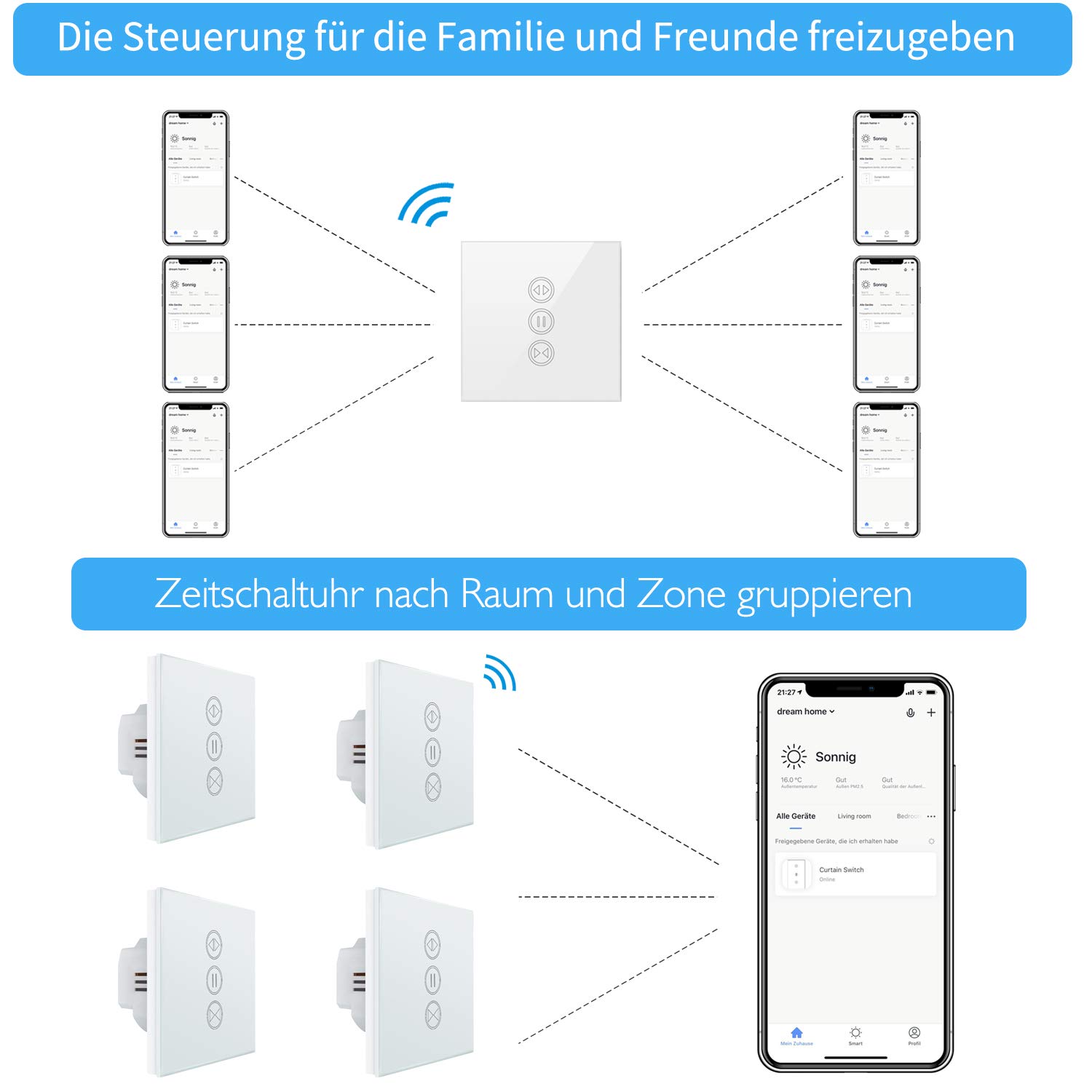
Image: Illustration of how multiple users can control the LoraTap Smart Roller Shutter Timer via the Smart Life app, demonstrating family sharing and the ability to group devices by room or zone for unified control.
Тэхнічнае абслугоўванне
- Уборка: The crystal glass panel is easy to clean. Use a soft, damp cloth to wipe the surface. Avoid abrasive cleaners or harsh chemicals.
- Рэгулярныя праверкі: Перыядычна правярайце правадныя злучэнні, каб пераканацца, што яны надзейныя.
Ліквідацыю непаладак
- Прылада не адказвае:
- Праверце, ці падаецца харчаванне на камутатар.
- Ensure the switch is properly connected to your Wi-Fi network (2.4 GHz only).
- Перазапусціце выключальнік, выключыўшы і ўключыўшы аўтаматычны выключальнік.
- Verify that the Smart Life app is up to date.
- Roller Shutter Not Moving:
- Confirm that the motor is receiving power and is functioning correctly.
- Check the motor wiring connections to the switch.
- Ensure the motor run time is correctly configured in the app if using partial open/close functions.
- Галасавое кіраванне не працуе:
- Ensure your Smart Life account is correctly linked to Alexa or Google Home.
- Праверце падключэнне да Інтэрнэту і стан прылады галасавога памочніка.
- Try re-discovering devices in the Alexa or Google Home app.
- Automatic Stop Issue: This issue has been resolved in newer versions. If you experience unexpected stops, ensure your device firmware is updated via the Smart Life app.
Гарантыя і падтрымка
LoraTap specializes in the research, development, and manufacturing of wireless switches. All LoraTap products are CE certified, ensuring compliance with European safety, health, and environmental protection requirements.
For technical support or warranty inquiries, please contact your retailer or visit the official LoraTap website for further assistance. Please have your product model number (5d4cddd3-8a52-4746-8937-9fbf21a20273) ready when contacting support.