
1. Уводзіны
This manual provides instructions for the proper use and maintenance of your AnyTone Speaker Microphone. This accessory is designed to enhance communication convenience for compatible two-way radios by integrating a speaker and microphone into a single handheld unit.
The speaker microphone features a 3.5mm earphone socket for private listening and a robust clip for secure attachment to clothing or gear.
2. Змесціва ўпакоўкі
Праверце наяўнасць усіх прадметаў у камплекце:
- 1 x AnyTone Speaker Microphone
3. Сумяшчальнасць
This speaker microphone is compatible with the following radio models and types:
- AnyTone AT-D878UV Plus
- AnyTone AT-D878UV
- AnyTone AT-D868UV
- Other radios utilizing a Kenwood K-type speaker microphone connector.
The connector features a 1 x 3.5mm pin and 1 x 2.5mm pin configuration.
4. Настройка
To connect the speaker microphone to your radio:
- Пераканайцеся, што ваша радыё выключана.
- Locate the speaker microphone jack on your compatible radio.
- Align the two-pin connector of the speaker microphone with the radio's jack. The connector has one 3.5mm pin and one 2.5mm pin.
- Gently insert the connector until it is fully seated. Do not force the connection.
- Power on your radio. The speaker microphone is now ready for use.
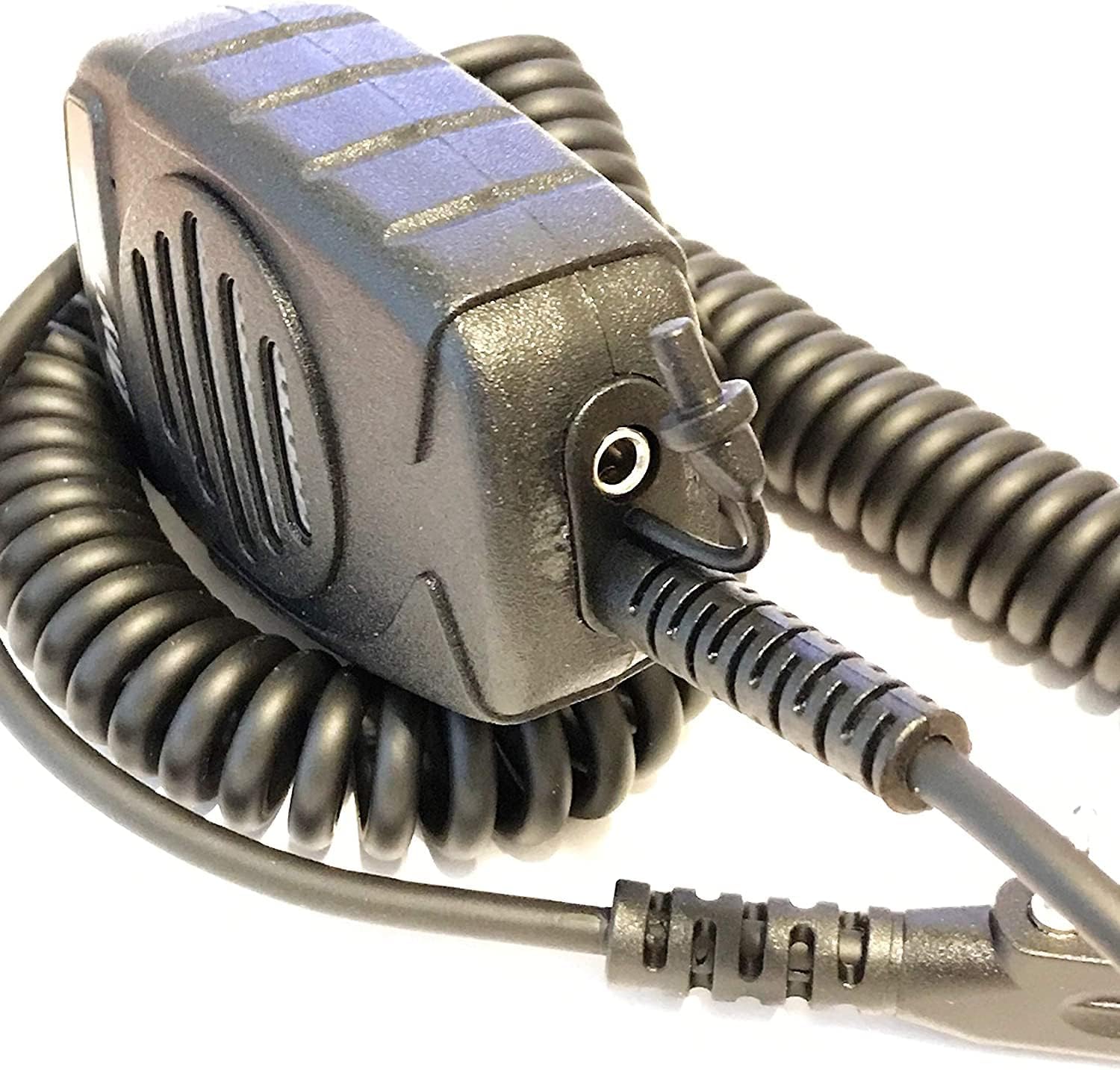
Малюнак 1: бок view of the speaker microphone, highlighting the coiled cable and the 3.5mm earphone jack.
5. Аперацыя
5.1 Перадача
Каб перадаць свой голас:
- Hold the speaker microphone approximately 2-5 cm (1-2 inches) from your mouth.
- Press and hold the Push-To-Talk (PTT) button located on the side of the microphone.
- Гаварыце выразна ў мікрафон.
- Адпусціце кнопку PTT, каб спыніць перадачу і вярнуцца ў рэжым прыёму.

Малюнак 2: Спераду view of the speaker microphone, illustrating the speaker and microphone placement.
5.2 Атрыманне
Incoming audio will be heard through the speaker on the front of the microphone. Adjust the volume using your radio's volume control.
5.3 Using the Earphone Socket
For private listening, connect a standard 3.5mm earphone (not included) into the earphone socket located on the underside of the speaker microphone. When an earphone is connected, audio will be routed to the earphone and will not play through the speaker.
5.4 Using the Clip
The speaker microphone features a strong, rotatable clip on the back for convenient attachment to clothing, straps, or other gear. This allows for hands-free operation and keeps the microphone easily accessible.

Малюнак 3: Назад view of the speaker microphone, showing the integrated clip.
6. Тэхнічнае абслугоўванне
To ensure the longevity and optimal performance of your speaker microphone:
- Уборка: Працярыце знешні выгляд мяккай, damp тканіна. Не выкарыстоўвайце агрэсіўныя хімікаты або абразіўныя ачышчальнікі.
- захоўванне: Store the microphone in a dry environment, away from extreme temperatures and direct sunlight.
- Апрацоўка: Avoid dropping the microphone or subjecting it to strong impacts. Do not pull on the coiled cable excessively.
- Ўздзеянне вады: Гэта прылада не воданепранікальная. Пазбягайце ўздзеяння дажджу, пырскаў або апускання ў ваду.
7. Выпраўленне непаладак
If you experience issues with your speaker microphone, refer to the following common problems and solutions:
- Няма гуку з дынаміка:
- Ensure the connector is fully inserted into the radio's jack.
- Check the radio's volume level.
- Verify that no earphone is plugged into the 3.5mm socket, which would mute the speaker.
- Test the microphone with another compatible radio if available.
- Others Cannot Hear My Voice (No Transmission):
- Ensure the PTT button is fully pressed and held during transmission.
- Confirm the microphone is connected correctly to the radio.
- Check your radio's settings for microphone input or transmission power.
- Скажонае аўдыя:
- Adjust the radio's volume to an appropriate level.
- Ensure you are speaking at a consistent distance from the microphone.
- Check for any physical damage to the microphone or cable.
If problems persist, consult your radio's user manual or contact AnyTone customer support.
8. Тэхнічныя характарыстыкі
| Нумар мадэлі | KKshop |
| Колер | Чорны |
| Памер штыфта | 1 x 3.5mm, 1 x 2.5mm (Kenwood K-type) |
| Вага прадукту | 5 унцый (135g) |
| Памеры прадукту (Д х Ш х У) | 3 х 2.25 х 1.25 цалі (7.62 х 5.72 х 3.18 см) |
| Памер | 36 мм (1.42 цалі) |
| SPL (узровень гукавога ціску) | 140 дБ +/- 2 дБ |
| Дыяпазон частот | 420 Гц - 20 кГц |
| Імпеданс | 8 Ом +/- 15% |
| Аўдыёвыхад | 1W |
| Тып | Усенакіраваны |
| Дыяпазон частот | 100 Гц - 160 кГц |
| Адчувальнасць | -54 дБ +/- 2dB |
| Імпеданс | 2.2К Ом |
| тtage | Пастаянны ток 1 - 10 В |
9. Гарантыя і падтрымка
For warranty information or technical support, please refer to the documentation provided with your original radio purchase or visit the official AnyTone webсайт. Канкрэтныя гарантыйныя ўмовы могуць адрознівацца ў залежнасці ад рэгіёна і прадаўца.
Вытворца: Qixiang Electron Science & Technology Co., Ltd.