
1. Важныя інструкцыі па бяспецы
Please read all instructions carefully before using the UNIC UC28+ projector. Keep this manual for future reference.
- крыніца харчавання: Выкарыстоўвайце толькі пазначаны адаптар сілкавання. Пераканайцеся, што разетка мае напружаннеtagадпавядае патрабаванням праектара.
- Вентыляцыя: Не блакуйце вентыляцыйныя адтуліны. Забяспечце дастатковую прастору вакол праектара для належнай цыркуляцыі паветра і прадухілення перагрэву.
- Цяпло: Праектар лamp generates heat. Avoid touching the lens or ventilation areas immediately after use.
- Вільготнасць: Do not expose the projector to rain, moisture, or immerse it in water. Keep liquids away from the device.
- Уборка: Адключыце праектар ад сеткі перад чысткай. Выкарыстоўвайце мяккую сухую тканіну. Не выкарыстоўвайце вадкія або аэразольныя ачышчальнікі.
- Бяспека вачэй: Не глядзіце непасрэдна ў аб'ектыў праектара, калі ён уключаны.amp уключаны. Яркае святло можа пашкодзіць вочы.
- Размяшчэнне: Размясціце праектар на ўстойлівай роўнай паверхні. Пазбягайце размяшчэння яго пад прамымі сонечнымі прамянямі або побач з крыніцамі цяпла.
- Абслугоўванне: Не спрабуйце самастойна абслугоўваць гэты прадукт. Звярніцеся да ўсіх абслугоўванняў кваліфікаванага абслуговага персаналу.
2. Прадукт скончыўсяview
The UNIC UC28+ is a portable LED projector designed for home cinema and entertainment. It supports a native resolution of 1920x1080 and offers multiple input options for versatile connectivity.
2.1 Кампаненты праектара

Малюнак 1: Топ view of the UNIC UC28+ projector. This image displays the manual control buttons located on the top panel, including 'ENTER', navigation arrows, 'INPUT' for source selection, and 'ESC' for exiting menus. The focus ring is also visible at the front.

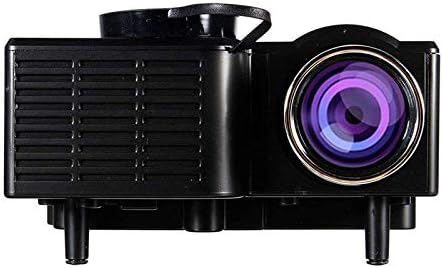
Малюнак 2: Спераду і збоку view of the UNIC UC28+ projector. This image highlights the main projection lens and the ventilation grilles on the side, essential for heat dissipation during operation.
Малюнак 3: Збоку view of the UNIC UC28+ projector. This image clearly shows the various input ports available: HDMI, USB, AV, SD card slot, and VGA, providing multiple options for connecting external devices.
3. Настройка
3.1 Змест пакета
- UNIC UC28+ LED Projector
- Адаптар сілкавання
- Пульт дыстанцыйнага кіравання
- AV-кабель
- Кіраўніцтва карыстальніка
3.2 Размяшчэнне праектара
Position the projector on a stable, flat surface. Ensure the projection surface (screen or wall) is clean and smooth. The optimal projection distance will vary based on desired screen size. Adjust the projector's angle to achieve a rectangular image.
3.3 Падключэнне харчавання
- Падключыце адаптар сілкавання да ўваходнага порта сілкавання праектара.
- Падключыце адаптар сілкавання да адпаведнай электрычнай разеткі.
- Індыкатар харчавання на праектары загарыцца.
3.4 Падключэнне ўваходных прылад
The UC28+ supports various input sources:
- HDMI: Connect a device (e.g., laptop, Blu-ray player, gaming console) using an HDMI cable to the HDMI port.
- USB: Устаўце флэш-назапашвальнік USB у порт USB, каб прайграваць медыяфайлы files непасрэдна.
- АВ: Use the provided AV cable to connect older devices (e.g., DVD player, VCR) to the AV port.
- SD-карта: Insert an SD card into the SD card slot to play media files.
- VGA: Connect a computer or laptop using a VGA cable to the VGA port.

Малюнак 4: Connectivity diagram for the UNIC UC28+ projector. This illustration demonstrates how various external devices such as computers, gaming consoles, smartphones, and media players can be connected to the projector using its multiple input options.
3.5 Рэгуляванне фокусу
After powering on and selecting an input source, rotate the focus ring located around the lens until the projected image appears clear and sharp.
4. Інструкцыя па эксплуатацыі
4.1 Уключэнне/выключэнне
- Уключэнне: Націсніце кнопку харчавання на праектары або пульце дыстанцыйнага кіравання. Праектар уключыцца, іamp будзе асвятляць.
- Выключэнне: Press the power button again. The projector will initiate a shutdown sequence. Allow the projector to cool down completely before unplugging or moving it.
4.2 Выбар крыніцы ўваходнага сігналу
Press the 'INPUT' button on the projector or remote control to cycle through available input sources (HDMI, USB, AV, SD, VGA). Select the source corresponding to your connected device.
4.3 Навігацыя па меню
Use the navigation arrows on the projector or remote control to move through menu options. Press 'ENTER' to confirm a selection and 'ESC' to go back or exit the menu.
4.4 Асноўныя налады
- Рэжым малюнка: Адрэгулюйце яркасць, кантраснасць, колер і рэзкасць.
- Суадносіны бакоў: Select between 16:9, 4:3, or Auto to match your content.
- Гук: Adjust volume or mute the audio output.
5. Тэхнічнае абслугоўванне
Рэгулярнае тэхнічнае абслугоўванне забяспечвае аптымальную прадукцыйнасць і падаўжае тэрмін службы вашага праектара.
- Ачыстка аб'ектыва: Use a soft, lint-free cloth or lens cleaning paper to gently wipe the lens. Avoid abrasive materials or excessive pressure.
- Чыстка корпуса праектара: Працірайце знешнія паверхні праектара мяккай сухой тканінай. Не выкарыстоўвайце агрэсіўныя хімікаты або растваральнікі.
- Вентыляцыя: Перыядычна правярайце і чысціце вентыляцыйныя рашоткі, каб прадухіліць назапашванне пылу, які можа перашкаджаць паветраабмену і выклікаць перагрэў. Выкарыстоўвайце мяккую шчотку або сціснутае паветра.
- захоўванне: Калі праектар не выкарыстоўваецца працяглы час, захоўвайце яго ў прахалодным, сухім і чыстам ад пылу месцы. Выкарыстоўвайце арыгінальную ўпакоўку або ахоўны чахол.
6. Выпраўленне непаладак
Калі ў вас узніклі праблемы з праектарам, звярніцеся да наступных распаўсюджаных праблем і рашэнняў:
| праблема | Магчымая прычына | Рашэнне |
|---|---|---|
| Няма сілы | Power cable disconnected, power outlet issue | Check power cable connection. Try a different power outlet. |
| Няма выявы | Incorrect input source, cable not connected, device not powered on | Select correct input source. Ensure all cables are securely connected. Power on the source device. |
| Размытая выява | Focus not adjusted, incorrect projection distance | Adjust the focus ring. Reposition the projector for optimal distance. |
| Без гуку | Volume too low, audio cable disconnected, source device muted | Increase projector volume. Check audio cable connections. Unmute source device. |
| Папярэджанне аб перагрэве | Blocked ventilation, prolonged use | Ensure ventilation openings are clear. Allow the projector to cool down. |
7. Тэхнічныя характарыстыкі
| Асаблівасць | Дэталь |
|---|---|
| Марка | УНІК |
| Нумар мадэлі | UC28+ |
| Тып дысплея | святлодыёд |
| Роднае дазвол | 1920 х 1080 пікселяў |
| Максімальнае разрозненне дысплея | 1920 х 1080 пікселяў |
| Яркасць | 400 люмен |
| Тэхналогія падлучэння | HDMI, USB, AV, SD, VGA |
| Формаў-фактар | Партатыўны |
| Тып мацавання | Настольнае мацаванне |
| Энергаспажыванне | 70 ват |
8. Гарантыя і падтрымка
For warranty information or technical support, please refer to the warranty card included with your product or contact the retailer where the product was purchased. Keep your proof of purchase for warranty claims.