Geekee G350

Geekee G350 True Wireless Earbuds Instruction Manual

Мадэль: G350

1. Уводзіны

The Geekee G350 True Wireless Earbuds offer a high-fidelity audio experience with advanced Bluetooth 5.0 technology. Designed for comfort and versatility, these in-ear headphones feature deep bass, crystal clear treble, and noise-cancelling capabilities. They are sweatproof with an IPX5 rating, making them suitable for sports and active use. The earbuds provide a stable connection, instant pairing, and extended battery life with their portable charging case.

Geekee G350 True Wireless Earbuds in charging case

Image 1: Geekee G350 True Wireless Earbuds in their charging case.

2. Змесціва ўпакоўкі

Калі ласка, пераканайцеся, што ўсе прадметы прысутнічаюць у вашай упакоўцы:

  • Geekee G350 Earphone x 2 (Left and Right Earbuds)
  • Зарадны чахол x 1
  • Regular Ear Tips (Sizes S, M, L, XL) x 4 Pairs
  • Rubber Ear Pieces x 2 Pairs
  • Зарадны кабель x 1
  • Кіраўніцтва карыстальніка x 1
Contents of the Geekee G350 Earbuds package

Image 2: All items included in the Geekee G350 package.

3. Настройка

3.1 Пачатковае спалучэнне

For the first-time use, follow these steps to pair your Geekee G350 earbuds:

  1. Зняць ахоўную плёнку: Before charging or first use, remove the plastic protective film from the charging contact points located on the bottom of each earbud.
  2. Зарадка навушнікаў: Place both earbuds back into the charging case and allow them to charge for a short period.
  3. Automatic Power On & Pairing Mode: Дастаньце абодва навушнікі з зараднага чахла. Яны аўтаматычна ўключацца і пяройдуць у рэжым спалучэння.
  4. Падключэнне праз Bluetooth: On your smartphone or Bluetooth-enabled device, go to the Bluetooth settings menu and select "Geekee G350" to connect.

After the initial connection, the earbuds will automatically turn on and connect to your smartphone when removed from the case, and automatically turn off and charge when placed back in the case.

Steps for instant pairing of Geekee G350 earbuds

Image 3: Visual guide for initial pairing of the earbuds.

3.2 Зарадка

The earbuds and charging case have separate battery capacities and charging times:

  • Ёмістасць батарэі навушнікаў: 50mAh/3.7V per earbud.
  • Час зарадкі навушнікаў: Прыкладна 1.5 гадзіны для поўнай зарадкі.
  • Ёмістасць батарэі ў зарадным корпусе: 500mAh / 3.7V.
  • Час зарадкі чахла для зарадкі: Прыкладна 2.5 гадзіны для поўнай зарадкі.

The charging case provides additional power, extending the total playtime. A fully charged case can boost the earbuds' playtime from 3-3.5 hours to 15 hours. In mono mode, using one earbud while the other charges, playtime can be extended up to 28 hours.

Battery life and charging times for Geekee G350 earbuds

Выява 4: Канецview of battery life and charging specifications.

4. Інструкцыя па эксплуатацыі

4.1 Элементы кіравання навушнікамі

Each earbud features a multi-function button and an LED indicator. Refer to the diagram below for control functions:

Geekee G350 earbud function button and LED indicator guide

Image 5: Detailed functions of the earbud button and LED indicator.

  • Прайграванне/Паўза: Націсніце кнопку функцыі адзін раз.
  • Наступны трэк: Press the function button for 2 seconds (Right earbud).
  • Папярэдні трэк: Press the function button for 2 seconds (Left earbud).
  • Актывацыя галасавога памочніка (Siri): Двойчы націсніце кнопку функцыі.
  • Адказ/завяршэнне выкліку: Націсніце кнопку функцыі адзін раз.
  • Адхіліць выклік: Націсніце функцыянальную кнопку на працягу 2 секунд.

The LED indicator displays charging status and Bluetooth connection status.

4.2 Рэжымы праслухоўвання

The Geekee G350 earbuds support two listening modes:

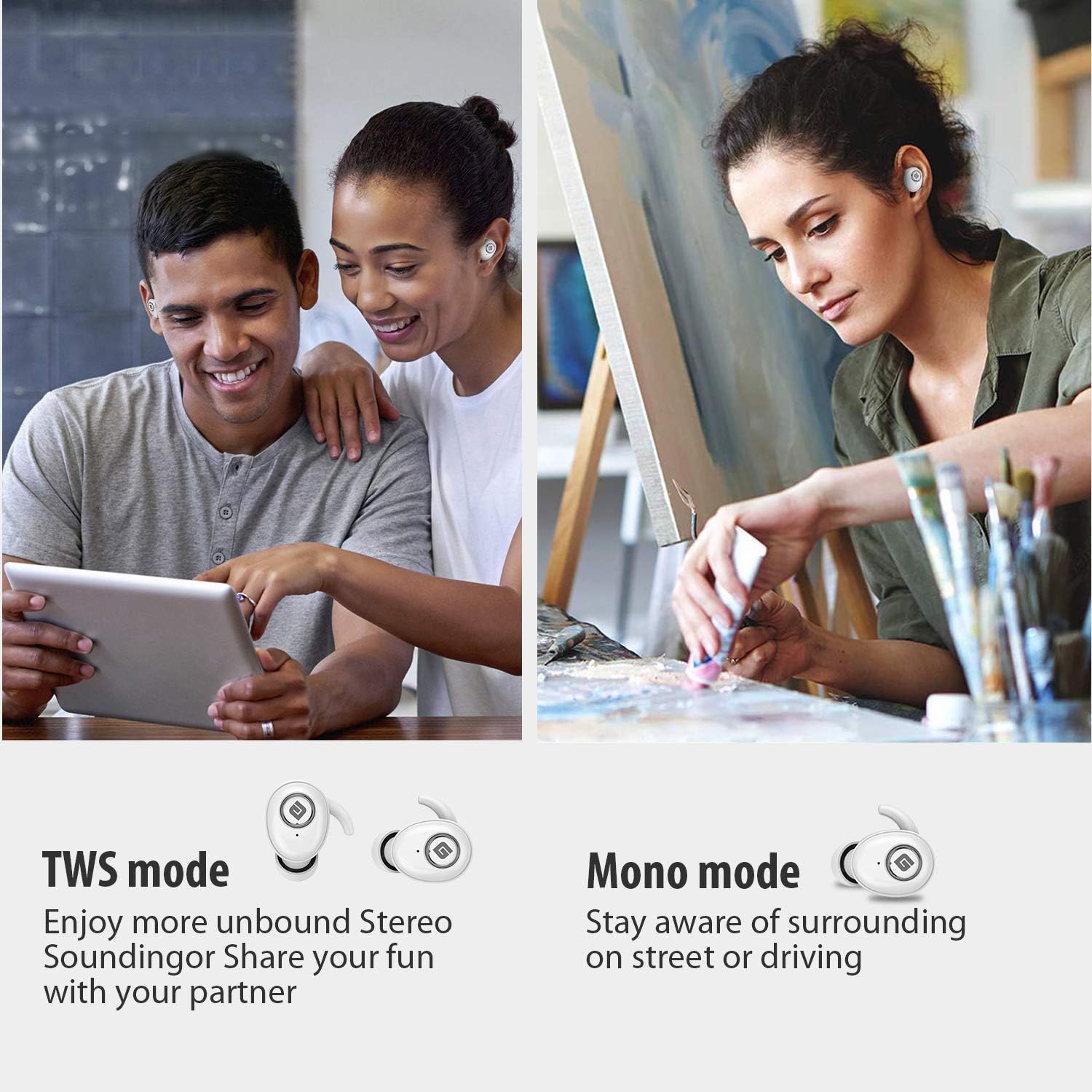
  • Рэжым TWS (True Wireless Stereo): Use both earbuds simultaneously for a full stereo sound experience. This mode is ideal for immersive audio.
  • Мона рэжым: Use a single earbud (only the Right earbud supports mono mode) to stay aware of your surroundings, such as when driving or walking in public.
Illustration of TWS and Mono listening modes for earbuds

Image 6: Comparison of TWS and Mono listening modes.

5. Тэхнічнае абслугоўванне

  • Сыход за батарэяй: Keep your headphones charged when the battery life is low to ensure optimal Bluetooth connection and protect the battery's longevity.
  • Выбар вушных насадак: Choose suitable ear tips and wear your headphones snugly, especially during physical activities like running or cycling. This helps reduce wind noise and ensures a secure fit.
  • Уборка: Regularly clean the earbuds and charging case with a soft, dry cloth to prevent dust and debris buildup. Avoid using harsh chemicals or abrasive materials.
  • захоўванне: Калі навушнікі не выкарыстоўваюцца, захоўвайце іх у зарадным чахле, каб абараніць і падтрымліваць зарад. Захоўвайце ў прахалодным, сухім месцы, удалечыні ад экстрэмальных тэмператур.
  • Воданепранікальнасць: The earbuds are IPX5 sweatproof, meaning they can resist a sustained, low-pressure water jet spray. They are not designed for submersion in water.

6. Выпраўленне непаладак

If you encounter issues with your Geekee G350 earbuds, please refer to the following common solutions:

  • Навушнікі не зараджаюцца:
    • Ensure the plastic protective film has been removed from the charging contacts on the earbuds.
    • Пераканайцеся, што зарадны кабель надзейна падключаны як да корпуса, так і да крыніцы харчавання.
    • Праверце, ці дастаткова зарада батарэі самога зараднага чахла.
  • Навушнікі не спалучаюцца/не падключаюцца:
    • Пераканайцеся, што Bluetooth уключаны на вашай прыладзе.
    • Ensure the earbuds are fully charged and out of the charging case.
    • Forget "Geekee G350" from your device's Bluetooth settings and attempt to pair again.
    • Паспрабуйце перазагрузіць прыладу і навушнікі.
  • Праблемы з гукам (нізкі ўзровень гучнасці, скажэнні):
    • Адрэгулюйце гучнасць як на падлучанай прыладзе, так і на навушніках.
    • Ensure ear tips are correctly sized and provide a snug fit to optimize sound quality and noise isolation.
    • Ачысціце дынамікі навушнікаў ад смецця.
  • Працуе толькі адзін навушнік:
    • Пераканайцеся, што абодва навушнікі зараджаны.
    • Place both earbuds back into the charging case, close the lid, wait a few seconds, then take them out again to re-establish the stereo connection.
    • If the issue persists, try resetting the earbuds (refer to the full user manual for specific reset instructions if available).

7. Тэхнічныя характарыстыкі

Асаблівасць Дэталь
Стандарт Bluetooth V5.0
Wireless Profile HFP, HSP, A2DP, AVRCP
Працоўны дыяпазон 10 м (33 футы)
Зарадка Voltage Пастаянны ток 5 В 1 А
Час чакання 160 гадзіны
Talk / Playing Time 2~3 hours (single charge), up to 15 hours with charging case, up to 28 hours in mono mode
Час зарадкі (гарнітура) 1.5 гадзіны
Час зарадкі (зарадны футляр) 2.5 гадзіны
Ёмістасць батарэі (гарнітура) 50 мАг/3.7 В
Ёмістасць акумулятара (зарадны чахол) 500 мАг/3.7 В
Вага прадмета 1.76 унцый (прыблізна 50 г)
Памеры прадукту 0.8 x 0.4 x 0.4 inches (per earbud)
Воданепранікальнасць IPX5 Потстойкость
Кантроль шуму Актыўнае падаўленне шуму
Мікрафон У камплекце

8. Гарантыя і падтрымка

Geekee is committed to providing high-quality service and professional support for its products. For any technical assistance or inquiries, please contact our support team.

  • Тэхнічная падтрымка: Lifetime technical help is available.
  • Час водгуку: Inquiries are typically responded to within 24 hours.
  • Кантактны адрас электроннай пошты: support@getgeekee.com
Geekee customer support contact information

Image 7: Geekee customer support details.

Афіцыйнае відэа пра прадукт

Відэа 1: Чыноўнік скончыўview of the Geekee G350 True Wireless Earbuds, highlighting key features and design.

Ask a question about this manual

Ask about setup, troubleshooting, compatibility, parts, safety, or missing instructions. Manuals+ will review the question and use this page’s manual context to help answer it.