
Важныя інструкцыі па бяспецы
Please read these instructions carefully before using your Coredy R650 Ultra Robot Vacuum and retain them for future reference. Failure to follow these instructions may result in electric shock, fire, or serious injury.
- Гэтым прыборам могуць карыстацца дзеці ва ўзросце ад 8 гадоў і асобы з паніжанымі фізічнымі, сэнсарнымі або разумовымі здольнасцямі або з адсутнасцю вопыту і ведаў, калі яны знаходзяцца пад наглядам або атрымалі інструкцыі адносна бяспечнага выкарыстання прыбора і разумеюць звязаныя з гэтым небяспекі .
- За дзецьмі трэба сачыць, каб яны не гулялі з прыборам.
- Чыстка і абслугоўванне карыстальнікам не павінны праводзіцца дзецьмі без нагляду.
- Выкарыстоўвайце толькі арыгінальны адаптар сілкавання, прадастаўлены вытворцам.
- Не выкарыстоўвайце робат-пыласос у вільготных памяшканнях або паблізу вады.
- Remove all loose cables, small objects, and fragile items from the floor before operation to prevent entanglement or damage.
- Do not operate the robot vacuum in areas with open flames or flammable materials.
- Пераканайцеся, што зарадная база размешчана на роўнай паверхні каля сцяны, з дастатковай прасторай вакол яе.
- Do not carry the robot vacuum by its handle when it is powered on.
- Выключыце робата-пыласос і адключыце зарадную базу ад сеткі перад выкананнем любога тэхнічнага абслугоўвання або чысткі.
Змест пакета
Пры распакаванні пераканайцеся, што ўсе кампаненты наяўныя і знаходзяцца ў добрым стане.
- 1x Coredy R650 Ultra Robotic Vacuum Cleaner
- 1x зарадная док-станцыя
- 1x 500ml Dust Bin (pre-installed)
- 2x Side Brushes (one pair)
- 1x Filter (pre-installed)
- 1x Пульт дыстанцыйнага кіравання
- 1x адаптар сілкавання
- 1x Cleaning Tool
- 1x Кіраўніцтва карыстальніка

Image: The Coredy R650 Ultra Robot Vacuum, its remote control, and a smartphone displaying the Coredy app interface.
Прадукт скончаныview
Кампаненты робата-пыласоса
- Верхняя вокладка: Houses the power button and Wi-Fi indicator.
- Кнопка харчавання: Initiates or pauses cleaning, powers on/off.
- Сметніца: Collects debris, located at the rear of the robot.
- Бакавыя шчоткі: Two rotating brushes on the front sides for edge and corner cleaning.
- Асноўная шчотка: V-shaped roller brush located underneath for deep cleaning.
- Вядучыя колы: Two large wheels for movement across various surfaces.
- Універсальнае кола: Front wheel for navigation.
- Кантакты для зарадкі: Two metal strips on the bottom for connecting to the charging base.
- Датчыкі падзення: Located on the bottom to prevent falls.
- Інфрачырвоныя датчыкі: Front-facing sensors for obstacle detection.
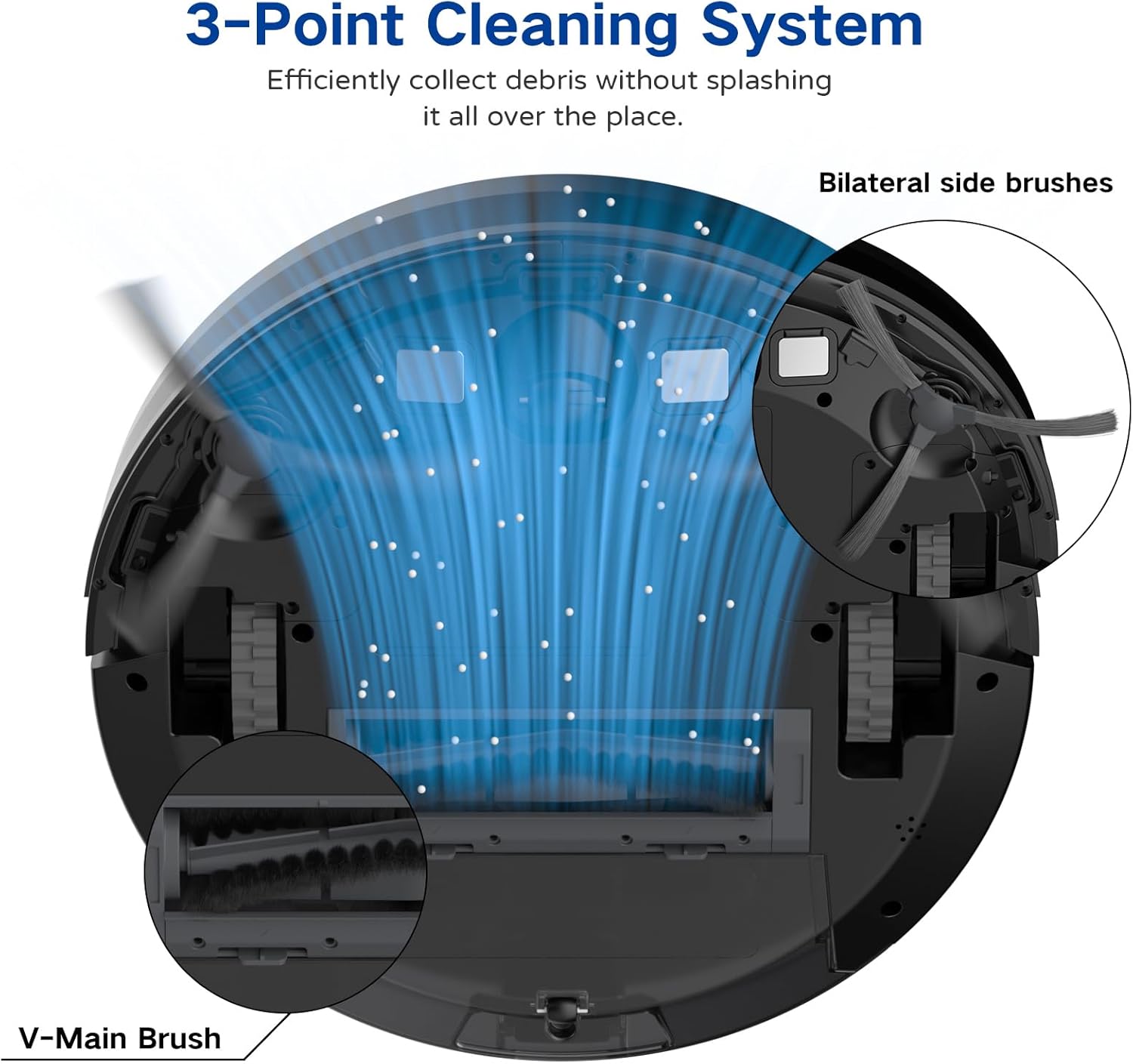
Image: A diagram illustrating the robot vacuum's 3-Point Cleaning System, showing bilateral side brushes and the V-main brush efficiently collecting debris.
Кампаненты зараднай базы
- Штыфты для зарадкі: Падключыцеся да зарадных кантактаў робата.
- Індыкатар харчавання: Паказвае стан зарадкі.
- Порт харчавання: Падключаецца да адаптара сілкавання.
Настройка
1. Размяшчэнне зараднай базы
Place the charging base on a hard, level surface against a wall. Ensure there is at least 3 feet (1 meter) of clear space to the front and 1.5 feet (0.5 meters) to each side of the charging base to allow the robot to dock properly. Plug the power adapter into the charging base and then into a wall outlet.
2. Пачатковая зарадка
Place the robot vacuum onto the charging base, ensuring the charging contacts align. The robot will begin charging automatically. For first-time use, charge the robot for at least 5-6 hours until the indicator light turns solid green, indicating a full charge.
3. Усталёўка бакавых шчотак
Attach the two side brushes to the posts on the bottom of the robot by pressing them down until they click into place. Ensure they are securely fastened.
4. Connecting to the Coredy App
- Download the 'Coredy' app from the App Store (iOS) or Google Play Store (Android).
- Зарэгіструйце ўліковы запіс і ўвайдзіце ў сістэму.
- Follow the in-app instructions to add your R650 Ultra robot vacuum to your account. This typically involves connecting your phone to a 2.4GHz Wi-Fi network and then connecting the robot to the same network.

Image: A hand interacting with a smartphone showing the Coredy app, which displays a real-time map of the robot's cleaning path and offers control options.
5. Інтэграцыя з галасавым памочнікам (Alexa/Google Assistant)
Once connected to the Coredy app, you can link your robot vacuum to Amazon Alexa or Google Assistant for voice control.
- Адкрыйце праграму Alexa або Google Home.
- Перайдзіце ў раздзел «Навыкі і гульні» (Alexa) або «Працуе з Google» (Google Home).
- Пошук the 'Coredy' skill/service and enable it.
- Log in with your Coredy app account credentials when prompted.
- Discover devices. You can now use voice commands like "Alexa, turn on Coredy R650 Ultra" or "Hey Google, start cleaning with Coredy R650 Ultra."

Image: The Coredy R650 Ultra Robot Vacuum positioned near its charging dock, with an Amazon Echo Dot in the background, illustrating voice control capabilities.
Кіраванне робатам-пыласосам
Starting/Stopping Cleaning
- Ручной запуск: Press the power button on the robot or the 'Clean' button on the remote control.
- Кіраванне праграмамі: Use the Coredy app to start or stop cleaning.
- Галасавое кіраванне: Use compatible voice assistants (e.g., "Alexa, start Coredy R650 Ultra").
- Паўза: Press the power button on the robot or the 'Clean' button on the remote during operation to pause. Press again to resume.
Рэжымы ачысткі
The R650 Ultra offers various cleaning modes to suit different needs:
- Аўтаматычная ачыстка: The robot automatically cleans in a Z-shaped path, adjusting to different floor types.
- Ачыстка плям: The robot intensely cleans a specific small area in a spiral pattern.
- Ачыстка краю: Робат прыбірае ўздоўж сцен і па краях мэблі.
- Кіраванне ўручную: Use the remote control or app to direct the robot manually.

Image: The Coredy R650 Ultra Robot Vacuum cleaning a hard floor, illustrating its Gyroscopic Dynamic Navigation and Z-shaped cleaning path for thorough coverage.
Планаванне ўборкі
You can schedule cleaning times using the Coredy app or the remote control. Refer to the app's interface or the remote control section of this manual for detailed instructions on setting schedules.
Рэгуляванне магутнасці ўсмоктвання
The R650 Ultra features adjustable suction power, with a maximum of 2200 Pa. It also includes an Auto Carpet Boost feature that automatically increases suction when carpet is detected.
Аўтаматычная падзарадка
When the battery level is low or a cleaning cycle is complete, the robot will automatically return to its charging base to recharge.
Тэхнічнае абслугоўванне
Рэгулярнае тэхнічнае абслугоўванне забяспечвае аптымальную прадукцыйнасць і падаўжае тэрмін службы вашага робата-пыласоса.
1. Апаражніць смеццевае вядро
It is recommended to empty the dustbin after each use.
- Націсніце кнопку вызвалення пылазборніка і выцягніце яго.
- Адкрыйце вечка пылазборніка і высыпце змесціва ў смеццевае вядро.

Image: The Coredy R650 Ultra Robot Vacuum on a wooden floor, with its 500ml dustbin detached and placed beside it, highlighting its capacity.
2. Ачыстка фільтра
Clean the filter weekly, or more frequently if you have pets or high usage.
- Выміце фільтр з пылазборніка.
- Акуратна пастукайце па фільтры, каб выдаліць свабодны бруд.
- Rinse the filter under running water. Ensure it is completely dry before reinstalling.
3. Ачыстка галоўнай шчоткі
Clean the main brush weekly.
- Turn the robot over and remove the main brush cover.
- Выміце асноўную шчотку.
- Выкарыстоўвайце прадастаўлены інструмент для чысткі, каб выдаліць валасы і смецце, якія наматаліся на шчотку.
- Зноў усталюйце галоўную шчотку і вечка.
4. Ачыстка бакавых шчотак
Check side brushes regularly for tangled hair or debris.
- Акуратна пацягніце бакавыя шчоткі ўверх, каб зняць іх.
- Выдаліце любыя валасы або смецце.
- Зноў усталюйце бакавыя шчоткі, пераканаўшыся, што яны зашчапіліся.
5. Ачыстка датчыкаў і зарадных кантактаў
Wipe the drop sensors, infrared sensors, and charging contacts on both the robot and the charging base with a clean, dry cloth monthly.
Ліквідацыю непаладак
If you encounter issues with your Coredy R650 Ultra, refer to the table below for common problems and solutions.
| праблема | Магчымая прычына | Рашэнне |
|---|---|---|
| Робат не ўключаецца | Нізкі зарад батарэі; Выключальнік харчавання | Charge the robot; Ensure power switch is on. |
| Робат не зараджаецца | Зарадныя кантакты забруджаныя; зарадная база адключана ад сеткі | Ачысціце кантакты зараднай прылады; пераканайцеся, што зарадная база падключана да сеткі. |
| Робат часта захрасае | Obstacles on floor; Robot stuck under furniture | Clear floor of cables/small items; Use boundary strips or block off low-clearance areas. |
| Дрэнная прадукцыйнасць ачысткі | Пыласборнік поўны; шчоткі заблыталіся; фільтр забіты | Ачысціце пылазборнік; ачысціце асноўную і бакавыя шчоткі; ачысціце або заменіце фільтр. |
| Немагчыма падключыцца да Wi-Fi/праграмы | Incorrect Wi-Fi password; 5GHz Wi-Fi network; Robot too far from router | Verify password; Ensure 2.4GHz Wi-Fi; Move robot closer to router. |
Тэхнічныя характарыстыкі
Technical specifications for the Coredy R650 Ultra Robot Vacuum.
| Асаблівасць | Дэталь |
|---|---|
| Марка | Coredy |
| Назва мадэлі | Coredy R650 Ultra Robotic Vacuum Cleaner |
| Магутнасць ўсмоктвання | Да 2200 Па |
| Тэрмін службы батарэі | Да 120 хвілін |
| Ёмістасць сметніцы | 500 мілілітраў |
| Памеры прадукту | 12.7 см Д х 12.7 см Ш х 2.76 см В |
| Метад кантролю | App, Remote Control, Voice Control |
| Сумяшчальныя прылады | Amazon Echo, Google Home, смартфоны |
| Тып фільтра | Картрыдж (HEPA) |
| Тып навігацыі | Gyroscopic Dynamic Navigation |

Image: A technical drawing illustrating the top and side dimensions of the Coredy R650 Ultra Robot Vacuum, showing its 12.7-inch diameter and 2.72-inch height.
Гарантыя і падтрымка
For warranty information, please refer to the warranty card included in your product packaging or visit the official Coredy website. If you require technical support or have questions not covered in this manual, please contact Coredy customer service through the contact information provided on their webна сайце або ў дакументах па куплі.