
Уводзіны
Thank you for choosing the Angetube Streaming 1080P HD Webcam 967. This manual provides essential information for setting up, operating, and maintaining your webcam to ensure optimal performance for streaming, video conferencing, and content creation.
Што ў скрынцы
- 1080p Webкамера х 1
- Кіраўніцтва карыстальніка x 1
Асаблівасці прадукту
- Adjustable Ring Fill Light: The webcam features an integrated ring light with three adjustable brightness levels to meet various lighting requirements for video chatting or streaming. This helps reduce visual noise and enhances detail in low-light environments.
- Прафесійны Webcam for Streaming: Designed for compatibility with live streaming software such as OBS, Xsplit, and Mixer. It supports background replacement powered by Chromacam, allowing for customized backgrounds during games or presentations.
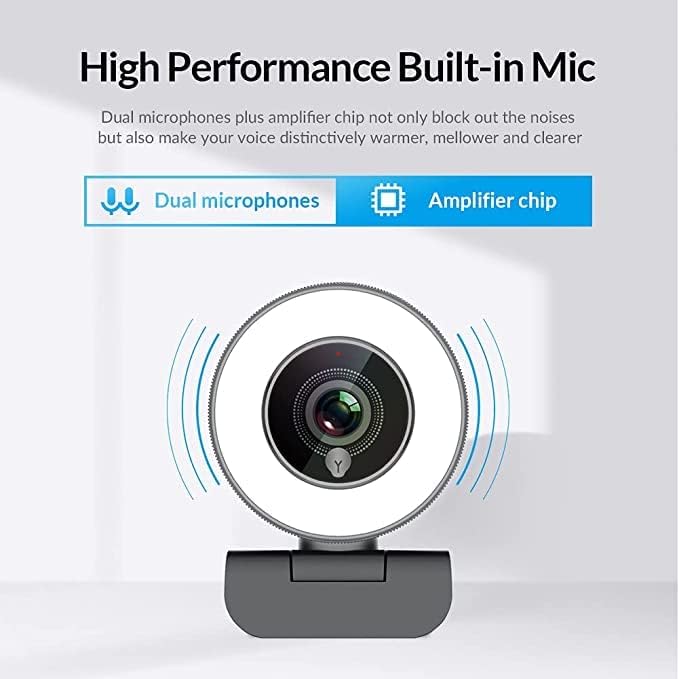
- Dual Noise-Canceling Microphones with AmpЧып lifier: Equipped with superior microphones and an amplifier chip to enhance speech quality, providing clear audio. Background noise is filtered out, ensuring your voice is heard distinctly. The microphone can pick up sound from up to 3 meters away.
- Хуткі і дакладны аўтафокус: The autofocus function eliminates the need for manual adjustments, keeping you consistently in focus during video calls or streams.
- High Quality, Low Bandwidth (H.264 Compression): Utilizes H.264 compression encoding for clearer and smoother video recording, video conferencing, and live broadcasts, optimizing bandwidth usage.
Настройка
- Распакуйце Webкамера: Акуратна зніміце webcam and its accessories from the packaging.
- Мантаж Webкамера: The webcam features a versatile clip that can be securely attached to the top of your monitor or laptop screen. Adjust the clip to ensure a stable fit. Alternatively, the base includes a standard tripod thread for mounting on a tripod (not included).
- Падключыцеся да кампутара: Падключыце кабель USB ад webпадключыце камеру да даступнага USB-порта вашага кампутара. webcam is plug-and-play, meaning it should be automatically recognized by most operating systems (Windows 7/8/10 or above, Mac OS 10.6 or above, Android V5.0 or above, Chrome OS 29.0.1547.70 or above, Ubuntu 2.6.24 or above) without requiring additional drivers.
- Распазнаванне праграмнага забеспячэння: Open your preferred video conferencing or streaming application (e.g., Zoom, Skype, OBS, YouTube Live, Google Meet). Select the Angetube 967 Webcam as your video and audio input device in the application's settings.
Інструкцыя па эксплуатацыі
Рэгуляванне кальцавой падсветкі
The Angetube 967 Webcam includes an integrated ring light to provide optimal illumination. To adjust the brightness:
- Locate the touch-sensitive button on the front of the webcam, just below the lens.
- Tap the button to cycle through three brightness levels: Low Light, Medium Light, and High Light.
- Tap a fourth time to turn the ring light off.

Функцыянальнасць аўтафакусоўкі
The webcam features automatic autofocus. This means the camera will continuously adjust its focus to keep your face clear and sharp without manual intervention. This is particularly useful for dynamic presentations or active streaming sessions.

Выкарыстанне мікрафона
The integrated dual noise-canceling microphones are designed to capture clear audio while minimizing background distractions. Ensure the webcam is positioned appropriately to optimize sound pickup, ideally within 3 meters for best results.
Сумяшчальнасць
The Angetube 967 Webcam is widely compatible with various operating systems and applications, including:
- Аперацыйныя сістэмы: Windows 7/8/10 or above, Mac OS 10.6 or above, Android V5.0 or above, Chrome OS 29.0.1547.70 or above, Ubuntu 2.6.24 or above.
- прыкладанні: OBS, Xsplit, Mixer, Zoom, Skype, Google Meet, YouTube Live, Facebook Live, and other video conferencing/streaming platforms.

Тэхнічнае абслугоўванне
- Ачыстка аб'ектыва: Use a soft, dry, lint-free cloth to gently wipe the webcam lens. Avoid using harsh chemicals or abrasive materials that could scratch the lens.
- захоўванне: Калі ён не выкарыстоўваецца, захоўвайце яго webЗахоўвайце камеру ў чыстым, сухім месцы, удалечыні ад экстрэмальных тэмператур і прамых сонечных прамянёў.
- Сыход за кабелем: Пазбягайце празмернага згінання або скручвання USB-кабеля, каб пазбегнуць пашкоджанняў.
Ліквідацыю непаладак
- WebКамера не выяўлена:
- Пераканайцеся, што кабель USB надзейна падключаны да абодвух webкамера і ваш камп'ютар.
- Паспрабуйце падключыць webкамеру ў іншы порт USB.
- Перазагрузіце кампутар.
- Праверце дыспетчар прылад вашай аперацыйнай сістэмы, каб даведацца, ці webcam is listed and recognized.
- Няма відэа/чорны экран:
- Забяспечце webcam is selected as the primary video input device in your application's settings.
- Check if any privacy settings on your operating system are blocking webcam access for the application.
- Зачыніце і зноў адкрыйце праграму.
- Няма гуку/нізкая якасць гуку:
- Verify that the Angetube 967 Webcam's microphone is selected as the audio input device in your application's settings.
- Check your computer's sound settings to ensure the microphone is enabled and not muted.
- Забяспечце webcam is positioned within optimal range (up to 3 meters) for sound pickup.
- Ring Light Not Working:
- Gently tap the touch-sensitive button below the lens to cycle through brightness levels.
- Забяспечце webcam is properly connected via USB, as the light draws power from the connection.
Тэхнічныя характарыстыкі
| Памеры прадукту | 5.3 х 6.6 х 7.6 цалі |
| Вага прадмета | 5.3 унцыі |
| Нумар мадэлі тавару | 967 |
| Тэхналогія фотадатчыка | CMOS |
| Дазвол відэазахопу | 1080p |
| Максімальная фокусная адлегласць | 3 |
| Максімальная дыяфрагма | 2.1 ф |
| Фармат захопу відэа | MP4 |
| Падтрымоўваны аўдыяфармат | AAC, MP3 |
| Тэхналогія падлучэння | USB |
| Дата першай даступнасці | 22 мая 2019 г |
Гарантыя і падтрымка
- Падтрымка кліентаў: Angetube offers lifetime technical customer support for this product.
- Час водгуку: Чакайце хуткага адказу на запыты, звычайна на працягу 24 гадзін.
- Вяртанне/абмен: Returns for an exchange or refund are accepted within 30 days of purchase.
- вытворца: XZC
- Прадавец: Angetube Store