
1. Уводзіны
This manual provides detailed instructions for the installation, operation, and maintenance of your Sanpyl Bluetooth MP3 Decoder Board. Please read this manual thoroughly before using the product to ensure proper function and to prevent damage.
2. Інфармацыя па бяспецы
- Пераканайцеся, што аб'ём блока харчаванняtage matches the product's specifications (DC 7V-12V or Micro USB 5V). Incorrect voltagе можа прычыніць шкоду.
- Не падвяргайце прыладу ўздзеянню вільгаці, дажджу або экстрэмальных тэмператур.
- Пазбягайце разборкі або мадыфікацыі прылады, бо гэта можа ануляваць гарантыю і стварыць рызыку для бяспекі.
- Захоўваць у месцах, недаступных дзецям.
- Адключыце электраэнергію перад тым, як рабіць якія-небудзь падключэнні або адключэнні.
3. Змесціва ўпакоўкі
Праверце наяўнасць усіх прадметаў у камплекце:
- 1 x Sanpyl Bluetooth MP3 Decoder Board
- 1 х пульт дыстанцыйнага кіравання
- 1 x 2-pin Power Cable
- 2 x 3-pin Audio Cables
4. Прадукт скончыўсяview
The Sanpyl Bluetooth MP3 Decoder Board is a versatile audio module designed for integrating music playback and FM radio capabilities into various projects. It supports multiple audio sources including USB drives, SD/MMC cards, Bluetooth, and external line-in. It also features hands-free calling and comes with a remote control for convenient operation.
4.1 Размяшчэнне пярэдняй панэлі

Малюнак 4.1: Front panel of the decoder board. This view shows the digital display, USB port, SD/MMC card slot, and control buttons for playback, volume, and mode selection.
- Лічбавай дысплей: Паказвае бягучы рэжым, нумар трэка, частату і г.д.
- Порт USB: Для падлучэння USB-флэш-назапашвальнікаў.
- Слот для карты SD/MMC: For inserting Secure Digital or MultiMediaCards.
- Кнопкі кіравання: Play/Pause, Volume Up/Next Track, Volume Down/Previous Track, Mode.
4.2 Заднія падключэнні

Малюнак 4.2: Rear connections of the decoder board. This image highlights the various input and output terminals for power, audio, and the FM antenna.
- DC 12V+ / GND: Main power input (7V-12V DC).
- Micro USB 5V Input: Alternative 5V power input.
- L IN / R IN / GND: Stereo audio line input.
- L Output / R Output / GND: Stereo audio line output.
- FM-антэна: Connection point for an external FM antenna.
4.3 Памеры
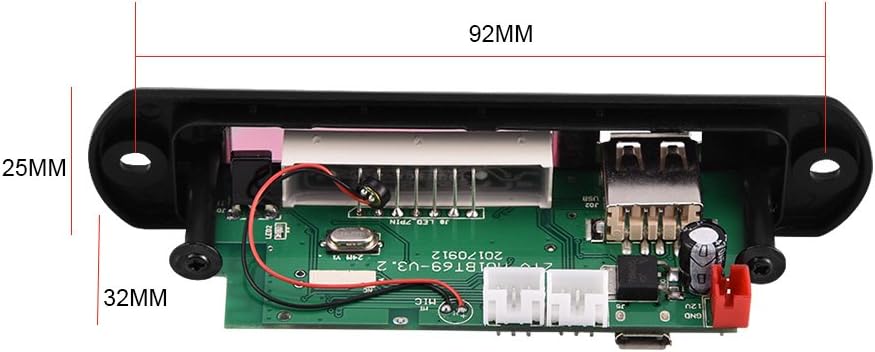
Малюнак 4.3: Physical dimensions of the decoder board. The panel length is 107mm, height is 25mm, and depth is 32mm. The mounting hole spacing is 92mm.
5. Тэхнічныя характарыстыкі
| Нумар мадэлі | Sanpylcw78yrodhs |
| Аперацыйная Voltage | DC 7V to 12V (main), Micro USB 5V (alternative) |
| Працоўны ток | ад 800 мА да 1 А |
| Panel Dimensions (L x H x D) | 107 мм х 25 мм х 32 мм |
| Адлегласць паміж мантажнымі адтулінамі | 92 мм |
| Памер экрана | 45 мм х 8 мм |
| Носьбіты, якія падтрымліваюцца | USB Disk, SD Card, MMC Card |
| Сувязь | Bluetooth, FM Radio, Line-in (AUX) |
| Асаблівасці | Hands-free calls, Multiple EQ modes, Mute function, Digital display |
| Вага прадмета | 2.08 унцый (прыблізна 59 г) |
6. Настройка
6.1 Падключэнне харчавання
The decoder board can be powered in two ways:
- 7-12 В пастаяннага току: Connect the provided 2-pin power cable to the "DC 12V+" and "GND" terminals on the rear of the board (refer to Figure 4.2). Ensure correct polarity.
- Micro USB 5V: Alternatively, connect a standard Micro USB cable to the "Micro USB 5V Input" port. This is suitable for 5V power sources.
Увага: Do not connect both 12V DC and Micro USB 5V power simultaneously. Choose one power source.
6.2 Аўдыё злучэння
- Аўдыявыхад: Use the provided 3-pin audio cables to connect the "L Output", "R Output", and "GND" terminals to your amplifier або актыўныя калонкі.
- Аўдыё ўваход (AUX): If you wish to use an external audio source (e.g., phone, computer), connect it to the "L IN", "R IN", and "GND" terminals. You will need to switch the mode to "LIN" for this input.
6.3 Падключэнне FM-антэны
Connect a suitable FM antenna to the "FM Antenna" terminal for optimal radio reception (refer to Figure 4.2).
7. Інструкцыя па эксплуатацыі
7.1 Power On / Automatic Playback
Once powered on, the decoder board will automatically start playing music if a USB disk, SD card, or MMC card is inserted. If no media is present, it will default to the last used mode.
7.2 Выбар рэжыму
Націсніце РЭЖЫМ button on the front panel or remote control to cycle through available modes: USB, SD, Bluetooth, FM, and LIN (Line Input).
7.3 Спалучэнне па Bluetooth
- Switch the decoder board to Bluetooth mode. The display will show "BT".
- На мабільнай прыладзе знайдзіце прылады Bluetooth.
- Select the device named М01БТ.
- If prompted for a password, enter 0000.
- Once paired, you can play audio from your device through the decoder board.
7.4 USB / SD / MMC Card Playback
- Устаўце флэш-назапашвальнік USB у порт USB або карту SD/MMC у слот для карт.
- The board will automatically switch to the corresponding mode (USB or SD) and begin playback.
- Выкарыстоўвайце Прайграванне/Паўза, VOL- / Previous, і VOL+ / Далей кнопкі для кіравання прайграваннем.
Праца з радыё 7.5 FM
- Switch the decoder board to FM рэжым.
- Націсніце і ўтрымлівайце Прайграванне/Паўза button to initiate an automatic scan for FM stations. The board will save found stations.
- Выкарыстоўвайце VOL- / Previous і VOL+ / Далей кнопкі для навігацыі паміж захаванымі станцыямі.
7.6 Гучная сувязь
When in Bluetooth mode and paired with a phone, the decoder board supports hands-free calling. Incoming calls can be answered or ended using the remote control or specific buttons on the board (refer to remote control diagram if available, or typically the Play/Pause button).
7.7 Функцыі дыстанцыйнага кіравання
У камплекце ёсць пульт дыстанцыйнага кіравання, які забяспечвае зручны доступ да розных функцый:
- Магутнасць: Уключыце/выключыце прыладу.
- рэжым: Switch between USB, SD, Bluetooth, FM, LIN.
- Прайграванне/Паўза: Start or pause playback. Answer/End calls.
- Папярэдні/Наступны: Skip tracks or navigate FM stations.
- Павялічыць/паменшыць гучнасць: Адрэгулюйце гучнасць гуку.
- EQ: Cycle through various equalizer sound modes.
- Адключэнне гуку: Выключыць або ўключыць гук.
- Кнопкі з лічбамі: Direct track selection (in USB/SD mode) or FM frequency input.
8. Тэхнічнае абслугоўванне
- Працірайце прыладу мяккай сухой тканінай. Не выкарыстоўвайце вадкія ачышчальнікі або растваральнікі.
- Keep the USB port and SD card slot free from dust and debris.
- Захоўвайце прыладу ў прахалодным, сухім месцы, калі яна не выкарыстоўваецца працяглы час.
9. Выпраўленне непаладак
| праблема | Магчымая прычына | Рашэнне |
|---|---|---|
| Няма харчавання / Прылада не ўключаецца. | Incorrect power connection; Insufficient voltage; Faulty power supply. | Check power cable connections and polarity. Ensure power supply is within 7V-12V DC or 5V Micro USB. Test with a different power source. |
| Няма выхаду гуку. | Volume too low; Mute function active; Incorrect audio output connection; AmpLifier пытанне. | Increase volume. Press Mute button on remote. Verify audio output cables are correctly connected to amplifier/speakers. Test amplifier with another source. |
| Не ўстанаўліваецца спалучэнне Bluetooth. | Device not in Bluetooth mode; Incorrect pairing password; Distance too far; Interference. | Ensure decoder is in Bluetooth mode ("BT" on display). Re-enter password "0000". Move device closer. Reduce interference from other wireless devices. |
| USB/SD card not playing. | Card/drive not inserted correctly; Unsupported file фармат; пашкоджаны носьбіт інфармацыі. | Re-insert media. Ensure media contains supported audio files (e.g., MP3). Try a different USB drive or SD card. |
| Слабы прыём FM-радыё. | No antenna connected; Weak signal; Interference. | Connect an external FM antenna. Reposition the antenna for better signal. Perform an auto-scan again. |
10. Гарантыя і падтрымка
Sanpyl products are designed for reliability and performance. For any issues or questions regarding your Bluetooth MP3 Decoder Board, please contact your retailer or Sanpyl customer support. Please retain your proof of purchase for warranty claims.
Для атрымання дадатковай дапамогі наведайце Sanpyl Store on Amazon.