
2BOOM BX390
2BOOM BX390 Bass King Wireless Bluetooth Boombox Stereo Speaker User Manual
Мадэль: BX390
1. Уводзіны
Дзякуй за пакупкуasing the 2BOOM BX390 Bass King Wireless Bluetooth Boombox Stereo Speaker. This manual provides essential information for setting up, operating, and maintaining your speaker to ensure optimal performance and longevity. Please read this manual thoroughly before using the product.

Image 1.1: The 2BOOM BX390 Bass King Wireless Bluetooth Boombox Stereo Speaker.
This image shows the 2BOOM BX390 Bass King speaker in blue, featuring a cylindrical design with a handle/strap attached. The front panel displays the control interface and speaker grille.
2. Змесціва ўпакоўкі
Калі ласка, праверце ўпакоўку на наяўнасць наступных прадметаў:
- 1 x 2BOOM BX390 Bass King Speaker
- 1 х 3.5 мм дапаможны кабель
- 1 х USB-кабель для зарадкі
- 1 х Кіраўніцтва карыстальніка (гэты дакумент)
- 1 x Attachable Shoulder Strap

Image 2.1: The 2BOOM BX390 speaker shown with its detachable shoulder strap, 3.5mm Aux cable, and USB charging cable.
This image displays the blue 2BOOM BX390 speaker from an angled perspective, highlighting the included shoulder strap attached to its side rings. The USB charging cable and 3.5mm Aux cable are visible in the foreground.
3. Асаблівасці прадукту
- Powerful Bass Sound: Equipped with 4-inch subwoofers and vibrating disks for crisp, clear, loud sound, booming low tones, and dynamic sound effects.
- Злучэнне Bluetooth: Connects wirelessly to smartphones, tablets, and other Bluetooth-enabled devices up to 33 ft.
- Убудаваны мікрафон: Supports hands-free calls.
- Трывалы і партатыўны дызайн: Features a rugged, rubberized exterior and an attachable strap for easy carrying.
- Некалькі варыянтаў уводу: Includes FM Radio, Aux-in Line, USB port, and SD Card slot.
- Убудаваная панэль кіравання: Direct control over volume, bass, and sound equalizer.

Image 3.1: The 2BOOM BX390 speaker with visual callouts for Deep Digital Bass, FM Radio, Long-Lasting Battery, and Straps Included.
This image shows the blue 2BOOM BX390 speaker from the front, with graphic overlays pointing out its key features: deep digital bass, FM radio capability, long-lasting battery, and the inclusion of straps for portability.
4. Элементы кіравання і парты
Familiarize yourself with the control panel and input ports of your BX390 speaker:

Image 4.1: Detailed diagram of the 2BOOM BX390 control panel and input ports.
Гэта выява паказвае буйны план view of the speaker's front panel, clearly labeling each button, port, and indicator. Labels include USB, DC 5V (charging), AUX, Previous, Play/Pause, Next, Mode, EQ, SD card slot, LED display, Power ON/OFF switch, Volume controls, and Bass controls.
- Порт USB: Для прайгравання з USB-назапашвальніка.
- DC 5V (порт зарадкі): Падключыце сюды кабель USB для зарадкі дынаміка.
- Уваход AUX: 3.5mm jack for connecting external audio devices via an Aux cable.
- Previous / Volume -: Кароткае націсканне для папярэдняга трэка; доўгае націсканне для памяншэння гучнасці.
- Прайграванне/Паўза: Press to play or pause audio. In FM mode, short press to auto-scan.
- Next / Volume +: Кароткае націсканне для пераходу да наступнай кампазіцыі; доўгае націсканне для павелічэння гучнасці.
- рэжым: Press to switch between Bluetooth, FM Radio, USB, SD Card, and AUX modes.
- Эквалайзер (эквалайзер): Press to cycle through different equalizer presets.
- Слот для SD-карты: Insert an SD card for audio playback.
- Святлодыёдны дысплей: Паказвае бягучы рэжым, нумар трэка або частату FM.
- Перамыкач уключэння / выключэння харчавання: Slide to turn the speaker on or off.
- Гучнасць +/-: Кнопкі для павелічэння або памяншэння агульнай гучнасці.
- НЧ +/-: Buttons to increase or decrease the bass level.
5. Настройка
5.1 Зарадка дынаміка
Before first use, fully charge the speaker. Connect the supplied USB charging cable to the DC 5V port on the speaker and the other end to a USB power adapter (not included) or a computer's USB port. The LED display may indicate charging status.
- Час зарадкі можа адрознівацца.
- Адключайце зарадную прыладу пасля поўнай зарадкі, каб падоўжыць тэрмін службы батарэі.
5.2 Уключэнне/выключэнне
Каб уключыць дынамік ON, slide the Power ON/OFF switch to the 'ON' position. You will hear an audible prompt, and the LED display will light up.
Каб уключыць дынамік ВЫКЛ, slide the Power ON/OFF switch to the 'OFF' position.
6. Інструкцыя па эксплуатацыі
6.1 Рэжым Bluetooth
The speaker automatically enters Bluetooth pairing mode when powered on if no other input source is connected, or after pressing the РЭЖЫМ button until "Bluetooth" is indicated.
- Пераканайцеся, што дынамік уключаны.
- На прыладзе з падтрымкай Bluetooth (смартфоне, планшэце і г.д.) уключыце Bluetooth і знайдзіце даступныя прылады.
- Выберыце "2BOOM BX390" or similar from the list.
- Once paired, the speaker will confirm with an audible prompt.
- Цяпер вы можаце прайграваць аўдыё з прылады праз дынамік.
Заўвага: The speaker will automatically reconnect to the last paired device if it's within range and Bluetooth is enabled.

Image 6.1: The 2BOOM BX390 speaker highlighting its Bluetooth connectivity.
This image shows the blue 2BOOM BX390 speaker with a prominent "Bluetooth" logo and "PORTABLE WIRELESS BASS KING SPEAKER" text, emphasizing its wireless audio capabilities.
6.2 Рэжым FM-радыё
To switch to FM Radio mode, press the РЭЖЫМ button until "FM" or the radio frequency is displayed.
- In FM mode, short press the Прайграванне/Паўза button to automatically scan and save available FM stations. The speaker will cycle through frequencies and store them.
- Выкарыстоўвайце Папярэдні і Далей кнопкі для навігацыі паміж захаванымі станцыямі.
- For better reception, extend the antenna (if applicable, or reposition the speaker).
6.3 USB / SD Card Mode
The speaker supports audio playback from USB flash drives and SD cards.
- Устаўце флэшку USB у Порт USB або SD-карту ў Слот для SD-карты.
- The speaker will automatically switch to the corresponding mode (USB or SD) and begin playing audio fileс. Калі не, націсніце кнопку РЭЖЫМ кнопка для выбару.
- Выкарыстоўвайце Папярэдні, Прайграванне/Паўза, і Далей кнопкі для кіравання прайграваннем.
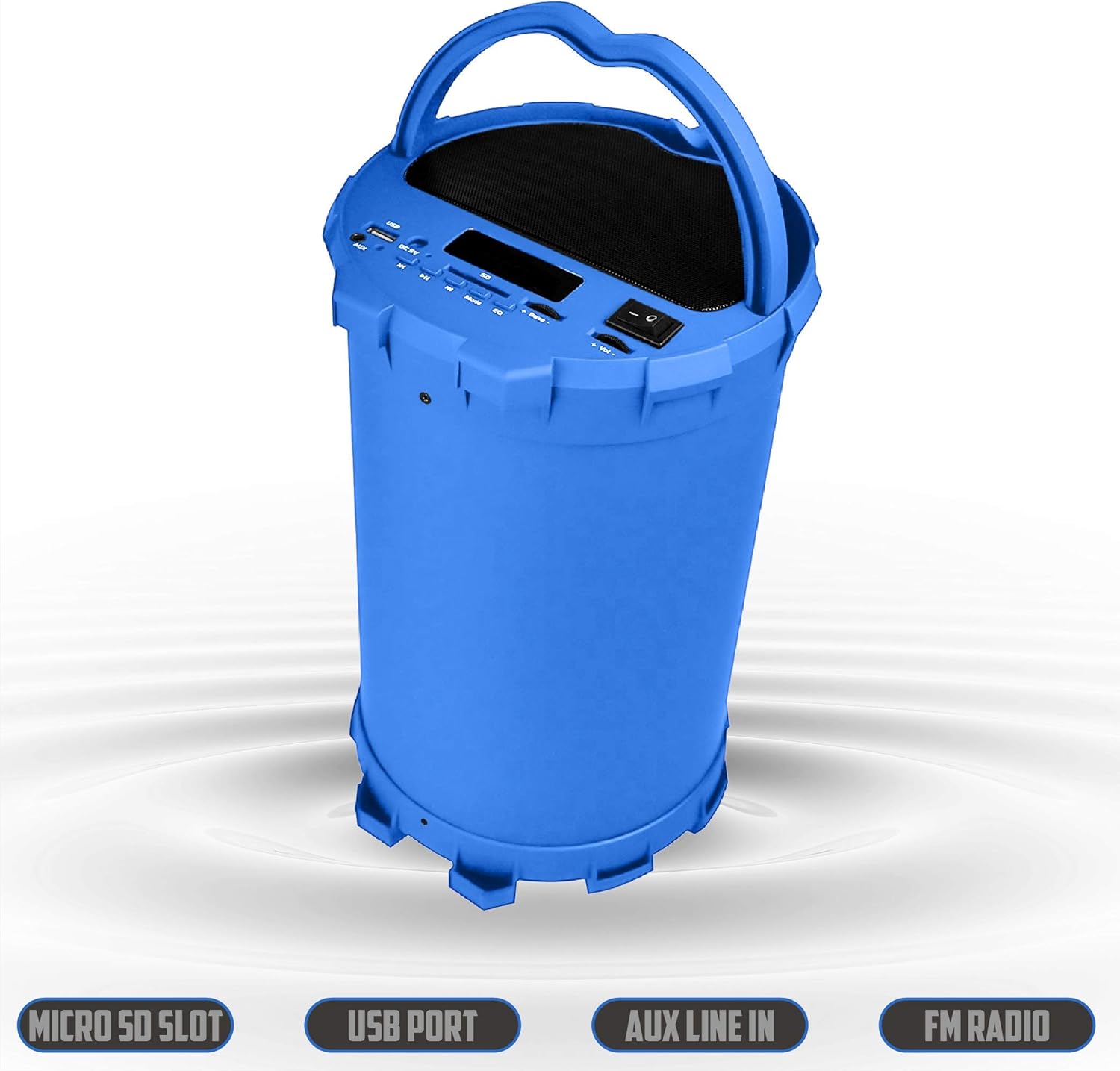
Image 6.2: The 2BOOM BX390 speaker shown upright, emphasizing the Micro SD Slot, USB Port, Aux Line In, and FM Radio capabilities.
This image displays the blue 2BOOM BX390 speaker in an upright position, with graphic overlays highlighting the Micro SD Slot, USB Port, Aux Line In, and FM Radio features on its control panel.
6.4 Рэжым AUX-уваходу
Connect external audio devices (e.g., MP3 players, computers) using the supplied 3.5mm Aux cable.
- Connect one end of the 3.5mm Aux cable to the AUX ўваход порт на дынаміку.
- Падключыце другі канец да аўдыёвыхаду вашай знешняй прылады.
- The speaker will automatically switch to AUX mode. If not, press the РЭЖЫМ кнопка для выбару.
- Кіруйце прайграваннем са знешняй прылады.
6.5 Adjusting Volume, Bass, and Equalizer
- Аб'ём: Выкарыстоўвайце Гучнасць +/- buttons (long press Previous/Next) to increase or decrease the overall volume.
- Бас: Выкарыстоўвайце Бас +/- buttons to adjust the bass level to your preference.
- Эквалайзер (эквалайзер): Націсніце EQ button to cycle through various preset equalizer modes (e.g., Pop, Rock, Jazz, Classical, Normal) to optimize sound for different music genres.
7. Тэхнічнае абслугоўванне
- Уборка: Выкарыстоўвайце мяккую сухую тканіну для чысткі вонкавага боку дынаміка. Не выкарыстоўвайце абразіўныя ачышчальнікі або растваральнікі.
- захоўванне: Захоўвайце дынамік у прахалодным, сухім месцы, удалечыні ад прамых сонечных прамянёў і экстрэмальных тэмператур, калі ён не выкарыстоўваецца працяглы час.
- Сыход за батарэяй: Каб падоўжыць тэрмін службы батарэі, пазбягайце частай поўнай разрадкі батарэі. Рэгулярна зараджайце дынамік, нават калі ён не выкарыстоўваецца.
- Воданепранікальнасць: Гэты дынамік не воданепранікальны. Пазбягайце кантакту з вадой або празмернай вільгаццю.
8. Выпраўленне непаладак
| праблема | Магчымая прычына | Рашэнне |
|---|---|---|
| Няма ўлады | Батарэя разраджана або разраджана. | Цалкам зарадзіце дынамік з дапамогай USB-кабеля, які ўваходзіць у камплект. |
| Няма гуку | Гучнасць занадта нізкая; выбраны няправільны рэжым; прылада падключана няправільна. | Павялічце гучнасць дынаміка і падлучанай прылады. Націсніце РЭЖЫМ to select correct input. Reconnect Bluetooth or Aux cable. |
| Спалучэнне Bluetooth не атрымалася | Дынамік не ў рэжыме спалучэння; прылада занадта далёка; перашкоды. | Ensure speaker is in Bluetooth mode. Move device closer to speaker. Turn off other Bluetooth devices. Forget "2BOOM BX390" on your device and re-pair. |
| Дрэнны прыём FM | Weak signal; speaker position. | Reposition the speaker. Try auto-scanning again. |
| USB/SD-карта не прайграваецца | Не падтрымліваецца file фармат; карта/дыск няправільна ўстаўлены; пашкоджаны files. | Забяспечыць files are in a supported format (e.g., MP3). Reinsert the USB drive/SD card. Try a different drive/card. |
9. Тэхнічныя характарыстыкі
| Асаблівасць | Дэталь |
|---|---|
| Марка | 2BOOM |
| мадэль | BX390 Bass King |
| Тэхналогія падлучэння | Дапаможны, Bluetooth, USB |
| Тып дынаміка | Стэрэа |
| Сумяшчальныя прылады | Ноўтбук, смартфон, планшэт |
| Сабвуферы | 4-inch (Quantity not specified, but implied by "subwoofers" and "dual subwoofers" in image) |
| Дыяпазон Bluetooth | Да 33 футаў (10 метра) |
| Уваходныя парты | USB, SD Card, 3.5mm AUX |
| радыё | FM-радыё |
10. Гарантыя і падтрымка
The 2BOOM BX390 Bass King speaker comes with an UNLIMITED 2BOOM WARRANTY.
For warranty claims or technical support, please contact 2BOOM customer service. Refer to the product packaging or 2BOOM's official webсайт для кантактнай інфармацыі.
Калі ласка, захавайце пацвярджэнне пакупкі для гарантыйных мэт.