
1. Уводзіны
This manual provides essential information for setting up, operating, maintaining, and troubleshooting your Lenovo ThinkPad E495 laptop. Please read this guide thoroughly to ensure proper use and to maximize the performance and longevity of your device.
The Lenovo ThinkPad E495 is a 14-inch Full HD laptop powered by an AMD Ryzen 5 3500U processor, equipped with 8GB of memory and a 256GB SSD, running Windows 10 Pro.
2. Прадукт скончыўсяview
Familiarize yourself with the main components of your ThinkPad E495 laptop.
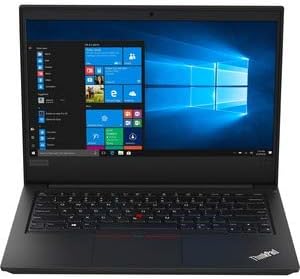
Малюнак 2.1: Спераду view of the Lenovo ThinkPad E495 laptop, open with the screen displaying the Windows 10 desktop and the keyboard visible.
2.1 Асноўныя кампаненты
- Дысплей: 14-inch Full HD (1920x1080) LCD screen.
- Клавіятура: Chiclet-style keyboard with TrackPoint.
- Сэнсарная панэль: Multi-touch enabled touchpad for navigation.
- Webкамера: Інтэграваны webкамера для відэаканферэнцый.
- парты: USB ports, HDMI output, Ethernet, Audio jack.
- Кнопка харчавання: Located on the side or top deck.
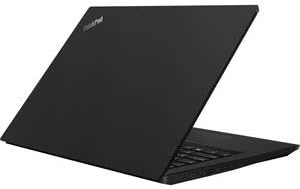
Малюнак 2.2: бок view of the Lenovo ThinkPad E495 laptop in a closed position, highlighting its slim profile.
3. Настройка
3.1 Распакаванне
Carefully remove the laptop and all accessories from the packaging. Ensure the following items are present:
- Ноўтбук Lenovo ThinkPad E495
- Адаптар пераменнага току
- Сілавы кабель
- Battery (may be integrated)
3.2 Падключэнне сілкавання
- Падключыце кабель сілкавання да адаптара пераменнага току.
- Падключыце адаптар пераменнага току да электрычнай разеткі.
- Connect the AC adapter's output plug to the power input port on your laptop.
- Перад першым выкарыстаннем дайце акумулятару зарадзіцца не менш за 30 хвілін або пакуль індыкатар зарада не пакажа дастатковы ўзровень.
3.3 Пачатковая загрузка і ўстаноўка Windows
- Націсніце кнопку харчавання, каб уключыць ноўтбук.
- Follow the on-screen instructions to complete the Windows 10 Pro setup process. This typically involves selecting your region, language, accepting terms, and creating a user account.
- Connect to a Wi-Fi network when prompted to ensure updates can be downloaded.
4. Кіраванне ноўтбукам
4.1 Кіраванне харчаваннем
- Уключэнне: Націсніце кнопку харчавання.
- Рэжым сну: Зачыніце вечка або націсніце Fn + F4 (ці эквівалентная клавіша сну).
- Выключыць: Націсніце кнопку «Пуск», затым «Харчаванне» > «Выключыць сістэму».
- Перазапуск: Націсніце кнопку «Пуск», затым «Харчаванне» > «Перазагрузка».
4.2 Клавіятура і прылады ўводу
- Клавіятура: Use the full-sized keyboard for typing. Function keys (F1-F12) often have secondary functions accessible via the Fn ключ.
- ТрэкПойнт: The red pointing stick in the center of the keyboard allows for precise cursor control. Use the associated buttons below the spacebar for left, right, and middle clicks.
- Сэнсарная панэль: The multi-touch touchpad supports gestures for scrolling, zooming, and other functions. Refer to Windows settings for customization.
4.3 Падключэнне перыферыйных прылад
Your ThinkPad E495 supports various external devices:
- USB прылады: Connect USB drives, mice, keyboards, or other USB accessories to the available USB ports.
- HDMI: Use the HDMI port to connect to an external monitor or projector.
- Wi-Fi: Connect to wireless networks via the built-in Wi-Fi. Access Wi-Fi settings through the Windows taskbar network icon.
- Bluetooth: Pair Bluetooth-enabled devices such as headphones, speakers, or mice. Enable Bluetooth in Windows settings.
- Ethernet: Connect to a wired network using the Ethernet port.

Figure 4.1: The Lenovo ThinkPad E495 laptop in use, displaying a video conference application on its screen.
5. Тэхнічнае абслугоўванне
5.1 Чыстка ноўтбука
- экран: Выкарыстоўвайце мяккую тканіну без ворса. dampвадой або сродкам для чысткі экранаў. Не распыляйце вадкасць непасрэдна на экран.
- Клавіятура і корпус: Выкарыстоўвайце мяккую тканіну, злёгкуampened with water or a mild cleaning solution. Avoid excessive moisture. An air duster can remove debris from between keys.
- парты: Keep ports free of dust and debris. Use compressed air if necessary.
5.2 Абнаўленне праграмнага забеспячэння
Рэгулярна абнаўляйце аперацыйную сістэму і драйверы, каб забяспечыць аптымальную прадукцыйнасць і бяспеку.
- Абнаўленні Windows: Перайдзіце ў Пуск > Налады > Абнаўленне і бяспека > Цэнтр абнаўлення Windows.
- Абнаўленні драйвераў: Наведайце афіцыйную службу падтрымкі Lenovo website for the latest drivers for your ThinkPad E495 model.
5.3 Рэзервовае капіраванне дадзеных
Рэгулярна рабіце рэзервовыя копіі важных дадзеных на знешні дыск або ў воблачнае сховішча, каб прадухіліць іх страту.
6. Выпраўленне непаладак
| праблема | Рашэнне |
|---|---|
| Ноўтбук не ўключаецца. | Пераканайцеся, што адаптар пераменнага току надзейна падключаны як да ноўтбука, так і да спраўнай разеткі. Праверце, ці працуе разетка. Паспрабуйце іншую разетку. |
| Screen is blank or not displaying. | Прэса Fn + F7 (or the display toggle key) to cycle through display modes. Ensure the laptop is not in sleep mode. Connect to an external monitor to check if the issue is with the laptop's display. |
| Праблемы з падключэннем да Wi-Fi. | Check if Wi-Fi is enabled in Windows settings. Restart your router and modem. Ensure you are within range of a Wi-Fi network. Update Wi-Fi drivers from the Lenovo support webсайт. |
| Клавіятура або сэнсарная панэль не рэагуюць. | Перазагрузіце ноўтбук. Праверце наяўнасць фізічных перашкод. Пераканайцеся, што драйверы абноўленыя. |
| Сістэма павольная або не рэагуе. | Close unnecessary applications. Check Task Manager for processes consuming high CPU or memory. Run a virus scan. Ensure Windows and drivers are updated. Consider freeing up disk space. |
Для атрымання больш падрабязнай інфармацыі аб ліквідацыі непаладак звярніцеся ў службу падтрымкі Lenovo webсайт або звярніцеся ў службу падтрымкі.
7. Тэхнічныя характарыстыкі
| Асаблівасць | Дэталь |
|---|---|
| Марка | Lenovo |
| Назва мадэлі | Lenovo ThinkPad E495 |
| Нумар мадэлі | 20NE0002US |
| Памер экрана | 14 цалі |
| Дазвол дысплея | 1920 x 1080 пікселяў (Full HD) |
| Мадэль працэсара | AMD Ryzen 5 3500U (2.1 ГГц, да 3.7 ГГц) |
| Аператыўная памяць | 8 ГБ DDR4 (2400 МГц) |
| Памер жорсткага дыска | 256 ГБ SSD |
| Аперацыйная сістэма | Windows 10 Pro |
| Графічны супрацэсар | AMD Radeon Vega 8 (інтэграваная) |
| Сувязь | Bluetooth 5.0, Ethernet (1 Gbps), USB, Wi-Fi |
| Парты | HDMI, USB ports, Headphones (Audio Output) |
| Webкамера | так |
| акумулятар | 3-cell, 45 Watt Hours |
| Вага прадмета | 3.86 фунта |
| Памеры (Д х Ш х Г) | 14.14" x 9.28" x 0.78" |
| UPC | 193386253563 |
8. Гарантыя і падтрымка
8.1 Гарантыя на выраб
Your Lenovo ThinkPad E495 laptop comes with a 1-year limited warranty. This warranty covers manufacturing defects and hardware failures under normal use conditions. For specific terms and conditions, please refer to the warranty documentation included with your product or visit the official Lenovo support webсайт.
8.2 Падтрымка кліентаў
For technical assistance, warranty claims, or additional support, please visit the official Lenovo support webсайт. Там вы можаце знайсці драйверы, часта задаваныя пытанні і кантактную інфармацыю службы падтрымкі кліентаў.
Падтрымка Lenovo Webсайт: support.lenovo.com