
1. Уводзіны
The MASTECH MS8260E is a versatile 2000-count digital multimeter designed for a wide range of electrical and electronic measurements. It features a large LCD display, non-contact voltage (NCV) detection, and capabilities for measuring AC/DC voltage, AC/DC current, resistance, capacitance, and inductance. This manual provides essential information for the safe and effective operation, maintenance, and troubleshooting of your device.
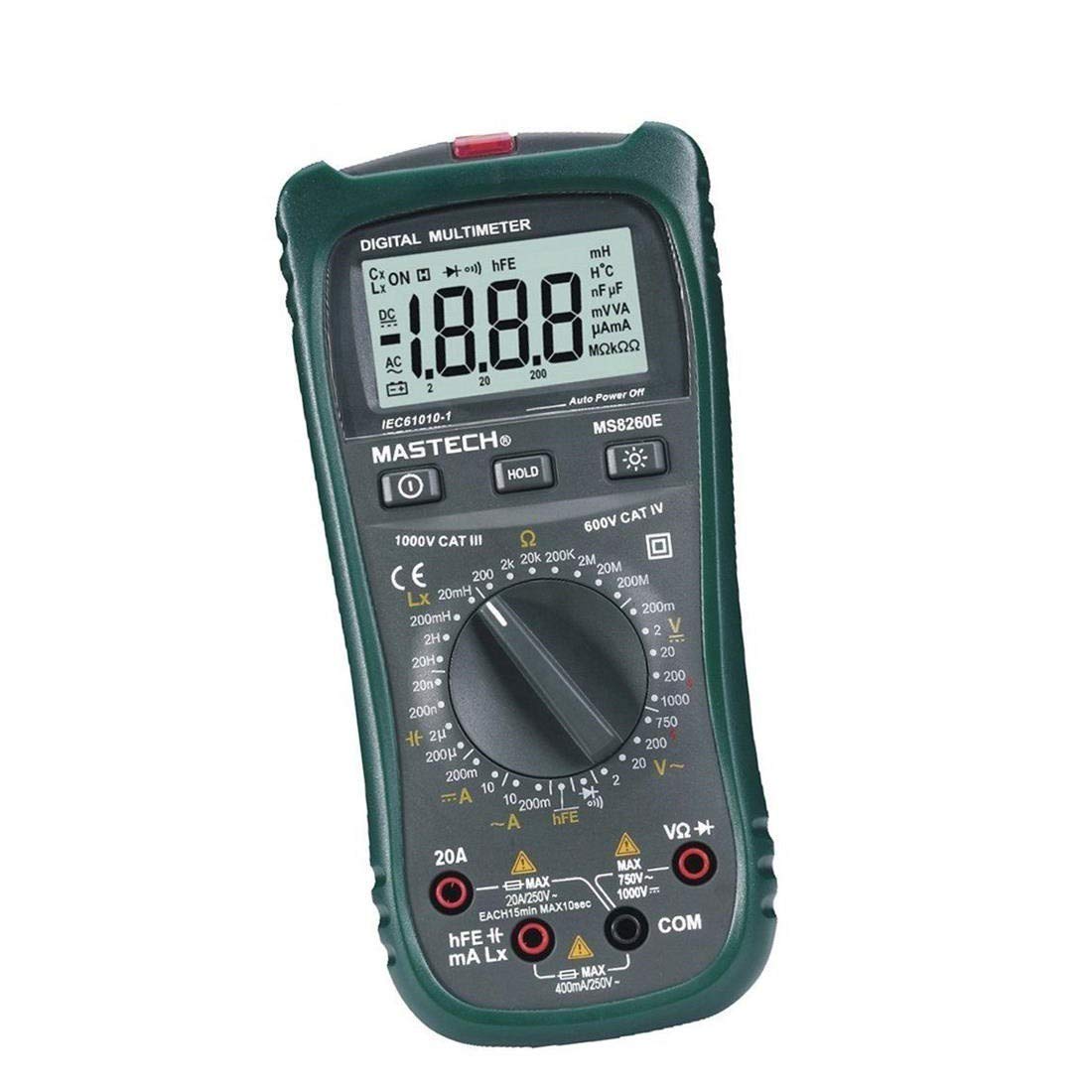
Малюнак 1: Спераду view of the MASTECH MS8260E Digital Multimeter, showing the LCD display, function rotary switch, and input jacks.
2. Інфармацыя па бяспецы
To ensure safe operation and service of the meter, follow these safety guidelines:
- Read and understand all instructions in this manual before using the meter.
- Заўсёды прытрымлівайцеся мясцовых і нацыянальных кодэксаў бяспекі.
- Не выкарыстоўвайце вымяральны прыбор, калі ён выглядае пашкоджаным або калі ізаляцыя на вымяральных правадах парушаная.
- Observe the input limits for each measurement range to prevent electrical shock or damage to the meter. This meter is rated for CAT.IV 600V.
- Будзьце асцярожныя пры працы з voltagвышэй за 30 В пераменнага току (RMS), 42 В пікавага або 60 В пастаяннага току. Гэтыя аб'ёмыtagуяўляюць небяспеку паражэння.
- Заўсёды адключайце харчаванне ад ланцуга і разраджайце ўсе высокавольтныяtage capacitors before making resistance, continuity, diode, or capacitance measurements.
- Неадкладна замяніце батарэйку, калі з'явіцца індыкатар нізкага зараду батарэі, каб забяспечыць дакладныя паказанні.
- Не выкарыстоўвайце лічыльнік у асяроддзі выбухованебяспечных газаў, пароў або пылу.
3. Прадукт скончыўсяview
The MS8260E multimeter is equipped with several features to facilitate accurate and convenient measurements:
- Large 2000 Counts LCD Display: Provides clear digital readings.
- Убудаваны бескантактавы VoltagДэтэктар e (NCV): Выяўляе AC voltage greater than 110V without physical contact, indicated by a flash warning.
- Функцыя ўтрымання дадзеных: Freezes the displayed reading for easy recording.
- Падсвятленне дысплея: Improves visibility in dimly lit conditions.
- Аўтаматычнае выключэнне: Conserves battery life by automatically turning off the meter after a period of inactivity.
- Індыкацыя разраду батарэі: Alerts the user when the battery needs replacement.
- Індыкацыя палярнасці: Automatically displays negative polarity.
- 30-Range Rotary Switch: Selects various measurement functions including AC/DC voltage, AC/DC current, resistance, capacitance, inductance, diode check, continuity test, and transistor (hFE) check.
4. Настройка
4.1 Устаноўка батарэі
The MS8260E requires one 9V battery (NEDA 1604/6F22). To install or replace the battery:
- Ensure the meter is turned off and disconnect all test leads from the input terminals.
- Знайдзіце вечка батарэйнага адсека на задняй панэлі глюкометра.
- Адкруціце фіксуючы(-я) шрубу(-ы) і зніміце вечка.
- Insert the 9V battery, observing the correct polarity.
- Закрыйце батарэйны адсек і замацуйце яго шрубай (шрубамі).
4.2 Падключэнне вымяральных правадоў
Always connect the black test lead to the "COM" (common) input jack. Connect the red test lead to the appropriate input jack based on the desired measurement:
- Для тtage, Resistance, Capacitance, Inductance, Diode, Continuity, and hFE measurements: Connect the red lead to the "VΩCAPHz" jack.
- For Current measurements up to 200mA: Connect the red lead to the "mA" jack.
- For Current measurements up to 10A: Connect the red lead to the "10A" jack.
Ensure test leads are fully inserted into the jacks before taking measurements.
5. Інструкцыя па эксплуатацыі
Turn the rotary switch to the desired function. The meter will display "OL" (Overload) if no input is present or if the input exceeds the range.
5.1 DC Voltagэлектроннае вымярэнне (DCV)
- Set the rotary switch to the desired DCV range (200mV, 2V, 20V, 200V, 1000V).
- Connect the black test lead to the "COM" jack and the red test lead to the "VΩCAPHz" jack.
- Падключыце вымяральныя шчоткі да кампанента або ланцуга, які трэба вымераць, выконваючы палярнасць.
- Прачытайце тtagзначэнне на ВК-дысплеі.
5.2 AC Voltagэлектроннае вымярэнне (ACV)
- Set the rotary switch to the desired ACV range (2V, 20V, 200V, 750V).
- Connect the black test lead to the "COM" jack and the red test lead to the "VΩCAPHz" jack.
- Падключыце вымяральныя дроты да сеткі пераменнага току.tagэлектронная крыніца.
- Прачытайце тtagзначэнне на ВК-дысплеі.
5.3 Вымярэнне пастаяннага току (DCA)
- Set the rotary switch to the desired DCA range (200mA, 10A).
- For measurements up to 200mA, connect the red lead to the "mA" jack. For measurements up to 10A, connect the red lead to the "10A" jack. The black lead connects to "COM".
- Open the circuit where current is to be measured and connect the meter in series with the load.
- Прачытайце бягучае значэнне на ВК-дысплеі.
5.4 AC Current Measurement (ACA)
- Set the rotary switch to the desired ACA range (200mA, 10A).
- For measurements up to 200mA, connect the red lead to the "mA" jack. For measurements up to 10A, connect the red lead to the "10A" jack. The black lead connects to "COM".
- Open the circuit where current is to be measured and connect the meter in series with the load.
- Прачытайце бягучае значэнне на ВК-дысплеі.
5.5 Вымярэнне супраціву (Ом)
- Set the rotary switch to the desired Ω range (200Ω, 2kΩ, 20kΩ, 200kΩ, 2MΩ, 20MΩ, 200MΩ).
- Connect the black test lead to "COM" and the red test lead to "VΩCAPHz".
- Ensure the circuit is de-energized and all capacitors are discharged.
- Падключыце вымяральныя дроты да рэзістара або кампанента.
- Прачытайце значэнне супраціўлення на ВК-дысплеі.
5.6 Capacitance Measurement (CAP)
- Set the rotary switch to the desired CAP range (20nF, 200nF, 2uF, 200uF).
- Connect the black test lead to "COM" and the red test lead to "VΩCAPHz".
- Перад падключэннем вымяральных правадоў пераканайцеся, што кандэнсатар цалкам разраджаны.
- Падключыце вымяральныя дроты да кандэнсатара.
- Прачытайце значэнне ёмістасці на ВК-дысплеі.
5.7 Inductance Measurement (L)
- Set the rotary switch to the desired Inductance range (20mH, 200mH, 2H, 20H).
- Connect the black test lead to "COM" and the red test lead to "VΩCAPHz".
- Connect the test leads across the inductor.
- Read the inductance value on the LCD display.
5.8 Дыёдны тэст
- Усталюйце паваротны перамыкач у становішча «дыёд».
- Connect the black test lead to "COM" and the red test lead to "VΩCAPHz".
- Падключыце чырвоны провад да анода, а чорны — да катода дыёда. Прамы токtage drop (typically 0.5V to 0.8V for silicon diodes) will be displayed.
- Reverse the leads. The display should show "OL" for a good diode.
5.9 Тэст бесперапыннасці
- Усталюйце паваротны перамыкач у становішча сімвала бесперапыннасці.
- Connect the black test lead to "COM" and the red test lead to "VΩCAPHz".
- Падключыце вымяральныя дроты да ланцуга або кампанента.
- Калі супраціўленне ніжэй за прыблізна 30 Ом, прагучыць зумер, які сведчыць пра адсутнасць цеплаправоднасці.
5.10 Transistor (hFE) Test
- Усталюйце паваротны перамыкач у становішча hFE.
- Вызначце тып (NPN або PNP) і разводку кантактаў (эмітар, база, калектар) транзістара.
- Insert the transistor leads into the corresponding sockets in the hFE test socket on the meter.
- Read the hFE (DC current gain) value on the LCD display.
5.11 Бескантактны выпtage (NCV) Выяўленне
- Set the rotary switch to the NCV position.
- Hold the top front part of the meter near the AC voltage source (e.g., an electrical outlet or insulated wire).
- Калі AC абtage greater than 110V is detected, the NCV indicator light will flash, and the buzzer may sound.
6. Тэхнічнае абслугоўванне
6.1 Ачыстка
Працярыце лічыльнік рэкламайamp cloth and a mild detergent. Do not use abrasives or solvents. Ensure the meter is dry before use.
6.2 Замена батарэі
When the "BAT" symbol appears on the display, the battery needs to be replaced. Refer to Section 4.1 for battery installation instructions.
6.3 Замена засцерагальніка
If the current measurement function fails, the fuse may need replacement. This operation should only be performed by qualified personnel. Refer to the service manual or contact customer support for fuse specifications and replacement procedures.
6.4 Захоўванне
If the meter is not to be used for an extended period, remove the battery to prevent leakage and damage to the meter. Store the meter in a cool, dry place away from direct sunlight.
7. Выпраўленне непаладак
| праблема | Магчымая прычына | Рашэнне |
|---|---|---|
| Няма дысплея або дысплей цьмяны | Low battery; Meter off | Replace battery; Turn on meter |
| "OL" displayed | Input exceeds range; Open circuit (for resistance/continuity) | Select higher range; Check circuit connection |
| Няправільныя паказанні | Low battery; Incorrect range selected; Poor test lead contact | Replace battery; Select appropriate range; Ensure good contact |
| Вымярэнне току не працуе | Перагарэў засцерагальнік | Replace fuse (by qualified personnel) |
8. Тэхнічныя характарыстыкі
| Функцыя вымярэнняў | Дыяпазон | Дакладнасць |
|---|---|---|
| DC Voltagе (DCV) | 200 мВ, 2 В, 20 В, 200 В, 1000 В | ±0.5% (200mV-200V), ±0.8% (1000V) |
| Пераменнага токуtagе (ACV) | 2В, 20В, 200В, 750В | ±0.8% (2V-200V), ±1.2% (750V) |
| Пастаянны ток (DCA) | 200 мА, 10 А | ±1.5% (200mA), ±2.0% (10A) |
| Пераменны ток (ACA) | 200 мА, 10 А | ±1.8% (200mA), ±3.0% (10A) |
| Супраціў (Ω) | 200Ω, 2kΩ, 20kΩ, 200kΩ, 2MΩ, 20MΩ, 200MΩ | ±0.8% (200Ω-2MΩ), ±1.0% (20MΩ), ±5.0% (200MΩ) |
| Ёмістасць (CAP) | 20nF, 200nF, 2uF, 200uF | ±4.0% (20nF-2uF), ±5.0% (200uF) |
| Індуктыўнасць (л) | 20mH, 200mH, 2H, 20H | ±3.0% |
| Гукавая бесперапыннасць | Buzzer sounds at <30Ω | Н/Д |
| Дыёдны тэст | 1 мА, 2.8 В | Н/Д |
| Транзістар (hFE) | 0 - 1,000 гг | Н/Д |
Агульныя характарыстыкі:
- Дысплей: LCD на 2000 адлікаў
- Рэйтынг бяспекі: CAT.IV 600V
- Магутнасць: 9V battery (NEDA 1604/6F22)
- Вага: Approximately 1 kg (including battery)
9. Гарантыя і падтрымка
For warranty information, technical support, or service inquiries, please refer to the warranty card included with your product or visit the official Mastech website. Do not attempt to repair the meter yourself, as this may void the warranty and pose safety risks.