
Уводзіны
This user manual provides comprehensive instructions for the Andoer HDV-201LM 1080P FHD Digital Video Camera. It covers setup, operation, maintenance, and troubleshooting to help you get the most out of your device. The Andoer HDV-201LM is a portable digital video camera designed for capturing high-quality photos and videos, making it ideal for preserving memories.
Змест пакета
Пасля адкрыцця ўпакоўкі пераканайцеся, што ў камплекце ёсць усе наступныя прадметы:
- 1 x Digital Video Camera
- 1 х Сумка для камеры
- 2 x Rechargeable Batteries (one already in camera)
- 1 х USB-кабель
- 1 х AV-кабель
- 1 х пульт дыстанцыйнага кіравання
- 1 х Кіраўніцтва карыстальніка (на англійскай мове)

Image: All items included in the Andoer HDV-201LM package, including the camera, batteries, cables, remote, and bag.
Настройка
1. Устаноўка батарэі
The camera comes with two 3.7V 1500mAh rechargeable batteries. One battery is typically pre-installed. Before first use, ensure you remove any insulating film from the battery terminals.
- Open the battery compartment cover, usually located at the bottom or side of the camera.
- Устаўце батарэйку, сочачы за правільнай палярнасцю, як паказана ўнутры адсека.
- Надзейна зачыніце крышку батарэйнага адсека.
- Charge the battery fully before initial use using the provided USB cable.

Image: The Andoer HDV-201LM camera, two rechargeable batteries, and the remote control, illustrating the main components.
2. Усталёўка карты памяці
The camera requires an SD card (not included) for storing photos and videos. A Class 10 or higher SD card is highly recommended for optimal performance and smooth recording.
- Знайдзіце слот для SD-карты, звычайна побач з батарэйным адсекам.
- Устаўце SD-карту металічнымі кантактамі ў правільным кірунку, пакуль яна не зафіксуецца на месцы.
- Каб выняць, акуратна націсніце на карту, пакуль яна не выскочыць.
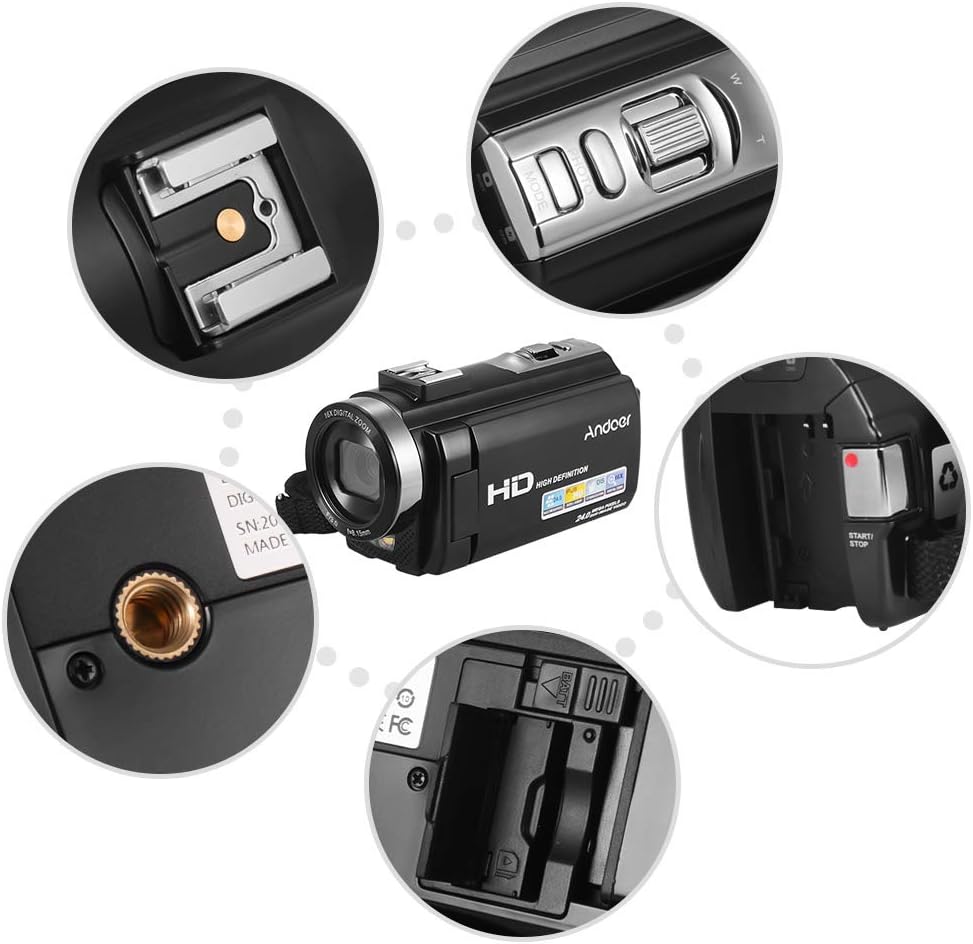
Выява: Крупны план views of various camera components, including the SD card slot, hot shoe mount, and control buttons.
3. Падключэнне знешніх аксесуараў
The camera features a hot shoe mount for connecting external accessories such as microphones or LED video lights (sold separately).
- Slide the accessory onto the hot shoe mount located on top of the camera.
- Secure the accessory if it has a locking mechanism.
- For external microphones, connect the audio cable to the camera's microphone input port.

Image: Illustration of the hot shoe mount on the Andoer HDV-201LM camera, showing how external microphones and LED lights can be attached.
Інструкцыя па эксплуатацыі
1. Уключэнне/выключэнне харчавання
- To power on, open the LCD screen or press the УЛАДА кнопка.
- To power off, close the LCD screen or press and hold the УЛАДА кнопка.
2. Запіс відэа
The camera supports 1080P FULL HD video recording.
- Уключыце камеру.
- Ensure the camera is in video recording mode (usually indicated by a video camera icon on the screen). If not, press the РЭЖЫМ кнопка для пераключэння.
- Націсніце ПУСК/СТОП button to begin recording. The recording indicator will light up.
- Націсніце ПУСК/СТОП кнопку яшчэ раз, каб спыніць запіс.
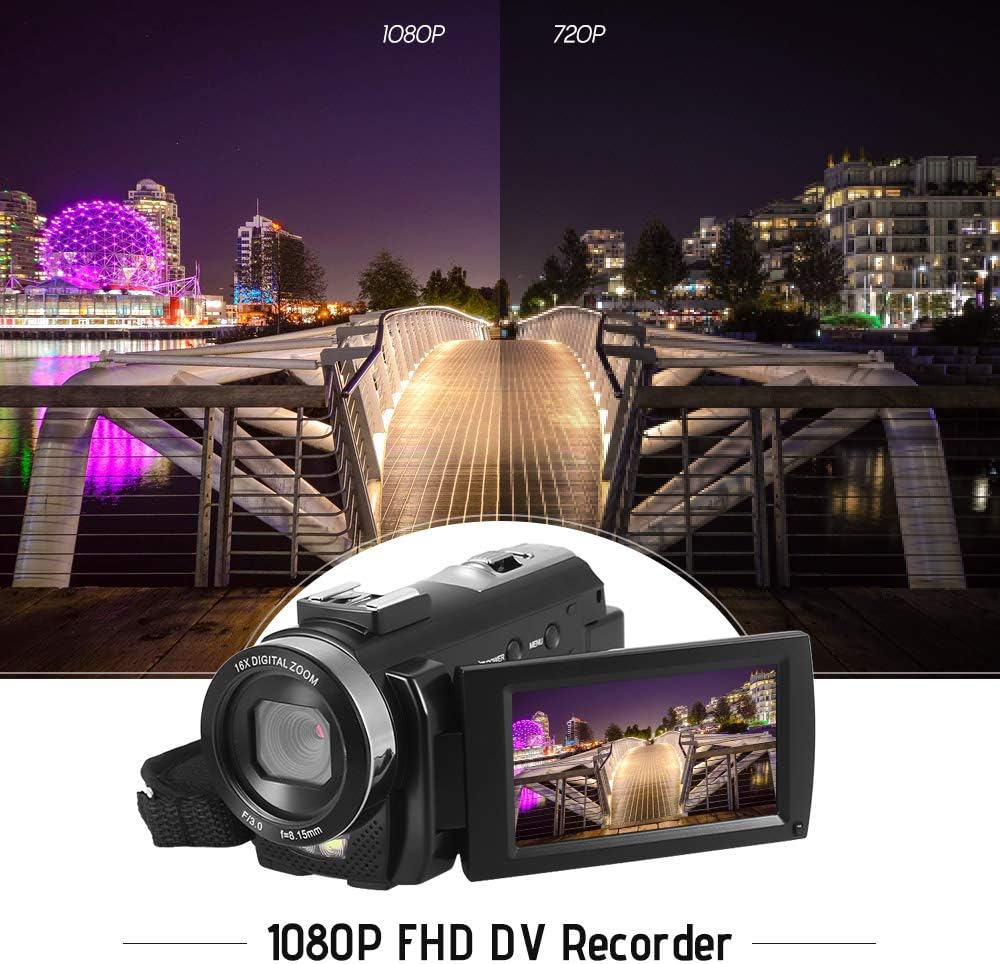
Image: Comparison of 1080P and 720P video quality, highlighting the 1080P FHD capability of the Andoer HDV-201LM camcorder.
3. Фатаграфаванне
The camera can capture still images up to 24MP (interpolation).
- Уключыце камеру.
- Націсніце РЭЖЫМ button to switch to photo mode (indicated by a camera icon).
- Скампануйце кадр з дапамогай ВК-экрана.
- Націсніце ФОТА button (shutter button) to take a picture.
4. Выкарыстанне ВК-экрана
The 3.0-inch TFT-LCD screen offers 270° rotation for flexible viewныя вуглы.
- Rotate the screen to face forward for self-recording or to various angles for comfortable viewінж.
- The screen displays recording status, battery level, mode, and other settings.

Image: The Andoer HDV-201LM camera with its rotatable LCD screen open, showing the camera's compact design.
5. Лічбавы зум
The camera features 16X digital zoom.
- Выкарыстоўвайце W (шырокі) і T (тэлеаб'ектыва) buttons, typically located near the top of the camera, to zoom in or out.
- Note: Digital zoom may reduce image quality compared to optical zoom.

Image: Demonstrates the 16X digital zoom capability of the Andoer HDV-201LM, showing a zoomed-in view of a subject.
6. Налады меню
Access the menu to adjust various camera settings:
- Націсніце МЕНЮ кнопка для ўваходу ў меню налад.
- Use the navigation buttons (up/down/left/right) to select options.
- Націсніце OK кнопку для пацверджання выбару.
- Прэса МЕНЮ зноў для выхаду.
Асноўныя налады ўключаюць:
- Баланс белага: Auto, Daylight, Cloudy, Fluorescent, Tungsten.
- рэжым: Auto, Night, Portrait, Landscape, Backlight, Sport, Party, Beach, High Sensitivity.
- Уздзеянне: Adjust brightness from ±3.0EV.
- Таймер: Off, 2s, 5s, 10s.
- Аўтаматычнае адключэнне харчавання: OFF, 1min, 3min, 5min.
- Іншыя функцыі: Face detection, smile capture, beauty face, anti-shake.

Image: A user holding and operating the Andoer HDV-201LM camera, demonstrating its portability and ease of use.
7. Connecting to a Computer (USB)
You can connect the camera to a computer to transfer files.
- Пераканайцеся, што камера ўключана.
- Падключыце камеру да кампутара з дапамогай USB-кабеля, які ўваходзіць у камплект.
- Камера будзе адлюстроўвацца на вашым кампутары як здымны дыск.
- You can now access and transfer your photos and videos.
Supported Operating Systems: Windows XP/Vista/7/8/10.

Выява: Крупны план view of the USB and TV output ports on the Andoer HDV-201LM camera, indicating connectivity options.
8. Connecting to a TV (AV Output)
View your recordings directly on a television using the AV cable.
- Connect one end of the AV cable to the camera's AV output port.
- Connect the other end to the AV input ports on your television (yellow for video, white/red for audio).
- Выберыце правільную крыніцу ўваходнага AV-сігналу на вашым тэлевізары.
TV Output Standards: NTSC/PAL.
9. Выкарыстанне пульта дыстанцыйнага кіравання
Уключаны пульт дыстанцыйнага кіравання дазваляе зручна кіраваць на адлегласці.
- Ensure the remote control battery (1 x 3V CR2025) is installed correctly.
- Point the remote control towards the camera's IR receiver.
- Use the buttons on the remote to control recording, playback, zoom, and menu navigation.
Тэхнічнае абслугоўванне
1. Чыстка камеры
- Выкарыстоўвайце мяккую, сухую тканіну для чысткі корпуса камеры.
- For the lens and LCD screen, use a specialized lens cleaning cloth and solution. Avoid abrasive materials.
- Не выкарыстоўвайце моцныя мыйныя сродкі або растваральнікі.
2. Сыход за батарэяй
- Калі батарэі не выкарыстоўваюцца, захоўвайце яе ў прахалодным сухім месцы.
- Пазбягайце частай поўнай разрадкі акумулятараў, каб падоўжыць тэрмін іх службы.
- Калі камера не будзе выкарыстоўвацца працяглы час, выміце акумулятар.
3. Захоўванне
- Store the camera in its camera bag to protect it from dust and scratches.
- Трымайце камеру далей ад экстрэмальных тэмператур, вільготнасці і прамых сонечных прамянёў.
Ліквідацыю непаладак
| праблема | Магчымая прычына | Рашэнне |
|---|---|---|
| Камера не ўключаецца. | Battery is dead or not inserted correctly. Insulating film on battery. | Charge the battery. Reinsert the battery correctly. Remove insulating film. |
| Немагчыма запісваць відэа/рабіць фота. | No SD card or SD card full/corrupted. Incorrect mode. | Insert a valid SD card. Delete files or format SD card. Switch to correct mode. |
| Дрэнная якасць выявы/відэа. | Lens is dirty. Low light conditions. Digital zoom used excessively. | Clean the lens. Use LED fill light. Avoid excessive digital zoom. |
| Не працуе пульт дыстанцыйнага кіравання. | Battery dead or incorrectly inserted. Obstruction between remote and camera. | Replace/reinsert remote battery. Ensure clear line of sight to IR receiver. |
| Камера завісае або перастае рэагаваць. | Праграмны збой. | Выміце і зноў устаўце акумулятар, каб скінуць налады камеры. |
Тэхнічныя характарыстыкі
| Асаблівасць | Дэталь |
|---|---|
| Марка | Андоер |
| Нумар мадэлі | HDV-201LM |
| Датчык | 8MP CMOS Sensor, max. 24MP (interpolation) |
| Знешняя памяць | SD Card, max. 32G (Not included, Class 10+ recommended) |
| Аб'ектыў камеры | Ff (F/3.0 f=8.15mm) |
| Экран | 3.0 Inch TFT-LCD (16:9), 270° rotation |
| Video Format & Resolution | AVI, 1920*1080P FULL HD/30fps, 1280*720 HD/30fps, VGA 640*480/30fps, QVGA 320*240/30fps |
| Image Format & Resolution | JPG, 5600*4200 (24MP Interpolation) / 5200*3900 (20MP Interpolation) / 4608*3456 (16MP Interpolation) / 4000*3000 (12MP Interpolation) / 3648*2736 (10MP Interpolation) / 3648*2048 HD (7M-Wide Interpolation) / 2592*1944 (5MP) / 2048*1536 (3MP) / 1920*1080 HD (2M-Wide) / 640*480 VGA |
| Баланс белага | Auto/ Daylight/ Cloudy/ Fluorescent/ Tungsten |
| Рэжым | Auto/Night/Portrait/Landscape/Backlight/Sport/Party/Beach/High Sensitivity |
| Уздзеянне | ± 3.0EV |
| Аўтатаймер | Выкл, 2 с, 5 с, 10 с |
| Аўтаматычнае адключэнне харчавання | OFF/1min/ 3min/ 5min |
| Порт USB | USB2.0 |
| ТБ выхад | NTSC/PAL |
| Падтрымка аперацыйнай сістэмы | Windows XP/Vista/7/8/10 |
| Блок харчавання камеры | 1 * Battery 3.7V 1500mAh (included) |
| Акумулятар пульта дыстанцыйнага кіравання | 1 * 3V CR2025 Battery |
| камера Памер | 13.5 * 5.5 * 6.5 см / 5.3 * 2.2 * 2.6 цалі |
| Вага камеры | 273g / 9.6oz (With battery) |
Гарантыя і падтрымка
This product comes with standard manufacturer support. For extended coverage, consider the following options:
- 1-гадовы пашыраны гарантыйны план
- 2 Years Extended Warranty Plan
For technical support or warranty claims, please refer to the contact information provided with your purchase documentation or visit the official Andoer webсайт.