
1. Прадукт скончыўсяview
The OOYCYOO 100 Amp MPPT Solar Charge Controller, Model KP60 100, is designed for efficient management of solar power systems. It automatically identifies 12V or 24V battery systems and is compatible with various battery types, including AGM, Sealed, Gel, Flooded, and Lithium. This controller features advanced Maximum Power Point Tracking (MPPT) technology to maximize energy harvest from solar panels, ensuring optimal charging for your battery bank.
Key features include a backlit LCD display for real-time monitoring, enhanced safety protections, and a high DC/DC transfer efficiency of up to 98.7%.

Малюнак 1: Спераду view of the OOYCYOO 100 Amp MPPT Solar Charge Controller, showing the LCD display and connection terminals.
2. Інструкцыі па тэхніцы бяспекі
Калі ласка, уважліва прачытайце ўсе інструкцыі і папярэджанні перад устаноўкай і эксплуатацыяй. Невыкананне гэтых інструкцый можа прывесці да паражэння электрычным токам, пажару або сур'ёзных траўмаў.
- Пераканайцеся, што ўся праводка правільна палярная і надзейна падключана, каб пазбегнуць пашкоджання кантролера і падлучаных прылад.
- Always disconnect the solar panel array and battery before installing or adjusting the controller.
- Усталюйце кантролер у добра вентыляваным памяшканні, удалечыні ад лёгкаўзгаральных матэрыялаў і прамых сонечных прамянёў.
- Do not disassemble or attempt to repair the controller. Refer to qualified personnel for service.
- Use appropriate circuit breakers or fuses for all connections to protect against overcurrent.
- Wear appropriate personal protective equipment, including eye protection and insulated gloves, during installation.
3. Кампаненты і злучэнні прадукту
The controller features clearly labeled terminals for solar panel input, battery connection, and load output. It also includes a remote temperature sensor port and USB charging ports.

Малюнак 2: падрабязна view of the controller's LCD display, 5S Reset button, Solar Panel Terminal, Battery Terminal, Load Terminal, USB 5V2A ports, Remote Temp Sensor port, and RS485 Communication Port.
Змест пакета:
- 1 x OOYCYOO 100A MPPT Solar Charge Controller (Model K2500W)
- 1 х датчык тэмпературы
- 1 х Кіраўніцтва карыстальніка (на англійскай мове)
4. Тэхнічныя характарыстыкі
The following table outlines the technical specifications for the OOYCYOO 100 Amp MPPT Solar Charge Controller (Model KP60 100).
| Параметр | Спецыфікацыя |
|---|---|
| Намінальны ток зарада | 100А |
| System Nominal Voltage | 12V/24VDC Auto Identifying |
| 12V System Max. PV Input Power | 1300 Вт |
| 24V System Max. PV Input Power | 2600 Вт |
| Макс. PV Open Circuit Voltagе (Voc) | 100 В пастаяннага току |
| Акумулятар Voltagе далёкасць | 9V ~ 32V |
| Power Terminal Wire Gauge | 10 AWG |
| Памеры (Д х Ш х У) | 12 х 7.8 х 3.2 цалі (30.5 х 19.8 х 8.1 см) |
| Вага | 8.84 фунта (4 кг) |
| Тып дысплея | ВК |
| Працоўная тэмпература | Да 45°C (113°F) |
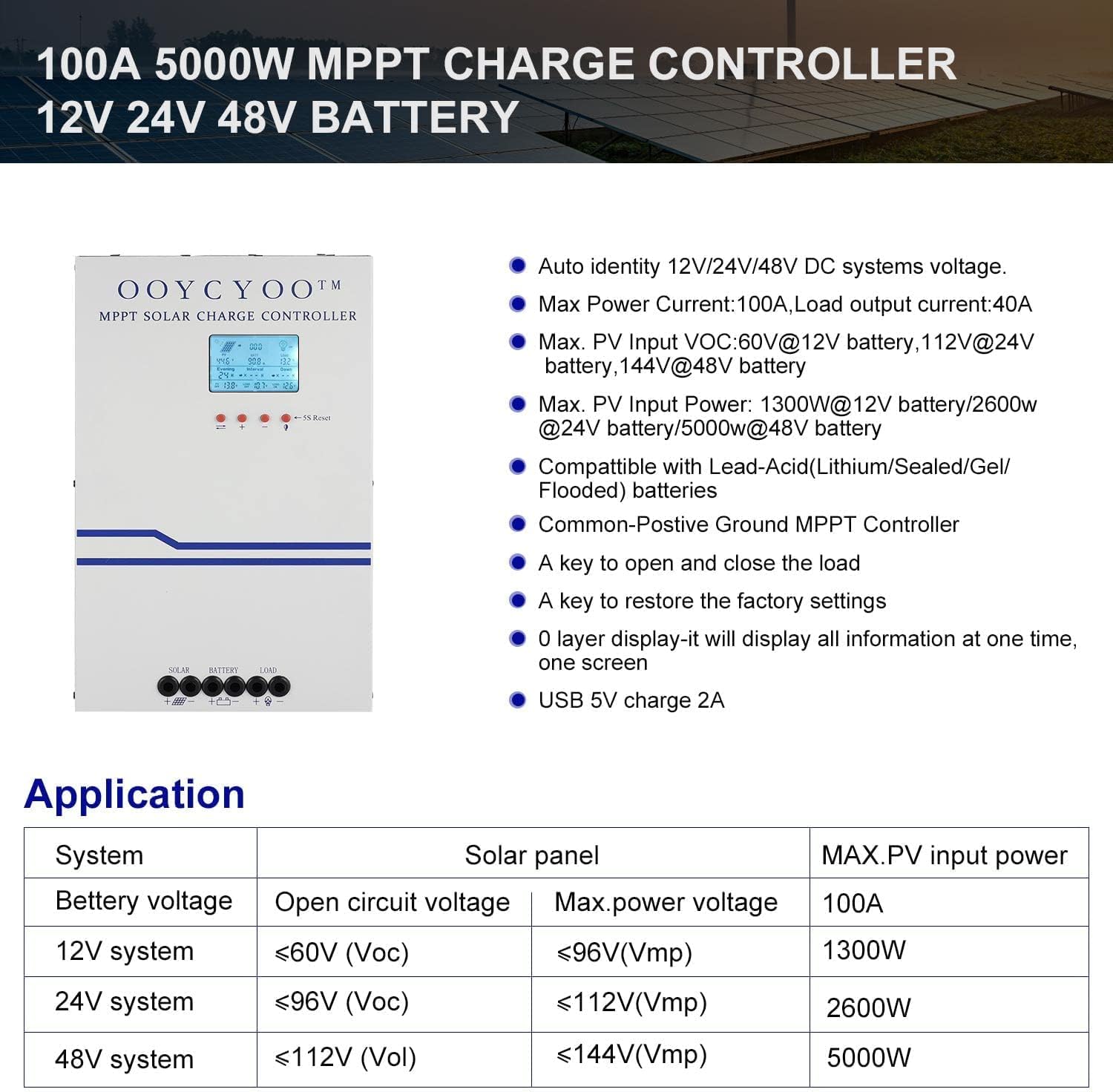
Figure 3: Application table detailing maximum PV input power and voltage for 12V, 24V, and 48V systems.
5. Кіраўніцтва па ўстаноўцы
Правільная ўстаноўка мае вырашальнае значэнне для бяспечнай і эфектыўнай працы вашага кантролера сонечнай зарадкі. Уважліва выконвайце наступныя дзеянні:
5.1 Мантаж кантролера
- Choose a dry, well-ventilated location, protected from direct sunlight, high temperatures, and moisture.
- Ensure sufficient clearance around the controller for proper airflow, especially around the cooling vents.
- Mount the controller vertically on a non-flammable surface using appropriate fasteners.
5.2 Правадныя злучэнні
Connect the components in the following order: Battery > Solar Panel > Load. Always ensure correct polarity.
- Падключыце акумулятар: Connect the battery cables to the battery terminals on the controller. Ensure the positive (+) and negative (-) terminals are correctly matched. The controller will automatically detect the battery voltage (12 В або 24 В).
- Падключыце сонечную панэль: Connect the solar panel cables to the PV input terminals on the controller. Verify correct polarity. Ensure the open circuit voltage (Voc) of your solar array does not exceed 100VDC.
- Падключыце нагрузку: Connect your DC load to the load output terminals. Ensure the load current does not exceed the controller's rated load current.
- Падключэнне датчыка тэмпературы: Plug the remote temperature sensor into its designated port. This sensor helps the controller optimize charging based on battery temperature.
The controller is compatible with various battery types:

Figure 4: The controller supports AGM, Sealed, Gel, Flooded, and Lithium-Iron phosphate batteries for 12V/24V/48V systems.
6. Кіраўніцтва па эксплуатацыі
Once installed, the controller will begin operation. The LCD display provides real-time system status and allows for configuration.
6.1 ВК-дысплей
The backlit LCD display shows various parameters such as battery voltage, charging current, solar panel voltage, load status, and accumulated energy (KWH). Use the buttons below the display to navigate through the different screens and access settings.
6.2 Асноўныя налады
The controller allows users to set parameters for different battery types (Lithium, LiFePO4, Li(NiCoMn)O2, Flooded, Sealed, Gel). Refer to the on-screen menu for specific adjustments to absorption voltagе, паплавок абtagе, і нізкі абtage disconnect settings. A load timer function is also available for controlling DC loads.
6.3 Праца вентылятара астуджэння
The built-in cooling fan activates automatically when the internal temperature exceeds 45°C (113°F) and turns off when the temperature drops below 40°C (104°F). This mechanism ensures optimal performance and extends the lifespan of the controller.
7. Тэхнічнае абслугоўванне
Regular maintenance helps ensure the longevity and optimal performance of your solar charge controller.
- Уборка: Periodically clean the controller's exterior with a dry cloth. Ensure cooling vents are free from dust and debris.
- Сувязі: Annually inspect all wiring connections for tightness and corrosion. Loose connections can cause overheating and damage.
- Асяроддзе: Verify that the installation environment remains dry and well-ventilated.
8. Выпраўленне непаладак
The controller incorporates multiple protection functions to safeguard your system. If an issue arises, check the LCD display for error codes or indicators.
8.1 Функцыі аховы
- PV Over Current/Power Protection
- PV Short Circuit Protection
- PV Абарона ад зваротнай палярнасці
- Night Reverse Charging Protection
- Абарона ад зваротнай палярнасці батарэі
- Батарэя над Voltagе Абарона
- Абарона батарэі ад разраду
- Battery Overheating, Controller Overheating Protection
- Lithium Battery Low Temperature Protection
- Абарона ад кароткага замыкання нагрузкі
- Абарона ад перагрузкі нагрузкі
- TVS High Voltage Абарона пераходных працэсаў
8.2 Агульныя праблемы
- Без зарадкі: Check solar panel connections, ensure sufficient sunlight, and verify battery voltagе знаходзіцца ў межах працоўнага дыяпазону.
- Загрузка не працуе: Check load connections, ensure battery voltage знаходзіцца вышэй нізкай гучнасціtage disconnect setting, and verify load timer settings.
- Перагрэў: Ensure adequate ventilation around the controller and that cooling vents are clear.
- Няправільны томtagэлектронныя паказанні: Verify all connections are secure and the temperature sensor is properly installed.
If issues persist after checking these points, please contact customer support.
9. Гарантыя і падтрымка
The OOYCYOO 100 Amp MPPT Solar Charge Controller is a professional product. For any questions or technical assistance, please contact us directly via email. We are committed to providing prompt support and ensuring your satisfaction.
Калі ласка, звярніцеся да дакументацыі па куплі, каб даведацца пра канкрэтныя ўмовы гарантыі.