
Уводзіны
This manual provides detailed instructions for the safe and effective operation of your Donner DJ Par Light. Please read this manual thoroughly before use and retain it for future reference. This device is designed to produce various lighting effects for events, parties, and stagе спектаклі.
Інфармацыя па бяспецы
- Пераканайцеся, што аб'ём блока харчаванняtagе адпавядае патрабаванням прылады.
- Не падвяргайце прыладу ўздзеянню дажджу або вільгаці, каб пазбегнуць паражэння электрычным токам або пажару.
- Always disconnect from the power supply before cleaning or servicing.
- Пазбягайце прамога траплення крыніцы святла ў вочы, бо гэта можа прывесці да пашкоджання вачэй.
- Забяспечце належную вентыляцыю, каб прадухіліць перагрэў. Не закрывайце вентыляцыйныя адтуліны.
- Асцярожна звяртайцеся з прыладай. Пазбягайце падзення або моцных удараў.
- Захоўваць у месцах, недаступных дзецям.
Змест пакета
Пераканайцеся, што ўсе прадметы наяўныя пры распакаванні:
- Donner DJ Par Light (1 unit)
- Пульт дыстанцыйнага кіравання (1 адзінка)
- Mounting Bracket (1 unit)
- Кабель харчавання (1 шт.)
- Кіраўніцтва карыстальніка (гэты дакумент)
Асаблівасці прадукту
- 18 RGB-святлодыёдаў: Features 18 x 3W RGB LED lights (6 Red, 6 Green, 6 Blue) for a wide range of color effects.
- Multi-mode Operation: Includes Static Color, Color Changing, Color Fade, Auto, Sound-activated, Master-slave, and DMX modes.
- Пульт дыстанцыйнага кіравання: Easy control via the included IR remote.
- DMX512 сумяшчальны: For professional lighting control.
- Убудаваны вентылятар астуджэння: Ensures stable operation and extends lifespan.
- Adjustable Dual Brackets: Allows for flexible mounting on trusses, walls, or standing on the floor.
Настройка
- Распакаванне: Асцярожна выміце лямпу і ўсе аксэсуары з упакоўкі.
- Ўстаноўка кранштэйна: Attach the dual brackets to the sides of the light using the provided screws and knobs. Ensure they are securely fastened.
- Мантаж:
- Падлогавая падстаўка: Position the light on a flat, stable surface using the brackets as a stand. Adjust the angle as desired.
- Hanging/Truss Mount: Выкарыстоўвайце адпаведны склamps (not included) to secure the light to a truss or ceiling. Always use a safety cable (not included) when hanging the unit.
- Падключэнне сілкавання: Connect the power cable to the light's power input and then to a suitable power outlet.

Рэжымы працы
The Donner DJ Par Light offers multiple operating modes, selectable via the remote control or the control panel on the back of the unit.

- Статычны каляровы рэжым: Displays a single, constant color. Use the remote's color buttons (Red, Green, Blue) or the control panel to select specific colors or mix RGB values.
- Color Changing (Jump) Mode: The light rapidly switches between different colors. The speed of the color change can be adjusted.
- Color Fade (Gradual) Mode: The light smoothly transitions from one color to another. The transition speed can be adjusted.
- Аўтаматычны рэжым: The light cycles through various pre-programmed lighting effects automatically.
- Рэжым гукавой актывацыі: The light reacts to ambient sound or music, changing colors and patterns in sync with the beat. Ensure the built-in microphone is not obstructed.
- Рэжым Master-Slave: Connect multiple lights using DMX cables. One unit acts as the master, controlling all connected slave units, ensuring synchronized lighting effects.
- Рэжым DMX: For advanced control using a DMX512 controller. This mode allows precise control over individual light parameters such as color intensity, strobe, and mode selection.
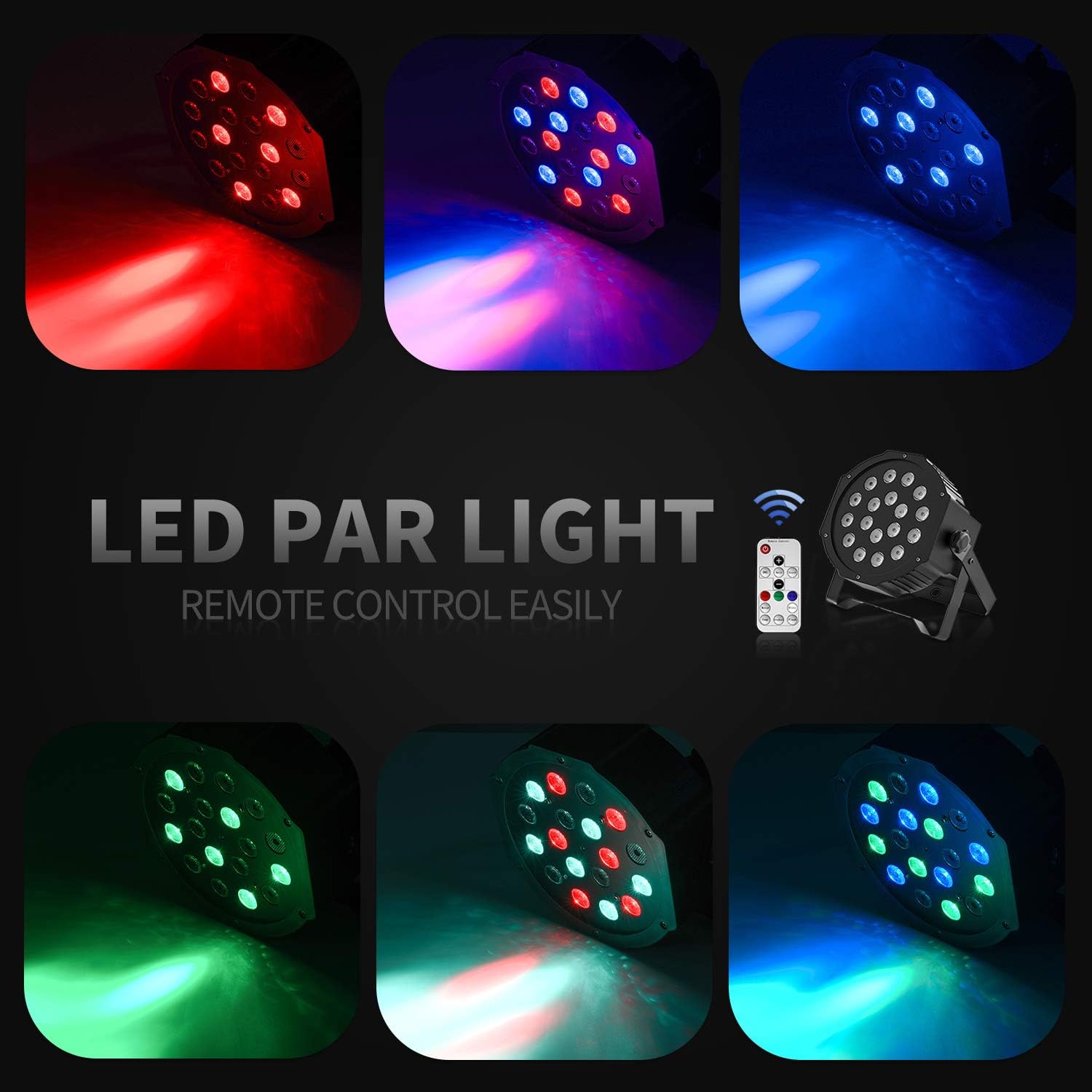
Праца дыстанцыйнага кіравання
The included IR remote control provides convenient access to the light's functions:
- УКЛЮЧАННЕ/ЧАКАВАННЕ: Press to power on or put the device in standby mode.
- DMX: Activates DMX mode. Use '+' and '-' to adjust the DMX address.
- Аўто: Activates Auto mode.
- Гук: Activates Sound-Activated mode.
- Чырвоны/зялёны/сіні: Selects static red, green, or blue color.
- Белы: Selects static white color.
- скачок: Activates Color Changing (Jump) mode.
- Gradual: Activates Color Fade (Gradual) mode.
- Успышка: Актывуе рэжым стробоскопа.
- Кнопкі +/-: Adjust speed in Jump/Gradual/Flash modes, or DMX address in DMX mode.
Кіраванне DMX
The Donner DJ Par Light supports DMX512 protocol for professional control. Connect a DMX controller to the DMX IN port using a 3-pin XLR cable. For multiple units, daisy-chain them by connecting the DMX OUT of one unit to the DMX IN of the next.
Функцыі DMX-канала (напрыклад,ample for 7-channel mode):
| Канал | Функцыя | Дыяпазон значэнняў | Апісанне |
|---|---|---|---|
| 1 | Майстар Дымер | 0-255 | Overall brightness (0=off, 255=max) |
| 2 | Чырвоная інтэнсіўнасць | 0-255 | Red LED brightness (0=off, 255=max) |
| 3 | Зялёная інтэнсіўнасць | 0-255 | Green LED brightness (0=off, 255=max) |
| 4 | Сіні інтэнсіўнасць | 0-255 | Blue LED brightness (0=off, 255=max) |
| 5 | Стробаскоп | 0-255 | Strobe speed (0=off, 255=fastest) |
| 6 | Выбар рэжыму | 0-255 | Selects various internal programs (Auto, Sound, Jump, Gradual) |
| 7 | Хуткасць праграмы | 0-255 | Adjusts speed of selected program (0=slow, 255=fast) |
Тэхнічнае абслугоўванне
- Уборка: Regularly clean the lens and housing with a soft, lint-free cloth. Do not use abrasive cleaners.
- захоўванне: Захоўвайце прыладу ў сухім, чыстым ад пылу месцы, калі яна не выкарыстоўваецца.
- агляд: Periodically check the power cable and DMX connections for any signs of damage.
Ліквідацыю непаладак
| праблема | Магчымая прычына | Рашэнне |
|---|---|---|
| Святло не ўключаецца. | No power, faulty cable, device in standby. | Check power connection. Ensure outlet is functional. Press ON/STANDBY button on remote or control panel. |
| Не працуе пульт дыстанцыйнага кіравання. | Low battery, remote not aimed correctly, IR sensor blocked. | Replace remote battery. Point remote directly at the IR sensor on the front of the light. Ensure no obstructions. |
| Light not responding in DMX mode. | Incorrect DMX address, faulty DMX cable, incorrect DMX mode selected. | Verify DMX address matches controller. Check DMX cable connections. Ensure DMX mode is active on the light. |
| Рэжым актывацыі гукам не працуе. | Microphone obstructed, sound level too low. | Ensure the microphone on the back panel is clear. Increase music volume or move the light closer to the sound source. |
Тэхнічныя характарыстыкі
| мадэль: | Remote Control/DMX |
| Крыніца святла: | 18 x 3W RGB LEDs (6 Red, 6 Green, 6 Blue) |
| Крыніца харчавання: | Правадная электрычная |
| Рэжымы кіравання: | Static Color, Color Changing, Color Fade, Auto, Sound-activated, Master-slave, DMX512 |
| матэрыял: | Пластыкавыя |
| Памеры прадукту: | 7.48 см Д х 5.12 см Ш х 7.48 см В |
| Вага прадмета: | 1.45 фунта |
Гарантыя і падтрымка
Donner provides a 12-month warranty for this product, covering manufacturing defects from the date of purchase. For warranty claims, technical support, or service inquiries, please contact Donner customer service through the retailer where the product was purchased or visit the official Donner webсайт для кантактнай інфармацыі.