
1. Уводзіны
This manual provides detailed instructions for the safe and efficient operation of your Blackweb Portable Blu-ray/DVD Player, model SDVD1183-BW. Please read this manual thoroughly before using the device and retain it for future reference. This portable player features an 11.4-inch HD screen, USB and SD card slots for media playback, and supports both Blu-ray and DVD discs.
2. Інфармацыя па бяспецы
- Крыніца харчавання: Use only the provided AC adapter. Ensure the voltage matches the requirements specified on the adapter.
- Бяспека акумулятара: Прылада змяшчае літый-іённы акумулятар. Не падвяргайце ўздзеянню экстрэмальных тэмператур, не праколвайце і не разбірайце яго. Утылізуйце акумулятары ў адпаведнасці з мясцовымі правіламі.
- Вентыляцыя: Do not block ventilation openings. Ensure adequate airflow around the device during operation.
- Вада і вільгаць: Keep the device away from water, rain, and high humidity. Do not operate with wet hands.
- Уборка: Disconnect power before cleaning. Use a soft, dry cloth. Avoid liquid cleaners or aerosols.
- Апрацоўка дыска: Handle discs by their edges. Avoid touching the playback surface. Keep discs clean and free from scratches.
- тэмпература: Operate the device within a temperature range of 5°C to 35°C (41°F to 95°F).
- дзеці: Гэта прылада не з'яўляецца цацкай. Захоўвайце ў месцах, недаступных для маленькіх дзяцей.
3. Прадукт скончыўсяview
Familiarize yourself with the components and controls of your portable Blu-ray/DVD player.

Малюнак 3.1: Фронт view Чорнагаweb Portable Blu-ray/DVD Player (SDVD1183-BW) with the screen open. The 11.4-inch display is visible at the top, and the control panel with navigation buttons, volume controls, and disc tray area is at the bottom.
3.1 Front Panel Controls (Open View)
- экран: 11.4-inch HD display.
- Латок для дыска: Area for inserting Blu-ray or DVD discs.
- Кнопка харчавання: Уключае або выключае прыладу.
- MODE/SOURCE Button: Switches between input sources (Disc, USB, SD).
- Navigation Buttons (Left/Right/Up/Down/Enter): Для навігацыі па меню і выбару.
- Кнопка прайгравання/паўзы: Пачынае альбо прыпыняе прайграванне.
- Кнопка "Стоп": Спыняе прайграванне.
- Кнопкі хуткай перамоткі наперад/назад: Skips chapters or fast forwards/rewinds playback.
- Кнопка SETUP: Доступ да меню сістэмных налад.
- Кнопкі VOL +/-: Рэгулюе ўзровень гучнасці.
- Дакладчыкі: Інтэграваныя стэрэадынамікі.
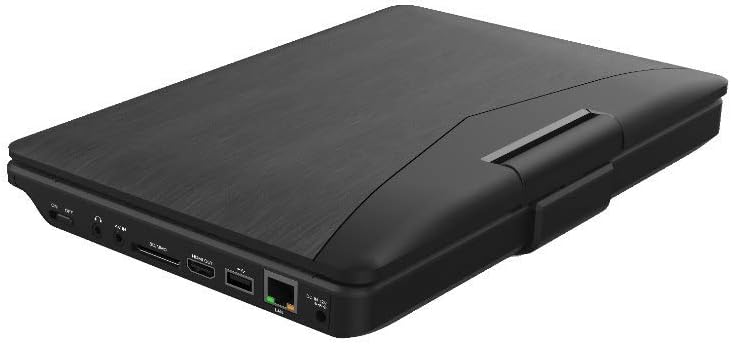
Малюнак 3.2: Збоку view Чорнагаweb Portable Blu-ray/DVD Player (SDVD1183-BW) when closed, highlighting the various input/output ports. These include the DC IN port, USB port, SD card slot, HDMI OUT port, and LAN (RJ45) port.
3.2 Парты бакавой панэлі
- DC IN: Уваход сілкавання для адаптара пераменнага току.
- Порт USB: Падключыце USB-флэш-назапашвальнікі для прайгравання медыяфайлаў.
- Слот для SD-карты: Insert SD memory cards for media playback.
- Выхад HDMI: Connect to an external display (TV, monitor) for larger viewінж.
- Порт лакальнай сеткі (RJ45): For wired network connection (if applicable for online features, though not explicitly stated for this model).
- Раз'ём для навушнікаў: 3.5mm audio output for private listening.
4. Настройка
4.1 Зарадка акумулятара
- Падключыце адаптар пераменнага току, які ўваходзіць у камплект, да порта DC IN на прайгравальніку.
- Устаўце другі канец адаптара пераменнага току ў стандартную разетку.
- The charging indicator light will illuminate, typically red, during charging. It will change color (e.g., green or off) when fully charged.
- Перад першым выкарыстаннем дайце поўнай зарадцы прыблізна 4-6 гадзіны.
4.2 Уключэнне/выключэнне
- Каб уключыць: Open the screen and press the УЛАДА button. The screen will light up.
- Каб выключыць: Націсніце і ўтрымлівайце УЛАДА кнопку, пакуль экран не выключыцца.
5. Інструкцыя па эксплуатацыі
5.1 Playing Blu-ray/DVD Discs
- Пераканайцеся, што плэер уключаны.
- Gently open the disc tray cover.
- Place a Blu-ray or DVD disc onto the spindle with the label side facing up. Press down gently until it clicks into place.
- Close the disc tray cover. The player will automatically detect the disc and begin playback or display the disc menu.
- Выкарыстоўвайце кнопкі навігацыі і УВОД to select options from the disc menu.
- Выкарыстоўвайце ПРАЙГРАЦЬ/Паўза, СТОП, FF, і REW кнопкі для кіравання прайграваннем.
5.2 Playing Media from USB/SD Card
- Устаўце флэш-назапашвальнік USB у порт USB або SD-карту ў слот для SD-карты.
- Націсніце РЭЖЫМ/КРЫНІЦА button to select "USB" or "SD" as the input source.
- The player will display the file browser. Use the navigation buttons to browse your media file(відэа, фота, музыка).
- Прэса УВОД to select and play a file.
5.3 Рэгуляванне налад
- Націсніце НАСТРОЙКА button to access the system settings menu.
- Use the navigation buttons to select categories such as "Video Setup," "Audio Setup," "Language Setup," etc.
- Прэса УВОД to enter a sub-menu and adjust settings like screen brightness, contrast, aspect ratio, audio output, and subtitle preferences.
- Прэса НАСТРОЙКА зноў, каб выйсці з меню.
5.4 Connecting to an External Display (HDMI)
- Ensure both the portable player and the external display (TV/monitor) are powered off.
- Падключыце адзін канец кабеля HDMI (не ўваходзіць у камплект) да ВЫХАД HDMI port on the portable player.
- Connect the other end of the HDMI cable to an HDMI input port on your external display.
- Power on both devices. Select the corresponding HDMI input on your external display.
- The portable player's output will now be displayed on the external screen. The portable player's screen may turn off or mirror the content, depending on settings.
5.5 Выкарыстанне навушнікаў
- Plug standard 3.5mm headphones into the headphone jack on the side of the player.
- The internal speakers will automatically mute when headphones are connected.
- Адрэгулюйце гучнасць з дапамогай ГУЧНАСЦЬ +/- кнопкі.
6. Тэхнічнае абслугоўванне
6.1 Ачыстка прылады
- Перад чысткай заўсёды адключайце адаптар сілкавання.
- Выкарыстоўвайце мяккую, сухую тканіну без ворса для працірання вонкавых паверхняў.
- For the screen, use a screen-specific cleaning cloth or solution, applying it to the cloth first, not directly to the screen.
- Не выкарыстоўвайце абразіўныя ачышчальнікі, воск або растваральнікі.
6.2 Сыход за дыскам
- Handle discs by their edges to avoid fingerprints and scratches on the playing surface.
- Захоўвайце дыскі ў скрынях, калі яны не выкарыстоўваюцца.
- If a disc is dirty, wipe it gently from the center outwards with a soft, lint-free cloth. Do not use harsh chemicals.
7. Выпраўленне непаладак
| праблема | Магчымая прычына | Рашэнне |
|---|---|---|
| Плэер не ўключаецца. | Акумулятар разраджаны. Адаптар харчавання не падключаны або няспраўны. | Connect the AC adapter and charge the battery. Ensure the AC adapter is securely connected to both the player and a working power outlet. |
| Няма малюнка на экране. | Screen brightness too low. HDMI cable connected to external display. | Adjust screen brightness in the SETUP menu. Disconnect HDMI cable or ensure external display is correctly configured. |
| Няма гуку. | Гучнасць занадта нізкая або выключаная. Навушнікі падключаны. Audio settings incorrect. | Павялічце гучнасць з дапамогай ГУЧНАСЦЬ + кнопка. Disconnect headphones if you want sound from speakers. Check audio settings in the SETUP menu. |
| Дыск не прайграваецца. | Дыск брудны, падрапаны або няправільна ўстаўлены. Фармат дыска не падтрымліваецца. Region code mismatch. | Clean the disc and reinsert it correctly. Ensure the disc is a supported Blu-ray or DVD format. This player supports region-free or compatible region discs. |
| USB/SD media not recognized. | Выбрана няправільная крыніца ўваходнага сігналу. File фармат не падтрымліваецца. USB drive/SD card corrupted or incompatible. | Прэса РЭЖЫМ/КРЫНІЦА to select "USB" or "SD". Refer to specifications for supported file фарматы. Try a different USB drive or SD card. Ensure it is formatted correctly (e.g., FAT32). |
8. Тэхнічныя характарыстыкі
- мадэль: SDVD1183-BW
- Памер экрана: 11.4 цаляў
- Раздзяленне экрана: 1280x720
- Тып носьбіта: Blu-Ray, DVD
- Падключэнне: USB, SD Card Slot, HDMI Out, LAN (RJ45), 3.5mm Headphone Jack
- Крыніца харчавання: AC Adapter, Built-in Lithium Ion Battery
- Вага прадмета: Прыкладна 4.15 фунта (1.88 кг)
- Памеры прадукту (ДxШxВ): 16 х 14.5 х 3.5 цалі (40.64 х 36.83 х 8.89 см)
- вытворца: Чорныweb
9. Гарантыя і падтрымка
For warranty information and technical support, please refer to the documentation provided at the time of purchase or contact the retailer. As this product is often sold as "Renewed," specific warranty terms may vary. Please consult the Amazon Renewed Guarantee for details regarding refurbished products purchased through Amazon.
For further assistance, you may also visit the official Blackweb падтрымка webсайт або звярніцеся ў службу падтрымкі кліентаў, калі такая маецца.