
1. Уводзіны
This manual provides essential instructions for the safe and efficient operation of your Areyourshop 12/24V 50A MPPT Solar Charge Controller. Please read this manual thoroughly before installation and use to ensure proper functionality and longevity of the device. This controller is designed to manage power flow from solar panels to batteries and loads, optimizing charging efficiency.
2. Прадукт скончыўсяview
The Areyourshop MPPT Solar Charge Controller is a robust device designed for solar power systems. It features an LCD display for monitoring, dual USB outputs for charging external devices, and comprehensive protection mechanisms.
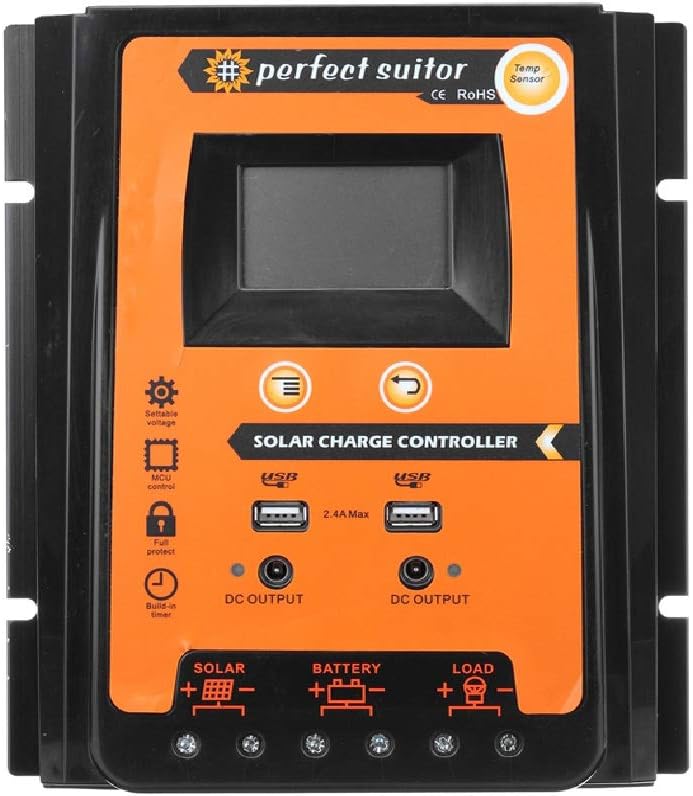
Выява: спераду view of the Areyourshop 50A MPPT Solar Charge Controller, showing the LCD screen, control buttons, USB ports, and connection terminals.
Асноўныя характарыстыкі:
- MPPT Charging: Utilizes Maximum Power Point Tracking technology for efficient solar energy conversion.
- Аўтаматычны Voltage Adaptation: Automatically detects 12V or 24V system voltage.
- ВК-дысплей: Provides real-time monitoring of system status and parameters.
- Два выхады USB: Two 2.4A USB ports for charging mobile devices.
- Комплексная абарона: Includes overcharge, over-discharge, overcurrent, and short-circuit protection.
- Рэгуляваныя параметры: Control parameters can be adjusted to suit various battery types.
- Тэмпературная кампенсацыя: Automatic temperature compensation for accurate charging and discharging voltage.

Image: Diagram highlighting features such as high conversion efficiency MPPT, intelligent LCD display, battery charge voltage/current/power, PV voltage/current power generation, perfect protection, and load power consumption work mode.
3. Тэхнічныя характарыстыкі
| Параметр | Каштоўнасць |
|---|---|
| мадэль | E401-A002 (PVSC50A) |
| Тып зарадкі | MPPT |
| Сістэма Voltage | 12В/24В (аўтаматычная ідэнтыфікацыя) |
| Намінальны ток зарада/разраду | 50А |
| Макс. PV Voltage | 50В |
| USB выхад | Dual USB, 2.4A each (5V total) |
| Over Charge Voltage | 13.7 В (для сістэмы 12 В) / 27.4 В (для сістэмы 24 В) |
| Over Discharge Voltage | 10.5-11V (for 12V system) / 21-22V (for 24V system) |
| Recovery Discharge Voltage | 12.6 В (для сістэмы 12 В) / 25.2 В (для сістэмы 24 В) |
| Тэмпературная кампенсацыя | -3mv/℃/cell |
| Empty Load Wastage | <45 мА |
| Loop Voltagе Кропля | <200 мв |
| Дысплей | ВК-дысплей |
| Dimensions (50A) | 21 х 19.2 х 4 см (прыблізна 8.27 х 7.56 х 1.57 цалі) |
| Вага прадмета | Прыбл. 1.98 фунта |
| Матэрыял | Пластыкавыя |
| Асаблівасці | Воданепранікальны |

Image: The 50A solar charge controller with its physical dimensions (21cm, 19.2cm, 4cm) indicated.
4. Настройка і ўстаноўка
Proper installation is crucial for the safe and efficient operation of your solar charge controller. Please follow these steps carefully.
Важныя заўвагі па бяспецы:
- This controller is designed exclusively for LEAD-ACID batteries. Do not use with other battery types (e.g., Lithium-ion, NiMH) as this may cause damage to the controller or battery.
- Ensure all connections are secure and correct polarity is observed to prevent damage.
- Усталюйце кантролер у добра вентыляваным памяшканні, удалечыні ад прамых сонечных прамянёў і вільгаці.
Спосаб падлучэння:
Злучыце кампаненты ў наступным парадку:
- Падключыце акумулятар: First, connect the battery to the controller's battery terminals (marked with a battery symbol). Ensure correct polarity (+ to + and - to -). The controller will automatically detect 12V or 24V system voltage.
- Падключыце сонечную панэль: Next, connect the solar panel to the controller's solar terminals (marked with a solar panel symbol). Ensure correct polarity.
- Падключыце нагрузку: Finally, connect your DC load to the controller's load terminals (marked with a light bulb symbol). Ensure correct polarity.

Image: A clear diagram illustrating the correct connection sequence: Solar Panel to Controller, Battery to Controller, and Load to Controller.
5. Інструкцыя па эксплуатацыі
The controller features an intuitive LCD display and control buttons for monitoring and adjusting settings.
ВК-дысплей і кнопкі:

Выява: Падрабязная view of the controller's LCD display and control buttons. Labels indicate: 1. Solar panel, 2. Battery, 3. Load, 4. Warming, 5. Digital display, 6. Voltage, 7. Timer setting, 8. Unit symbol value. The 'Menu' button switches display or function, and 'Return' button is also shown.
- Digital Display (5): Shows various parameters like voltage, current, and charge status.
- Кнопка меню: Press to cycle through different display screens or functions. Long press to enter setting mode for adjustable parameters.
- Кнопка вяртання: Used to exit setting mode or confirm selections.
Рэгуляванне параметраў:
The controller allows adjustment of certain parameters to optimize performance for your specific lead-acid battery. Refer to the LCD display and use the Menu/Return buttons to navigate and modify settings such as overcharge voltage, over-discharge voltage, and load control mode. Consult your battery's specifications for recommended voltagэлектронныя налады.
Выхад USB:
The dual 2.4A USB ports provide 5V output for charging small electronic devices. These outputs are active when the controller is powered.
6. Тэхнічнае абслугоўванне
Рэгулярнае тэхнічнае абслугоўванне забяспечвае даўгавечнасць і аптымальную прадукцыйнасць вашага кантролера сонечнай зарадкі.
- Чысціня: Трымайце кантролер чыстым і без пылу і смецця. Выкарыстоўвайце для чысткі сухую тканіну.
- Сувязі: Periodically check all wiring connections to ensure they are tight and free from corrosion. Loose connections can lead to power loss or overheating.
- Вентыляцыя: Ensure the installation area remains well-ventilated to prevent overheating of the controller.
- Зарад батарэі: Monitor your battery's health and electrolyte levels (for flooded lead-acid batteries) as per the battery manufacturer's recommendations.
7. Выпраўленне непаладак
У гэтым раздзеле разглядаюцца распаўсюджаныя праблемы, з якімі вы можаце сутыкнуцца пры выкарыстанні кантролера сонечнай зарадкі.
- Няма дысплея/няма харчавання: Check battery connections and ensure the battery has sufficient charge. Verify solar panel connections.
- Controller Stops Output to Load: The controller is designed to protect the battery from over-discharge. If the battery voltage drops below the set over-discharge voltage (e.g., 10.5-11V for 12V systems), the load output will be disconnected. The output will automatically recover once the solar panel charges the battery back to the recovery discharge voltage (e.g., 12.6V for 12V systems).
- Акумулятар не зараджаецца: Verify solar panel connections and ensure the panel is receiving adequate sunlight. Check for any shading or damage to the solar panel. Ensure the battery is properly connected and not severely discharged.
- Абарона ад перазарадкі: The controller will stop charging the battery once it reaches the overcharge voltage (e.g., 13.7V for 12V systems) to prevent damage.
- Няправільны томtagэлектронныя паказанні: Ensure all connections are secure. Temperature compensation is automatic, but extreme temperatures can affect readings.
8. Важныя заўвагі і папярэджанні
- Lead-Acid Batteries Only: This controller is specifically designed for use with LEAD-ACID batteries. Using it with other battery chemistries may result in damage to the battery or the controller, and poses a safety risk.
- Simple MPPT Controller: This product is a simple MPPT controller. While it offers efficient charging, it does not include advanced features such as communication interfaces found in higher-end multifunctional MPPT controllers.
- Сцэнары прымянення: This controller is suitable for various applications including farm solar power systems, solar street lights, solar patio lights, solar billboards, outdoor camping solar systems, and ship solar systems.

Выява: Visual examples of suitable application scenarios for the solar charge controller, including residential solar, water pumping, street lighting, and recreational use.
9. Гарантыя і падтрымка
For any technical assistance or warranty inquiries, please contact Areyourshop customer support. Keep your purchase receipt as proof of purchase.
Manufacturer: Areyourshop