
1. Уводзіны
This manual provides essential instructions for the safe and effective operation of your Goopow H11 Kids Digital Camera. Please read this manual thoroughly before using the product and retain it for future reference.
2. Змесціва ўпакоўкі
Праверце, ці ўсе пералічаныя ніжэй прадметы ўваходзяць у вашу ўпакоўку:
- Goopow H11 Kids Digital Camera (with soft silicone cover)
- USB-кабель для зарадкі
- Карта Micro SD на 32 ГБ
- Шнурок
- Кіраўніцтва карыстальніка
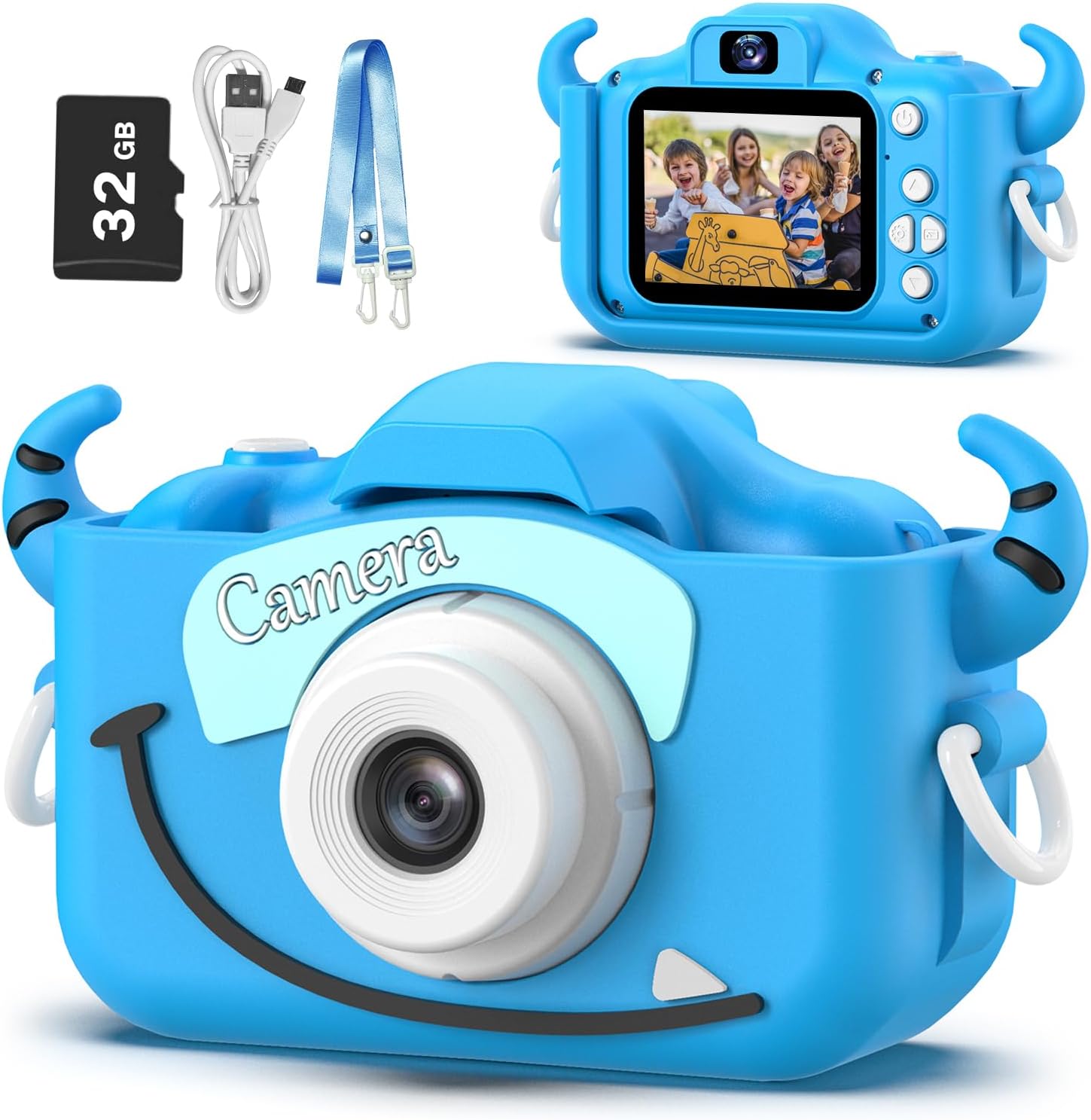
Image: Goopow H11 Kids Digital Camera, 32GB SD card, USB cable, and lanyard.
3. Прадукт скончыўсяview
The Goopow H11 is a compact digital camera designed for children, featuring a durable soft silicone cover. It supports photo capture, video recording, playback, and includes built-in games.

Image: Dimensions of the Goopow H11 Kids Digital Camera, highlighting its compact size.
Асноўныя характарыстыкі:
- 2.0-цалевы ВК-экран: Для viewфота і відэа.
- Запіс відэа 1080P: Capture clear video moments.
- 8-кратны лічбавы зум: For capturing distant subjects.
- Рэжым сэлфі: Фронтальная камера для аўтапартрэтаў.
- Некалькі функцый: Photo capture, video recording, playback, games, time-lapse, and various scene selections/frames.
- Трывалы сіліконавы чахол: Provides protection against drops and bumps.
- Убудаваная акумулятарная батарэя: 3.7V Lithium battery, USB rechargeable.
- SD-карта на 32 ГБ у камплекце: Ampсховішча для фота і відэа.
Відэа: Рэкламны відэаролікasing the Goopow Kids Camera, highlighting its design, various colors, and features like selfie mode, digital zoom, and fun filters.
4. Настройка
4.1. Зарадка камеры
Before first use, fully charge the camera. Connect the provided USB charging cable to the camera's charging port and a compatible USB power adapter (not included) or computer USB port. The charging indicator light will illuminate during charging and turn off when fully charged.
Важна: Use a charger with an output of no more than 1A. Avoid fast chargers, as they can damage the battery. Charging should be supervised by an adult.
4.2. Inserting/Removing the SD Card
The camera comes with a 32GB Micro SD card pre-installed. If you need to remove or insert the card:
- Gently lift the silicone cover to expose the SD card slot.
- To insert, push the Micro SD card into the slot until it clicks into place.
- To remove, gently push the card again until it pops out.
4.3. Прымацаванне шнурка
Attach the provided lanyard to the camera for easy carrying and to prevent accidental drops. Thread the lanyard through the designated loops on the camera's silicone cover.
5. Інструкцыя па эксплуатацыі
5.1. Уключэнне/выключэнне харчавання
Press and hold the power button (usually located on the top or side) for a few seconds to turn the camera on or off.

Image: The Goopow H11 Kids Digital Camera displaying its main menu with icons for camera, video, playback, settings, games, and music.
5.2. Навігацыя
Use the directional buttons (up, down, left, right) to navigate through the menu options. Press the "OK" or shutter button to select an option.
5.3. Фатаграфаванне
- From the main menu, select the camera icon.
- Скампануйце кадр з дапамогай ВК-экрана.
- Press the shutter button (top right) to take a picture.
- To switch to selfie mode, use the appropriate button (refer to the camera's button layout).

Image: The Goopow H11 Kids Digital Camera in selfie mode, showing three children smiling on the screen.
5.4. Запіс відэа
- From the main menu, select the video camera icon.
- Націсніце кнопку спуску засаўкі, каб пачаць запіс. Націсніце яе яшчэ раз, каб спыніць.

Image: The Goopow H11 Kids Digital Camera recording video, with a scene of children at a birthday party displayed on the screen.
5.5. Прайграванне
Select the playback icon from the main menu to view your captured photos and videos. Use the directional buttons to browse through them.
5.6. Асаблівасці
- Frames and Filters: Access various fun frames and filters from the camera menu to add creative effects to your photos.
- Лічбавае павелічэнне: Use the zoom buttons (if available) to adjust the 8X digital zoom.
- гульні: The camera includes multiple puzzle games for entertainment.

Image: The Goopow H11 Kids Digital Camera displaying various funny frames and filters that can be applied to photos.

Image: The Goopow H11 Kids Digital Camera demonstrating its 8X digital zoom capability, showing a child's face at different zoom levels.
6. Тэхнічнае абслугоўванне
- Падтрымлівайце камеру ў чысціні, праціраючы яе мяккай сухой тканінай.
- Пазбягайце працяглага ўздзеяння экстрэмальных тэмператур або прамых сонечных прамянёў на камеру.
- Ensure the charging port and SD card slot are free from dust and debris.
7. Выпраўленне непаладак
| праблема | Рашэнне |
|---|---|
| Камера не ўключаецца. | Пераканайцеся, што акумулятар зараджаны. Падключыце зарадную прыладу і паспрабуйце яшчэ раз. |
| Немагчыма рабіць фота/відэа. | Check if the SD card is inserted correctly and has sufficient storage space. |
| Дрэнная якасць выявы. | Ensure adequate lighting. Clean the camera lens if it's dirty. |
| Камера замярзае. | Press the reset button (if available, refer to product diagram) or hold the power button for 10 seconds to force a restart. |
8. Тэхнічныя характарыстыкі
- мадэль: H11
- Марка: Goopow
- Памеры прадукту: 1.3 х 7.52 х 4.45 цалі
- Вага прадмета: 3.7 унцыі
- акумулятар: 1 літый-палімерная батарэя (у камплекце)
- аптычны зум: 8x
- Максімум WebКамера Раздзяленне выявы: 12 МП
- Падтрымліваецца File Фармат: JPEG
- Стабілізацыя выявы: Лічбавы
9. Гарантыя і падтрымка
For warranty information or technical support, please refer to the contact details provided with your purchase or visit the official Goopow webсайт. Захоўвайце пацвярджэнне пакупкі для прэтэнзій па гарантыі.