
1. Уводзіны
Дзякуй за пакупкуasing the LOVCUBE 15 Inch Digital Photo Frame L15N. This manual provides essential information for setting up, operating, and maintaining your digital photo frame. Please read these instructions carefully before use to ensure optimal performance and longevity of your device.
The LOVCUBE L15N features a 15-inch HD IPS display, motion sensor, and supports various media formats for photos, videos, and music. It is designed for ease of use, allowing you to display your cherished memories with minimal setup.
2. Прадукт скончыўсяview
2.1 Змест пакета
- LOVCUBE 15 Inch Digital Photo Frame
- Remote Control (requires 1 CR2 battery, typically included)
- Адаптар сілкавання
- Настольны стэнд
- Wall-mounting Brackets and Screws
- Кіраўніцтва карыстальніка
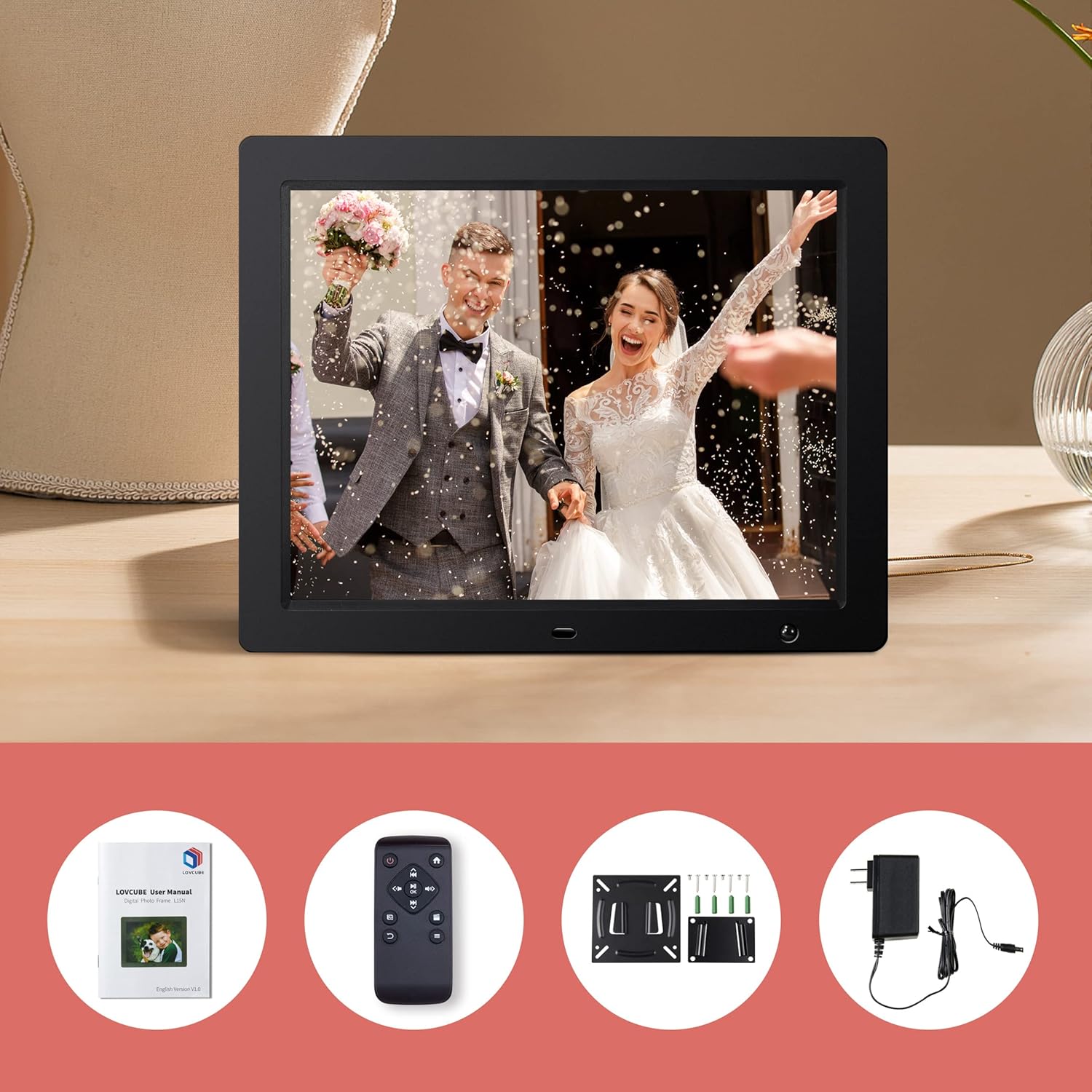
Image: Package contents of the LOVCUBE digital photo frame.
2.2 Асноўныя магчымасці
- 15-inch HD IPS Display: 1024x768 resolution with a 4:3 aspect ratio and 178° wide viewкут агляду для атрымання выразных і яркіх малюнкаў.
- Датчык руху: Built-in high-sensitivity motion sensor to conserve energy by turning the screen on/off automatically.
- Прайграванне мультымедыя: Supports photos, 1080p Full HD videos, and background music playback.
- Breakpoint Play: Resumes playback of photos, music, or videos from the last viewed point.
- Slideshow Options: Customizable slideshow effects, transition times, and playback order (random or sequential).
- Некалькі функцый: Includes clock, alarm, calendar, and auto power on/off scheduling.
- Падключэнне: Features USB and SD card slots for easy media input (supports up to 32GB).
- Універсальнае размяшчэнне: Comes with a desktop stand and wall-mounting brackets.
2.3 Парты і элементы кіравання
Familiarize yourself with the ports and controls located on the back and sides of the frame.
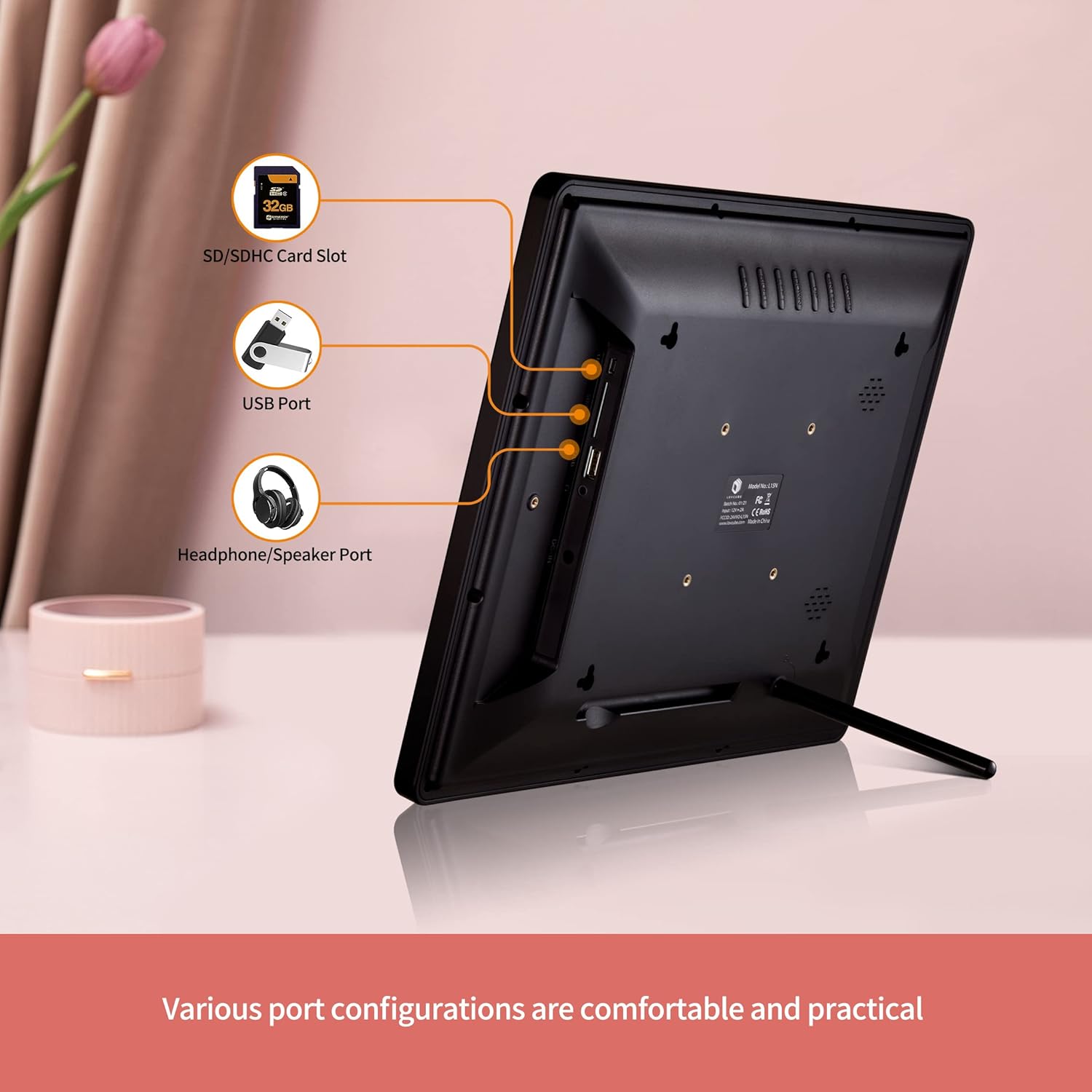
Выява: Задняя частка view of the digital photo frame with labeled ports.
- Слот для карты SD/SDHC: Insert your SD or SDHC memory card here.
- Порт USB: Connect a USB flash drive for media playback.
- Headphone/Speaker Port: Падключыце знешнія навушнікі або дынамікі.
- DC IN: Падключыце адаптар сілкавання сюды.
- Кнопка харчавання: Уключае або выключае рамку.
- Кнопкі навігацыі: For menu navigation (Up, Down, Left, Right, Enter).
- Кнопка меню: Доступ да галоўнага меню.
- Кнопка выхаду: Вяртае на папярэдні экран або выходзіць з меню.
3. Настройка
3.1 Распакоўка і размяшчэнне
- Акуратна дастаньце ўсе кампаненты з упакоўкі.
- Choose a suitable location for your digital photo frame.
- For Desktop Use: Attach the included desktop stand to the back of the frame.
- Для насценнага мантажу: Use the provided wall-mounting brackets and screws to securely mount the frame on a wall. Ensure the wall can support the weight of the frame.

Image: Wall hanging method diagram.
3.2 Падключэнне харчавання
- Connect the power adapter to the DC IN port on the frame.
- Падключыце адаптар сілкавання да стандартнай электрычнай разеткі.
3.3 Устаўка носьбіта інфармацыі
The frame supports SD/SDHC cards and USB flash drives up to 32GB. No software installation is required.
- Insert your SD card into the SD/SDHC card slot or your USB flash drive into the USB port. Ensure it is inserted correctly.
- The frame will automatically detect the media and begin playing content.

Image: Plug and play functionality with a USB stick.
3.4 Налада дыстанцыйнага кіравання
The remote control requires one CR2 battery. Ensure the battery is correctly installed according to the polarity markings.
4. Інструкцыя па эксплуатацыі
4.1 Асноўная навігацыя
Use the remote control or the buttons on the back of the frame to navigate the menus.
- Кнопка харчавання: Press to turn the frame on or off.
- Кнопка меню: Press to access the main menu options (Photo, Music, Video, Calendar, Settings).
- Кнопкі са стрэлкамі: Use to move between menu items or adjust settings.
- Кнопка ўводу: Пацвердзіце выбар.
- Кнопка выхаду: Go back to the previous screen or exit the current function.

Image: Using the remote control to operate the digital photo frame.
4.2 Photo Slideshow
- У галоўным меню абярыце Фота.
- The frame will start a slideshow of all photos on the inserted media.
- In the settings menu, you can customize:
- Эфекты слайд-шоў: Choose from various transition styles.
- Час пераходу: Set the duration each photo is displayed.
- Рэжым прайгравання: Select random or sequential playback.
- Фонавая музыка: Enable music to play during the slideshow.

Image: Slideshow mode with background music.
4.3 Video and Music Playback
- У галоўным меню абярыце Відэа or Музыка.
- Перамяшчайцеся па сваім files and select the desired video or music track to play.
- The frame supports 1080p FHD video playback.
Датчык руху 4.4
The built-in motion sensor helps save energy by automatically turning the screen on when motion is detected and off when no motion is present for a set period.
- Доступ да Налады меню.
- Знайдзіце Датчык руху варыянт.
- Enable or disable the motion sensor and adjust its sensitivity or delay time as needed.

Image: Motion sensor functionality.
4.5 Clock, Calendar, and Alarm
The frame can display the current time and date, and function as an alarm clock.
- У галоўным меню абярыце Каляндар каб view дата і час.
- У ст Налады menu, you can set the time, date, and configure alarms.

Image: Digital photo frame displaying clock and calendar.
4.6 Auto Power On/Off
Schedule specific times for the frame to automatically power on and off.
- Перайсці да Налады меню.
- Знайсці Аўтаматычнае ўключэнне/выключэнне варыянт.
- Set your desired power on and power off times.
4.7 Налады мовы
The frame supports multiple languages.
- Доступ да Налады меню.
- Выберыце мова option and choose your preferred language.
5. Тэхнічнае абслугоўванне
5.1 Ачыстка рамы
- Заўсёды адключайце рамку ад сеткі перад чысткай.
- Use a soft, dry cloth to wipe the screen and frame.
- Для выдалення ўстойлівых плям на экране злёгку працярыцеampПрацярыце тканіну вадой або растворам для чысткі экрана. Пазбягайце агрэсіўных хімічных рэчываў.
5.2 Safe Media Removal
To prevent data corruption, always ensure the frame is not actively reading or writing to the SD card or USB drive before removing it. It is recommended to power off the frame before removing media.
6. Выпраўленне непаладак
- Няма харчавання: Пераканайцеся, што адаптар сілкавання надзейна падключаны як да рамы, так і да спраўнай электрычнай разеткі.
- Няма дысплея/пусты экран: Check if the frame is powered on. Verify that an SD card or USB drive with compatible media is inserted correctly. The motion sensor might have turned the screen off; try moving in front of the frame or pressing a button on the remote.
- Пульт дыстанцыйнага кіравання не адказвае: Check the CR2 battery in the remote control and replace if necessary. Ensure there is a clear line of sight between the remote and the frame's IR receiver.
- Media Not Recognized: Ensure the SD card or USB drive is formatted correctly (FAT32 is generally recommended) and its capacity does not exceed 32GB. Reinsert the media.
- Праблемы з прайграваннем відэа: Забяспечце відэа files are in a supported format and resolution (up to 1080p FHD). Some high-bitrate 1080p videos may not play smoothly.
- Images Appear Distorted: Ensure your images have a resolution compatible with the frame's 1024x768 display and 4:3 aspect ratio for best results.
7. Тэхнічныя характарыстыкі
| Асаблівасць | Дэталь |
|---|---|
| Нумар мадэлі | WH00004D |
| Памер экрана | 15 цалі |
| Тып дысплея | HD IPS-дысплей |
| дазвол | 1024 х 768 пікселяў |
| Суадносіны бакоў | 4:3 |
| Viewing кут | 178° |
| Носьбіты, якія падтрымліваюцца | SD/SDHC Card (up to 32GB), USB Flash Drive (up to 32GB) |
| Прайграванне відэа | Up to 1080p FHD |
| Сувязь | USB |
| Асаблівасці | Motion Sensor, Breakpoint Play, Clock, Calendar, Alarm, Auto Power On/Off |
| Акумулятар пульта дыстанцыйнага кіравання | 1 х CR2 (у камплекце) |
| Прыблізная вага прадмета | 5.92 фунта |
8. Гарантыя і падтрымка
8.1 Інфармацыя аб гарантыі
LOVCUBE provides a Гарантыя 12 месяцаў for each unit from the date of purchase. This warranty covers manufacturing defects and ensures your product functions as intended under normal use.
8.2 Падтрымка кліентаў
For any questions, technical assistance, or warranty claims, please contact LOVCUBE customer service. We offer 24-hour after-sales service каб дапамагчы вам.
Please refer to the contact information provided with your purchase or visit the official LOVCUBE webсайт для падрабязнай інфармацыі аб падтрымцы.