
Prtukyt 6S
Prtukyt 6S Wireless Headphones User Manual
Model: 6S | Brand: Prtukyt
Уводзіны
Thank you for choosing the Prtukyt 6S Wireless Headphones. This manual provides detailed instructions on how to set up, operate, and maintain your headphones to ensure optimal performance and longevity. Please read this manual thoroughly before using the product.

Image: Prtukyt 6S Wireless Headphones in black and red, showcasinагульны дызайн.
Асноўныя характарыстыкі
- HI-FI Stereo Sound: High-definition audio with deep bass and crystal-clear treble, powered by a 57mm driver for precise sound reproduction.
- Пашыраны Bluetooth 5.0: Ensures fast, stable connections and low latency for audio/video streaming.
- Доўгі тэрмін службы батарэі: Up to 40 hours of continuous playtime on a single charge, thanks to a 500mAh lithium-polymer battery.
- Зручны дызайн: Features super soft, skin-texture simulating ear cushions and an adjustable, padded headband for extended wear comfort.
- Складаны і партатыўны: Ergonomic, foldable design for easy storage and transport, ideal for travel and daily use.
- Multi-Mode Playback: Supports wireless Bluetooth, wired 3.5mm audio connection, Micro SD/TF card playback, and FM radio.
- Убудаваны мікрафон: High-quality microphone for clear, hands-free calls.

Выява: Зверхуview of the headphones' key features, including Hi-Fi sound, comfortable earmuffs, radio receiver, long battery life, foldable design, and HD call capability.

Image: Close-up of the headphone earcup highlighting the Bluetooth 5.0 chip, Hi-Fi sound, 57mm driver, and extra bass capabilities.
Змест пакета
Калі ласка, пастаўце галачку для наступных пунктаў:
- Prtukyt 6S Wireless Headphones
- USB-кабель для зарадкі
- Аўдыёкабель 3.5 мм
- Кіраўніцтва карыстальніка

Image: Visual representation of the items included in the product packaging: the headphones, a USB charging cable, and a 3.5mm audio cable.
Настройка
1. Зарадка навушнікаў
Before first use, fully charge the headphones. A full charge takes approximately 3 hours and provides up to 40 hours of playtime.
- Падключыце меншы канец USB-кабеля для зарадкі да порта зарадкі на амбушуры навушнікаў.
- Падключыце большы канец USB-кабеля для зарадкі да USB-адаптара харчавання (не ўваходзіць у камплект) або USB-порта кампутара.
- The LED indicator light will show charging status (e.g., red for charging, off when fully charged).

Image: Visual representation of the headphones' long battery life, indicating up to 40 hours of playtime on a single charge.
2. Спарванне Bluetooth
Pair your headphones with your Bluetooth-enabled device (smartphone, tablet, PC).
- Пераканайцеся, што навушнікі зараджаны і выключаны.
- Press and hold the Power/Multi-function button until the LED indicator flashes blue and red alternately, indicating pairing mode.
- На сваёй прыладзе ўключыце Bluetooth і знайдзіце даступныя прылады.
- Select "6S" from the list of found devices.
- Пасля спалучэння святлодыёдны індыкатар будзе павольна міргаць сінім колерам, і вы пачуеце гук пацверджання.
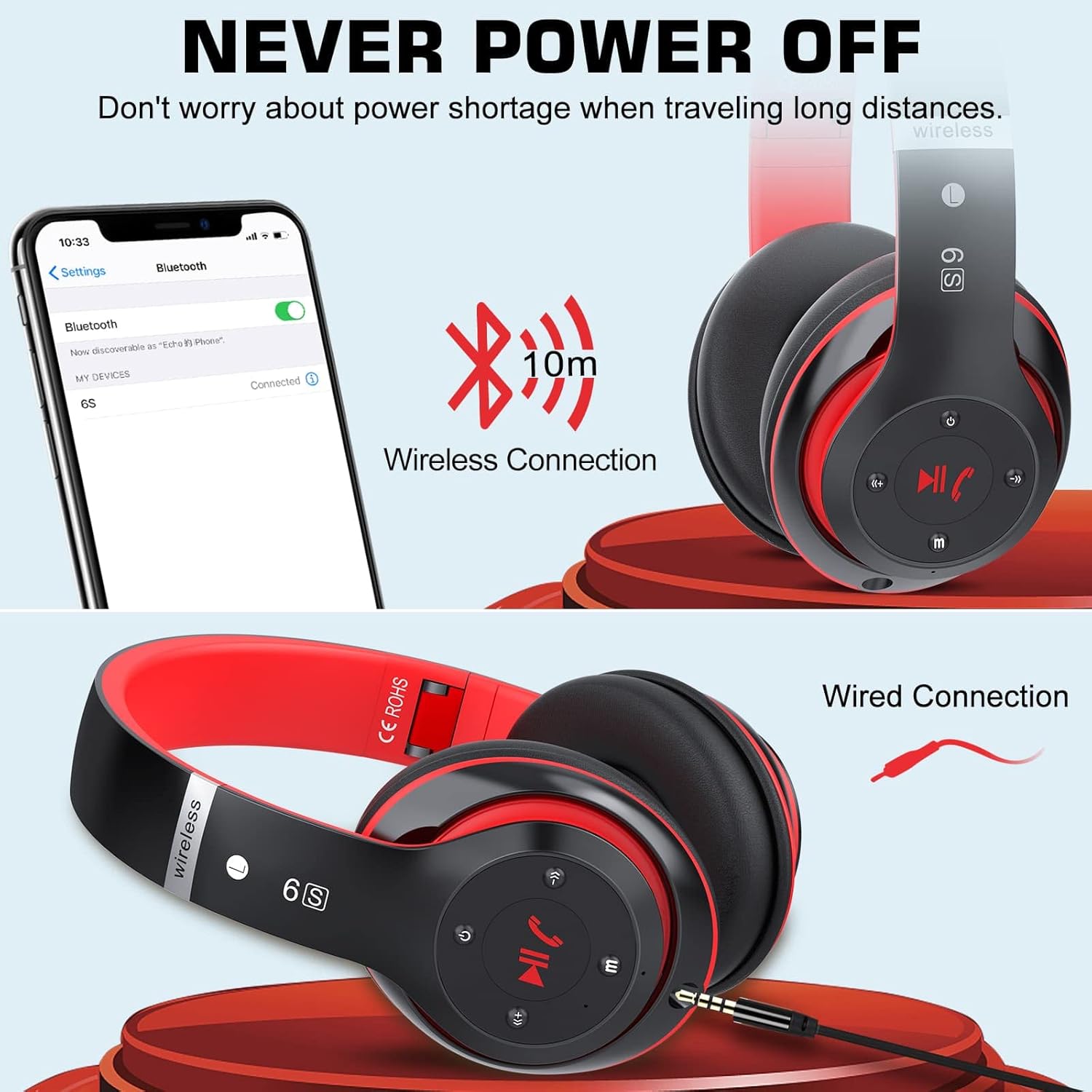
Image: Demonstrates both wireless Bluetooth connection (up to 10m range) and wired connection options for the headphones.
3. Правадное злучэнне (рэжым Aux)
Use the included 3.5mm audio cable for a wired connection, especially when the battery is low or for non-Bluetooth devices.
- Plug one end of the 3.5mm audio cable into the audio input port on the headphone earcup.
- Падключыце другі канец да 3.5-мм аўдыёраз'ёма вашай прылады.
- Навушнікі аўтаматычна пераключацца ў правадны рэжым.
4. Прайграванне з карт Micro SD/TF
Insert a Micro SD/TF card loaded with MP3 audio fileу адпаведную адтуліну на навушніках.
- Locate the Micro SD/TF card slot on the headphone earcup.
- Gently insert the Micro SD/TF card until it clicks into place.
- The headphones will automatically switch to TF card playback mode. Use the control buttons to navigate tracks.
5. Рэжым FM-радыё
The headphones can receive FM radio signals. For best reception, ensure the 3.5mm audio cable is plugged in, as it acts as an antenna.
- Уключыце навушнікі.
- Націсніце кнопку «M» (рэжым), каб пераключыцца ў рэжым FM-радыё.
- Націсніце кнопку прайгравання/паўзы, каб аўтаматычна сканаваць і захаваць даступныя FM-станцыі.
- Для пераключэння паміж захаванымі станцыямі выкарыстоўвайце кнопкі «Папярэдні/наступны трэк».
Інструкцыя па эксплуатацыі
Familiarize yourself with the control buttons located on the earcup for easy operation.

Image: Detailed diagram showing the location and function of each button on the headphone earcup, including power, track control, volume, mode, and call handling.
| Кнопка/Дзеянне | Функцыя |
|---|---|
| Кнопка харчавання (Укл./Выкл.) | Націсніце і ўтрымлівайце, каб уключыць/выключыць харчаванне. |
| Play/Pause / Answer/Hang Up | Press once to play/pause music. Press once to answer/end a call. Press and hold to reject a call. |
| Previous Song / Volume Down (-) | Short press for previous song. Long press to decrease volume. |
| Next Song / Volume Up (+) | Short press for next song. Long press to increase volume. |
| Кнопка рэжыму (M) | Press to switch between Bluetooth, TF Card, and FM Radio modes. |
| Audio Cable Link Hole | Connect 3.5mm audio cable for wired playback. |
Тэхнічнае абслугоўванне
- Уборка: Для чысткі навушнікаў выкарыстоўвайце мяккую сухую тканіну. Не выкарыстоўвайце абразіўныя ачышчальнікі або растваральнікі.
- захоўванне: Калі навушнікі не выкарыстоўваюцца, захоўвайце іх у прахалодным, сухім месцы, удалечыні ад прамых сонечных прамянёў і экстрэмальных тэмператур. Складаная канструкцыя забяспечвае кампактнае захоўванне.
- Сыход за батарэяй: Каб падоўжыць тэрмін службы батарэі, не разраджайце навушнікі цалкам часта. Рэгулярна зараджайце іх, нават калі яны доўга не выкарыстоўваюцца.
- Пазбягайце вільгаці: Не падвяргайце навушнікі ўздзеянню вады або празмернай вільгаці.

Image: The headphones in their folded state, illustrating their compact and portable design for easy carrying and storage.
Ліквідацыю непаладак
| праблема | Магчымая прычына | Рашэнне |
|---|---|---|
| Навушнікі не ўключаюцься. | Нізкі акумулятар. | Поўнасцю зарадзіце навушнікі. |
| Немагчыма спалучыцца з прыладай Bluetooth. | Навушнікі не ў рэжыме спалучэння; Bluetooth прылады выключаны; занадта далёка ад прылады. | Ensure headphones are in pairing mode (flashing blue/red). Turn on Bluetooth on your device. Move headphones closer to the device (within 10m). |
| Няма гуку ў рэжыме Bluetooth. | Volume too low; not properly paired; wrong audio output selected on device. | Increase headphone and device volume. Re-pair the headphones. Select "6S" as the audio output on your device. |
| Слабы прыём FM-радыё. | No antenna connected; weak signal. | Plug in the 3.5mm audio cable (acts as antenna). Try auto-scanning again. Move to an area with better signal. |
| Micro SD/TF card not recognized. | Card not inserted correctly; unsupported format. | Re-insert the card firmly. Ensure card contains MP3 files. |
Тэхнічныя характарыстыкі
| Асаблівасць | Дэталь |
|---|---|
| Назва мадэлі | 6S |
| Марка | Пртукіт |
| Тэхналогія падлучэння | Бесправадная сувязь (Bluetooth 5.0) |
| Тэхналогія бесправадной сувязі | Bluetooth |
| Аўдыё ўваход | Гняздо 3.5 мм |
| Формаў-фактар | Накладныя на вуха (цыркум-аурыкулярныя) |
| Тып батарэі | Літый-палімерны (500 мАг) |
| Час гульні | Да 40 гадзін |
| Час зарадкі | Прыбл. 3 гадзіны |
| Далёкасць бесправадной сувязі | Да 10 метраў (33 футаў) |
| Матэрыял | Скура, пластык |
| Колер | Чорны/чырвоны |

Image: Illustration of a 40mm stereo driver, emphasizing its role in delivering sound purity and precision.
Гарантыя і падтрымка
Prtukyt provides a 12-month warranty for this product. If you encounter any issues or have questions regarding your Prtukyt 6S Wireless Headphones, please contact our customer support for assistance. We are committed to ensuring your satisfaction.
Contact information for support is typically found on the product packaging or the brand's official webсайт.
Ask a question about this manual
Ask about setup, troubleshooting, compatibility, parts, safety, or missing instructions. Manuals+ will review the question and use this page’s manual context to help answer it.