
WiMiUS P21
Кіраўніцтва карыстальніка праектара WiMiUS P21
Мадэль: P21
1. Уводзіны
This manual provides detailed instructions for the setup, operation, and maintenance of your WiMiUS P21 Full HD 1080P LED Projector. Please read this manual thoroughly before using the projector to ensure proper function and longevity of the device.

Выява: спераду view of the WiMiUS P21 Projector, showing the lens and control panel.
2. Змесціва ўпакоўкі
Праверце, ці ўсе пералічаныя ніжэй прадметы ўваходзяць у камплект. Калі якія-небудзь прадметы адсутнічаюць або пашкоджаныя, звярніцеся ў службу падтрымкі кліентаў.
- WiMiUS P21 Projector
- Пульт дыстанцыйнага кіравання
- Сілавы кабель
- Кабель HDMI
- Кабель VGA
- AV-кабель
- Вечка аб'ектыва
- Кіраўніцтва карыстальніка (гэты дакумент)

Image: The WiMiUS P21 Projector displayed with its remote control, power cable, HDMI cable, VGA cable, AV cable, and user manual.
3. Асаблівасці прадукту
The WiMiUS P21 Projector offers advanced features for an enhanced viewвопыт:
- Высокая яркасць і кантраснасць: 6500 Lumens brightness and an 8000:1 contrast ratio for clear and vivid images.
- Уласцівае дазвол 1080P: Delivers a native resolution of 1920x1080 pixels, supporting 1080P at 60Hz and 4K input for detailed visuals.
- Гнуткі памер праекцыі: Adjustable projection size from 50 to 300 inches with a projection distance of 1.5 to 6.5 meters.
- Функцыя лічбавага павелічэння: Allows image size reduction from 100% to 75% via remote control without moving the projector.
- Убудаваны аўдыё: Dual built-in 5W stereo speakers provide clear sound.
- Шырокая сувязь: Equipped with 2 HDMI ports, 2 USB ports, 1 VGA port, and 1 AV port for connecting various devices.
- Доўгі лamp жыццё: Святлодыёд lamp designed for up to 100,000 hours of operation.

Image: Visual comparison illustrating the difference between 6500 lumens with 8000:1 contrast and lower specifications, highlighting improved clarity and color saturation.
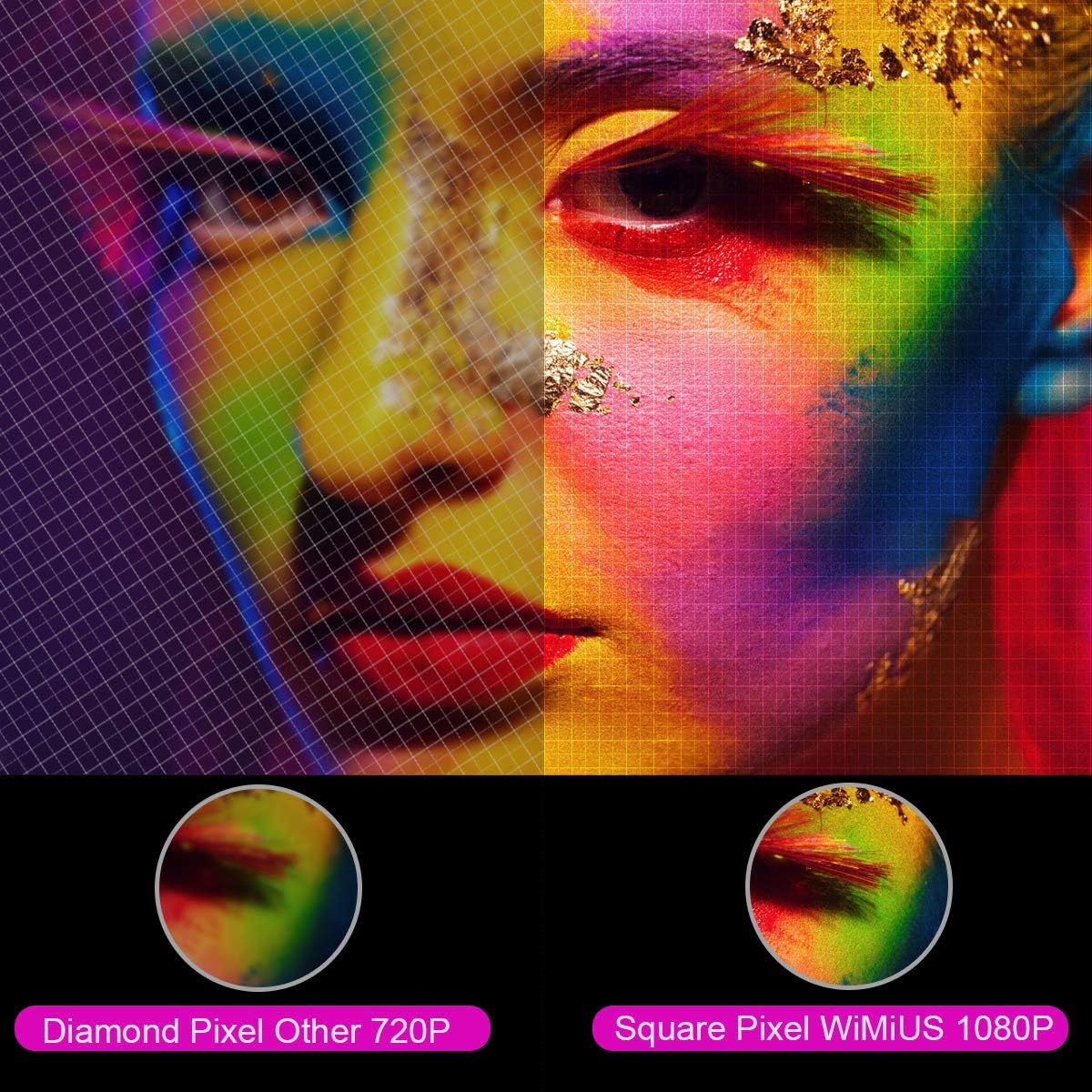
Выява: Павялічанае view comparing the pixel structure of a 720P projector (diamond pixel) versus the WiMiUS 1080P projector (square pixel), demonstrating higher resolution.

Image: Diagram showing the projector with sound waves emanating from it, indicating the presence of built-in dual 5W speakers.
4. Настройка
4.1 Размяшчэнне
Place the projector on a stable, flat surface or mount it to a ceiling. Ensure there is adequate ventilation around the unit. The optimum projection distance is approximately 3 meters (9.8 feet) for a balanced image size and clarity.

Image: A diagram illustrating various projection sizes (50-300 inches) and corresponding projection distances (1.5m to 6.5m), with an optimal distance of 3m highlighted.
4.2 Падключэнне харчавання
- Падключыце кабель харчавання да ўваходу харчавання праектара.
- Устаўце другі канец кабеля сілкавання ў разетку.
- Націсніце кнопку харчавання на праектары або пульце дыстанцыйнага кіравання, каб уключыць прыладу.
4.3 Падключэнне знешніх прылад
The P21 projector supports multiple input sources. Refer to the diagram below for port locations.

Image: A detailed diagram highlighting the various connection ports on the projector, including HDMI (x2), USB (x2), AV, Audio Out, Y/Pb/Pr, and PC-RGB (VGA).
- HDMI: Connect devices like laptops, Blu-ray players, gaming consoles (PS3, PS4, Xbox), Chromecast, or Fire TV Stick using an HDMI cable.
- USB: Устаўце USB-назапашвальнік для прайгравання медыяфайлаў files непасрэдна.
- VGA (PC-RGB): Connect to a computer using a VGA cable.
- АВ: Use the provided AV cable to connect older devices.
- Аўдыёвыхад: Connect external speakers or headphones if desired.
Note: If connecting a device and experiencing no sound, ensure that Dolby Digital output is turned off on the connected device, as the projector may not support it directly.
5. Інструкцыя па эксплуатацыі
5.1 Уключэнне/выключэнне сілкавання
Націсніце кнопку харчавання на праектары або пульце дыстанцыйнага кіравання, каб уключыць або выключыць прыладу.
5.2 Выбар крыніцы
Use the "Source" button on the remote control or projector panel to select the desired input source (HDMI1, HDMI2, USB1, USB2, VGA, AV).
5.3 Фокус і карэкцыя трапецападобнага скажэння
- Фокус: Rotate the focus ring near the lens until the image is clear.
- Карэкцыя трапецеідальных скажэнняў: Adjust the keystone ring or use the menu settings for vertical ±15° keystone correction to correct distorted images.
5.4 Функцыя маштабавання
The digital zoom function allows you to adjust the image size without moving the projector. Use the zoom controls on the remote control to reduce the image size from 100% down to 75%.

Image: A visual representation of the zoom function, showing a projected image shrinking from 100% to 75% on a screen, controlled by the projector.
5.5 Налады меню
Press the "Menu" button on the remote to access settings for picture mode, sound mode, aspect ratio (4:3/16:9), and other advanced options.
6. Тэхнічнае абслугоўванне
6.1 Ачыстка аб'ектыва
Use a soft, lint-free cloth specifically designed for optical lenses to gently clean the projector lens. Avoid using abrasive cleaners or excessive force.
6.2 Ачыстка паветранага фільтра
Рэгулярна правярайце і чысціце паветраны фільтр, каб прадухіліць назапашванне пылу, які можа паўплываць на прадукцыйнасць іamp life. Refer to the projector's exterior for the air filter location and cleaning instructions.
6.3 лamp жыццё
Святлодыёд lamp in your WiMiUS P21 projector has an estimated lifespan of up to 100,000 hours. No user replacement is typically required during the product's operational life. If the lamp stops working, please contact customer support.
7. Выпраўленне непаладак
| праблема | Магчымая прычына | Рашэнне |
|---|---|---|
| Не адлюстроўваецца выява | Кабель сілкавання адключаны, няправільная крыніца ўваходнага сігналу, надзета вечка аб'ектыва. | Праверце падключэнне да сілкавання, абярыце правільную крыніцу ўваходнага сігналу, зніміце вечка аб'ектыва. |
| Відарыс размыты | Фокус не адрэгуляваны, праектар занадта блізка/далёка ад экрана. | Adjust the focus ring, ensure optimal projection distance. |
| Выява скажоная (трапецыяпадобная) | Праектар не перпендыкулярны экрану. | Adjust keystone correction. |
| Няма гуку з праектара | Volume too low, incorrect audio settings, Dolby Digital enabled on source device. | Increase volume, check audio settings, turn off Dolby Digital on the connected device. |
| Пульт дыстанцыйнага кіравання не працуе | Batteries depleted, obstruction between remote and projector. | Replace batteries, ensure clear line of sight to IR receiver. |
8. Тэхнічныя характарыстыкі
| Асаблівасць | Дэталь |
|---|---|
| Марка | WiMiUS |
| мадэль | P21 |
| Яркасць | 6500 люмен |
| Каэфіцыент кантраснасці | 8000:1 |
| Роднае дазвол | 1920 x 1080 (Full HD) |
| Падтрымка максімальнага дазволу | 4K Ultra HD |
| Тэхналогія адлюстравання | святлодыёд |
| Святлодыёд Lamp жыццё | 100,000 гадзін |
| Памер праекцыі | 50-300 цаляў |
| Адлегласць праекцыі | 1.5 - 6.5 метраў |
| Функцыя маштабавання | 100% - 75% (Reduced) |
| Суадносіны бакоў | 4:3 / 16:9 |
| Карэкцыя Keystone | Па вертыкалі ±15° |
| Выступоўцы | Dual built-in stereo (2 x 5W) |
| Сувязь | 2x HDMI, 2x USB, 1x VGA, 1x AV, Audio Out |
| Узровень шуму | 30 дэцыбел |
| Энергаспажыванне | 140 ват |
| Памеры прадукту | 32 х 24 х 11 см |
| Вага | 2.5 кг |
9. Гарантыя і падтрымка
The WiMiUS P21 HD Projector comes with a lifetime warranty. If the LED lamp stops functioning or any other issues arise with the projector, please contact WiMiUS customer support for assistance or replacement. A repair center is available in the USA for service needs.
For further support, please refer to the official WiMiUS webсайт або звярніцеся ў іх аддзел абслугоўвання кліентаў.