
1. Уводзіны
Дзякуй за пакупкуasing the DURGOD HK Venus RGB Mechanical Gaming Keyboard. This 60% layout keyboard features durable doubleshot PBT keycaps, Cherry MX Blue switches, and a robust aluminum chassis. It offers customizable RGB backlighting and advanced functionality through the DURGOD Hera Engine software. This manual provides detailed instructions for setup, operation, maintenance, and troubleshooting to ensure optimal performance and longevity of your keyboard.
2. Змесціва ўпакоўкі
Калі ласка, пераканайцеся, што ўсе прадметы прысутнічаюць у вашай упакоўцы:
- DURGOD HK Venus RGB Mechanical Gaming Keyboard
- USB Type-C to Type-A Cable (5.9 ft / 1.8 m)
- USB Type-C to Type-C Cable (3.3 ft / 1 m)
- Здымальнік клавішнай шапкі
- Кіраўніцтва карыстальніка (гэты дакумент)
3. Настройка
3.1 Падключэнне клавіятуры
- Select the appropriate USB cable (Type-C to Type-A for standard USB ports, or Type-C to Type-C for compatible devices).
- Connect the USB Type-C end of the cable to the port on the back of the DURGOD HK Venus keyboard.
- Падключыце іншы канец кабеля да вольнага порта USB на вашым кампутары.
- Клавіятура будзе аўтаматычна распазнана вашай аперацыйнай сістэмай.

Малюнак 3.1: USB Type-C Interface for Keyboard Connection. This image shows a close-up of the USB Type-C port located on the side of the DURGOD HK Venus keyboard, highlighting its modern and reversible connector for reliable connectivity.
3.2 Software Installation (DURGOD Hera Engine)
To unlock the full potential of your DURGOD HK Venus keyboard, including macro programming, key remapping, and advanced RGB lighting customization, download and install the DURGOD Hera Engine software.
- Visit the official DURGOD website to download the latest version of the Hera Engine software.
- Выконвайце інструкцыі на экране, каб завяршыць усталёўку.
- Пасля ўсталёўкі запусціце праграму, каб наладзіць параметры клавіятуры.

Малюнак 3.2: Customization with DURGOD Hera Engine. This image illustrates the extensive customization options available through the DURGOD Hera Engine software, including personalized macros and dynamic RGB lighting effects.
4. Інструкцыя па эксплуатацыі
4.1 Асноўныя функцыі клавіятуры
The DURGOD HK Venus is a 60% layout keyboard, meaning some functions are accessed via a combination of keys. The primary function layer is standard QWERTY.
4.2 Кіраванне падсветкай RGB
The keyboard features 16.8 million color RGB backlighting with multiple effects. Basic lighting adjustments can be made directly on the keyboard:
- Змяніць рэжым асвятлення: Выкарыстоўвайце Fn + [Key Combination] (refer to keyboard legends or software for specific combinations).
- Наладзіць яркасць: Выкарыстоўвайце Fn + стрэлка ўверх/уніз (if available, otherwise via software).
- Рэгуляванне хуткасці/кірунку: Выкарыстоўвайце Fn + стрэлка ўлева/ўправа (if available, otherwise via software).
For advanced customization, including specific color settings, effects, and per-key lighting, use the DURGOD Hera Engine software.

Малюнак 4.1: DURGOD HK Venus RGB Backlighting. This image displays the DURGOD HK Venus keyboard illuminated with its customizable RGB backlighting, showcasing the vibrant color combinations across the keys.
4.3 Tap Mode for Arrow Keys
The DURGOD HK Venus features a "Tap Mode" which allows you to access arrow key functionality without a dedicated arrow cluster. This is typically achieved by tapping specific modifier keys:
- Стрэлка ўверх: Націсніце зрух
- Стрэлка ўлева: Націсніце Fn1
- Стрэлка ўніз: Націсніце Fn2
- Стрэлка ўправа: Націсніце Ctrl
Note: The exact key combinations for Tap Mode may be configurable via the Hera Engine software.
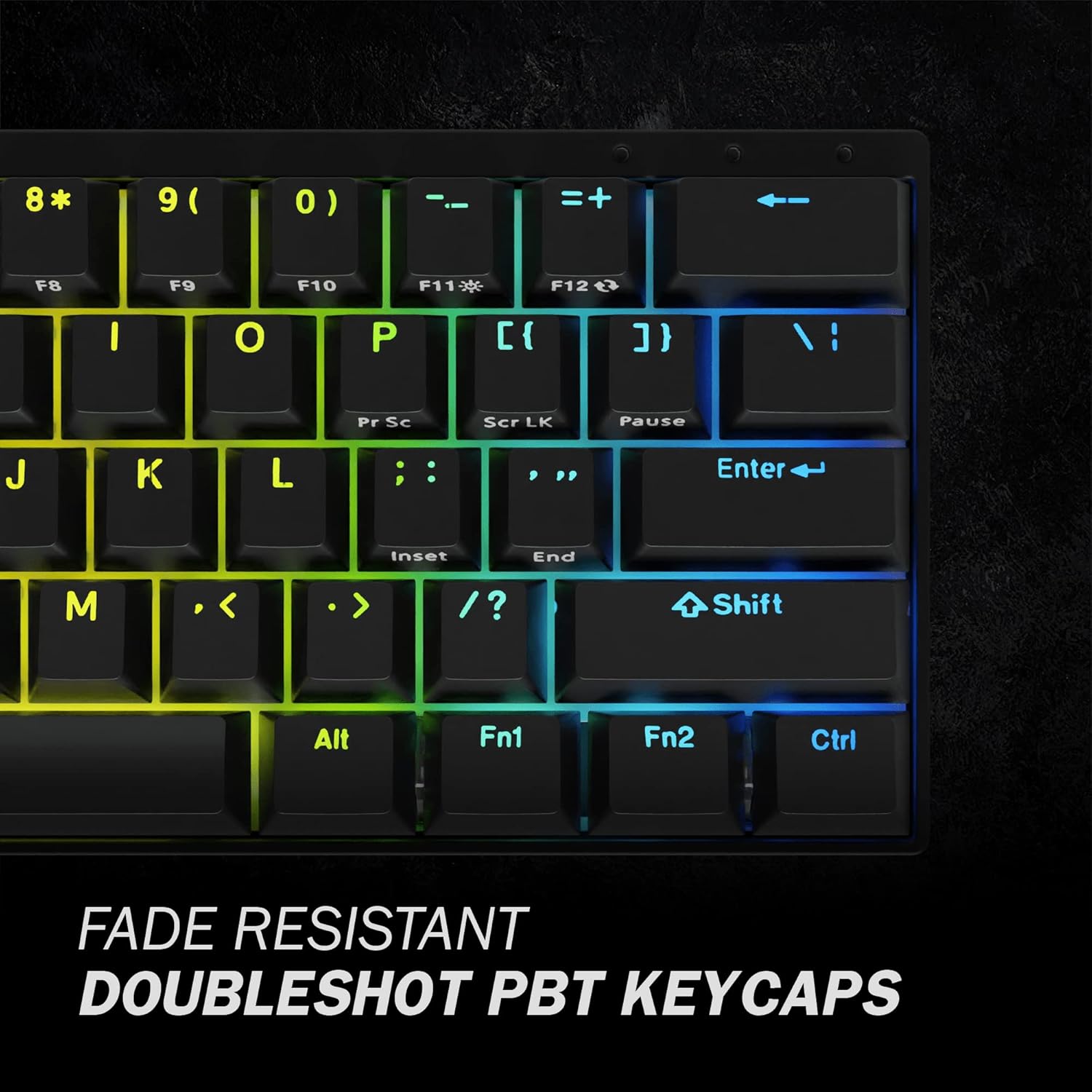
Малюнак 4.2: Tap Mode Key Legends. This image provides a close-up view of the keycaps, specifically highlighting the secondary legends on the Shift, Fn1, Fn2, and Ctrl keys, which indicate their function as arrow keys in Tap Mode.
4.4 Пераключэнне некалькіх клавіш (NKRO)
The DURGOD HK Venus supports N-Key Rollover (NKRO), which means every key press is registered independently, regardless of how many keys are pressed simultaneously. This prevents "ghosting" or "key jamming" and is crucial for fast-paced typing and gaming.
5. Тэхнічнае абслугоўванне
5.1 Чыстка клавіятуры
Рэгулярная чыстка дапамагае падтрымліваць знешні выгляд і функцыянальнасць клавіятуры.
- Адключыце клавіятуру ад кампутара перад чысткай.
- Выкарыстоўвайце балон са сціснутым паветрам, каб выдаліць пыл і смецце паміж клавішамі.
- Wipe the keycaps and chassis with a soft, slightly damp, тканіна без ворса. Пазбягайце празмернай вільгаці.
- Не выкарыстоўвайце агрэсіўныя хімікаты, абразіўныя ачышчальнікі або растваральнікі.
5.2 Зняцце і замена каўпачка клавіш
The included keycap puller can be used to safely remove keycaps for cleaning or replacement.
- Акуратна размясціце здымнік клавіш на клавішы, якія вы хочаце зняць.
- Ensure the puller's wires hook under opposite sides of the keycap.
- Pull straight up with even pressure until the keycap detaches from the switch stem.
- Каб усталяваць на месца, сумясціце каўпачок клавішы са штокам перамыкача і моцна націсніце, пакуль ён не зафіксуецца на месцы.
Caution: Be gentle when removing keycaps to avoid damaging the switch stems.

Малюнак 5.1: Cherry MX Blue Switches. This image provides a detailed view of the Cherry MX Blue mechanical switches beneath the keycaps, illustrating the mechanism that provides tactile and audible feedback.
6. Выпраўленне непаладак
If you encounter issues with your DURGOD HK Venus keyboard, refer to the following common solutions:
6.1 Клавіятура не рэагуе
- Праверце падключэнне кабеля: Пераканайцеся, што кабель USB надзейна падключаны як да клавіятуры, так і да кампутара. Паспрабуйце іншы порт USB.
- Паспрабуйце іншы кабель: Use the alternative USB cable provided (Type-C to Type-C or Type-C to Type-A) to rule out a faulty cable.
- Перазагрузіце кампутар: Перазагрузка сістэмы часта можа вырашыць праблемы з падключэннем.
- Тэст на іншым кампутары: If possible, test the keyboard on another computer to determine if the issue is with the keyboard or the original computer's setup.
6.2 Клавішы не рэгіструюцца або паўтараюцца
- Ачыстка пад клавішамі: Remove the affected keycap(s) using the keycap puller and clean any debris around the switch stem using compressed air.
- Праграмнае ўмяшанне: Ensure no other keyboard software or macro programs are conflicting with the DURGOD Hera Engine.
- Абнаўленне прашыўкі: Check the DURGOD website for any available firmware updates for your keyboard model, as these often address performance issues.
6.3 RGB Lighting Not Working Correctly
- Праверце налады праграмнага забеспячэння: Open the DURGOD Hera Engine software and verify that lighting effects are enabled and configured as desired.
- Reset Lighting: Some keyboards have a factory reset option for lighting (refer to software or manufacturer's webсайт).
- Пераўсталюйце праграмнае забеспячэнне: If issues persist, try uninstalling and reinstalling the Hera Engine software.
7. Тэхнічныя характарыстыкі
| мадэль | Venus 60% US |
| Макет | 60% (61 клавіша) |
| Тып перамыкача | Cherry MX Blue Mechanical Switches |
| Клавішы | Doubleshot PBT, Translucent |
| Падсвятленне | RGB (16.8 мільёнаў колераў) |
| Сувязь | Правадны USB Type-C |
| N-Key Rollover | Supported (NKRO) |
| Матэрыял шасі | Алюміній |
| Памеры (Д х Ш х У) | 11.45 х 4.13 х 1.15 цалі (29.08 х 10.49 х 2.92 см) |
| Вага | 1.98 фунта (0.9 кг) |
| Сумяшчальнасць | Windows 11/10/8/7/Vista/XP, Mac OS |
8. Інфармацыя аб гарантыі
DURGOD products are manufactured to the highest quality standards. For detailed warranty information, including terms, conditions, and duration, please refer to the official DURGOD webсайт або гарантыйны талон, які ўваходзіць у камплект пастаўкі прадукту. Захоўвайце пацвярджэнне пакупкі для прэтэнзій па гарантыі.
9. Падтрымка кліентаў
If you require further assistance or have questions not covered in this manual, please contact DURGOD customer support:
- Афіцыйны Webсайт: www.durgod.com (Check for support section or contact page)
- электронная пошта: Звяртайцеся да чыноўніка webсайт для атрымання канкрэтных адрасоў электроннай пошты падтрымкі.
When contacting support, please have your product model (Venus 60% US) and purchase information ready.