
LC-dolida usb c to hdmi vga ethernet
LC-dolida USB C to HDMI VGA USB3.0 Adapter User Manual
Model: usb c to hdmi vga ethernet
Брэнд: LC-dolida
1. Уводзіны
The LC-dolida USB C Hub Adapter is a versatile 7-in-1 device designed to expand the connectivity of your USB-C enabled laptop, tablet, or smartphone. It provides multiple ports including HDMI, VGA, Ethernet, USB 3.0, 3.5mm audio, and Power Delivery (PD) charging, enhancing your device's capabilities for various applications such as external display connections, high-speed data transfer, and network access.
2. Асноўныя магчымасці
- Multiport Connectivity: Equipped with HDMI, VGA, RJ45 Ethernet, 3.5mm audio jack, 2x USB 3.0 ports, and a Power Delivery (PD) charging port.
- Выхад відэа высокай раздзяляльнасці: HDMI supports resolutions up to 4K@30Hz, and VGA supports up to 1080P@60Hz. Both can be used simultaneously for dual display at 1080P.
- Fast and Stable Network: RJ45 Ethernet port supports up to 1000Mbps for reliable wired internet connection.
- Эфектыўная пастаўка энергіі: USB-C PD charging port supports up to 87W to keep your device charged while using the hub.
- Высакахуткасная перадача дадзеных: Two USB 3.0 ports offer data transfer speeds up to 5Gbps, allowing connection of external USB devices.
- Аўдыявыхад: Integrated 3.5mm audio jack for connecting headphones or speakers.
- Шырокая сумяшчальнасць: Compatible with various USB-C devices including 2018/17/16 MacBook/Pro/Air, Google Chromebook Pixel, Surface Book 2, and supports Samsung Dex for compatible smartphones.
3. Змесціва ўпакоўкі
- LC-dolida USB C Hub Adapter (Model: usb c to hdmi vga ethernet)
- Кіраўніцтва карыстальніка
4. Тэхнічныя характарыстыкі
| Асаблівасць | Дэталь |
|---|---|
| Марка | ЛК-даліда |
| Нумар мадэлі | usb c to hdmi vga ethernet |
| Апаратная платформа | Ноўтбук, ПК |
| Сумяшчальнасць аперацыйнай сістэмы | Windows 10 (and above for some features), macOS, Android (for Samsung Dex) |
| Вага прадмета | 3.8 унцыі |
| Памеры ўпакоўкі | 6.69 х 3.7 х 0.71 цалі |
| Выхад HDMI | Up to 4K@30Hz, 1080P@60Hz (backward compatible) |
| Выхад VGA | Да 1080P@60Hz |
| Адначасовы дысплей | HDMI and VGA can be used simultaneously (both at 1080P) |
| Порт Ethernet | RJ45, supports up to 1000Mbps |
| Парты USB 3.0 | 2 ports, data transfer up to 5Gbps |
| Порт падачы харчавання (PD) | USB-C, max 87W charging |
| Аўдыёраз'ём | 3.5 мм |
| Сумяшчальныя прылады | Laptops, Monitors, Projectors, Smartphones (with USB-C video output support) |
5. Інструкцыі па ўсталёўцы
- Падключыце канцэнтратар: Plug the USB-C connector of the LC-dolida hub into the USB-C port of your host device (laptop, tablet, or smartphone).
- Connect External Displays (HDMI/VGA):
- For HDMI output, connect an HDMI cable from the hub's HDMI port to your monitor or TV.
- For VGA output, connect a VGA cable from the hub's VGA port to your monitor or projector.
- For audio output via VGA, connect a 3.5mm audio cable from the hub's audio jack to your speakers or headphones.
Заўвага: HDMI and VGA can be used simultaneously, but both displays will output at 1080P resolution.

Figure 1: Connecting to HDMI and VGA displays. HDMI supports up to 4K, VGA up to 1080P. 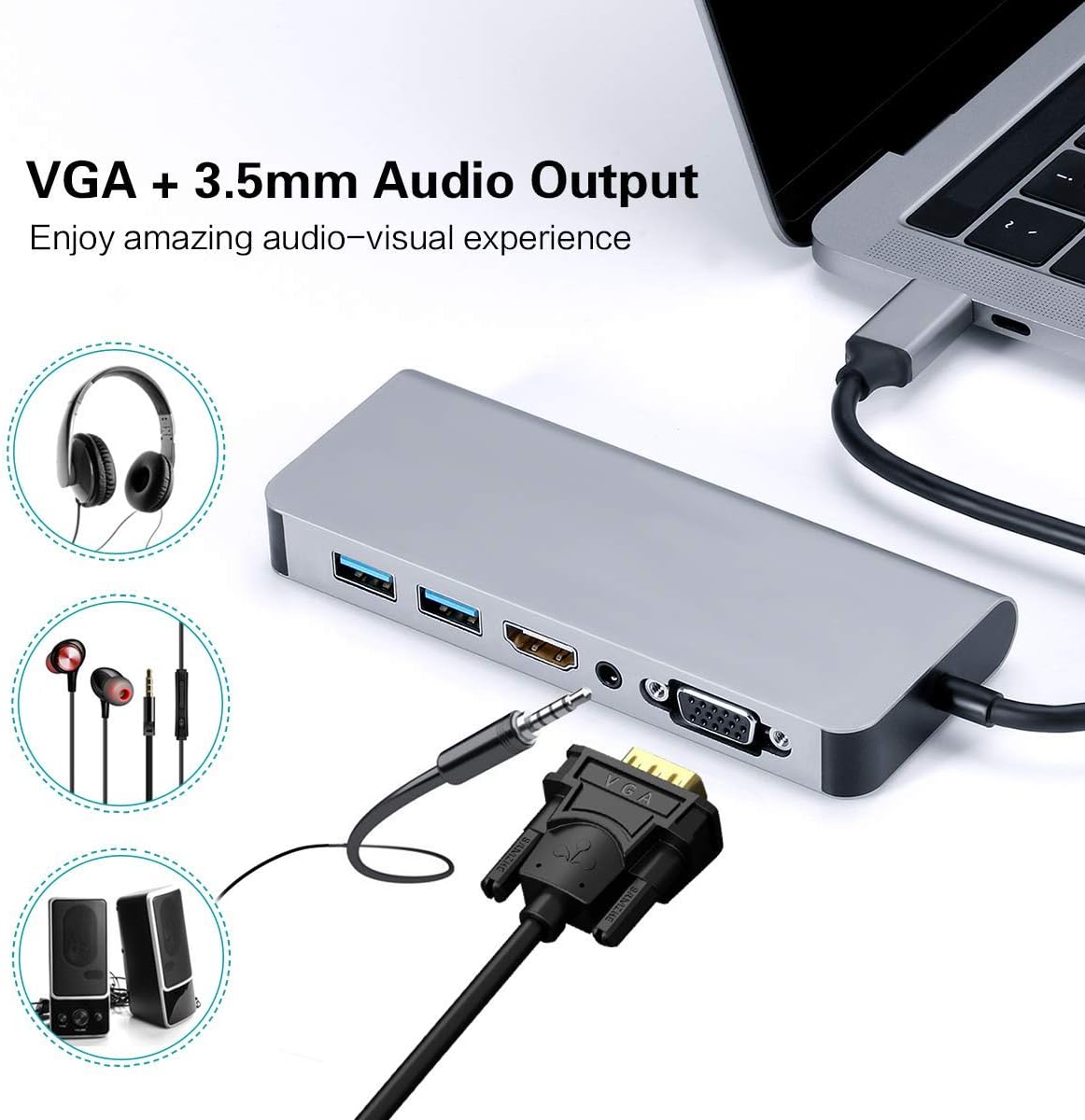
Figure 2: VGA and 3.5mm Audio Output for an enhanced audio-visual experience. - Падключэнне да сеткі: For a stable wired internet connection, plug an Ethernet cable into the RJ45 port on the hub.
- Падключыце прылады USB: Plug your USB peripherals (e.g., mouse, keyboard, USB drive) into the USB 3.0 ports.
- Power the Host Device: If your host device requires charging, connect your USB-C power adapter to the Power Delivery (PD) port on the hub. This allows your device to charge while using the hub's other functions.

Figure 3: Power Delivery and Data Transfer via USB 3.0 ports.
6. Інструкцыя па эксплуатацыі
6.1 Рэжымы адлюстравання
The hub supports both Mirror Mode and Extend Mode when connecting to external displays.
- Люстэркавы рэжым: Duplicates your host device's screen onto the external display(s). This is ideal for presentations or sharing content.
- Рэжым пашырэння: Extends your desktop across multiple screens, allowing for increased workspace. This mode is typically supported by laptops.
Заўвага: Extend Mode functionality is primarily for laptops. For smartphones, it typically mirrors the display or activates specific desktop environments like Samsung Dex.

6.2 Samsung Dex Experience
For compatible Samsung smartphones (S10/S10+/S10e/S9/S9+/S8/S8+/S8 Active/Huawei Mate10/Pro), the hub can enable a PC-like desktop experience via Samsung Dex. To activate Dex mode, ensure external power is supplied to the hub via the PD charging port.
Заўвага: Samsung Dex functionality may require your phone's operating system to be upgraded to Windows 10 or above. Always ensure your device is compatible and updated.


6.3 Афіцыйнае відэа прадукту
Video 1: An official demonstration of the 7-in-1 USB C Multiport Hub by LC-Dolida, showcasing its various functions and connectivity options.
7. Выпраўленне непаладак
- Няма вываду на дысплей:
- Пераканайцеся, што порт USB-C вашай прылады падтрымлівае відэавыхад (альтэрнатыўны рэжым DisplayPort).
- Check all cable connections (USB-C to hub, HDMI/VGA to display).
- Verify the input source on your monitor/TV is set correctly (e.g., HDMI 1, VGA).
- Паспрабуйце перазагрузіць галоўную прыладу.
- For Samsung Dex, ensure external power is connected to the hub.
- USB-прылады не распазнаюцца:
- Пераканайцеся, што хаб надзейна падключаны да вашай галоўнай прылады.
- Try connecting the USB device directly to your host device to confirm it's functional.
- If using high-power USB devices, ensure external power is supplied to the hub via the PD port.
- Slow Ethernet Speed:
- Check your Ethernet cable for damage.
- Ensure your network drivers are up to date on your host device.
- Праверце, ці правільна працуе ваш маршрутызатар/мадэм.
- Праблемы з зарадкай:
- Ensure your USB-C power adapter is connected to the hub's PD port and is functional.
- Verify your host device supports USB-C Power Delivery.
- Some devices, like the Samsung S8+, may not charge fully or quickly through the hub if the power input is insufficient for both the hub and the device.
8. Догляд і абслугоўванне
- Keep the hub away from water, fire, and corrosive materials.
- Пазбягайце падзення або моцных удараў канцэнтратара.
- Не спрабуйце самастойна разабраць або адрамантаваць прыладу. Звярніцеся ў службу падтрымкі па дапамогу.
- Clean the hub with a soft, dry cloth. Avoid using harsh chemicals or abrasive cleaners.
- Захоўвайце канцэнтратар у прахалодным сухім месцы, калі ён не выкарыстоўваецца.
9. Гарантыя і падтрымка
LC-dolida products are designed for reliability and performance. For any issues or questions regarding your LC-dolida USB C Hub Adapter, please contact our customer support team. We are committed to providing assistance and ensuring your satisfaction.
Please refer to the product packaging or the official LC-dolida webсайт для атрымання падрабязнай інфармацыі аб гарантыі і кантактнай інфармацыі.
Ask a question about this manual
Ask about setup, troubleshooting, compatibility, parts, safety, or missing instructions. Manuals+ will review the question and use this page’s manual context to help answer it.