
Уводзіны
The Motorola E202 is a digital cordless phone designed for ease of use and practicality. It features a bright backlit display, speakerphone functionality, and a "Do Not Disturb" mode. This model incorporates essential calling features, including advanced call blocking technology that allows you to block up to 10 unwanted numbers. This manual provides detailed instructions for setting up, operating, and maintaining your Motorola E202 cordless phone.
Змест пакета
Перад пачаткам пераканайцеся, што ў вашай упакоўцы ёсць усе пералічаныя ніжэй прадметы:
- Cordless Handset and Base Unit
- Additional Cordless Handset and Charger
- Адаптар харчавання (x2)
- Rechargeable Ni-MH Batteries (x4)
- Тэлефонны шнур
- Кіраўніцтва карыстальніка (гэты дакумент)

Image: The Motorola E202 Digital Cordless Phone, showing the handset resting in its base unit.
Настройка
- Усталюйце батарэі: Open the battery compartment cover on the back of each handset. Insert the two supplied Ni-MH rechargeable batteries, observing the correct polarity (+ and -). Close the battery compartment cover securely.

Выява: Збоку view of the Motorola E202 handset, showing the battery compartment area.
- Падключэнне базавага блока:
- Connect one end of the telephone line cord to the TEL LINE socket on the back of the main base unit.
- Падключыце другі канец тэлефоннага шнура да тэлефоннай разеткі.
- Connect one power adapter to the POWER socket on the main base unit and plug the other end into a mains power outlet.
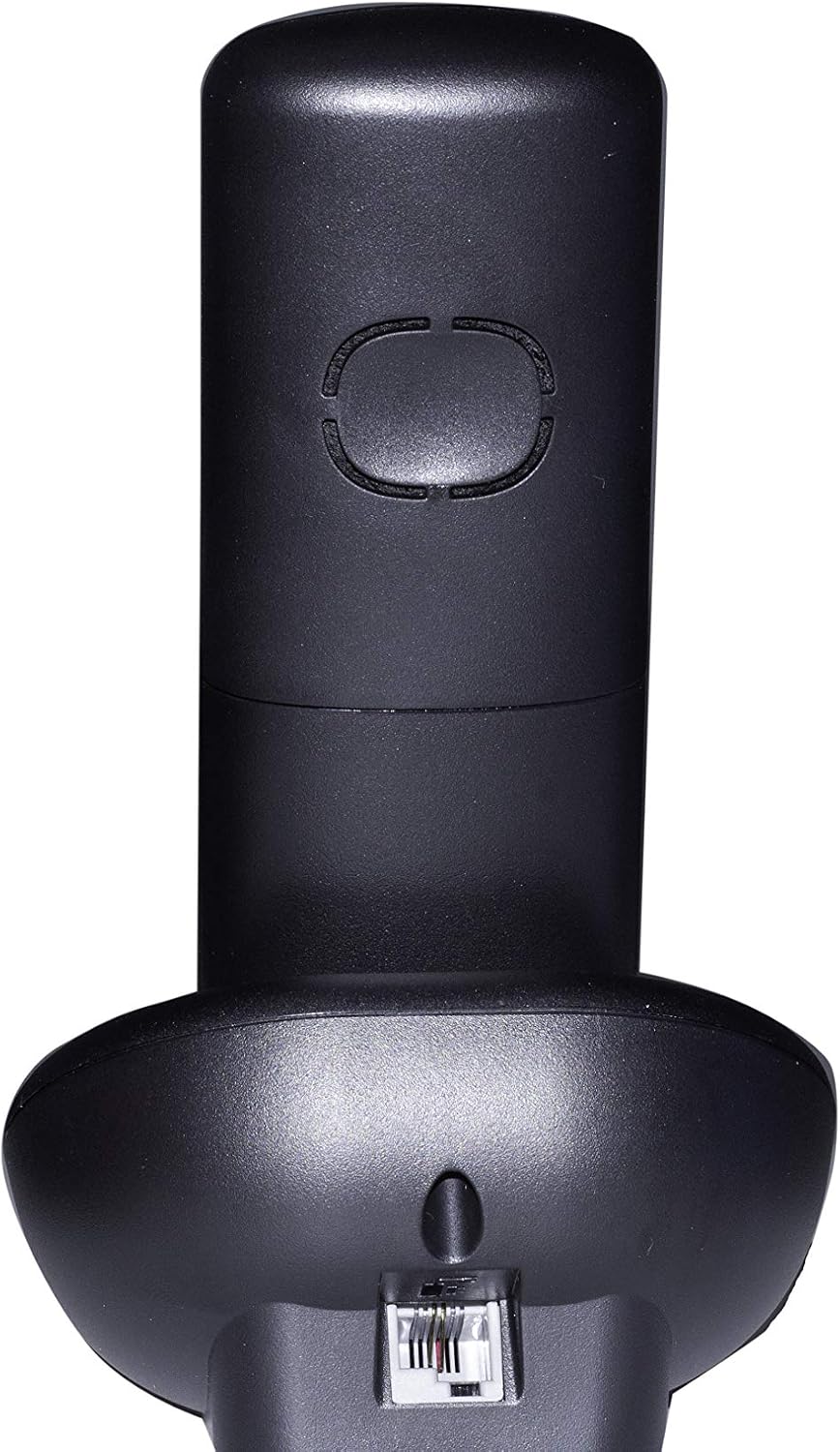
Выява: Задняя частка view of the Motorola E202 base unit, showing the telephone line and power input ports.
- Connect Additional Charger: Connect the second power adapter to the POWER socket on the additional charger unit and plug the other end into a mains power outlet.
- Зарадка тэлефонаў: Place each handset on its respective base/charger unit. The handsets will emit a short beep, and the display will indicate charging. Allow the handsets to charge for at least 16 hours before first use to ensure optimal battery performance.
Інструкцыя па эксплуатацыі

Выява: спераду view of the Motorola E202 handset, highlighting the display and keypad.
Здзяйсненне і прыём званкоў
- Зрабіце званок: Націсніце Green Call button (looks like a phone receiver), then dial the number. Alternatively, dial the number first and then press the Green Call button.
- Прыняць званок: Калі тэлефон звоніць, націсніце кнопку Green Call button.
- Завяршыць выклік: Націсніце Red End Call button (looks like a phone receiver with a line through it) або пастаўце трубку назад на базу/зарадную прыладу.
- Гучная сувязь: Падчас размовы націсніце Кнопка гучнай сувязі (looks like a speaker icon) to activate or deactivate the speakerphone.
Тэлефонная кніга
- Тэлефонная кніга можа захоўваць да 50 імёнаў і нумароў.
- To access the phonebook, press the Up/Down navigation buttons калі слухаўка не працуе.
- Follow the on-screen prompts to add, edit, or delete entries.
Блакаванне выкліку
- The Motorola E202 features advanced call blocking technology, allowing you to block up to 10 specific numbers.
- To block a number, navigate to the Call Blocking menu via the handset's menu options.
- You can also activate the "Do Not Disturb" function by pressing the dedicated "Do Not Disturb" button (looks like a crescent moon).
Caller ID and Redial
- Ідэнтыфікатар абанента: The handset display shows the caller's name and number (if available and subscribed to Caller ID service). The Caller ID list stores up to 20 names and numbers.
- Паўторны набор: The phone automatically stores the last 10 dialed numbers. Press the Кнопка паўторнага набору (looks like an 'R' or a curved arrow) to access and redial these numbers.
Тэхнічнае абслугоўванне
To ensure the longevity and optimal performance of your Motorola E202 cordless phone, follow these maintenance guidelines:
- Уборка: Працярыце трубку і базу мяккай губкайamp тканіна. Не выкарыстоўвайце абразіўныя ачышчальнікі або растваральнікі.
- Сыход за батарэяй: Use only the specified rechargeable Ni-MH batteries. If the phone will not be used for an extended period, remove the batteries to prevent leakage.
- Размяшчэнне: Keep the phone away from heat sources, direct sunlight, and moisture. Avoid placing it near other electrical appliances that may cause interference.
- Пазбягайце кропель: Handle the handset with care to prevent damage from accidental drops.
Ліквідацыю непаладак
If you encounter issues with your Motorola E202, refer to the following common problems and solutions:
| праблема | Рашэнне |
|---|---|
| Няма нумара набору. |
|
| Нельга рабіць або прымаць званкі. |
|
| Poor sound quality or interference. |
|
| Дысплей тэлефона пусты. |
|
Тэхнічныя характарыстыкі
| Асаблівасць | Дэталь |
|---|---|
| Марка | Motorola |
| мадэль | E202 |
| Колер | Чорны |
| Тып тэлефона | бесправадной тэлефон |
| Колькасць тэлефонаў | 2 (Dual Cordless Phone) |
| Патрабуюцца батарэі | 2 AAA Ni-MH rechargeable batteries per handset (included) |
| Матэрыял | Акрыланітрылбутадыенстырол (АБС) |
| Памеры прадмета (ДxШxВ) | 20 x 30 x 20 cm (approximate, likely packaging dimensions) |
| Тып аўтаадказчыка | Лічбавы |
| Сумяшчальныя прылады | Other cordless devices of the same model, automatic answering, fax |
| Шматлінейная аперацыя | так |
| Ідэнтыфікатар абанента | Yes (Caller ID list with 20 names and numbers) |
| Ёмістасць тэлефоннай кнігі | 50 імёнаў і лічбаў |
| Блакаванне выкліку | Blocks up to 10 numbers, "Do Not Disturb" function |
| Памяць паўторнага набору | Апошнія 10 лічбаў |
| Час размовы | Да 10 гадзін |
| Час чакання | Да 200 гадзін |
Гарантыя
The Motorola E202 Digital Cordless Phone comes with a Гарантыя 24 месяцаў from the date of purchase. This warranty covers manufacturing defects and material faults under normal use. Please retain your proof of purchase for warranty claims. The warranty does not cover damage caused by misuse, accidents, unauthorized repairs, or normal wear and tear.
Падтрымка
For further assistance, technical support, or to report a problem not covered in this manual, please refer to the official Motorola support channels. You can often find additional resources, FAQs, and contact information on the official Motorola website. A PDF version of this user manual is also available for download from the product's Amazon page or Motorola's support site.
Каб атрымаць найбольш актуальную інфармацыю аб падтрымцы, наведайце: www.motorola.com/support