
Уводзіны
This manual provides comprehensive instructions for the setup, operation, maintenance, and troubleshooting of your Logitech G703 Hero Lightspeed Wireless Gaming Mouse. Designed for precision and responsiveness, this mouse features the 16,000 DPI Hero optical sensor and Lightspeed wireless technology, along with customizable RGB illumination.
Прадукт скончаныview
The Logitech G703 Hero is a high-performance wireless gaming mouse engineered for competitive play and daily use. Key features include:
- Датчык HERO 16K: Delivers precise 1:1 tracking and 16,000 max DPI.
- Бесправадная сувязь LIGHTSPEED: Provides pro-grade connectivity with an incredibly fast 1 ms report rate.
- Эрганамічны дызайн: Shaped for comfort with rubber grips.
- Праграмуемыя кнопкі: Six customizable buttons for personalized control.
- Рэгуляваная вага: Includes an optional 10g removable weight.
- Падсвятленне LIGHTSYNC RGB: Customizable 16.8M color illumination.
- POWERPLAY Compatible: Supports continuous wireless charging with a POWERPLAY mouse pad (sold separately).
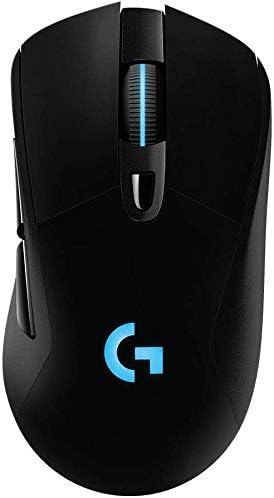
Малюнак 1: Верх view of the Logitech G703 Hero Wireless Gaming Mouse, showcasing its ergonomic design and illuminated 'G' logo.

Малюнак 2: Разарваны view illustrating key components including 6 programmable buttons, advanced button tensioning, charging/data cable, wireless extension adapter, LIGHTSPEED wireless nano receiver, ergonomic design with rubber grip, and 16.8M color RGB lighting.

Figure 3: Bottom and side profile of the G703 mouse, highlighting the ON/OFF switch, HERO 16K sensor, and the slot for the 10g removable weight. Dimensions are also shown.

Figure 4: Details of the HERO 16K Sensor, emphasizing 1:1 tracking, 16,000 max DPI, and class-leading efficiency.

Figure 5: Illustration of LIGHTSPEED Wireless technology, providing pro-grade connectivity with an incredibly fast 1 ms report rate.

Figure 6: The G703 mouse shown with a POWERPLAY mouse pad, indicating compatibility for continuous wireless charging and up to 60 hours of rechargeable battery life.
Настройка
- Зарадзіць мыш: Connect the included charging/data cable to the mouse and a USB port on your computer. Allow the mouse to fully charge before first use.
- Connect the LIGHTSPEED Receiver: Insert the LIGHTSPEED wireless nano receiver into an available USB port on your computer. For optimal performance, use the included wireless extension adapter to position the receiver closer to the mouse.
- Уключэнне: Locate the ON/OFF switch on the bottom of the mouse and slide it to the 'ON' position.
- Install G HUB Software: For full customization of buttons, DPI settings, and RGB lighting, download and install the Logitech G HUB software from the official Logitech webсайт.
- Optional Weight: If desired, insert the 10g removable weight into the designated slot on the bottom of the mouse for personalized feel and balance.
Інструкцыя па эксплуатацыі
Функцыі кнопак
The G703 Hero features six programmable buttons. By default, these buttons perform standard mouse functions. You can customize their actions using the Logitech G HUB software.
- Левы клік (кнопка 1): Першаснае дзеянне.
- Пстрыкніце правай кнопкай мышы (кнопка 2): Secondary action.
- Middle Click/Scroll Wheel (Button 3): Activates middle click, scrolls up/down.
- DPI Cycle (Button 4): Цыклічнае пераключэнне паміж зададзенымі ўзроўнямі адчувальнасці DPI.
- Forward (Button 5): Перамяшчаецца наперад web браўзеры або праграмы.
- Back (Button 6): Пераходзіць назад у web браўзеры або праграмы.
Рэгуляванне DPI
The DPI (Dots Per Inch) setting determines the mouse cursor's sensitivity. Use the DPI Cycle button (Button 4) to switch between different DPI profiles. You can configure these profiles in the G HUB software to match your preferences for various games or tasks.
Настройка асвятлення RGB
The G703 Hero features LIGHTSYNC RGB lighting on the 'G' logo and scroll wheel. Use the Logitech G HUB software to select from 16.8 million colors, synchronize lighting effects with other Logitech G devices, or create custom animations.
Кіраванне батарэяй
The mouse offers up to 60 hours of battery life on a single charge. When the battery is low, the RGB lighting may flash to indicate the need for recharging. Connect the charging/data cable to continue using the mouse while it charges. For continuous wireless charging, the mouse is compatible with the Logitech POWERPLAY Wireless Charging System (sold separately).
Тэхнічнае абслугоўванне
To ensure optimal performance and longevity of your Logitech G703 Hero mouse, follow these maintenance guidelines:
- Уборка: Выкарыстоўвайце мяккую тканіну без ворса, каб працерці паверхню мышы. Для выдалення ўстойлівага бруду злёгкуampпрамыйце тканіну вадой. Пазбягайце агрэсіўных хімічных рэчываў або абразіўных матэрыялаў.
- Сыход за датчыкам: Keep the optical sensor on the bottom of the mouse clean and free of dust or debris. Use a can of compressed air to gently clear any obstructions.
- захоўванне: Калі мыш не выкарыстоўваецца працяглы час, захоўвайце яе ў чыстым, сухім месцы, удалечыні ад экстрэмальных тэмператур.
Ліквідацыю непаладак
| праблема | Магчымае рашэнне |
|---|---|
| Мышка не рэагуе |
|
| Затрымка або перарывістае падключэнне |
|
| DPI or button settings not working |
|
| Не працуе RGB-асвятленне |
|
Тэхнічныя характарыстыкі
- Марка: Logitech
- мадэль: G703 Hero Lightspeed
- Тэхналогія падключэння: Wireless (LIGHTSPEED)
- Тэхналогія выяўлення руху: Optical (HERO 16K Sensor)
- Макс. DPI: 16,000
- Праграмуемыя кнопкі: 6
- RGB асвятленне: LIGHTSYNC RGB (16.8M colors)
- Вага: 7.8 ounces (without optional weight)
- Optional Weight: 10 г
- Тэрмін службы батарэі: Up to 60 hours (without lighting), up to 35 hours (with default lighting)
- Памеры (Д х Ш х У): 5.67 х 3.35 х 3.31 цаляў (памеры ўпакоўкі)
- колер: Чорны
- Першая даступная дата: 11 снежня 2017 г
Гарантыя і падтрымка
This product is sold as "Renewed" and may come with specific return policies. Please refer to your purchase documentation for details on the return policy, which typically allows for returns or replacements within 90 days. For technical support, driver updates, and additional resources, please visit the official Logitech support webсайт.
Служба падтрымкі Logitech Webсайт: support.logi.com