
Уводзіны
This manual provides detailed instructions for the safe and efficient operation of your JVC KD-T812BT CD Receiver. Please read this manual thoroughly before using the product and keep it for future reference. This unit features integrated Alexa, Bluetooth hands-free calling and audio streaming, a high-performance tuner, sound processor, USB, AUX, and Spotify Control.
Настройка
Распакаванне і змесціва ўпакоўкі
Carefully remove all items from the packaging. Ensure all components are present before proceeding with installation.
- KD-T812BT Main Unit
- Пярэдняя панэль
- Пярэдняя рама
- Installation Sleeve
- Праводка ISO
- Release Hooks (2x)
- Мікрафон
Ўстаноўка
Professional installation is recommended for optimal performance and safety. Refer to the included wiring harness diagram for correct connections. Ensure the vehicle's battery is disconnected before starting installation.
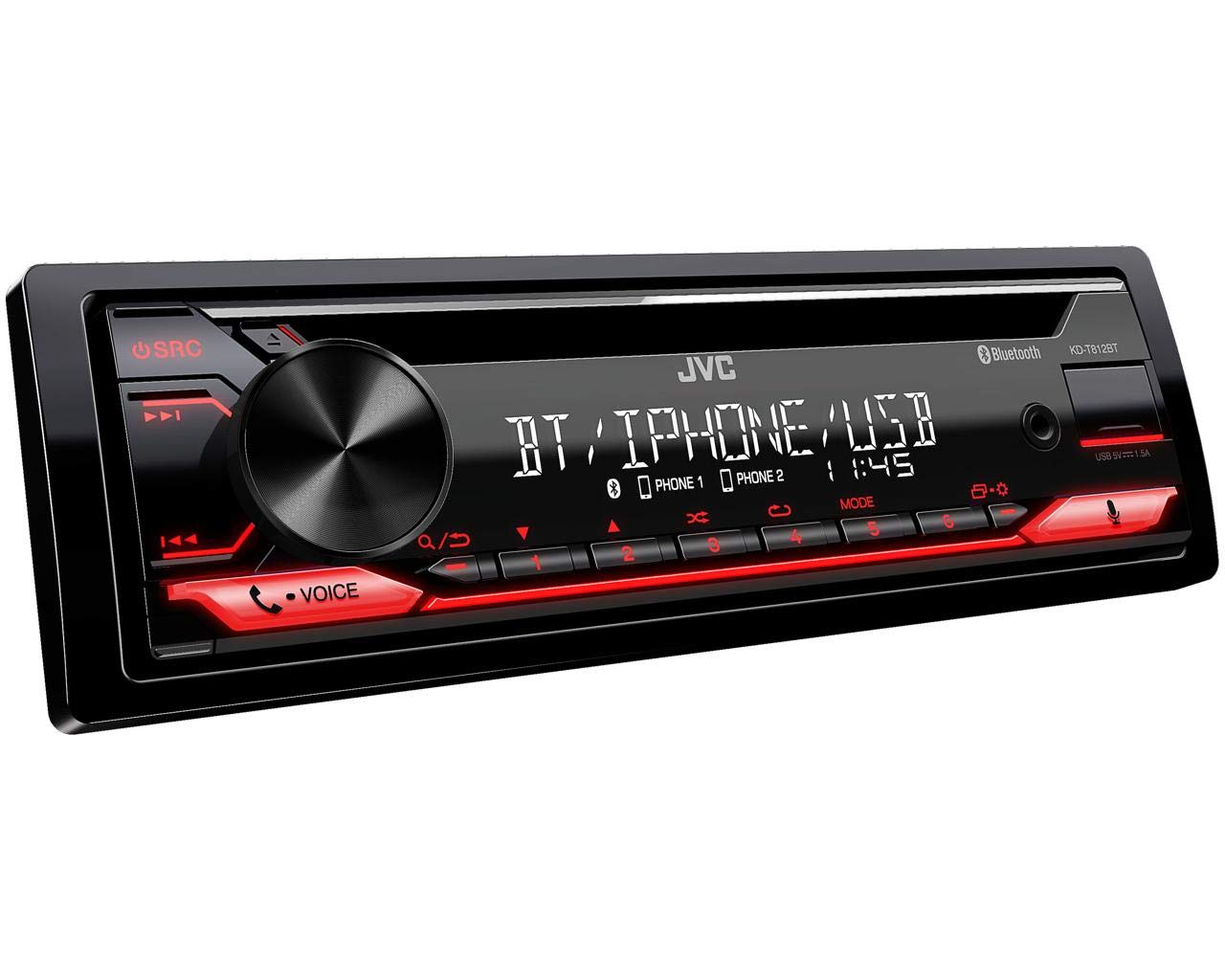
Малюнак 1: Спераду view of the JVC KD-T812BT CD Receiver. This image shows the main display, control knob, source button, and various function buttons with red illumination.

Малюнак 2: Задняя частка view of the JVC KD-T812BT CD Receiver, illustrating the wiring harness connector, antenna input, and RCA pre-out connections.
Першапачатковае ўключэнне
- Пасля ўстаноўкі зноў падключыце акумулятар аўтамабіля.
- Націсніце SRC кнопка для ўключэння прылады.
- Выконвайце падказкі на экране для пачатковай налады, у тым ліку выбару мовы.
Спалучэнне Bluetooth
To use Bluetooth features, you must pair your smartphone with the receiver.
- Уключыце Bluetooth на смартфоне.
- On the KD-T812BT, navigate to the Bluetooth menu.
- Выберыце «Спалучэнне» або «Пошук прылад».
- Select "KD-T812BT" from your smartphone's Bluetooth device list.
- Пацвердзіце код спалучэння на абедзвюх прыладах, калі будзе запытана.
- Up to two phones can be connected simultaneously for hands-free calls, and up to five smartphones for audio playback.

Figure 3: Illustration representing the Bluetooth hands-free calling feature, highlighting wireless connectivity for communication.
JVC Remote App
Download the JVC Remote App from your smartphone's app store to control the receiver directly from your device.

Figure 4: Icon representing the JVC Remote App, which allows smartphone control of the receiver.
Інструкцыя па эксплуатацыі
Асноўныя элементы кіравання
- Уключэнне/выключэнне харчавання: Націсніце SRC button. Hold to turn off.
- Рэгулятар гучнасці: Rotate the large central knob.
- Выбар крыніцы: Націсніце SRC button repeatedly to cycle through sources (CD, USB, Tuner, Bluetooth Audio, AUX).
- Навігацыя па меню: Use the central knob and surrounding buttons to navigate menus.
Прайграванне кампакт-дыскаў
- Устаўце кампакт-дыск у адтуліну для дыскаў этыкеткай уверх. Прылада аўтаматычна пачне прайграванне.
- Выкарыстоўвайце Прапусціць кнопкі (<< / >>) to change tracks.
- Націсніце Паўза/Прайграванне кнопку для прыпынення або аднаўлення прайгравання.
- Каб выняць кампакт-дыск, націсніце кнопку Выняць кнопка.
Прайграванне з USB
Connect a USB storage device to the USB port. The unit supports AAC, MP3, WMA, WAV, and FLAC audio formats. The USB port also provides 1.5A charging for smartphones.

Figure 5: Logo indicating compatibility with iPhone and iPod devices for direct connection via USB.

Figure 6: Icon illustrating the USB port's capability to provide up to 1.5A charging current for connected devices.
Радыё цюнэр
Select the Tuner source. Use the шукаць buttons to find stations. Press and hold to auto-seek. Store your favorite stations using the preset buttons (1-6).
- RDS (сістэма радыёданых): Displays station information, program type, and traffic announcements where available.
- Памяць станцыі: The unit supports 18 FM and 6 MW station presets.
Аўдыё струмень Bluetooth
Once paired, select Bluetooth Audio as the source. You can stream music from your smartphone. The advanced AVRCP 1.6 profile allows for convenient searching of individual music tracks directly from the car stereo.
Званок па гучнай сувязі
When a paired phone receives a call, the unit will display caller information. Use the Адказ і Завяршыць выклік buttons on the unit to manage calls. The external microphone ensures clear communication.
Інтэграцыя Alexa
With the Alexa app installed on your smartphone and connected via Bluetooth, you can use voice commands for various functions, including playing music, checking traffic, creating shopping lists, and getting news updates.

Figure 7: Logo indicating the integration of Amazon Alexa voice services within the receiver.
Spotify Control
Connect your smartphone running the Spotify app via Bluetooth or USB. You can then control Spotify playback directly from the receiver, including track selection and playlist browsing.

Figure 8: Logo representing the Spotify Control feature, allowing direct control of Spotify from the head unit.
Налады гуку
Access the sound menu to adjust audio settings:
- 13-Band Parametric iEQ: Allows precise adjustment of frequency response.
- DSP (Digital Signal Processor) with Time Alignment: Optimizes sound stagшляхам рэгулявання затрымкі для кожнага дынаміка.
- Актыўны кросовер: Configures frequency ranges for connected speakers and subwoofers.

Figure 9: Icon representing the Digital Sound Processor (DSP) capabilities for advanced audio tuning.
Налады дысплея
Adjust the brightness of the display and button illumination through the system settings menu. The unit features a 13-digit VA LCD display for good readability.
Тэхнічнае абслугоўванне
Ачыстка прылады
Wipe the unit's surface with a soft, dry cloth. For stubborn dirt, use a cloth lightly dampened with water. Avoid using abrasive cleaners or solvents, as they can damage the finish.
Чыстка дыскаў
Handle CDs by their edges. If a CD is dirty, wipe it gently from the center outwards with a soft, lint-free cloth. Do not use solvents or abrasive cleaners.
Ліквідацыю непаладак
If you encounter issues with your KD-T812BT, refer to the following common problems and solutions:
| праблема | Магчымая прычына | Рашэнне |
|---|---|---|
| Няма ўлады | Loose wiring connection; Blown fuse. | Check power and ground connections. Inspect and replace fuse if necessary. |
| Няма гуку | Занадта нізкая гучнасць; уключаны гук без гуку; праблема з праводкай дынаміка. | Increase volume. Deactivate mute. Check speaker connections. |
| Збой злучэння Bluetooth | Device not in pairing mode; Interference; Already connected to another device. | Ensure both devices are in pairing mode. Move closer to the unit. Disconnect from other devices. |
| CD/USB playback error | Dirty or scratched disc; Incompatible file format; Damaged USB device. | Ачысціце або заменіце дыск. Пераканайцеся files are supported formats. Try a different USB device. |
If the problem persists after attempting these solutions, please contact JVC customer support.
Тэхнічныя характарыстыкі
| Асаблівасць | Спецыфікацыя |
|---|---|
| Нумар мадэлі | KD-T812BT |
| Марка | JVC |
| Тэхналогія падлучэння | Bluetooth, USB |
| Тып кантролера | Amazon Alexa |
| Асаблівасці | RDS, Spotify |
| Сумяшчальныя прылады | Смартфон |
| Кадзіроўка аўдыё | Стэрэа |
| Рэжым выхаду гуку | Стэрэа |
| Канфігурацыя канала аб'ёмнага гуку | 4.0 |
| Выходная магутнасць | 200 Watts (4 x 50 W) |
| Колькасць каналаў | 4 |
| Internet Application | Spotify |
| Метад кантролю | Ужыванне |
| Фармат лічбавых медыя | MP3 audio, WAV, WMA, AAC, FLAC |
| Колер | Чорны |
| Ток зарадкі USB | Да 1.5 А |
| Дысплей | 13-digit VA LCD |
Інфармацыя аб гарантыі
Гэты прадукт распаўсюджваецца на a 2-гадовая гарантыя вытворцыКалі ласка, захавайце пацвярджэнне пакупкі для прэтэнзій па гарантыі. Гарантыя распаўсюджваецца на дэфекты матэрыялаў і вырабу пры нармальным выкарыстанні. Яна не распаўсюджваецца на пашкоджанні, выкліканыя няправільным выкарыстаннем, аварыяй, несанкцыянаванай мадыфікацыяй або няправільнай устаноўкай.
For detailed warranty terms and conditions, please refer to the warranty card included with your product or visit the official JVC webсайт.
Падтрымка кліентаў
For further assistance, technical support, or service inquiries, please contact JVC customer support. You can find contact information on the official JVC webна сайце або ў дакументацыі, якая пастаўляецца з вашым прадуктам.
Before contacting support, please have your product model number (KD-T812BT) and purchase details ready.
Афіцыйны JVC Webсайт: www.jvc.com