
1. Уводзіны
The Okaysou AirMic4S Air Purifier is designed to provide clean and fresh air in your home or office. It features an advanced filtration system to capture and reduce airborne particles, odors, and harmful gases, contributing to a healthier indoor environment.

Figure 1.1: Okaysou AirMic4S Air Purifier, illustrating its capability to filter various airborne contaminants including dust, pollen, dander, smoke, and VOCs.
This manual provides detailed instructions for the setup, operation, maintenance, and troubleshooting of your AirMic4S Air Purifier. Please read it thoroughly before use and keep it for future reference.
2. Інфармацыя па бяспецы
Каб знізіць рызыку пажару, паражэння электрычным токам або траўмаў, калі ласка, выконвайце наступныя меры бяспекі:
- Заўсёды адключайце ачышчальнік паветра ад сеткі перад перамяшчэннем, чысткай або заменай фільтраў.
- Не выкарыстоўвайце прыладу з пашкоджаным шнуром або вілкай.
- Трымайце шнур сілкавання далей ад нагрэтых паверхняў.
- Do not block air openings or place the unit on a soft surface where openings may be blocked.
- Не апускайце прыладу ў ваду ці іншыя вадкасці.
- Гэты прыбор не прызначаны для выкарыстання асобамі (у тым ліку дзецьмі) з абмежаванымі фізічнымі, сэнсарнымі або разумовымі здольнасцямі, або з адсутнасцю вопыту і ведаў, за выключэннем выпадкаў, калі яны знаходзяцца пад наглядам або інструкцыямі адносна выкарыстання прыбора асобай, адказнай за іх бяспеку .
- Use only genuine Okaysou replacement filters to maintain optimal performance and warranty.
3. Прадукт скончыўсяview
The Okaysou AirMic4S features a compact design with powerful air purification capabilities. It utilizes a multi-stage filtration system to effectively clean the air.

Малюнак 3.1: Спераду view of the Okaysou AirMic4S Air Purifier, showcasinг яго элегантны дызайн.
3.1 Асноўныя кампаненты
- Паветразаборная рашотка: Located on the lower section, designed to capture hair and large particles.
- Панэль кіравання: Top-mounted touch panel for all functions.
- Выхад паветра: Top grille for purified air release.
- Адсек фільтра: Houses the multi-stagэлектронны фільтр.
3.2 Сістэма фільтрацыі
The AirMic4S employs an advanced 3-stage H13 True HEPA filtration system:
- Мыйны папярэдні фільтр: The first defense, capturing large particles like hair and fur.
- Фільтр H13 True HEPA: Captures pollen, dander, dust, smell, and smoke particles as small as 0.3 microns.
- Фільтр з актыўным вуглём: Effectively absorbs stubborn and unwanted odors, harmful gases, and VOCs.

Figure 3.2: Illustration of the advanced 3-stage H13 True HEPA filtration system, detailing the washable pre-filter, H13 True HEPA filter, and active carbon filter.
4. Настройка
Follow these steps to set up your Okaysou AirMic4S Air Purifier:
- Распакуйце блок: Асцярожна дастаньце ачышчальнік паветра з упакоўкі.
- Выдаліць упакоўку фільтра: Before first use, unscrew the bottom cover (twist counter-clockwise) and remove the plastic packaging from the filter.
- Зноў усталюйце фільтр: Place the filter back into the unit, ensuring it is seated correctly.
- Бяспечная ніжняя вечка: Replace the bottom cover and twist clockwise to secure it.
- Размяшчэнне: Place the air purifier on a firm, level surface. Ensure there is adequate space around the unit for proper airflow (at least 6 inches from walls or furniture).
- Падключыць: Падключыце шнур сілкавання да адпаведнай электрычнай разеткі.
5. Інструкцыя па эксплуатацыі
The AirMic4S features an intuitive touch control panel for easy operation.

Figure 5.1: The control panel of the AirMic4S, showing buttons for power, fan speed, timer, filter reset, and night light/sleep mode.
5.1 Функцыі панэлі кіравання
- Кнопка харчавання (⑁): Націсніце, каб уключыць або выключыць прыладу.
- Fan Speed Button (✴): Цыклічнае пераключэнне хуткасцей вентылятара (нізкая, сярэдняя, высокая).
- Timer Button (⌛): Sets the operating timer for 2, 4, or 8 hours. The unit will automatically turn off after the selected time.
- Night Light Mode (🌙): Activates or deactivates the night light feature.
- Sleep Mode (🌛): Activates a quiet operation mode (as low as 24dB) for undisturbed sleep.
- Filter Reset Indicator (📄): Lights up when it's time to replace the filter. Press and hold to reset after filter replacement.
5.2 Агульныя дзеянні
- Уключэнне: Press the Power button to start the air purifier. It will typically start on a low fan speed.
- Адрэгулюйце хуткасць вентылятара: Press the Fan Speed button repeatedly to cycle through the desired fan speeds (Low, Medium, High).
- Устанавіць таймер: Press the Timer button to select 2H, 4H, or 8H. The corresponding indicator will light up.
- Актываваць рэжым сну: Press the Sleep Mode button to enter ultra-quiet operation. The night light may dim or turn off in this mode.
- Control Night Light: Use the Night Light button to toggle the light on or off independently.
- Выключэнне: Зноў націсніце кнопку харчавання, каб выключыць прыладу.
6. Тэхнічнае абслугоўванне
Рэгулярнае абслугоўванне забяспечвае аптымальную прадукцыйнасць і падаўжае тэрмін службы вашага ачышчальніка паветра.
6.1 Замена фільтра
The filter replacement indicator will illuminate when it's time to change the filter. Filter lifespan varies based on usage and air quality.
- Адключыце ачышчальнік паветра ад разеткі.
- Turn the unit upside down and twist the bottom cover counter-clockwise to remove it.
- Зніміце стары фільтр.
- Insert a new genuine Okaysou filter into the unit.
- Replace the bottom cover and twist clockwise to secure it.
- Plug in the unit. With the unit powered on, press and hold the Filter Reset button for 3-5 seconds until the indicator light turns off.
Okaysou offers 4 optional replacement filters tailored to specific needs:
- Арыгінальны фільтр: Best for general use, absorbing odors, dander, pollen, smoke.
- Customized Blue Filter (G-Defense Filter): Best for humid environments to absorb harmful substances.
- Customized Green Filter (Toxin Absorber Filter): Best for areas with high levels of toxins, vehicle exhaust, VOCs.
- Yellow Odor Remover Filter: Best for powerfully reducing odors from ash, wildfire, cooking.

Figure 6.1: Various optional replacement filters available for the AirMic4S, each designed for specific air purification needs.
6.2 Чыстка прылады
- Працярыце знешнія паверхні ачышчальніка паветра мяккай сухой тканінай.
- The washable pre-filter can be gently cleaned with a soft brush or vacuum cleaner to remove large dust and hair particles. Ensure it is completely dry before reinstallation.
- Не выкарыстоўвайце абразіўныя ачышчальнікі або растваральнікі.
7. Выпраўленне непаладак
If you encounter issues with your AirMic4S Air Purifier, refer to the following table for common problems and solutions:
| праблема | Магчымая прычына | Рашэнне |
|---|---|---|
| Прылада не ўключаецца. | Не падключана; адсутнічае харчаваннеtage; filter not installed correctly. | Ensure unit is securely plugged in. Check power supply. Verify filter is unwrapped and correctly seated, and bottom cover is secured. |
| Паветраны паток слабы або шумны. | Фільтр забруджаны або забіты; заблакіраваны паветразаборнікі/выхадныя адтуліны для паветра. | Clean or replace the filter. Ensure nothing is obstructing the air inlets or outlets. |
| Пах захоўваецца. | Filter needs replacement; strong external odor source. | Replace the filter, especially if using the Original filter for strong odors. Consider using an Odor Remover filter. Ensure the room is adequately ventilated. |
| Filter Reset light remains on after replacement. | Скід фільтра выкананы няправільна. | With the unit powered on, press and hold the Filter Reset button for 3-5 seconds until the light turns off. |
If the problem persists after trying these solutions, please contact Okaysou customer support.
8. Тэхнічныя характарыстыкі
| Асаблівасць | Дэталь |
|---|---|
| Нумар мадэлі | AirMic 4S |
| Памеры прадукту | 8.7" Г x 8.7" Ш x 11.89" У |
| Вага | 6.6 фунта |
| Намінальная магутнасць | 25 ват |
| Узровень шуму | 24 дБ (рэжым сну) |
| Зона пакрыцця | Up to 300 sq. ft. (5x per hour in 150 sq.ft, 3x per hour in 300 sq.ft, 2x per hour in 580 sq.ft) |
| Тып фільтрацыі | H13 True HEPA (3-Stage) |
| Без азону | 100% Ozone Free |
| Сертыфікаты | CARB, CE, RoHS, ETL Listed |
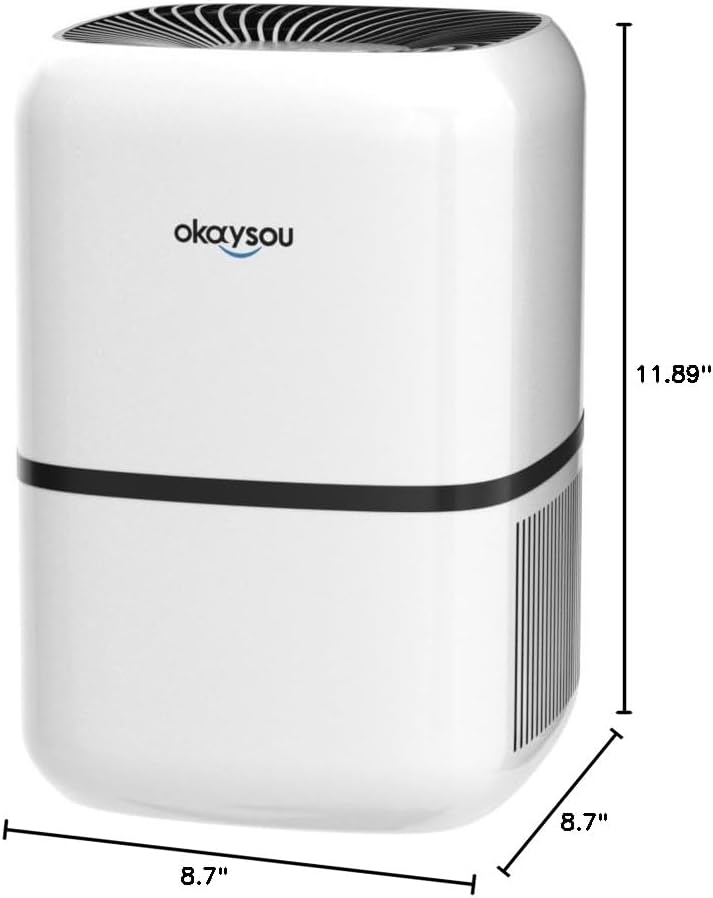
Малюнак 8.1: Памеры view of the Okaysou AirMic4S Air Purifier, showing its height, depth, and width.
9. Гарантыя і падтрымка
The Okaysou AirMic4S Air Purifier comes with a Гарантыя 5 год. Okaysou also provides lifetime US-based customer support.
For warranty claims, technical assistance, or any questions regarding your product, please contact Okaysou customer support through their official channels or refer to the contact information provided with your purchase.
You can also visit the official Okaysou store on Amazon for more information and support: Okaysou Amazon Store