
1. Уводзіны
This manual provides essential information for the installation, operation, maintenance, and troubleshooting of your Chieftec Polaris 650W 80Plus Certified Power Supply Unit (PSU). Please read this manual thoroughly before installing and using the product to ensure proper function and safety. The Chieftec Polaris 650W PSU is designed to provide stable and efficient power to your personal computer system.
2. Інфармацыя па бяспецы
Заўсёды выконвайце наступныя меры бяспекі, каб пазбегнуць траўмаў або пашкоджання абсталявання:
- Не рабі open the PSU casinг. Высокі аб'ёмtages inside can cause electric shock. There are no user-serviceable parts inside.
- Не рабі insert any objects into the PSU's ventilation openings.
- Не рабі expose the PSU to water, moisture, or high humidity.
- Ensure the PSU is installed in a well-ventilated area, free from obstructions to airflow.
- Заўсёды адключайце шнур харчавання пераменнага току ад разеткі перад усталёўкай, зняццем або чысткай блока харчавання.
- Use only the modular cables provided with your Chieftec Polaris 650W PSU. Using incompatible cables may damage the PSU or connected components.
- Ensure all cable connections are secure before powering on the system.
3. Змесціва ўпакоўкі
Праверце, ці ёсць усе прадметы ў вашай упакоўцы:
- Chieftec Polaris 650W Power Supply Unit
- Modular Cable Set (e.g., 24-pin ATX, 8-pin EPS/CPU, PCIe, SATA, Molex)
- Шнур сілкавання
- Крапежныя шрубы
- Кіраўніцтва карыстальніка (гэты дакумент)
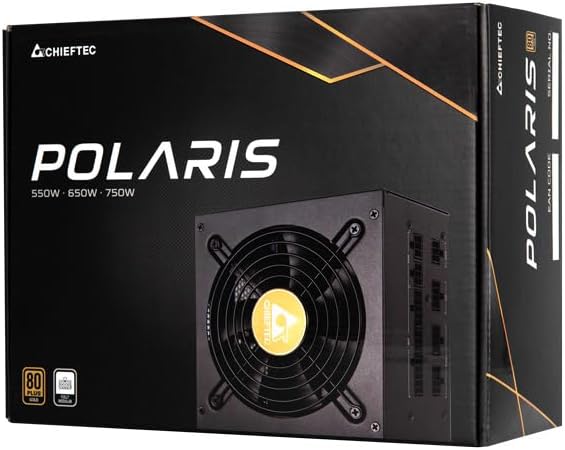
Image: The Chieftec Polaris 650W Power Supply Unit and its retail packaging.
4. Настройка і ўстаноўка
Follow these steps to install your Chieftec Polaris 650W PSU into your personal computer system:
- Падрыхтуйце сваю сістэму: Пераканайцеся, што камп'ютар цалкам выключаны і адключаны ад разеткі. Адкрыйце корпус камп'ютара, каб атрымаць доступ да месца мацавання блока харчавання.
- Зняць стары блок харчавання (калі ёсць): If replacing an existing PSU, disconnect all cables from the components and motherboard, then unscrew and remove the old PSU.
- Усталюйце новы блок харчавання: Carefully slide the Chieftec Polaris 650W PSU into the designated PSU bay in your computer case. Ensure the fan faces the correct direction (typically downwards for bottom-mounted PSUs, or as per case design for optimal airflow). Secure the PSU with the provided mounting screws.
- Падключэнне модульных кабеляў: Identify the necessary modular cables for your system components (motherboard, CPU, graphics card, storage drives). Connect these cables to the corresponding ports on the back of the PSU. Refer to the image below for connector identification.
- Падключэнне да кампанентаў: Connect the other end of the modular cables to your motherboard (24-pin ATX and 8-pin EPS/CPU), graphics card(s) (PCIe), and storage devices (SATA/Molex). Ensure all connections are firm and fully seated.
- Кабельнае кіраванне: Акуратна пракладзеце кабелі, каб палепшыць паветраабмен і эстэтыку ўнутры вашага корпуса.
- Канчатковыя праверкі: Double-check all connections. Ensure no loose cables are obstructing fans. Close your computer case.
- Падключыце сетку пераменнага току: Plug the AC power cord into the PSU's power inlet and then into a wall outlet.

Выява: Задняя частка view of the Chieftec Polaris 650W PSU showing modular cable connection ports for M/B, SATA, PCIe, and CPU.

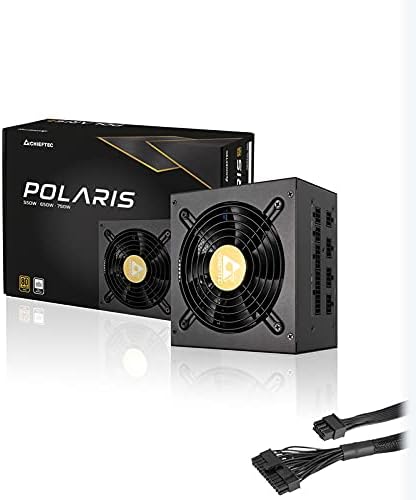
Image: The Chieftec Polaris 650W Power Supply Unit with its modular cables connected, ready for installation.
5. Інструкцыя па эксплуатацыі
Once the Chieftec Polaris 650W PSU is correctly installed and all connections are secure:
- Уключэнне: Locate the power switch on the back of the PSU (next to the AC power inlet). Ensure it is in the 'I' (On) position.
- Запуск сістэмы: Press the power button on your computer case. The system should power on, and the PSU fan will begin to spin, indicating normal operation.
- Праца вентылятара: The PSU features an air cooling method. The fan will operate to dissipate heat generated by the power supply components. Its speed may vary depending on the load and temperature to maintain optimal cooling and noise levels.
- Выключэнне: To shut down your system, use the operating system's shutdown procedure. For a complete power cut, switch the PSU's power switch to the 'O' (Off) position and unplug the AC power cord.
Выява: зверху ўніз view of the Chieftec Polaris 650W Power Supply, highlighting the cooling fan and protective grille.
6. Тэхнічнае абслугоўванне
Proper maintenance ensures the longevity and optimal performance of your PSU:
- Ачыстка ад пылу: Periodically (e.g., every 3-6 months), power off your computer, unplug the AC cord, and open the case. Use compressed air to gently blow dust out of the PSU's fan and ventilation grilles. Не рабі use a vacuum cleaner directly on the PSU as it can generate static electricity.
- Умовы навакольнага асяроддзя: Ensure the computer operates in a clean, dry, and well-ventilated environment. Avoid extreme temperatures and direct sunlight.
- Цэласнасць кабеля: Occasionally check that all modular cables are securely connected and not frayed or damaged.
7. Выпраўленне непаладак
If you encounter issues with your Chieftec Polaris 650W PSU, consider the following troubleshooting steps:
- Няма харчавання:
- Пераканайцеся, што шнур харчавання пераменнага току надзейна падключаны як да блока харчавання, так і да разеткі.
- Check that the PSU's power switch on the back is in the 'I' (On) position.
- Праверце працаздольнасць разеткі, падключыўшы да яе іншую прыладу.
- Confirm all internal power cables (24-pin ATX, 8-pin EPS/CPU) are firmly connected to the motherboard.
- Нестабільнасць сістэмы/выпадковыя адключэнні:
- Пераканайцеся, што блок харчавання мае належную вентыляцыю і не пераграваецца.
- Check all power connections to components (graphics card, storage) for looseness.
- If possible, test the PSU with a different set of components or in another system to rule out other hardware issues.
- Незвычайныя шумы:
- A rattling or grinding noise may indicate a fan issue. Power off the system and inspect the PSU fan for obstructions (e.g., loose cables).
- If the noise persists and is not due to an obstruction, contact support.
Калі гэтыя дзеянні не вырашаць праблему, звярніцеся да раздзела «Гарантыя і падтрымка».
8. Тэхнічныя характарыстыкі
| Асаблівасць | Спецыфікацыя |
|---|---|
| Марка | Шэфтэк |
| Назва мадэлі | Палярная зорка |
| Нумар мадэлі тавару | IN-ACT-ZDLCHFOBU0087 |
| Выхад ватtage | 650 ват |
| Формаў-фактар | ATX |
| Спосаб астуджэння | паветра |
| Тып раздыма | ATX |
| Сумяшчальныя прылады | Персанальны кампутар |
| Памеры прадукту (Д х Ш х У) | 8.66 х 3.15 х 1.18 цалі (22 х 8 х 3 см) |
| Вага прадмета | 4.4 фунта (2 кілаграма) |
| Атэстацыя | Сертыфікат 80Plus |
9. Гарантыя і падтрымка
Chieftec products are manufactured to high-quality standards. For specific warranty terms and conditions, please refer to the warranty card included with your product or visit the official Chieftec website. Warranty periods and coverage may vary by region and product.
For technical support, product inquiries, or warranty claims, please contact Chieftec customer service through their official website or the contact information provided in your product documentation. When contacting support, please have your product model number (IN-ACT-ZDLCHFOBU0087) and proof of purchase readily available.