
1. Уводзіны
This manual provides detailed instructions for the Zopsc Portable MP4 Player. This device is designed for portable media playback, supporting music, video, radio, recording, and e-book functions. It features a 1.8-inch color display and supports up to a 32GB memory card for expanded storage.
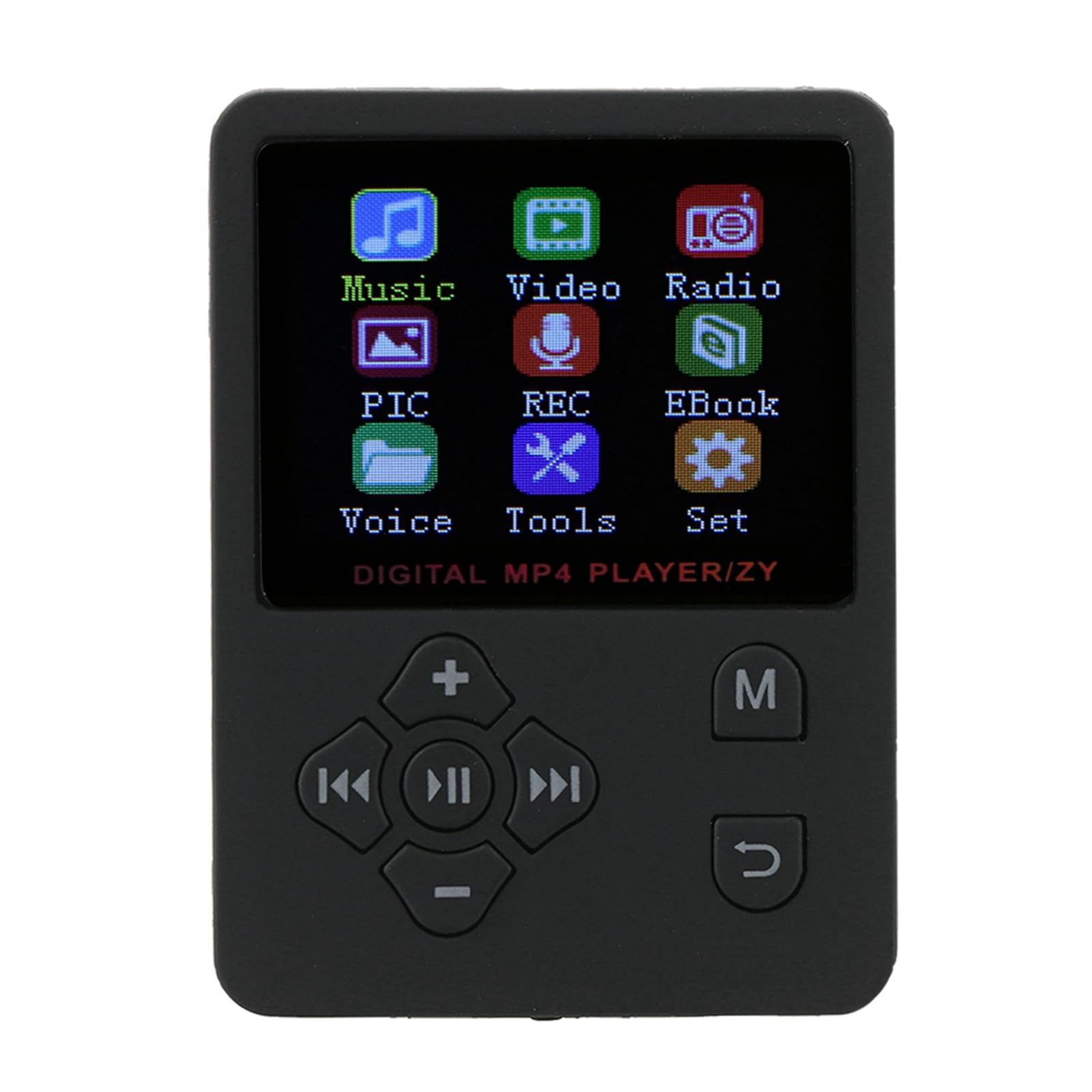
Выява 1.1: Спераду view of the Zopsc Portable MP4 Player showing its menu interface.
2. Што ў скрынцы
Праверце наяўнасць усіх прадметаў у камплекце:
- Zopsc Portable MP4 Player
- Навушнік
- Зарадны кабель

Image 2.1: The MP4 player, earphones, and charging cable included in the package.
3. Прадукт скончыўсяview
The Zopsc Portable MP4 Player is designed for ease of use and versatility. Key features include:
- Дысплей: 1.8-inch LCD color screen.
- захоўванне: No internal memory; supports up to 32GB Micro SD card (not included).
- акумулятар: Built-in 180mAh polymer lithium battery, providing 6-8 hours of continuous playback.
- Падключэнне: USB for charging and data transfer.
- Аўдыё фарматы: Supports MP3 and other audio formats.
- Фарматы відэа: Supports AMV video format.
- Функцыі: Music playback, video playback, FM radio, voice recording, e-book reader, stopwatch.
- мова: Default English, with support for 13 switchable languages.

Image 3.1: The MP4 player's main menu, illustrating its various functions.
4. Настройка
4.1 Зарадка прылады
Before first use, fully charge the MP4 player. Connect the provided USB charging cable to the player's USB port and to a power source (e.g., computer USB port or a USB wall adapter). The battery indicator on the screen will show charging status.

Image 4.1: Connecting the charging cable to the MP4 player.
4.2 Устаўка карты Micro SD
The player requires a Micro SD card for storing media files. Locate the card slot on the side of the device. Gently insert the Micro SD card into the slot until it clicks into place. Ensure the card is inserted in the correct orientation.

Image 4.2: Illustration of inserting a Micro SD card for 'Plug & Play' functionality.
4.3 Падключэнне навушнікаў
Plug the 3.5mm jack of your headphones into the headphone port located on the bottom of the player.

Image 4.3: The MP4 player with connected headphones.
5. Інструкцыя па эксплуатацыі
5.1 Уключэнне/выключэнне сілкавання
To power on, press and hold the power button (usually located on the side or top) until the screen lights up. To power off, press and hold the power button again until the device shuts down.
5.2 Навігацыя па меню
Use the directional buttons (up, down, left, right) to navigate through menu options. The 'MENU' button typically returns to the previous screen or main menu. The central button is usually for selection or play/pause.

Image 5.1: The MP4 player showcasing its multiple play modes and features.
5.3 Прайграванне музыкі
- У галоўным меню абярыце «Музыка».
- Праглядзіце сваю музыку fileзахоўваецца на карце Micro SD.
- Выберыце песню, каб пачаць прайграванне.
- Use the 'VOL' buttons to adjust volume.
- Use the left/right arrow buttons to skip tracks.
- The central button acts as play/pause.
5.4 Прайграванне відэа
The player supports AMV video format. Ensure your video files are converted to this format for proper playback.
- From the main menu, select 'Video'.
- Browse your video files.
- Выберыце відэа для прайгравання.
5.5 FM -радыё
Connect your headphones as they act as the antenna for the FM radio.
- У галоўным меню абярыце «Радыё».
- Выкарыстоўвайце параметры меню для пошуку станцый або ручной налады.
5.6 Запіс голасу
The player includes a built-in microphone for voice recording.
- From the main menu, select 'REC' (Recording).
- Выконвайце падказкі на экране, каб пачаць, прыпыніць і захаваць запісы.

Image 5.2: The MP4 player displaying its recording function.
5.7 Чыталка электронных кніг
The player supports reading text files.
- From the main menu, select 'EBook'.
- Browse and select your text files.
5.8 Функцыя секундамера
Access the stopwatch feature from the 'Tools' menu.
- From the main menu, select 'Tools'.
- Select 'Stopwatch' and follow the on-screen instructions to start, stop, and reset.
5.9 Налады мовы
The device supports 13 languages. To change the language:
- From the main menu, select 'Set' (Settings).
- Navigate to 'Language' and choose your preferred language.
6. Тэхнічнае абслугоўванне
6.1 Ачыстка
Wipe the device with a soft, dry cloth. Avoid using liquid cleaners or solvents, as they may damage the screen or casing.
6.2 Сыход за акумулятарам
Каб падоўжыць тэрмін службы батарэі, пазбягайце частай поўнай разрадкі батарэі. Рэгулярна зараджайце прыладу, асабліва калі яна не будзе выкарыстоўвацца працяглы час.

Image 6.1: The MP4 player displaying its battery charging status.
6.3 Захоўванне
Захоўвайце прайгравальнік у прахалодным, сухім месцы, удалечыні ад прамых сонечных прамянёў і экстрэмальных тэмператур.
7. Выпраўленне непаладак
| праблема | Магчымая прычына | Рашэнне |
|---|---|---|
| Прылада не ўключаецца | Нізкі зарад батарэі; прылада завісла | Charge the device for at least 30 minutes. If frozen, press and hold the power button for 10-15 seconds to force a restart. |
| Cannot play music/video | No Micro SD card; unsupported file фармат; пашкоджаны files | Ensure a Micro SD card is inserted. Verify files are in supported formats (e.g., MP3 for audio, AMV for video). Try re-transferring files. |
| З навушнікаў няма гуку | Headphones not properly connected; volume too low; faulty headphones | Пераканайцеся, што навушнікі цалкам падключаны. Павялічце гучнасць. Праверце з іншымі навушнікамі. |
| Радыё не працуе | Headphones not connected (acting as antenna) | Connect headphones to enable FM radio functionality. |
8. Тэхнічныя характарыстыкі
- Марка: Zopsc
- Нумар мадэлі: Zopsca1iypo4gz8-01
- колер: Чорны
- Памер экрана: 1.8 цалі
- Тэхналогія адлюстравання: ВК
- Захоўванне памяці: Supports up to 32GB Micro SD Card (not included)
- Падключэнне: USB
- Падтрымліваюцца аўдыяфарматы: MP3, etc.
- Падтрымліваюцца фарматы відэа: AMV
- акумулятар: 180mAh Polymer Lithium
- Тэрмін службы батарэі: Approximately 6-8 hours of continuous playback
- Вага прадмета: 0.07 кілаграма
- Памеры прадмета (Д х Ш х У): 0.3" x 2" x 2.8"
9. Афіцыйныя відэа пра прадукт
9.1 Portable MP3 Music Player Overview
Відэа 9.1: Кароткі аглядview of the portable MP3 music player, highlighting its suitability for active lifestyles and premium audio experience.
9.2 Portable MP3 Music Player Features
Video 9.2: Demonstrates key features of the portable MP3 music player, including its 1.8-inch LCD screen and lossless audio capabilities.
10. Гарантыя і падтрымка
This product is covered by a standard return policy, allowing for refunds or replacements within 30 days of purchase. For technical support or warranty claims, please contact the manufacturer, Zopsc, through your retailer or their official support channels. Please retain your proof of purchase for warranty validation.