
Уводзіны
Дзякуй за пакупкуasing the Caliber Alarm Clock with QI Charging Station. This device combines a digital alarm clock with a convenient wireless charging pad and a USB charging port, designed to simplify your bedside setup. It also features an adjustable night light and a large LED display for clear visibility.
This manual provides detailed instructions on how to set up, operate, maintain, and troubleshoot your new alarm clock. Please read it thoroughly before use to ensure optimal performance and longevity of the product.
Настройка
Распакаванне: Carefully remove the alarm clock from its packaging. Ensure all components are present: the alarm clock unit and the power adapter.
Падключэнне сілкавання: Connect the provided power adapter to the DC input port on the back of the alarm clock. Plug the other end of the adapter into a standard wall outlet. The display will illuminate.
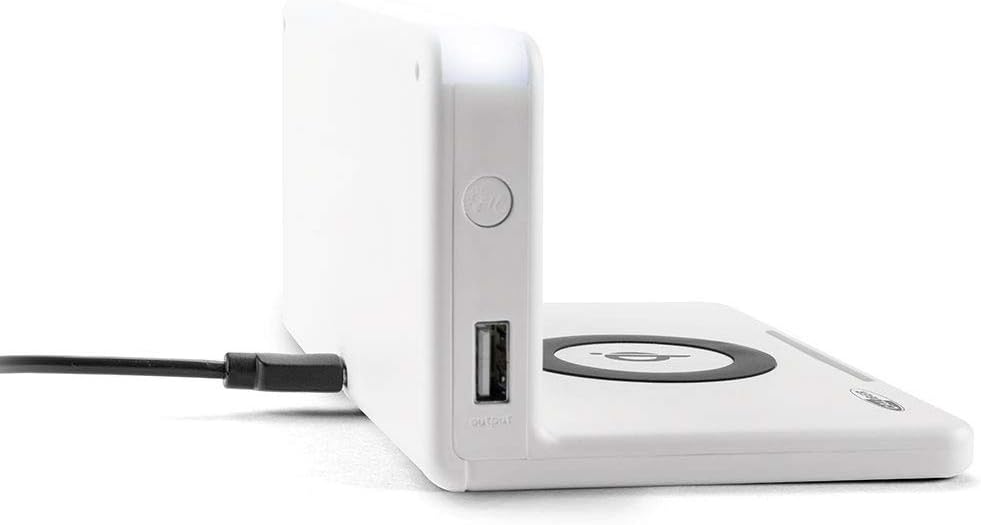
Выява: Збоку view of the alarm clock, illustrating the power input port (left) and the USB output port (right).
Battery Installation (Backup): The unit includes 1 Lithium Ion battery for backup. This battery maintains time settings during power outages. No user installation is typically required for this pre-installed battery.
Пачатковая ўстаноўка часу: Upon first power-up, the clock may display a default time or require manual setting. Refer to the "Operating" section for detailed instructions on setting the time.
Інструкцыя па эксплуатацыі
Ўстаноўка часу і даты
- Націсніце і ўтрымлівайце УСТАНОВА ЧАСУ button (location may vary, typically on the back or top) until the hour digits flash.
- Выкарыстоўвайце + or - кнопкі для рэгулявання гадзіны.
- Прэса УСТАНОВА ЧАСУ зноў, каб перайсці да хвілін, затым адрэгулюйце з дапамогай + or -.
- Repeat for year, month, and day if applicable.
- Прэса УСТАНОВА ЧАСУ one last time to confirm and exit.
Ўстаноўка будзільнікаў
- Націсніце і ўтрымлівайце ТРЫВОГА button (or similar) until the alarm hour digits flash.
- Adjust the alarm hour and minutes using the + or - кнопкі.
- Прэса ТРЫВОГА каб пацвердзіць.
- Каб уключыць/выключыць будзільнік, націсніце кнопку ТРЫВОГА ВКЛ / ВЫКЛ кнопка. На дысплеі з'явіцца/знікне значок сігналу трывогі.
- Калі прагучыць сігнал трывогі, націсніце СНАОЗ button for a temporary pause, or any other button to turn it off for the day.
Using the QI Wireless Charging Station
The alarm clock features a built-in QI wireless charging pad for compatible devices.
- Ensure the alarm clock is powered on.
- Place your QI-compatible smartphone or device directly onto the charging pad, centering it over the Лагатып QI.
- A charging indicator (e.g., an LED light or on-screen icon) will illuminate to confirm charging has begun. If charging does not start, reposition your device.

Image: A smartphone placed on the QI charging pad of the alarm clock, showing the charging interface on the phone screen.

Image: The alarm clock with a phone positioned on its wireless charging surface, indicating active charging.
Выкарыстанне USB-порта для зарадкі
A USB output port is available on the side of the unit for charging non-QI compatible devices or for faster wired charging.
- Connect your device's USB charging cable to the USB output port on the alarm clock.
- Падключыце другі канец кабеля да прылады. Зарадка пачнецца аўтаматычна.
Adjusting Display Brightness and Night Light
- The alarm clock features adjustable display brightness. Look for a ДЫММЕР or ЯРКАСЦЬ button, typically on the back or top. Press it repeatedly to cycle through brightness levels.
- To activate or adjust the night light, locate the dedicated НАЧНІЧНІК button. Press it to turn the light on/off or cycle through different brightness settings if available.
Тэхнічнае абслугоўванне
- Уборка: Disconnect the power adapter before cleaning. Use a soft, dry cloth to wipe the surface of the alarm clock. Do not use abrasive cleaners, waxes, or solvents as they may damage the finish.
- захоўванне: Калі прылада захоўваецца працяглы час, адключыце яе ад электрасеткі і захоўвайце ў прахалодным, сухім месцы.
- Апрацоўка: Avoid dropping the unit or subjecting it to strong impacts. Keep it away from water and high humidity.
Ліквідацыю непаладак
| праблема | Магчымая прычына | Рашэнне |
|---|---|---|
| Дысплей гадзінніка пусты. | Няма падключэння да сілкавання. | Пераканайцеся, што адаптар сілкавання надзейна падключаны да прылады і да спраўнай разеткі. |
| QI charging not working. | Device not QI-compatible; device not properly aligned; foreign objects on pad; phone case too thick. | Verify device compatibility. Reposition device on the center of the pad. Remove any foreign objects. Remove thick phone cases. |
| Сігналізацыя не гучыць. | Будзільнік не ўключаны; гучнасць занадта нізкая; няправільны час будзільніка. | Ensure the alarm icon is displayed. Check alarm volume settings. Verify the alarm time is set correctly. |
| Час няправільны. | Няправільна ўсталяваны час; адключэнне электраэнергіі. | Reset the time manually. If power was interrupted, the backup battery should maintain time, but a manual check is recommended. |
Тэхнічныя характарыстыкі
| Асаблівасць | Дэталь |
|---|---|
| Марка | Калібр |
| Нумар мадэлі | HCG018QI/W |
| Колер | Белы |
| Тып дысплея | Лічбавы |
| Асаблівасць | Night light, QI charging station, USB charging port |
| Крыніца харчавання | Правадная электрычная |
| Памеры прадукту | 7.09 х 4.25 х 3.86 цалі |
| Вага прадмета | 7.9 унцыі (225 грама) |
| Батарэі | 1 Lithium Ion battery (included, for backup) |
| GTIN | 08714505047157 |
Гарантыя і падтрымка
This Caliber product is designed for reliability and performance. For information regarding warranty coverage, please refer to the warranty card included with your purchase or visit the official Caliber webсайт.
Should you encounter any issues not covered in the troubleshooting section, or require further assistance, please contact Caliber customer support. Contact details can typically be found on the product packaging or the manufacturer's official webсайт.