
1. Уводзіны
Thank you for choosing the Awei A831BL Bluetooth In-Ear Headset. This manual provides essential information for the safe and efficient use of your device. Please read it carefully before use and retain it for future reference.
The Awei A831BL is a wireless in-ear headset designed for mobile phone use, offering up to 8 hours of continuous talk and music playback. It features pure, high-quality bass sound and is suitable for various activities.
2. Змесціва ўпакоўкі
Калі ласка, праверце ўпакоўку на наяўнасць наступных прадметаў:
- Awei A831BL Bluetooth In-Ear Headset
- USB-кабель для зарадкі
- Наканечнікі (розных памераў)
- Кіраўніцтва карыстальніка
3. Прадукт скончыўсяview
Familiarize yourself with the components of your Awei A831BL headset.
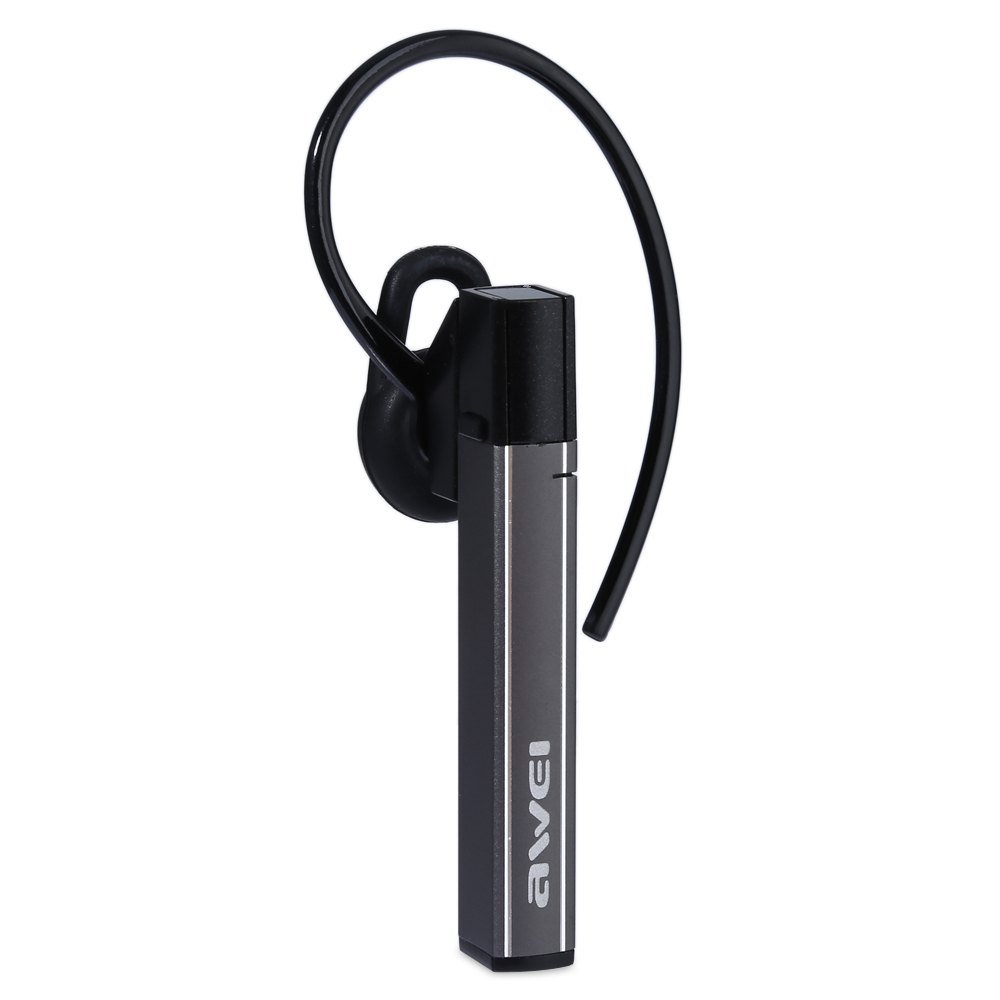
Image: The Awei A831BL Bluetooth In-Ear Headset in grey, showing the earbud design and inline controls.
The headset features an ergonomic in-ear design for comfortable wear, especially during activities. It includes an integrated microphone for hands-free calls and inline controls for managing audio and calls.
4. Настройка
4.1 Зарадка гарнітуры
- Падключыце кабель зарадкі USB да порта зарадкі на гарнітуры.
- Падключыце другі канец USB-кабеля да адаптара харчавання USB (не ўваходзіць у камплект) або да USB-порта кампутара.
- The indicator light will illuminate (e.g., red) during charging.
- Once fully charged, the indicator light will change (e.g., turn blue or turn off).
A full charge provides up to 8 hours of talk or music playback time.
4.2 Спалучэнне па Bluetooth
- Пераканайцеся, што гарнітура цалкам зараджана і выключана.
- Press and hold the Multi-function button (usually the center button on the inline control) for approximately 5-7 seconds until the indicator light flashes red and blue alternately, indicating pairing mode.
- On your mobile phone or Bluetooth-enabled device, enable Bluetooth and search for available devices.
- Select "Awei A831BL" from the list of found devices.
- Калі будзе прапанаваны пароль, увядзіце «0000» (чатыры нулі).
- Once successfully paired, the indicator light will flash blue slowly, and you may hear a confirmation tone.
Пры ўключэнні гарнітура аўтаматычна паспрабуе падключыцца да апошняй спалучанай прылады.
5. Інструкцыя па эксплуатацыі
5.1 Уключэнне/выключэнне сілкавання
- Уключэнне: Press and hold the Multi-function button for about 3 seconds until the blue indicator light flashes.
- Выключэнне: Press and hold the Multi-function button for about 3-4 seconds until the red indicator light flashes briefly and then turns off.
5.2 Прайграванне музыкі
- Прайграванне/Паўза: Націсніце шматфункцыянальную кнопку адзін раз.
- Павялічыць гучнасць: Націсніце кнопку «+».
- Паменшыць гучнасць: Націсніце кнопку «-».
- Наступны трэк: Націсніце і ўтрымлівайце кнопку «+».
- Папярэдні трэк: Націсніце і ўтрымлівайце кнопку «-».
5.3 Кіраванне выклікамі
- Адказаць на званок: Націсніце шматфункцыянальную кнопку адзін раз, калі паступае званок.
- Завяршыць выклік: Націсніце шматфункцыянальную кнопку адзін раз падчас размовы.
- Адхіліць выклік: Press and hold the Multi-function button for about 2 seconds when a call comes in.
- Паўторны набор апошняга нумара: Двойчы націсніце шматфункцыянальную кнопку.
The integrated microphone allows for clear hands-free communication.
6. Тэхнічнае абслугоўванне
- Рэгулярна працірайце гарнітуру мяккай сухой тканінай.
- Avoid exposing the headset to extreme temperatures, humidity, or corrosive substances.
- Не спрабуйце разбіраць або мадыфікаваць гарнітуру, бо гэта прывядзе да анулявання гарантыі і можа прывесці да пашкоджанняў.
- Захоўвайце гарнітуру ў прахалодным, сухім месцы, калі яна не выкарыстоўваецца.
7. Выпраўленне непаладак
| праблема | Рашэнне |
|---|---|
| Гарнітура не ўключаецца. | Ensure the headset is fully charged. Connect it to a power source and try again. |
| Немагчыма спалучыць прыладу. | Ensure the headset is in pairing mode (flashing red and blue). Turn off and on your device's Bluetooth. Move closer to the device. Clear previous Bluetooth connections on your device. |
| Няма гуку або нізкі ўзровень гучнасці. | Check the volume levels on both the headset and your connected device. Ensure the headset is properly connected. |
| Дрэнная якасць званка. | Ensure the microphone is not obstructed. Move to an area with less interference. Check your phone's signal strength. |
8. Тэхнічныя характарыстыкі
| Асаблівасць | Дэталь |
|---|---|
| Марка | Авей |
| Нумар мадэлі | А831БЛ |
| Колер | Шэры |
| Тэхналогія падлучэння | Бесправадная сувязь (Bluetooth) |
| Тып гарнітуры | Укладышы |
| Мікрафон | так |
| Шумапрыглушэнне | няма |
| Тэрмін службы батарэі | Up to 8 hours (talk/music) |
| Асаблівасці гуку | Pure, high-quality bass sound |
| Матэрыял | Пластыкавыя |
| Сумяшчальныя прылады | Мабільныя тэлефоны |
9. Гарантыя і падтрымка
Awei products are designed and manufactured to the highest quality standards. For warranty information and customer support, please refer to the warranty card included in your package or contact your local retailer. Keep your purchase receipt as proof of purchase.
For further assistance, please visit the official Awei webсайт або звярніцеся ў іх аддзел абслугоўвання кліентаў.


