
1. Уводзіны і большview
The Escort EDM 1111A is a versatile digital multimeter designed for accurate measurement of various electrical parameters. This device is essential for electricians, technicians, and hobbyists for testing circuits, components, and power sources. It features a clear digital display and a rotary dial for selecting different measurement functions.

The Escort EDM 1111A Digital Multimeter with red and black test leads connected, ready for use.
Асноўныя функцыі ўключаюць:
- DC Voltage (DCV) measurement
- Пераменнага токуtage (ACV) measurement
- DC Current (DCA) measurement
- AC Current (ACA) measurement
- Вымярэнне супраціву (Ω).
- Capacitance (CX) measurement
- Diode and Transistor (hFE) testing
2. Настройка
2.1 Устаноўка батарэі
The Escort EDM 1111A requires a DC 9V 006P battery for operation. To install or replace the battery:
- Пераканайцеся, што мультыметр выключаны.
- Знайдзіце батарэйны адсек на задняй частцы прылады.
- Carefully slide open or unscrew the battery cover.
- Insert a new 9V 006P battery, observing the correct polarity (+/-).
- Надзейна заменіце крышку батарэйнага адсека.

Тыл view of the Escort EDM 1111A Digital Multimeter, showing the battery compartment cover and the product label.
2.2 Падключэнне вымяральных правадоў
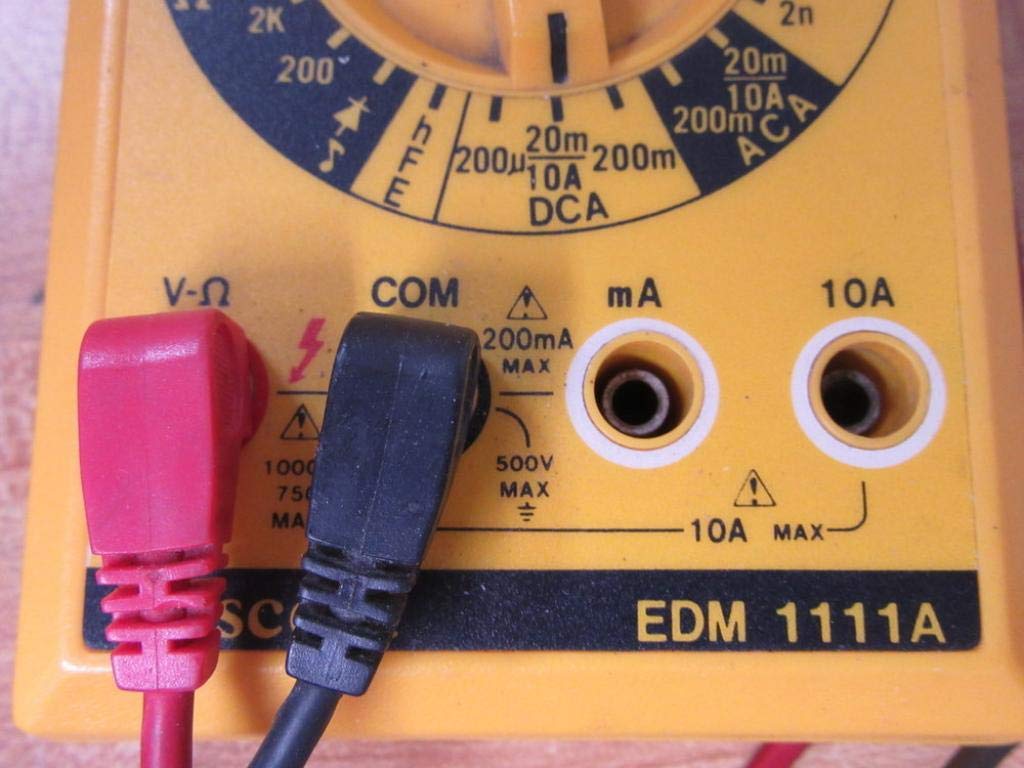
The multimeter comes with two test leads, typically one red (positive) and one black (negative/common). Proper connection is crucial for accurate and safe measurements.
- Для большасці аб'ёмаўtage, resistance, and low current measurements, connect the black lead to the 'COM' (Common) jack.
- Connect the red lead to the 'V-Ω-mA' jack for voltagе, супраціў і міліampтут бягучыя вымярэнні.
- Для вымярэнняў высокага току (да 10 А) падключыце чырвоны провад да раздыма «10 А». Always ensure the correct jack is used to prevent damage to the meter or circuit.

A closer look at the input jacks (V-Ω, COM, mA, 10A) and the lower portion of the rotary dial, indicating current measurement ranges.

The red and black test probes (leads) used with the Escort EDM 1111A Digital Multimeter, featuring pointed tips for electrical contact.
3. Інструкцыя па эксплуатацыі
Before taking any measurements, ensure the test leads are correctly connected and the rotary dial is set to the appropriate function and range.

Падрабязны view of the rotary selector dial on the Escort EDM 1111A Digital Multimeter, displaying various measurement functions such as DCV, ACV, Ω, DCA, ACA, and CX.
3.1 Вымярэнне пастаяннага току Voltagе (DCV)
- Set the rotary dial to the desired DCV range (e.g., 200m, 2, 20, 200, 1000). Choose a range higher than the expected voltage.
- Connect the red lead to the positive (+) side of the circuit and the black lead to the negative (-) side.
- Прачытайце тtage значэнне на дысплеі.
3.2 Вымярэнне AC Voltagе (ACV)
- Set the rotary dial to the desired ACV range (e.g., 200m, 2, 20, 200, 750). Choose a range higher than the expected voltage.
- Падключыце вымяральныя дроты да сеткі пераменнага току.tage source. Polarity does not matter for AC voltage.
- Прачытайце тtage значэнне на дысплеі.
3.3 Вымярэнне супраціўлення (Ом)
- Перад вымярэннем супраціўлення пераканайцеся, што ланцуг або кампанент абясточаны.
- Set the rotary dial to the desired Ω range (e.g., 200, 2K, 20K, 200K, 2M, 20M, 200M).
- Падключыце вымяральныя дроты да кампанента, які трэба вымераць.
- Прачытайце значэнне супраціву на дысплеі.
3.4 Вымярэнне пастаяннага току (DCA)
- Пераканайцеся, што ланцуг абясточаны.
- Set the rotary dial to the desired DCA range (e.g., 200µ, 2m, 20m, 200m, 10A).
- Важна: For currents up to 200mA, use the 'V-Ω-mA' jack for the red lead. For currents up to 10A, use the '10A' jack.
- Break the circuit and connect the multimeter in series with the load. The current must flow through the multimeter.
- Зноў уключыце ланцуг і прачытайце значэнне току.
3.5 Вымярэнне пераменнага току (ACA)
- Пераканайцеся, што ланцуг абясточаны.
- Set the rotary dial to the desired ACA range (e.g., 200µ, 2m, 20m, 200m, 10A).
- Важна: For currents up to 200mA, use the 'V-Ω-mA' jack for the red lead. For currents up to 10A, use the '10A' jack.
- Разарвіце ланцуг і падключыце мультыметр паслядоўна з нагрузкай.
- Зноў уключыце ланцуг і прачытайце значэнне току.
3.6 Measuring Capacitance (CX)
- Перад праверкай пераканайцеся, што кандэнсатар цалкам разраджаны.
- Set the rotary dial to the CX range (e.g., 2n, 20n, 200n, 2µ, 20µ).
- Падключыце вымяральныя дроты да вывадаў кандэнсатара.
- Прачытайце значэнне ёмістасці на дысплеі.
3.7 Diode and Transistor (hFE) Testing
Refer to the specific markings on the dial for diode and transistor testing functions. Typically, diode test mode allows checking the forward voltage drop of a diode, and hFE mode is used for measuring the DC current gain of transistors.
4. Тэхнічнае абслугоўванне
4.1 Замена батарэі
Replace the 9V 006P battery when the low battery indicator appears on the display or if the multimeter fails to power on. Follow the instructions in Section 2.1.
4.2 Ачыстка
Для ачысткі мультыметра выкарыстоўвайце мяккую губкуamp тканінай. Не выкарыстоўвайце абразіўныя ачышчальнікі або растваральнікі, бо яны могуць пашкодзіцьasing or display. Ensure the device is turned off and disconnected from any circuits before cleaning.
4.3 Захоўванне
When not in use for extended periods, store the multimeter in a cool, dry place, away from direct sunlight and extreme temperatures. Consider removing the battery to prevent leakage, which could damage the internal components.
5. Выпраўленне непаладак
| праблема | Магчымая прычына | Рашэнне |
|---|---|---|
| Няма дысплея або дысплей цьмяны | Нізкі або разраджаны акумулятар | Replace the 9V 006P battery. |
| Няправільныя паказанні | Выбраны няправільны дыяпазон Poor lead connection Damaged test leads Incorrect input jack used | Выберыце адпаведны дыяпазон. Ensure leads are firmly connected. Inspect and replace damaged leads. Verify leads are in the correct V-Ω-mA or 10A jack. |
| Адлюстравана "OL" (перагрузка) | Вымярэнне перавышае выбраны дыяпазон | Пераключыцеся на больш высокі дыяпазон. |
| Няма гукавога сігналу бесперапыннасці | Continuity function not selected Разамкнутая ланцуг | Ensure dial is on continuity/diode test. Check the circuit for breaks. |
6. Тэхнічныя характарыстыкі
| Параметр | Каштоўнасць |
|---|---|
| мадэль | EDM 1111A |
| Памеры прадукту (Д х Ш х У) | 8 х 4 х 2 цалі |
| Вага прадмета | 1.84 фунта |
| Крыніца харчавання | DC 9V 006P Battery |
| Тып вымярэння | Мультыметр |
| Вытворца | Эскорт |
| Дата першай даступнасці | 21 лістапада 2019 г |
| DC Voltagе Дыяпазоны | 200 мВ, 2 В, 20 В, 200 В, 1000 В |
| Пераменнага токуtagе Дыяпазоны | 200 мВ, 2 В, 20 В, 200 В, 750 В |
| Дыяпазоны пастаяннага току | 200 мкА, 2 мА, 20 мА, 200 мА, 10 А |
| Дыяпазоны пераменнага току | 200 мкА, 2 мА, 20 мА, 200 мА, 10 А |
| Дыяпазоны супраціву | 200Ω, 2KΩ, 20KΩ, 200KΩ, 2MΩ, 20MΩ, 200MΩ |
| Дыяпазоны ёмістасці | 2nF, 20nF, 200nF, 2µF, 20µF |
7. Інфармацыя аб гарантыі
For specific warranty details regarding your Escort EDM 1111A Digital Multimeter, please refer to the documentation provided at the time of purchase or contact the manufacturer directly. Warranty terms typically cover defects in materials and workmanship under normal use.
8. Падтрымка кліентаў
If you encounter any issues or have questions not covered in this manual, please contact Escort customer support. Have your product model number (EDM 1111A) and serial number (if applicable, found on the back label) ready when contacting support for faster assistance.
The product label on the back of the Escort EDM 1111A, indicating 'DIGITAL MULTIMETER DC 9V 006P BATTERY', serial number, and 'MADE IN TAIWAN R.O.C.'.