
RAPOO H1030
Кіраўніцтва карыстальніка Bluetooth-стэрэагарнітуры Rapoo H1030
Model: H1030 | Brand: RAPOO
1. Уводзіны
Thank you for choosing the Rapoo H1030 Bluetooth Stereo Headset. This manual provides detailed instructions to help you set up, operate, and maintain your headset for optimal performance. Please read this manual thoroughly before using the product.
2. Прадукт скончыўсяview
The Rapoo H1030 is a wireless over-ear stereo headset designed for comfortable audio listening and communication. It features Bluetooth connectivity, an integrated microphone, and volume controls.

Малюнак 2.1: Фронт view of the Rapoo H1030 Bluetooth Stereo Headset. This image shows the overall design of the headset, with both earcups and the headband visible from the front.

Малюнак 2.2: Збоку view of the Rapoo H1030 Bluetooth Stereo Headset, illustrating the adjustable headband and the design of the over-ear cushions.
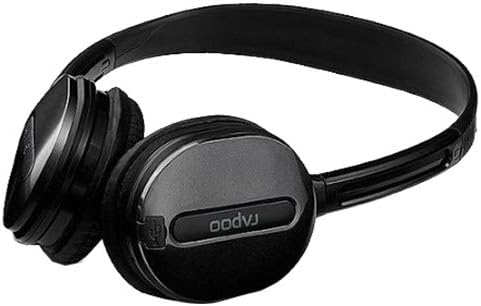
Малюнак 2.3: Буйны план view of an earcup, highlighting the integrated controls and the "rapoo" branding. This image details the buttons for volume and playback control, and potentially the charging port or microphone location.
2.1 Асноўныя магчымасці
- Wireless Bluetooth connectivity (2.4 GHz, up to 10 meters / 33 feet range)
- Накладная канструкцыя для камфорту
- Built-in omni-directional microphone with noise cancelling
- Убудаваны рэгулятар гучнасці
- Літыевая акумулятарная батарэя (360 мАг)
- Рэгуляваная павязка на галаву
3. Настройка
3.1 Зарадка гарнітуры
Before initial use, fully charge the headset. The Rapoo H1030 features a built-in 360mAh rechargeable lithium battery.
- Locate the charging port on the headset (refer to Figure 2.3 for general control area).
- Connect the charging cable (typically Micro-USB) to the headset and the other end to a USB power source (e.g., computer USB port, USB wall adapter).
- The charging indicator light will illuminate (color may vary, refer to product packaging for specifics).
- Поўная зарадка займае прыблізна 2 гадзіны. Пасля завяршэння зарадкі індыкатар зменіць колер або выключыцца.
A fully charged headset provides approximately 6 hours of usage time.
3.2 Спалучэнне па Bluetooth
The headset uses smart connection technology for easy pairing.
- Пераканайцеся, што гарнітура зараджана і выключана.
- Press and hold the power button (or pairing button, if separate) on the headset until the indicator light begins to flash rapidly, indicating it is in pairing mode.
- На вашай прыладзе (смартфоне, планшэце, камп'ютары) уключыце Bluetooth і знайдзіце даступныя прылады.
- Select "RAPOO H1030" (or similar name) from the list of found devices.
- Once connected, the indicator light on the headset will typically stop flashing and remain solid, or turn off.
- The headset is now ready for use. It should automatically reconnect to the last paired device when powered on and within range.
4. Інструкцыя па эксплуатацыі
4.1 Уключэнне/выключэнне сілкавання
- Уключэнне: Націсніце і ўтрымлівайце кнопку харчавання прыблізна 3 секунды, пакуль не загарыцца індыкатар.
- Выключэнне: Press and hold the power button for approximately 3-5 seconds until the indicator light turns off.
4.2 Рэгулятар гучнасці
The headset features integrated volume controls.
- Павялічыць гучнасць: Націсніце кнопку павелічэння гучнасці.
- Паменшыць гучнасць: Націсніце кнопку памяншэння гучнасці.
4.3 Кіраванне выклікамі
When connected to a smartphone, the headset can manage phone calls.
- Адказ/завяршэнне выкліку: Press the Multi-function button (often the power button or a dedicated call button) once.
- Адхіліць выклік: Націсніце і ўтрымлівайце шматфункцыянальную кнопку прыблізна 2 секунды.
- Паўторны набор апошняга нумара: Двойчы націсніце шматфункцыянальную кнопку.
4.4 Прайграванне музыкі
When playing music from a connected device, use the headset controls.
- Прайграванне/Паўза: Націсніце шматфункцыянальную кнопку адзін раз.
- Наступны трэк: Press and hold the Volume Up button (or a dedicated 'Next' button).
- Папярэдні трэк: Press and hold the Volume Down button (or a dedicated 'Previous' button).
5. Тэхнічнае абслугоўванне
- Уборка: Для чысткі гарнітуры выкарыстоўвайце мяккую сухую тканіну. Не выкарыстоўвайце абразіўныя ачышчальнікі або растваральнікі.
- захоўванне: Store the headset in a cool, dry place away from direct sunlight and extreme temperatures. When not in use, consider folding the headset (refer to Figure 5.1) to save space and protect it.
- Сыход за батарэяй: Каб падоўжыць тэрмін службы батарэі, пазбягайце частай поўнай разрадкі батарэі. Рэгулярна зараджайце гарнітуру, нават калі яна не выкарыстоўваецца пастаянна.
- Ўздзеянне вады: The headset is not waterproof. Avoid exposure to water or excessive moisture.

Малюнак 5.1: The Rapoo H1030 headset in a folded position, demonstrating its portability and ease of storage. This compact form helps protect the earcups and headband when not in use.
6. Выпраўленне непаладак
| праблема | Магчымая прычына | Рашэнне |
|---|---|---|
| Гарнітура не ўключаецца. | Нізкі акумулятар. | Зараджайце гарнітуру не менш за 2 гадзіны. |
| Немагчыма спалучыць прыладу. | Headset not in pairing mode; Bluetooth disabled on device; device too far. | Ensure headset is in pairing mode (flashing light). Enable Bluetooth on your device. Move headset closer to the device (within 10 meters). Try restarting both devices. |
| Няма гуку або нізкі ўзровень гучнасці. | Volume too low on headset or device; headset not properly connected. | Increase volume on both headset and connected device. Re-pair the headset. |
| Дрэнная якасць гуку або абрывы сувязі. | Перашкоды; прылада па-за зонай дзеяння; нізкі зарад батарэі. | Move closer to the connected device. Avoid obstacles between headset and device. Charge the headset. Avoid environments with strong Wi-Fi or other 2.4 GHz signals. |
7. Тэхнічныя характарыстыкі
| мадэль | H1030 |
| Марка | РАПОУ |
| Сувязь | Wireless (Bluetooth, 2.4 GHz) |
| Далёкасць перадачы | Да 10 метраў (33 футаў) |
| Тып навушнікаў | Надвушная |
| Мікрафон | Built-in, Omni-Directional, Noise Cancelling |
| Тып батарэі | Літыевая акумулятарная батарэя |
| Ёмістасць батарэі | 360 мАг |
| Час зарадкі | Прыкладна 2 гадзіны |
| Час выкарыстання | Прыкладна 6 гадзіны |
| Памеры (Д х Ш х У) | 6.85 х 5.43 х 2.17 цалі |
| Вага | 80 г |
| Колер | Чорны |
| Матэрыял | Метал, гума |
8. Гарантыя і падтрымка
For warranty information and technical support, please refer to the warranty card included with your product or visit the official RAPOO webсайт. Захоўвайце чэк аб куплі як пацвярджэнне пакупкі для гарантыйных прэтэнзій.
вытворца: Рапу
Ask a question about this manual
Ask about setup, troubleshooting, compatibility, parts, safety, or missing instructions. Manuals+ will review the question and use this page’s manual context to help answer it.