
1. Уводзіны
Thank you for choosing the Amcrest 1080P WiFi Pan/Tilt Indoor Security Camera (Model: ASH21-W). This manual provides essential information for setting up, operating, and maintaining your device. This camera offers advanced features such as 1080P Full-HD video, pan/tilt functionality, human and pet detection, motion tracking, two-way audio, and various storage options to ensure comprehensive monitoring of your indoor spaces.
2. Што ў скрынцы
- Amcrest ASH21-W 1080P WiFi Pan/Tilt Camera
- Адаптар сілкавання
- USB кабель харчавання
- Мантажная пласціна
- Мантажныя шрубы і анкеры
- Кароткае кіраўніцтва
Заўвага: A MicroSD card (up to 256GB) for local storage is not included and must be purchased separately.
3. Настройка
3.1 Уключэнне
- Падключыце кабель харчавання USB да порта харчавання камеры.
- Падключыце адаптар сілкавання да стандартнай электрычнай разеткі.
- The camera will power on, and the indicator light will begin to flash.
3.2 Загрузка праграмы і рэгістрацыя ўліковага запісу
- Спампаваць Amcrest SmartHome праграму з App Store (iOS) або Google Play Store (Android).
- Адкрыйце праграму і зарэгіструйце новы ўліковы запіс або ўвайдзіце ў сістэму, калі ён у вас ужо ёсць.
3.3 Спалучэнне прылад
- In the Amcrest SmartHome app, tap the "Add Device" icon (usually a '+' symbol).
- Select your camera model or choose to scan the QR code.
- Адсканіруйце QR-код, размешчаны ўнізе вашай камеры.
- Follow the on-screen prompts to connect the camera to your 2.4GHz Wi-Fi network and set a device password.
- Name your device (e.g., "Living Room Camera", "Baby's Room").
3.4 Варыянты мантажу
The camera can be placed on a tabletop or mounted on a wall or ceiling. Use the provided mounting plate, screws, and anchors for secure installation if mounting is desired.

Малюнак 1: Amcrest ASH21-W camera on a table, showcasinг яго кампактны дызайн.
4. Інструкцыя па эксплуатацыі
4.1 У прамым эфіры View & Кіраванне панарамаваннем/нахілам
Once connected, access the live video feed through the Amcrest SmartHome app. Use the on-screen controls to remotely pan (355°) and tilt (80°) the camera lens to view розныя зоны вашага пакоя.

Малюнак 2: Amcrest ASH21-W camera demonstrating pan and tilt motion with blue arrows, indicating its auto-tracking capability.
4.2 Двухбаковае аўдыё
The camera features a built-in microphone and speaker, enabling two-way communication. Tap the "Talk" button in the app to speak through the camera, and tap "Listen" to hear audio from the camera's location.

Малюнак 3: A person using a smartphone to engage in two-way talk through the Amcrest camera, showing the live feed on the phone screen.
4.3 Baby Monitor Mode
Activate Baby Monitor Mode in the app to receive notifications based on adjustable sound thresholds (VOX alarm). This feature is ideal for monitoring infants or pets, alerting you to sounds like crying or barking without requiring constant visual monitoring.
Малюнак 4: Amcrest ASH21-W camera with a smartphone displaying the baby monitor interface, showing a baby in a crib and audio level graphs.
4.4 Motion Detection & Smart Tracking
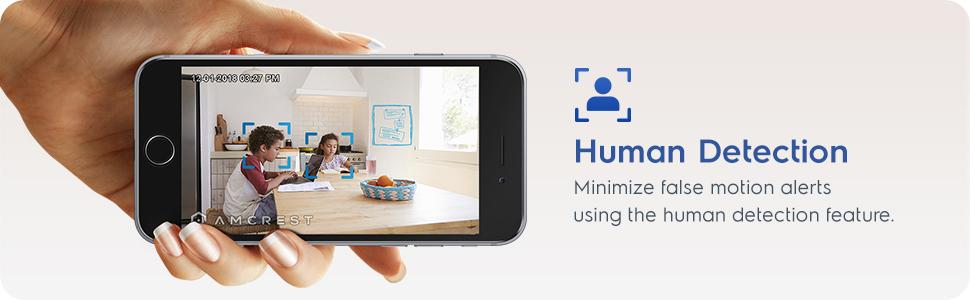
Enable motion detection to receive alerts and record footage when movement is detected. Utilize the human detection filter to reduce false alarms. With Smart Tracking enabled, the camera will automatically pan and tilt to follow detected human movement across the room.

Малюнак 5: Amcrest ASH21-W camera on a table, with a smartphone showing a human detection alert and a 93-degree viewing angle graphic.
4.5 Начное бачанне
The camera provides clear night vision up to 33 feet in absolute darkness, ensuring continuous monitoring even in low-light conditions.
4.6 Запіс і захоўванне
Recordings can be stored in several ways:
- Карта MicroSD: Insert a MicroSD card (up to 256GB, not included) into the camera's slot for local storage.
- Воблака Амкрэста: Utilize optional cloud storage services for remote access to recordings.
- Праграмнае забеспячэнне іншых вытворцаў: Compatible with Amcrest NVRs and third-party surveillance software like Blue Iris, Synology, QNAP NAS, Zoneminder, and RTSP.

Малюнак 6: Amcrest ASH21-W camera highlighting the MicroSD card slot and showing icons for Amcrest Smart Home Cloud and MicroSD Card storage options.
4.7 Alerts & Notifications
Receive instant notifications on your smartphone when motion or human detection events occur. Review event playback directly from the app.
Відэа 1: Official Amcrest video demonstrating the Smart Home WiFi Pan/Tilt Baby Monitor Camera's features, including setup, app interface, baby monitor mode, human detection, smart tracking, night vision, and storage options.
5. Тэхнічнае абслугоўванне
- Уборка: Выкарыстоўвайце мяккую сухую тканіну для чысткі аб'ектыва і корпуса камеры. Пазбягайце выкарыстання агрэсіўных хімічных рэчываў або абразіўных матэрыялаў.
- Абнаўленні прашыўкі: Regularly check the Amcrest SmartHome app for firmware updates to ensure optimal performance and security.
- Размяшчэнне: Ensure the camera is placed in a location with good Wi-Fi signal strength and away from direct heat sources or extreme temperatures.
6. Выпраўленне непаладак
- Праблемы з падключэннем: Ensure your Wi-Fi network is 2.4GHz. Check your router's signal strength and try restarting both the camera and your router.
- Няма Live View: Verify the camera is powered on and connected to Wi-Fi. Check the app for any error messages.
- Ілжывыя трывогі: Adjust motion detection sensitivity settings in the app. Utilize human detection filters to minimize alerts from non-human movement.
- Дрэнная якасць выявы: Пераканайцеся, што аб'ектыў камеры чысты. Праверце хуткасць падключэння да Інтэрнэту.
- Праблемы з двухбаковай аўдыёсувяззю: Check volume settings on your phone and in the app. Ensure there is no obstruction to the camera's microphone or speaker.
7. Тэхнічныя характарыстыкі
| Асаблівасць | Дэталь |
|---|---|
| Дазвол відэазахопу | 1080p |
| Дыяпазон павароту/нахілу | Панарамаванне 355°, нахіл 80° |
| Viewing кут | 93 градусаў |
| Дыяпазон начнога бачання | Да 33 футаў |
| Параметры захоўвання | MicroSD (up to 256GB), Amcrest Cloud, NVR/3rd Party Software |
| Сувязь | Wi-Fi (2.4 ГГц) |
| Двухбаковае аўдыё | Yes (Built-in Mic & Speaker) |
| Дэтэктар руху | Yes (Human & Pet Detection, Motion-Tracking) |
| Сумяшчальныя прылады | Amazon Alexa |
| Крыніца харчавання | Электрычны шнур (5 В пастаяннага току, 5 Вт) |
| Памеры (Д х Ш х У) | 4.17 х 3.04 х 3.04 цалі |
| Вага прадмета | 0.53 фунта (8.4 унцыі) |
| Матэрыял | Пластыкавыя |
| Выкарыстанне ў памяшканні/на вуліцы | У памяшканні |
8. Гарантыя і падтрымка
The Amcrest ASH21-W camera comes with a full 1-year US Warranty. For any technical assistance or support, please contact Amcrest directly. Lifetime technical support is provided by Amcrest, a United States-based company headquartered in Houston, TX.
For further assistance, please refer to the Amcrest SmartHome app's support section or visit the official Amcrest webсайт.