
HUAWEI GT
HUAWEI Watch GT Smartwatch User Manual
Model: GT | Brand: HUAWEI
Уводзіны
This manual provides comprehensive instructions for the HUAWEI Watch GT smartwatch. It features a 1.39-inch AMOLED touchscreen, integrated GPS, and a heart rate monitor. This guide will assist you with initial setup, daily operation, maintenance, and understanding the device's capabilities.
The HUAWEI Watch GT is designed for users seeking a blend of style and advanced health and fitness tracking. Its robust build, including a ceramic case and silicone band, ensures durability for various activities.

Выява: спераду view of the HUAWEI Watch GT smartwatch with an orange silicone band.
Асноўныя характарыстыкі
- 1.39-inch AMOLED Touchscreen: Provides vibrant colors and clear visibility.
- Убудаваны GPS: Accurate tracking for outdoor activities like running, cycling, and climbing.
- Манітор сардэчнага рытму: Continuously tracks heart rate for health insights.
- Маніторынг сну: Analyzes sleep patterns to help improve sleep quality.
- Воданепранікальнасць: Rated for 50 meters, suitable for swimming.
- Доўгі тэрмін службы батарэі: Распрацаваны для працяглага выкарыстання паміж зарадкамі.
- Некалькі спартыўных рэжымаў: Supports various activities including triathlon, running, walking, cycling, swimming, and climbing.
- Трывалая канструкцыя: Features a ceramic case and silicone band.
Настройка
1. Распакаванне і першапачатковы агляд
Carefully remove all components from the packaging. Verify that all items are present: the HUAWEI Watch GT, charging cable, and documentation.

Image: The HUAWEI Watch GT smartwatch as it appears when first unboxed.
2. Зарадка прылады
Before first use, fully charge your HUAWEI Watch GT. Connect the charging cable to the watch's charging port and plug the other end into a USB power adapter (not included) or a computer's USB port. The watch display will indicate charging status.

Выява: Задняя частка view of the HUAWEI Watch GT, highlighting the heart rate sensor and charging contacts.
3. Спалучэнне са смартфонам
- Download the HUAWEI Health app from your smartphone's app store (compatible with iOS and Android devices).
- Адкрыйце праграму і выконвайце інструкцыі на экране, каб стварыць уліковы запіс або ўвайсці.
- Пераканайцеся, што Bluetooth уключаны на вашым смартфоне.
- In the HUAWEI Health app, navigate to 'Devices' and select 'Add device'. Choose your HUAWEI Watch GT from the list of available devices.
- Пацвердзіце запыт на спалучэнне як на гадзінніку, так і на смартфоне.
Інструкцыя па эксплуатацыі
Базавая навігацыя
- Правядзіце пальцам уверх/уніз: Scroll through notifications and quick settings.
- Правядзіце пальцам улева/управа: Access different widgets like heart rate, weather, and activity data.
- Націсніце: Выберыце элемент або адкрыйце праграму.
- Press Top Button: Access the app list or return to the home screen.
- Press Bottom Button: Customizable shortcut, typically for workout modes.

Image: The HUAWEI Watch GT displaying a watch face with time and date.
Маніторынг сардэчнага рытму
The HUAWEI Watch GT continuously monitors your heart rate. You can view your current heart rate and historical data through the heart rate widget or the HUAWEI Health app. Ensure the watch is snug on your wrist for accurate readings.

Image: A user wearing the HUAWEI Watch GT, which displays heart rate information on its screen.
GPS сачэнне
The built-in GPS provides precise location tracking for outdoor workouts. Start an outdoor activity mode (e.g., Outdoor Run, Cycling) to activate GPS. The watch will record your route, distance, and pace.

Image: The HUAWEI Watch GT showing GPS signal acquisition, indicating readiness for outdoor tracking.
Рэжымы трэніровак
Select from various pre-installed workout modes to track your activities. Each mode is optimized to provide relevant metrics for that specific exercise. Examples include running, cycling, swimming, and triathlon.

Image: The HUAWEI Watch GT displaying a selection of workout icons, indicating different sport modes.
Адсочванне сну
Wear your watch to bed to automatically track your sleep. The HUAWEI Health app will provide detailed analysis of your sleep stages (deep, light, REM) and offer suggestions for improvement.

Image: The HUAWEI Watch GT displaying sleep duration and quality metrics.
Тэхнічнае абслугоўванне
- Уборка: Рэгулярна чысціце гадзіннік і раменьчык мяккай губкайamp тканіна. Пазбягайце рэзкіх хімікатаў.
- Воданепранікальнасць: The watch is water resistant up to 50 meters. It is suitable for shallow-water activities like swimming in a pool or ocean. Do not use it for diving, hot showers, or saunas, as steam and hot water can compromise the seals.
- захоўванне: Захоўвайце гадзіннік у прахалодным, сухім месцы, калі ён не выкарыстоўваецца.
- Кантакты для зарадкі: Keep the charging contacts on the back of the watch clean and dry to ensure proper charging.
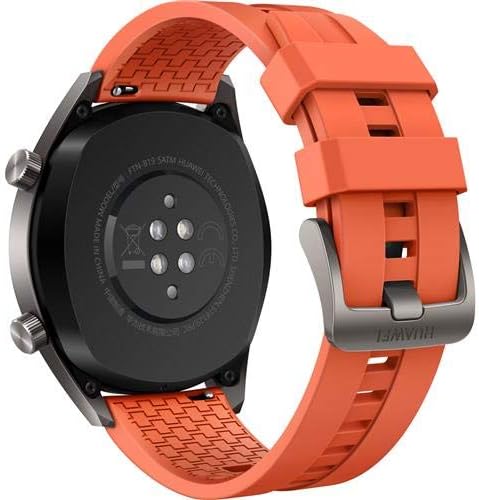
Выява: Задняя частка view of the HUAWEI Watch GT smartwatch, showing the heart rate sensor and charging pins, important for maintenance.
Ліквідацыю непаладак
- Гадзіннік не ўключаецца: Пераканайцеся, што гадзіннік цалкам зараджаны. Падключыце яго да зараднай прылады і пачакайце некалькі хвілін, перш чым спрабаваць уключыць.
- Немагчыма спалучыць прыладу са смартфонам:
- Пераканайцеся, што Bluetooth уключаны на вашым тэлефоне.
- Пераканайцеся, што праграма HUAWEI Health абноўлена да апошняй версіі.
- Перазагрузіце і гадзіннік, і смартфон.
- Паспрабуйце адлучыць прыладу і зноў падключыць яе праз праграму.
- Inaccurate heart rate/GPS data: Ensure the watch is worn snugly on your wrist, not too loose or too tight. For GPS, ensure you are in an open area with a clear view неба.
- Кароткі тэрмін службы батарэі: Check if features like always-on display or continuous heart rate monitoring are enabled, as these can consume more power. Adjust settings in the HUAWEI Health app to optimize battery life.
Тэхнічныя характарыстыкі
| Асаблівасць | Дэталь |
|---|---|
| Марка | HUAWEI |
| Назва мадэлі | GT |
| Памер экрана | 1.39 цалі |
| Тып дысплея | AMOLED |
| дазвол | 454 х 454 |
| Тэхналогія падлучэння | Bluetooth, WiFi |
| GPS | Built-in GPS (Galileo, Glonass, GPS) |
| Асаблівасці | GPS, Heart Rate Monitor |
| Аперацыйная сістэма | Android (Compatible with iOS and Android devices) |
| Глыбіня воданепранікальнасці | 50 Meters (IP68) |
| Тып матэрыялу раменьчыка | Сілікон |
| Тып матэрыялу корпуса | Керамічны |
| Увод чалавечага інтэрфейсу | Сэнсарны экран |
| Вымераныя паказчыкі | Аптычны датчык сардэчнага рытму |
Гарантыя і падтрымка
This HUAWEI Watch GT includes a Canadian Warranty. For specific warranty terms and conditions, please refer to the warranty card included in your product packaging or visit the official HUAWEI support webсайт.
For technical support, troubleshooting assistance, or service inquiries, please contact HUAWEI customer support. Manufacturer contact information: Plano, TX 75024, US.
Відэа аб прадуктах
MayuFit Fitness Tracker Overview
Відэа: Гэта відэа дае агульнае ўяўленнеview of the MayuFit Fitness Tracker, demonstrating its features and functionality. While not specifically the HUAWEI Watch GT, it illustrates general fitness tracker capabilities.