
Tomshine 93d6461d-17a8-45d0-bfc9-82643fae0e7c
Tomshine Floor Lamp Кіраўніцтва карыстальніка
Model: 93d6461d-17a8-45d0-bfc9-82643fae0e7c
Уводзіны
This manual provides detailed instructions for the setup, operation, and maintenance of your Tomshine Floor Lamp. Designed for versatile lighting, this LED floor lamp features stepless dimming, four color temperature settings, and convenient control via both a touch sensor and a remote control. Its flexible gooseneck allows for precise light positioning, making it ideal for living rooms, bedrooms, offices, and reading areas.
Інструкцыі па тэхніцы бяспекі
- Пераканайцеся, што аб'ём блока харчаванняtage адпавядае lamp's requirements before plugging in.
- Не разбірайце і не мадыфікуйце lamp. Усе паслугі па абслугоўванні павінны выконвацца кваліфікаваным персаналам.
- Захоўвайце лamp далей ад вады або damp environments. This product is designed for indoor use only.
- Avoid direct eye exposure to the LED light source for prolonged periods.
- Змесціце lamp on a stable, flat surface to prevent tipping. The sturdy iron base is designed for stability, but caution is advised around children and pets.
- Адключыце lamp ад разеткі перад чысткай або любым тэхнічным абслугоўваннем.
Змест пакета
Перад зборкай пераканайцеся, што ўсе кампаненты наяўныя:
- Святлодыёдны падлогу Lamp (Gooseneck head, multiple pole sections, base)
- Пульт дыстанцыйнага кіравання
- Адаптар пераменнага току

Малюнак 1: Лamp Кампаненты і аксэсуары
Ўстаноўка і зборка
Выканайце наступныя дзеянні, каб сабраць падлогуamp:
- Connect the power cable from the lamp base to the AC adapter.
- Carefully thread the power cable through the pole sections.
- Screw the pole sections together clockwise, ensuring a secure connection. Start from the base and work your way up to the gooseneck section.
- Once all sections are securely connected, plug the AC adapter into a standard wall outlet.
Video 1: Product Features and Assembly Guide. This video demonstrates the lamp's various lighting modes and provides a step-by-step guide for assembling the lamp components, including connecting the power cable and screwing the pole sections together.
Інструкцыя па эксплуатацыі
Сэнсарнае кіраванне
У лamp features a touch control panel located on the stand below the gooseneck:
- Кароткі націск: Tap the power icon to turn the lamp ON/OFF. Short press the sun icon to cycle through the 4 color temperatures (3000K, 4000K, 5000K, 6000K).
- Доўгі націск: Slide your finger across the touch surface or long press the sun icon to adjust the brightness steplessly (20%-100%).
Пульт дыстанцыйнага кіравання
The included remote control offers comprehensive control over the lamp's functions. The remote can be conveniently adsorbed onto the lamp post via its magnetic feature.
- Кнопка харчавання: Павярніце lamp ВКЛ/ВЫКЛ.
- Рэгуляванне каляровай тэмпературы: Buttons for increasinг або ўказasing color temperature.
- Рэгуляванне яркасці: Buttons for increasinг або ўказasinяркасць g.
- Прадусталяваныя рэжымы: Dedicated buttons for various lighting scenes:
- Рэжым адпачынку
- Рэжым чытання
- Офісны рэжым
- Рэжым груднога гадавання
- Забаўляльны рэжым
- Рэжым сну
- 100% яркасць: Instantly set the lamp да поўнай яркасці.
- Sleeping Timer: Усталюйце 1-гадзінны таймер для аўтаматычнага адключэння.

Figure 2: Remote Control and Touch Panel
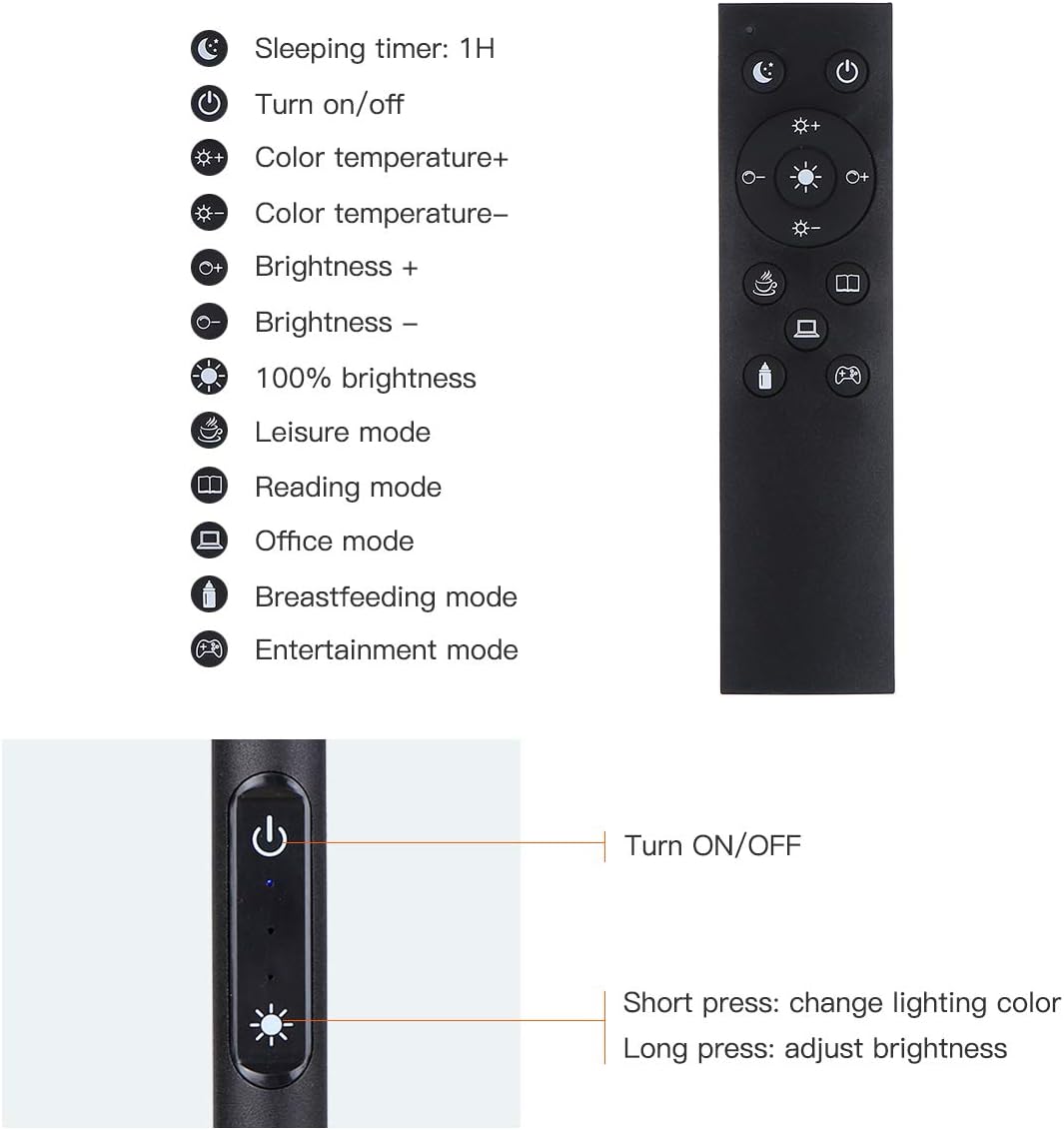
Figure 3: Remote and Touch Control Functions

Figure 4: Color Temperature and Brightness Options
Рэгуляваная гусіная шыя
У лamp features a flexible gooseneck and a 360° swivel head, allowing you to direct light precisely where needed. The gooseneck maintains its position once adjusted, preventing drift or drooping.

Figure 5: Flexible Gooseneck and Dimensions
Тэхнічнае абслугоўванне
- Уборка: Адключыце сілкаванне перад чысткай. Выкарыстоўвайце мяккую сухую тканіну, каб выцерці лamp. Не выкарыстоўвайце абразіўныя ачышчальнікі або растваральнікі.
- Святлодыёдная крыніца святла: У лamp is equipped with integrated LED bulbs that are designed for long life and are not user-replaceable.
- захоўванне: Пры захоўванні lamp for an extended period, disassemble it and store in its original packaging in a dry, cool place.
Ліквідацыю непаладак
| праблема | Магчымая прычына | Рашэнне |
|---|---|---|
| Lamp не ўключаецца. | Няма блока харчавання; няспраўнае злучэнне; няспраўны адаптар. | Check if the power plug is securely inserted into the outlet and the lamp. Ensure the adapter is functioning. Try a different outlet. |
| Не працуе пульт дыстанцыйнага кіравання. | Remote battery low or dead; remote out of range; obstruction. | Заменіце батарэю пульта дыстанцыйнага кіравання. Пераканайцеся, што паміж пультам і l няма перашкодamp. Move closer to the lamp. |
| Brightness/Color temperature not adjusting. | Incorrect button pressed; lamp in a fixed mode. | Refer to the operating instructions for correct button functions. If in a preset mode, try switching to manual adjustment. |
| Lamp нечакана міргае або цьмянее. | Нестабільнае харчаванне; дрэннае злучэнне. | Ensure the power connection is stable. Try plugging into a different outlet. If the issue persists, contact customer support. |
Тэхнічныя характарыстыкі
| Асаблівасць | Дэталь |
|---|---|
| Марка | Томшын |
| Нумар мадэлі | 93d6461d-17a8-45d0-bfc9-82643fae0e7c |
| Lamp Тып | Паверх Лamp |
| Тып крыніцы святла | святлодыёд |
| Яркасць | 1500 люмен |
| Ватtage | 10 ват |
| Каляровыя тэмпературы | 3000K, 4000K, 5000K, 6000K (4 modes) |
| Зацямненне | Бесступеньчатая (20%-100%) |
| Метад кантролю | Сэнсарны, пульт дыстанцыйнага кіравання |
| Памеры прадукту | 63.78" Г x 7.87" Ш x 63.6" У |
| Вага прадмета | 2.76 фунта |
| Базавы матэрыял | Жалеза |
| Абажур Матэрыял | Метал |
| Крыніца харчавання | Убудова |
| Выкарыстанне ў памяшканні/на вуліцы | У памяшканні |
Гарантыя і падтрымка
Tomshine products are manufactured to the highest quality standards. For any questions, technical support, or warranty claims, please contact Tomshine customer service through the retailer's platform or visit the official Tomshine store online. Please retain your proof of purchase for warranty purposes.
Для атрымання дадатковай інфармацыі наведайце Tomshine Store.
Ask a question about this manual
Ask about setup, troubleshooting, compatibility, parts, safety, or missing instructions. Manuals+ will review the question and use this page’s manual context to help answer it.