
August AUD E1
Кіраўніцтва карыстальніка разумнага гадзінніка для здароўя AUDAR E1 у жніўні
Model: AUD E1
1. Уводзіны
The August AUDAR E1 Smart Health Watch is designed to help you monitor your health and fitness activities. It features advanced sensors for heart rate, blood pressure, and ECG measurements, along with comprehensive fitness tracking capabilities. This manual provides detailed instructions to help you get the most out of your device.
2. Што ў скрынцы
Upon unboxing your August AUDAR E1 Smart Health Watch, please ensure all the following items are present:
- August AUDAR E1 Smart Health Watch
- USB-кабель для зарадкі
- Кіраўніцтва карыстальніка (гэты дакумент)

Figure 2.1: Contents of the AUDAR E1 packaging, showing the smartwatch, charging cable, and documentation.
3. Прадукт скончыўсяview
The AUDAR E1 features a sleek design with a circular display and a comfortable silicone strap. Key components include the display, side button, and health sensors on the rear.

Малюнак 3.1: Спераду view of the AUDAR E1 Smart Health Watch, showing the display with an ECG reading.

Figure 3.2: Dimensions of the AUDAR E1 Smart Health Watch.
4. Настройка
4.1 Зарадка прылады
Before first use, fully charge your AUDAR E1. Connect the magnetic USB charging cable to the charging points on the back of the watch and plug the USB end into a power source (e.g., computer USB port, USB wall adapter).

Figure 4.1: Charging the AUDAR E1 Smart Health Watch.
4.2 Downloading the AUDAR App
The AUDAR E1 requires the companion AUDAR app for full functionality. Download the app from your smartphone's app store:
- Для прылад Android: Пошук "AUDAR" on the Крама Google Play.
- For Apple iOS devices: Пошук "AUDAR" on the Apple App Store.
4.3 Спалучэнне са смартфонам
- Пераканайцеся, што Bluetooth уключаны на вашым смартфоне.
- Open the AUDAR app.
- Follow the in-app instructions to search for and connect to your AUDAR E1 device. The app will guide you through the pairing process.
- Пасля спалучэння гадзіннік сінхранізуе час і дадзеныя з вашым тэлефонам.

Figure 4.2: AUDAR E1 compatibility with iOS and Android devices via the Audar app.
5. Інструкцыя па эксплуатацыі
5.1 Асноўная навігацыя
The AUDAR E1 features a touch-sensitive display and a side button for navigation:
- Правядзіце пальцам уверх/уніз: Пракручвайце меню і апавяшчэнні.
- Правядзіце пальцам улева/управа: Access different data screens (e.g., heart rate, steps, calories).
- Націсніце: Выберыце элемент або ўвайдзіце ў меню.
- Бакавая кнопка: Націсніце, каб вярнуцца на галоўны экран або абудзіць прыладу.
6. Функцыі маніторынгу здароўя
The AUDAR E1 provides comprehensive health data monitoring:
- Манітор сардэчнага рытму: The watch regularly measures your heart rate. Manual measurements can be taken via the enhanced ECG function for a deeper understanding of your heart health. Daily and weekly reports are available in the AUDAR app.
- Манітор артэрыяльнага ціску: Measure and visualize systolic and diastolic blood pressure throughout the day. Weekly reports provide clear insights into your blood pressure trends.
- Адсочванне сну: Monitor your sleep patterns, including sleep duration and quality. This feature helps you understand your rest routine.
- Fatigue Levels: The watch tracks and reports on your fatigue levels, contributing to a holistic view of your current health and fitness routine.

Figure 6.1: The AUDAR E1 monitoring heart rate, blood pressure, and ECG during activity.
7. Функцыі адсочвання фізічнай формы
The AUDAR E1 can be used as a fitness tracker for various activities:
- Рэжым практыкаванняў: Activate exercise mode for activities such as walking, running, and cycling.
- Адсочванне актыўнасці: Track steps taken, calories burned, and GPS route data (utilizes your phone's GPS). The watch adapts to your personal profile для дакладных дадзеных.
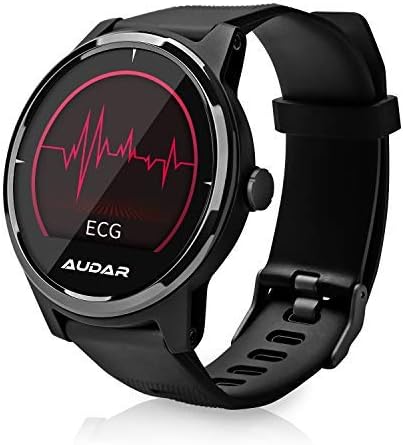
Figure 7.1: Fitness tracking metrics displayed on the AUDAR E1.
8. Апавяшчэнні і разумныя функцыі
Stay connected with your AUDAR E1:
- Message and Call Reception: Receive notifications for SMS messages, incoming calls, and alarms directly on your watch.
- Напаміны і сігналы трывогі: Set reminders and alarms through the app, which will vibrate on your wrist, ensuring you don't miss important events.

Figure 8.1: Message and call notifications on the AUDAR E1.
9. CareMate Function
The AUDAR app provides access to the innovative CareMate network. This feature allows you to designate a trusted responder to receive your health data, enabling remote care for vulnerable or elderly individuals while maintaining their independence.

Figure 9.1: The CareMate function allows monitoring of loved ones' health data.
10. Акумулятар і зарадка
The AUDAR E1 is designed for extended use, offering significant battery life:
- Тэрмін службы батарэі: The E1 can last up to 10 days on a single 2-hour charge. In standby mode, it can last up to 20 days.
- Зарадка: Use the provided magnetic USB charging cable. Ensure the charging pins align correctly with the contacts on the back of the watch.
11. Тэхнічнае абслугоўванне
To ensure the longevity and optimal performance of your AUDAR E1 Smart Health Watch, follow these maintenance guidelines:
- Уборка: Regularly wipe the watch and strap with a soft, dry cloth. If necessary, use a slightly damp тканінай і мяккім мылам, затым старанна высушыце. Пазбягайце агрэсіўных хімічных рэчываў або абразіўных матэрыялаў.
- Воданепранікальнасць: The AUDAR E1 has an IPX7 water resistance rating, meaning it can withstand splashes, rain, and brief immersion in water (up to 1 meter for 30 minutes). It is suitable for daily use but not recommended for swimming, showering, or diving. Avoid exposing the watch to hot water or steam.
- захоўванне: Калі гадзіннік не выкарыстоўваецца працяглы час, захоўвайце яго ў прахалодным, сухім месцы, удалечыні ад прамых сонечных прамянёў і экстрэмальных тэмператур.
12. Выпраўленне непаладак
If you encounter issues with your AUDAR E1, please refer to the following common solutions:
| праблема | Магчымая прычына / рашэнне |
|---|---|
| Гадзіннік не ўключаецца і не рэагуе. | Battery may be depleted. Charge the watch for at least 30 minutes. Ensure the charging cable is properly connected. |
| Немагчыма спалучыць са смартфонам. | Ensure Bluetooth is enabled on your phone. Make sure the watch is charged and within range. Restart both the watch and your phone. Try unpairing and re-pairing in the app. |
| Inaccurate health readings (HR, BP, ECG). | Ensure the watch is worn snugly on your wrist, not too tight or too loose. Clean the sensors on the back of the watch. Avoid excessive movement during measurements. Readings are for reference and not medical diagnoses. |
| Апавяшчэнні не з'яўляюцца. | Check app permissions on your phone to ensure the AUDAR app has access to notifications. Verify notification settings within the AUDAR app. Ensure the watch is connected via Bluetooth. |
| Кароткі тэрмін службы батарэі. | Frequent use of certain features (e.g., continuous heart rate monitoring, bright screen) can drain the battery faster. Reduce screen brightness or turn off unnecessary features. Ensure the watch is fully charged. |
| Watch strap breaks or deteriorates. | Contact August customer support for replacement strap options. |
13. Тэхнічныя характарыстыкі
| Асаблівасць | Дэталь |
|---|---|
| Марка | жнівень |
| Нумар мадэлі | AUD E1 |
| Колер | Чорны |
| Аперацыйная сістэма | Android (сумяшчальны з iOS) |
| Памер экрана | 1 цалі |
| Сувязь | Bluetooth |
| Асаблівасці | Heart Rate Monitor, Sleep Monitor, Notification, Blood Pressure Monitor, Calorie Tracker, ECG |
| Сумяшчальныя прылады | Смартфон |
| Тып батарэі | Літый-іённы |
| Ёмістасць батарэі | 220 мАг (прыблізна) |
| Воданепранікальнасць | IPX7 |
| GPS | Uses phone's GPS |
| Форма | Круглая |
14. Гарантыя і падтрымка
For warranty information and technical support, please refer to the August brand's official website or contact their customer service directly. Details can typically be found on the August support page or within the product packaging.
You can visit the August brand store on Amazon for more information: August Brand Store