
1. Уводзіны
This manual provides essential information for the safe and efficient operation of your VOLTCRAFT FG-32502T Function Generator. Please read this manual thoroughly before using the device and keep it for future reference. The FG-32502T is a versatile 2-channel arbitrary waveform generator capable of producing various waveforms including sine, square, pulse, ramp, noise, and arbitrary signals across a frequency range of 1µHz to 250MHz.
2. Інструкцыі па тэхніцы бяспекі
WARNING: Failure to follow these safety instructions may result in electric shock, fire, or damage to the device.
- Заўсёды падключайце прыладу да заземленай разеткі.
- Не адкрывайце прыладу casing. Унутры няма дэталяў, якія можна абслугоўваць самастойна. Па ўсіх пытаннях абслугоўвання звяртайцеся да кваліфікаванага персаналу.
- Пазбягайце выкарыстання прылады ў вільготных абоamp умовы.
- Забяспечце належную вентыляцыю, каб прадухіліць перагрэў.
- Выкарыстоўвайце толькі шнур харчавання, які пастаўляецца з прыладай.
- Адключыце электрычнасць перад чысткай або перамяшчэннем прылады.
Observe all warning labels on the device. The rear panel of the device contains important safety warnings, including a German warning indicating that the protective conductor must be connected to counteract electric shocks and that there are no user-serviceable parts inside. It also states not to remove covers and to always leave maintenance work to qualified personnel.

выява: Rear panel of the VOLTCRAFT FG-32502T Function Generator, featuring warning labels in German, various input/output ports such as USB, LAN, and power input, and regulatory markings.
3. Змесціва ўпакоўкі
Пераканайцеся, што ўсе прадметы ёсць у наяўнасці і ў добрым стане пасля распакавання:
- VOLTCRAFT FG-32502T Function Generator (1 unit)
- Шнур харчавання (1 шт.)
- Кіраўніцтва карыстальніка (гэты дакумент)
- USB-кабель (для падлучэння да ПК)
Калі якія-небудзь тавары адсутнічаюць або пашкоджваюцца, неадкладна звярніцеся да пастаўшчыка.
4. Прадукт скончыўсяview
4.1 Пярэдняя панэль
The front panel features the main display, control buttons, a rotary encoder, and output connectors for Channel 1 (CH1) and Channel 2 (CH2).
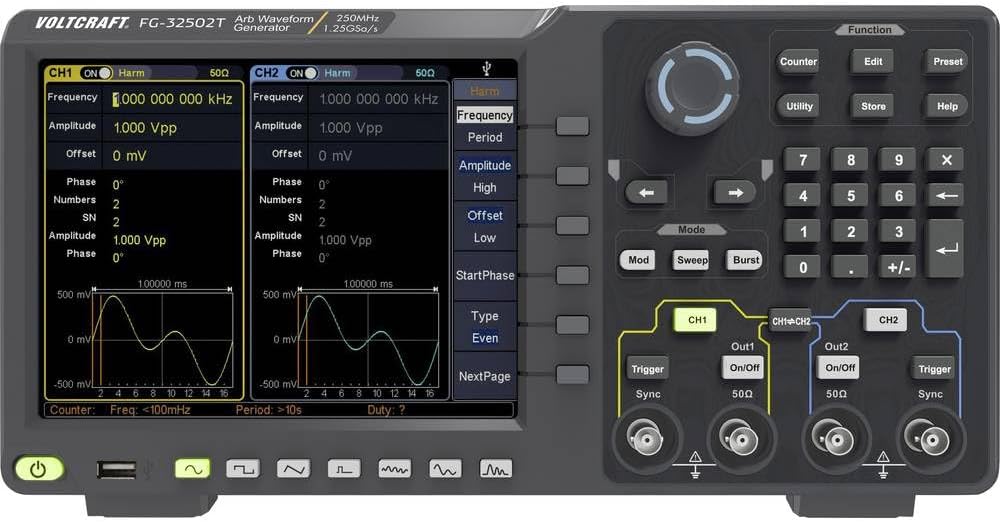
выява: Front panel of the VOLTCRAFT FG-32502T Function Generator, showing the display with two active channels (CH1 and CH2) displaying sine waves, various function buttons, a rotary encoder, and output connectors.
4.2 Задняя панэль
The rear panel includes the power input, USB host, USB device, LAN interface, external modulation input, external reference clock input, and external trigger input.
выява: Rear panel of the VOLTCRAFT FG-32502T Function Generator, featuring warning labels in German, various input/output ports such as USB, LAN, and power input, and regulatory markings.
5. Настройка
- Размяшчэнне: Place the function generator on a stable, level surface with adequate ventilation.
- Падключэнне сілкавання: Connect the supplied power cord to the power input on the rear panel of the device, then plug the other end into a grounded AC power outlet (100-240V, 50/60Hz).
- Уключэнне: Press the power button located on the front panel to turn on the device. The display will illuminate, and the system will perform a self-test.
- Выходнае злучэнне: Connect your test leads or cables to the desired output channels (CH1 or CH2) on the front panel.
6. Інструкцыя па эксплуатацыі
The FG-32502T offers a wide range of waveform generation and modulation capabilities. The main display shows the settings for both channels, and dedicated buttons and a rotary encoder allow for precise control.
6.1 Basic Waveform Generation (Sine, Square, Pulse, Ramp)
- Выберыце канал: Press the CH1 or CH2 button to select the channel you wish to configure.
- Выберыце форму хвалі: Press the 'Function' button, then use the navigation keys or rotary encoder to select the desired basic waveform (e.g., Sine, Square, Pulse, Ramp).
- Змяніць параметры: Use the dedicated parameter buttons (e.g., Frequency, Amplitude, Offset) and the rotary encoder to adjust the waveform characteristics.
Example: Pulse Waveform Setup
To set up a pulse waveform, select 'Pulse' from the function menu. You can then adjust parameters such as Frequency, Amplitude, Offset, Width, Rising Edge, and Falling Edge.
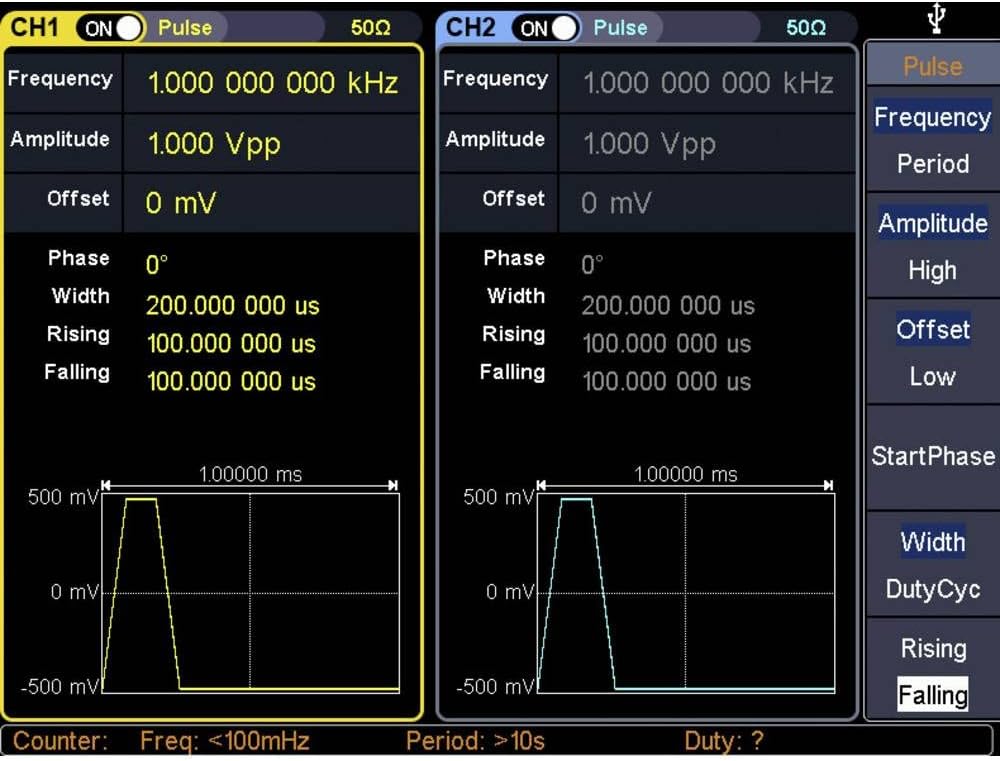
выява: Close-up of the VOLTCRAFT FG-32502T display, illustrating the settings for a Pulse waveform on both channels, including frequency, amplitude, offset, width, rising, and falling edge parameters.
Example: Square Waveform Setup
To set up a square waveform, select 'Square' from the function menu. You can adjust parameters such as Frequency, Amplitude, and Offset.

выява: Close-up of the VOLTCRAFT FG-32502T display, illustrating the settings for a Square waveform on both channels, including frequency, amplitude, and offset parameters.
6.2 Arbitrary Waveforms
The device supports 152 built-in arbitrary waveform groups. To use an arbitrary waveform:
- Select 'Arb' from the function menu.
- Navigate through the available arbitrary waveform groups using the rotary encoder.
- Adjust parameters like frequency and amplitude as needed.
6.3 Modulation Options
The FG-32502T offers various modulation types, including AM, FM, PM, FSK, ASK, BPSK, PSK, PWM, and 3FSK. To apply modulation:
- Select the desired waveform for the carrier signal.
- Press the 'Mod' button.
- Select the modulation type and adjust its parameters (e.g., modulation depth, frequency, source).
6.4 Counter Function
The device includes a frequency counter. To use the counter:
- Connect the signal to be measured to the counter input.
- Press the 'Counter' button to activate the function.
- The display will show the measured frequency.
7. Тэхнічнае абслугоўванне
7.1 Ачыстка
To clean the device, disconnect it from the power supply. Use a soft, dry cloth to wipe the exterior. For stubborn dirt, a slightly damp можна выкарыстоўваць тканіну з мяккім мыйным сродкам, сачыце за тым, каб вадкасць не патрапіла ўнутр прылады. Не выкарыстоўвайце абразіўныя ачышчальнікі або растваральнікі.
7.2 Захоўванне
When not in use for extended periods, store the function generator in a dry, dust-free environment, away from direct sunlight and extreme temperatures.
8. Выпраўленне непаладак
- Прылада не ўключаецца:
- Праверце, ці надзейна падключаны шнур харчавання як да прылады, так і да разеткі.
- Пераканайцеся, што разетка працуе.
- Няма выхаднога сігналу:
- Verify that the output channel (CH1/CH2) is enabled.
- Праверце amplitude settings; ensure it is not set to 0V.
- Ensure the output cables are correctly connected and not damaged.
- Incorrect waveform displayed:
- Review the waveform type and parameter settings on the display.
- Perform a factory reset if settings appear corrupted (refer to the utility menu for this option).
For issues not covered here, please contact VOLTCRAFT customer support.
9. Тэхнічныя характарыстыкі
| Асаблівасць | Спецыфікацыя |
|---|---|
| Нумар мадэлі | FG-32502T |
| Вытворца | ВАЛТКРАФТ |
| Каналы | 2 |
| Дыяпазон частот | 1µHz - 250MHz (for basic waveforms) |
| Basic Waveforms | Сінус, квадрат, пульс, Ramp, Шум |
| Адвольныя формы хваль | 152 built-in groups, 2 points to 1 Mpts length |
| Modulation Options | AM, FM, PM, FSK, ASK, BPSK, PSK, PWM, 3FSK, Burst, Sweep |
| Інтэрфейсы сувязі | USB Host, USB Device, LAN, External Modulation, External Reference Clock, External Trigger |
| Frequency Counter Resolution | 7 digits (Input frequency range: 100 - 200 MHz) |
| Электразабеспячэнне | Mains Powered (100-240V, 50/60Hz) |
| Вага прадмета | 2.5 кг |
| Дата першай даступнасці | 21 снежня 2019 г |
10. Гарантыя і падтрымка
For warranty information, technical support, or service requests, please refer to the documentation included with your product or visit the official VOLTCRAFT webсайт. Захоўвайце чэк аб куплі як пацверджанне пакупкі.